MoGe: Monocular Geometry Estimation from a Single Image
[CVPR'25 Oral] MoGe: Unlocking Accurate Monocular Geometry Estimation for Open-Domain Images with Optimal Training Supervision
At a glance
- What is it?
- Microsoft's MoGe recovers metric point maps, depth, normals and camera FOV from one open-domain photo in a single forward pass. Here is what the install actually requires, where it breaks, and who should skip it.
- Who is it for?
- Adopt MoGe if you have an NVIDIA GPU with a recent CUDA driver, Python 3.10 or newer, and a pipeline that needs metric-scale 3D from ordinary photos rather than a depth number on its own. Skip it if you develop on macOS, because the README states MoGe-3 depends on FlexGEMM and Triton ships no macOS wheels, or if you need a permissively licensed model without reading the licence file first.
- Can I use it commercially?
- Check first. The repository uses a licence we do not classify automatically, so read its LICENSE file before any commercial use.
- Is it still maintained?
- Yes. The repository last received commits 16 days ago.
- What is it written in?
- Mainly JavaScript, according to GitHub's language statistics.
Answers come from the project's GitHub data, last synced on November 13, 2026, and from our analysis. They are not legal advice.
Star history
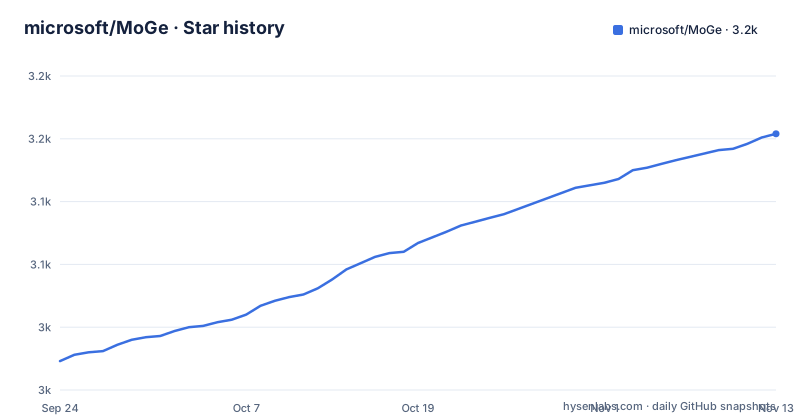
- microsoft/MoGe3,154 ★ · +181
| Repository | 2026-09-24 | 2026-11-13 |
|---|---|---|
| microsoft/MoGe | 3k | 3.2k |
181 Stars in the last 50 days, measured from the daily GitHub snapshot. Compare with other projects
Editorial analysis
What MoGe recovers from a single photograph
MoGe estimates 3D geometry from one open-domain image. The README lists four outputs produced in one forward pass: a metric point map, a metric depth map, a normal map and the camera field of view. That combination is the point. A depth-only model tells you how far away a surface is; a point map places each pixel in a 3D coordinate frame, and the FOV estimate is what makes the frame consistent without a calibration step.
The intended users are people building 3D reconstruction or scene-understanding pipelines who cannot control how their images were captured. The README describes the input domain as open-domain, meaning arbitrary photographs rather than a fixed sensor rig. If you already have stereo pairs, a LiDAR scan or a calibrated camera, MoGe is solving a problem you do not have.
The model family spans three generations. MoGe-1 is the original CVPR'25 work. MoGe-2 adds metric scale and sharper detail. MoGe-3, released 2026-08-18 according to the README news entry, targets fine-grained point map geometry through self-guided sparse volumetric refinement. Checkpoints range from a 35M-parameter ViT-S variant up to a 1.25B-parameter ViT-G model, so the accuracy-versus-VRAM decision is explicit rather than hidden.
How the model produces geometry in one pass
The architecture is a vision transformer encoder followed by task-specific heads. The README does not publish a layer-by-layer diagram in the text, but the repository layout and the dependency list make the shape of the system visible: a ViT backbone (the checkpoint names vitl, vitb, vits and vitg map to ViT-Large, Base, Small and Giant) feeds heads that emit the point map, depth, normals and FOV.
MoGe-3 adds a refinement stage the README calls self-guided sparse volumetric refinement. That is the mechanism behind the fine-detail claim. The practical consequence is a heavier dependency chain: MoGe-3 relies on FlexGEMM, which builds on Triton. That single dependency is why the README states macOS is not supported, since Triton publishes no macOS wheels.
The FOV estimate is optional to override. The README lists ground-truth FOV input as a feature that enhances accuracy further. If your camera metadata is trustworthy, supplying it removes one source of error; if it is not, the model estimates it. Resolution support is described as flexible across aspect ratios from 2:1 to 1:2, and inference resolution is adjustable, which trades speed against detail.
The published latency figure is 60ms per image on an A100 or RTX3090 at FP16 with the ViT-L model. Treat that as a hardware-specific number from the project, not a promise about your machine.
Installing MoGe with uv and running the CLI
The README requires Python 3.10 or newer. Dependencies live in pyproject.toml, which works with both uv and pip. uv is the recommended path because pyproject.toml pins torch and torchvision to the CUDA 13.0 wheel index, and uv reads that configuration while pip does not.
Clone the repository and sync the environment. This creates a .venv/ and installs MoGe into it in editable mode.
git clone https://github.com/microsoft/MoGe.git
cd MoGe
uv sync
The project script is named moge, so after syncing you prefix commands with uv run. The README gives this form as the example:
uv run moge infer ...Alternatively, activate the environment with source .venv/bin/activate and call moge directly. If you intend to train rather than infer, the train extra pulls accelerate, wandb, tensorboard and mlflow; the README points to docs/train.md for that workflow.
If you prefer pip, install straight from the repository, or from a clone if you plan to edit the code:
pip install git+https://github.com/microsoft/MoGe.gitBecause pip ignores uv's index configuration, a plain pip install takes whatever PyTorch build PyPI currently serves. The README shows how to pass the index explicitly when you need a specific CUDA version:
pip install -e . --index-url https://download.pytorch.org/whl/cu130Checkpoints are pulled from the Hugging Face Hub. The README lists Ruicheng/moge-vitl for MoGe-1, the moge-2-vitl, moge-2-vitl-normal, moge-2-vitb-normal and moge-2-vits-normal repositories for MoGe-2, and moge-3-vitg and moge-3-vitl for MoGe-3. Consult the repository for the exact argument that points the CLI at a specific checkpoint before scripting a download.
The GPU and platform constraints are not optional
The largest limitation is stated plainly: macOS is not supported. This is not a packaging oversight you can patch around, because MoGe-3 depends on FlexGEMM, which builds on Triton, and Triton publishes no macOS wheels. If your team develops on Apple silicon laptops, the inference path will not run there. The pyproject.toml environments field reinforces this, listing only sys_platform == 'linux' and sys_platform == 'win32' under tool.uv.
The second constraint is CUDA version drift. pyproject.toml pins torch and torchvision to the CUDA 13.0 wheel index. The README documents two escape routes: edit the index URL in pyproject.toml, or reinstall PyTorch into the synced environment with a different backend. The example given is:
uv pip install --torch-backend=cu128 torch torchvision --reinstallIt also notes that --torch-backend=auto picks a build matching your installed driver. Getting this wrong is the most likely first-run failure, and it presents as an import or device error rather than a clear message about wheel indices.
The dependency bounds are deliberately loose, which the README acknowledges. Loose bounds mean the project is compatible with most dependency versions, but they also mean a fresh resolve months from now may pull combinations the maintainers never exercised. The repository has no published GitHub releases, so the version number in pyproject.toml (3.0.0) is the reference point rather than a tagged release you can pin by name.
MoGe against Depth Anything and similar depth models
The natural comparison is with monocular depth estimation models such as Depth Anything. The difference is scope, not just accuracy. A depth model returns a depth map, usually relative rather than metric, and leaves camera intrinsics and surface orientation to you. MoGe returns a metric point map, metric depth, normals and an FOV estimate together.
That matters for downstream work. If you want to lift a photo into a 3D viewer or a mesh, you need points in a consistent frame and normals for shading; assembling those from a relative depth map means estimating intrinsics separately and deriving normals from the depth gradient, which amplifies noise. MoGe's normals come from a dedicated head, and the FOV is inferred rather than assumed.
The cost is weight and dependency surface. MoGe-3's ViT-G checkpoint is 1.25B parameters, an order of magnitude above the 104M ViT-B variant, and the FlexGEMM and Triton dependencies narrow your platform options in a way that a pure PyTorch depth model does not. If you only need a relative depth map for compositing or as a conditioning signal, MoGe is more machinery than the task requires.
MoGe-2 also ships a metric-scale flag per checkpoint in the README table, which is a useful signal: not every variant provides metric scale, so the model you download determines what units you get.
Licence, maintenance and what an upgrade costs
The repository metadata reports the licence as NOASSERTION, while pyproject.toml declares license = "MIT" and lists LICENSE among the license-files. Those two signals disagree, and the discrepancy is worth resolving before you ship MoGe inside a product. Read the LICENSE file in the repository root and, if the distinction matters to your legal team, check the Hugging Face model cards for the checkpoints you intend to use, since model weights can carry terms separate from the code. This is a factual gap in the metadata, not legal advice.
On maintenance: the repository is not archived, and the last push was on 2026-09-09. That is recent, and the README carries a news entry for the MoGe-3 release on 2026-08-18. The project is moving, but the absence of retrieved releases means there is no versioned artifact to pin against; you track the main branch or a commit hash.
Upgrade cost is dominated by the dependency chain. torch, torchvision, utils3d_moge, pipeline and flex-gemm are all pinned to specific sources in pyproject.toml, several of them git URLs with commit hashes. Moving from MoGe-2 to MoGe-3 is not a checkpoint swap: MoGe-3 pulls in FlexGEMM and therefore Triton, which is what removes macOS support. Budget for a re-resolve and a CUDA index check on every upgrade, not just a new weight file.
Editorial conclusion
Adopt MoGe if you have an NVIDIA GPU with a recent CUDA driver, Python 3.10 or newer, and a pipeline that needs metric-scale 3D from ordinary photos rather than a depth number on its own. Skip it if you develop on macOS, because the README states MoGe-3 depends on FlexGEMM and Triton ships no macOS wheels, or if you need a permissively licensed model without reading the licence file first. Before committing, verify two things: that your CUDA version matches the wheel index in pyproject.toml, and that the model checkpoint you pick is the one whose metric scale and normal outputs your downstream code expects.
Frequently asked questions
What is MoGe and what does it output?
MoGe is a model for recovering 3D geometry from monocular open-domain images. The README lists metric point maps, metric depth maps, normal maps and camera FOV, all produced in one forward pass.
Can I install MoGe on macOS?
No. The README states that macOS is not supported because MoGe-3 depends on FlexGEMM, which builds on Triton, and Triton publishes no macOS wheels.
Which MoGe checkpoint should I download?
The README lists checkpoints from Ruicheng/moge-vitl for MoGe-1 up to Ruicheng/moge-3-vitg at 1.25B parameters. MoGe-2 and MoGe-3 checkpoints provide metric scale, and the normal variants add normal maps.
Official sources
Add this badge to your README
If you maintain this project, the badge below links readers to this analysis and shows its maintenance status from the daily GitHub snapshot. Paste the markdown into your README; add ?metric=license or ?metric=stars to the image URL for a different field.

[](https://hysenlabs.com/projects/microsoft-moge)Star history chart for your README
[](https://hysenlabs.com/projects/microsoft-moge)Was this useful?