microsoft/TRELLIS: Structured 3D Latents for Image and Text to 3D
Official repo for paper "Structured 3D Latents for Scalable and Versatile 3D Generation" (CVPR'25 Spotlight).
At a glance
- What is it?
- TRELLIS is Microsoft's research release for generating 3D assets from text or image prompts, decoding one structured latent into radiance fields, 3D Gaussians or meshes. It is a Linux and CUDA project with a 16GB GPU floor, and the README says text conditioning is the weaker path.
- Who is it for?
- Adopt TRELLIS if you have a Linux workstation or node with a 16GB-plus NVIDIA GPU, a CUDA Toolkit matching the submodules you enable, and a pipeline that already turns text into images, since the README states text-conditioned models are less creative and detailed and recommends generating an image first.
- Can I use it commercially?
- Yes. MIT is a permissive licence: you can use, modify and sell software built on it, as long as you keep its copyright and licence notices.
- Is it still maintained?
- Yes. The repository last received commits 19 days ago.
- What is it written in?
- Mainly Python, according to GitHub's language statistics.
Answers come from the project's GitHub data, last synced on November 15, 2026, and from our analysis. They are not legal advice.
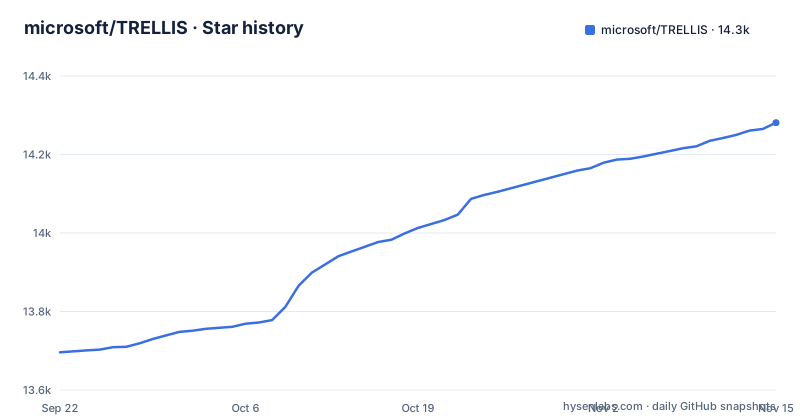
Star history
- microsoft/TRELLIS14,281 ★ · +585
| Repository | 2026-09-22 | 2026-11-15 |
|---|---|---|
| microsoft/TRELLIS | 13.7k | 14.3k |
585 Stars in the last 54 days, measured from the daily GitHub snapshot. Compare with other projects
Editorial analysis
What TRELLIS generates, and for whom
TRELLIS is a large 3D asset generation model. It takes text or image prompts and produces 3D assets in several formats: radiance fields, 3D Gaussians and meshes. The repository is the official code for the paper "Structured 3D Latents for Scalable and Versatile 3D Generation", a CVPR'25 Spotlight, and it ships pre-trained models with up to 2 billion parameters trained on a dataset of 500K diverse objects.
The audience is narrower than the demo page suggests. This is a research release for people who can run CUDA on Linux and are comfortable assembling dependencies from a shell script. If you want a hosted generator with a web form, the README links a Hugging Face demo and a project page, and those are the right entry points. The code in this repository is for engineers who need the model locally, either to produce assets into their own pipeline or to build on the latent representation.
The stated capabilities are high quality shape and texture, output format selection, and editing: generating variants of the same object and local edits of a generated asset. The last two are what separate it from single-format 3D generators, and they are the reason to read the latent design rather than treat the model as a black box.
SLAT and Rectified Flow Transformers: the mechanism
The cornerstone is a unified Structured LATent, abbreviated SLAT, which the README describes as the representation that allows decoding to different output formats. That single intermediate is the whole design argument. Instead of training one model per output type, TRELLIS generates a structured latent and then decodes it into radiance fields, 3D Gaussians or a mesh depending on what the downstream task needs. The backbones are Rectified Flow Transformers tailored for SLAT.
The practical consequence is that format choice becomes a decoding step rather than a separate generation run. The repository reflects this in its entry points: example.py for the image-conditioned path, example_text.py for text, example_variant.py for asset variants, example_multi_image.py for multi-image conditioning, and app.py plus app_text.py for Gradio demos. Gaussian export appears in app.py and example.py according to the 12/18/2024 update note.
Multi-image conditioning was added for the TRELLIS-image model and is described as a tuning-free algorithm with no specialized model trained for it, so the README warns it may not give the best results for all input images. That is an honest framing of a heuristic, and it is the kind of limitation worth reading before you build a product path on it. The 03/25/2025 update also released training code, so the repository covers training as well as inference.
Installing TRELLIS: clone, conda, and setup.sh flags
The README requires Linux, an NVIDIA GPU with at least 16GB of memory, the CUDA Toolkit for compiling submodules, conda, and Python 3.8 or higher. The code has been verified on NVIDIA A100 and A6000 GPUs, and tested with CUDA 11.8 and 12.2. Clone with submodules, since the build depends on them:
git clone --recurse-submodules https://github.com/microsoft/TRELLIS.git
cd TRELLIS
The dependency install is a single sourced script invocation. The README's example creates a conda environment named trellis, installs basic dependencies, and enables xformers, flash-attn, diffoctreerast, spconv, mipgaussian, kaolin and nvdiffrast:
. ./setup.sh --new-env --basic --xformers --flash-attn --diffoctreerast --spconv --mipgaussian --kaolin --nvdiffrastThe README notes this takes a while because of the dependency count, and suggests installing one flag at a time if it fails. Dropping --new-env installs into an existing environment; the default environment uses PyTorch 2.4.0 with CUDA 11.8. If several CUDA Toolkits are installed, the README sets PATH to the intended one before running, for example `export PATH=/usr/local/cuda-11.8/bin:$PATH`.
For a first real use, run the image-conditioned example, which is the path the README treats as the primary one:
python example.pyThe repository also provides `python example_text.py` for text prompts, `python example_variant.py` for variants, and `python app.py` for the Gradio demo. On GPUs that do not support flash-attn, such as the NVIDIA V100, the README says to omit the --flash-attn flag, install xformers only, and set `ATTN_BACKEND=xformers` before running.
Where TRELLIS stops being the right tool
The README is direct about the weakest link: text to 3D. It states that text-conditioned models are less creative and detailed due to data limitations, and recommends generating images with a text-to-image model first and then using the TRELLIS-image models. If your product idea is a text box that returns a finished mesh, this repository tells you to insert an image generation step, and that step brings its own model, licence and latency.
Platform support is the second boundary. The code is tested only on Linux. The README points to an issue thread for Windows and labels that setup not fully tested, so a Windows workstation is not a supported configuration here. There is no documented CPU path, and the 16GB GPU floor is a minimum for the model, not a comfortable target.
The build itself is a failure mode. Compiling submodules needs a matching CUDA Toolkit, and the README warns that mismatched or multiple toolkit installs break the build unless PATH is set correctly. The setup script's flags are not independent: the attention backend you pick has to match your GPU, and choosing flash-attn on unsupported hardware is the documented way to get a broken environment. None of this is unusual for research code, but it means the install is a session, not a command.
TRELLIS compared with a mesh-only generator
The natural alternative is a generator that emits a mesh directly. The difference is in the intermediate representation. A mesh-only model optimizes for one output and usually gives you a single artifact at the end of the run. TRELLIS generates SLAT and decodes from it, so the same latent can be read as a radiance field for rendering, as 3D Gaussians, or as a mesh for geometry work, and the README ties variant generation and local editing to that same representation.
That flexibility has a cost. You carry a bigger dependency set, including diffoctreerast, spconv, mipgaussian, kaolin and nvdiffrast, each of which compiles against CUDA. A single-format mesh generator typically ships a leaner environment. The trade is real: choose TRELLIS when you need more than one output format from one generation, or when you want to edit and vary assets rather than regenerate them. Choose a mesh-only pipeline when the deliverable is a mesh and nothing else, and when you would rather not maintain CUDA-compiled submodules.
The 500K-object dataset release and the training code are a second axis of comparison. If you intend to fine-tune on your own assets, the dataset toolkits and training code in this repository are the material to read, and a closed mesh generator gives you nothing comparable.
Maintenance, licence and the cost of upgrading
The repository is not archived, and the last push was on 2026-10-27. The README's own update log ends at 03/25/2025, when training code and the TRELLIS-text models were released, so the visible feature history is older than the last commit. The repository has no published GitHub releases, which means there is no tagged version to pin. That matters for upgrades: without tags, moving forward means tracking the main branch, and a change to setup.sh or a submodule can invalidate a working environment. Plan to pin a commit hash rather than a version number.
The licence is MIT. That is permissive and short, but the repository pulls in compiled submodules and pre-trained weights, and MIT on this repository does not automatically describe the terms of everything it downloads. Check the terms of the model files you actually fetch before shipping anything commercial.
The upgrade cost is mostly environmental. The README fixes the default environment at PyTorch 2.4.0 with CUDA 11.8, and the submodules compile against whichever CUDA Toolkit is on PATH. Changing GPU generations or CUDA versions means re-running the setup script with different flags, and the README's advice to install flags one at a time is a signal that the combined path is fragile.
Editorial conclusion
Adopt TRELLIS if you have a Linux workstation or node with a 16GB-plus NVIDIA GPU, a CUDA Toolkit matching the submodules you enable, and a pipeline that already turns text into images, since the README states text-conditioned models are less creative and detailed and recommends generating an image first. Do not adopt it if you need Windows support, a CPU-only path, or a packaged installer; the README says the code is tested only on Linux and points to an issue thread for a Windows setup that is not fully tested. Before committing, verify that the GPU you have supports the attention backend you plan to install, because the README ties the flash-attn flag to specific hardware and gives xformers as the fallback with ATTN_BACKEND.
Frequently asked questions
What hardware does microsoft/TRELLIS need?
The README requires an NVIDIA GPU with at least 16GB of memory and states the code has been verified on NVIDIA A100 and A6000 GPUs. It also requires the CUDA Toolkit for compiling submodules, tested with CUDA 11.8 and 12.2.
How do I install microsoft/TRELLIS?
Clone the repository with --recurse-submodules, then source setup.sh with the flags for the components you need, for example the README's command that creates a conda environment named trellis and enables xformers, flash-attn, diffoctreerast, spconv, mipgaussian, kaolin and nvdiffrast.
Does microsoft/TRELLIS run on Windows?
The README states the code is currently tested only on Linux, and points to an issue thread for a Windows setup that it labels not fully tested. Windows is therefore not a supported configuration in the documentation.
Can microsoft/TRELLIS generate 3D from text prompts directly?
It can, through the TRELLIS-text models and example_text.py, but the README recommends generating images with a text-to-image model first and then using the TRELLIS-image models, because text-conditioned models are less creative and detailed due to data limitations.
Official sources
Add this badge to your README
If you maintain this project, the badge below links readers to this analysis and shows its maintenance status from the daily GitHub snapshot. Paste the markdown into your README; add ?metric=license or ?metric=stars to the image URL for a different field.

[](https://hysenlabs.com/projects/microsoft-trellis)Star history chart for your README
[](https://hysenlabs.com/projects/microsoft-trellis)Was this useful?