YouCompleteMe: filtering matches a subsequence, and the identifier index grows as you read
A code-completion engine for Vim
At a glance
- What is it?
- YouCompleteMe is a Vim completion engine built on several language servers at once, and two of its mechanisms are unusual enough to change how you use it. Filtering matches a subsequence rather than a string prefix, so you can type scattered characters and still hit a completion, and the identifier-based engine only knows about symbols in files you have actually visited.
- Who is it for?
- YouCompleteMe suits a Vim user who wants native semantic completion in several languages at once without running a separate client for each, and who reads enough of the documentation to install it properly rather than running the advanced path by default.
- Can I use it commercially?
- Yes, with conditions. GPL-3.0 is a copyleft licence: if you distribute software that includes it, you must release that software's source code under the same licence. Running it internally without distributing it does not trigger that obligation.
- Is it still maintained?
- Yes. The repository last received commits 2 days ago.
- What is it written in?
- Mainly Python, according to GitHub's language statistics.
Answers come from the project's GitHub data, last synced on November 14, 2026, and from our analysis. They are not legal advice.
Star history
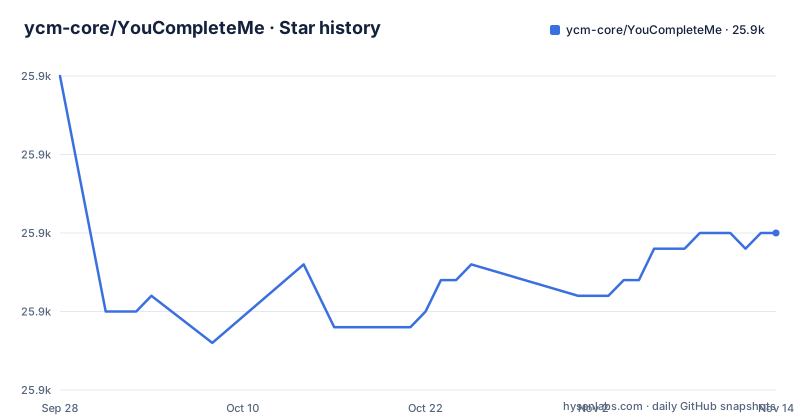
- ycm-core/YouCompleteMe25,875 ★ · -10
| Repository | 2026-09-28 | 2026-11-14 |
|---|---|---|
| ycm-core/YouCompleteMe | 25.9k | 25.9k |
-10 Stars in the last 47 days, measured from the daily GitHub snapshot. Compare with other projects
Editorial analysis
Filtering is a subsequence match, not a prefix match
The single most useful thing to understand about how this plugin filters is that it is not doing what most completion engines do. The README is emphatic on the point: the filtering is not based on the input being a string prefix of the completion, though that also works. The input has to be a subsequence match, meaning the characters you typed need to appear somewhere in a candidate in the order you typed them.
The worked example makes it concrete. The input `abc` is a subsequence of `xaybgc` but not of `xbyxaxxc`, because in the first the letters appear in order and in the second they do not.
The practical effect is that you can type non-contiguous fragments of an identifier and still get a hit. If you remember three letters scattered through a long name, you do not have to remember where they sit.
That flexibility would normally produce a noisy menu, which is what the next part solves. After filtering, a sorting system ranks the candidates so the most relevant rise to the top, with the stated result that you usually need to press TAB only once. So the subsequence match widens what you can find, and the ranking is what stops that from costing you keystrokes.
Seven language servers ship, plus a generic LSP path and a fallback
The engine list in the README is long, and each entry names the tool that does the actual work rather than implementing anything itself.
For the C-family, which the README defines as C, C++, Objective-C, Objective-C++ and CUDA, the engine is clangd-based. Python, both version 2 and 3, goes through Jedi. C# goes through OmniSharp with Roslyn. Go goes through Gopls. JavaScript and TypeScript go through a TypeScript language server. Rust goes through rust-analyzer, and Java through the Java language server.
Three more paths sit alongside those. There is a generic Language Server Protocol implementation, so you can plug in an arbitrary server for any language. There is an identifier-based engine that works with every language regardless. And there is a completer that uses data from Vim's own omnicomplete system, described as semantic for many other languages such as Ruby and PHP.
So the architecture is a host for other people's compilers and language servers rather than a single completion implementation. The repository reflects that, with a third_party directory and a .gitmodules file.
The supported install is a script, and the manual path is for rare cases
The README is unusually direct about which installation route to use. It recommends the supplied installer script, and states that the full installation guide is for rare, advanced use cases and that most users should use the script.
That is worth heeding, because the manual path is the one people find first. The documentation has separate sections for macOS, Linux 64-bit, Windows and the full installation guide, and a new user reading top to bottom will land in the long version. The structure of the document lists requirements and the per-platform sections, with the full guide last, which reflects the intended order.
There is also a plugin manager complication, and it is stated rather than hidden. The instructions in the document suggest using Vundle, but the README notes that there are currently problems with Vundle and links to alternative instructions using Vim packages instead. So the documented path for plugin installation is one the project itself is steering you away from.
Taken together, the installation story is: use the script, and if you are following a tutorial that wires it up by hand, check whether the plugin manager step is still current. The project publishes no GitHub releases, so a tagged version is not the way to pin what you are running either.
The C-family documentation is mandatory, and the failure has a named error
The support section of the README reads like a diagnostic decision tree, and the order matters.
First, read the installation instructions for your operating system and use the installer script. If the server is not starting and you get a specific error, one that says YouCompleteMe unavailable, the README sends you to the troubleshooting guide rather than to a forum. Next, read the user guide section for the semantic completer you are actually using, and for the C-family languages it is written that you must read that section, with the emphasis in the original text.
The reason is the architecture from earlier. Clang-based completion needs real compiler flags, include paths and standard library headers, and getting those wrong produces completion that silently misses symbols rather than a clear crash. A dedicated section for it is not padding.
Then the FAQ, and only after installation instructions, user guides and the FAQ, the contacts section.
The one instruction that stands out is a prohibition: do not go to the Vim channel on Freenode for support, and contact the maintainers directly instead. That is a small thing, and it signals that this plugin carries enough native dependencies and platform variation that generic Vim support channels cannot usefully hold its answers.
The identifier engine only harvests files you have visited
The fallback engine for every language is worth understanding on its own, because its behaviour is a limitation as much as a feature.
The README says it collects all of the identifiers in the current file and in other files you visit, as well as your tags files, and searches them when you type, with identifiers placed into per-filetype groups. So the identifier index is built from your reading, not from a repository-wide scan.
That has a direct consequence. A symbol you have never opened and that is not in your tags file may simply not be offered, and when it appears to be missing you have no way to tell whether it does not exist or whether you have not been there yet. In a large codebase this makes the identifier engine most useful for names you have already seen in context, which is a different job from the semantic engines that answer questions about a symbol you have not read yet.
The per-filetype grouping is a second detail with a purpose. It keeps identifiers discovered in a Python file from cluttering completions in a C file, which is what makes a single index across many languages tolerable.
So there are really two tiers here: the language servers know your project, and the identifier engine knows your recent history.
Semantic completion fires on trigger characters, and the triggers differ per language
The semantic layer is triggered automatically in insert mode by certain characters rather than by a keypress, and the README is specific that the set differs by language. For C++, the triggers are the dot, the arrow, and the scope resolution operator. Other languages use different triggers, and the semantic engine can also be triggered from the keyboard if you prefer that.
That design is why there is a whole features section layered on top. Once a server is answering, the plugin can also provide signature help, semantic highlighting, inlay hints, symbol search, type and call hierarchy, and refactoring commands, with the user guide listing a separate section for each.
Diagnostics are the other visible piece, described as the little red X in the left gutter, and the README notes it was inspired by another Vim plugin. The user guide also has a section on diagnostic highlighting groups.
The commands are namespaced rather than scattered: the user guide documents a YcmCompleter subcommand set split into go-to commands, semantic information commands, refactoring commands and miscellaneous commands, and there are documented functions and autocommands as well.
That is a large surface, and it is all downstream of getting one server running correctly.
The repository is a Vim plugin and a Python server, with a minimal vimrc for testing
The layout shows the split between the two halves of the project. The Vim side follows the plugin convention with an autoload directory and a plugin directory, which is why the code is loaded lazily rather than at startup. The Python side has its own directory.
Installation lives in a Python script and a shell script at the top level. Testing is Python tooling: a test runner, a tox configuration, a coverage configuration and a codecov configuration, with a coverage report linked from the README.
Two files are more interesting than they look. A minimal vimrc exists for running YouCompleteMe in isolation, which is the sensible way to find out whether a completion problem is the plugin or your own configuration. And a file with a name in the style of an extra configuration file for the plugin provides a per-project hook, which is where language-specific flags and compile settings belong rather than in a global configuration.
There is also a Vimspector configuration file, .vimspector.json, at the top level.
Around the edges: a merge automation configuration, a script for listing outstanding work, a script for regenerating the Vim documentation, and a contributors and code of conduct file. The last push to the repository was on 2026-10-31, and the project is GPL-3.0 licensed.
Editorial conclusion
YouCompleteMe suits a Vim user who wants native semantic completion in several languages at once without running a separate client for each, and who reads enough of the documentation to install it properly rather than running the advanced path by default. It is a poor fit if you need a symbol index that covers a codebase you have not opened, since the identifier engine only harvests what you visit, and a poor fit if you want a plugin with no native dependencies, since several engines are external binaries or language servers. Before installing, check three things: which language you actually need, since the C-family path carries a mandatory documentation section and separate triggers, whether the plugin manager named in the instructions still works, as the README says the recommended one currently has problems, and what your per-project extra configuration will be.
Frequently asked questions
what is you complete me
YouCompleteMe is a fast, as-you-type, fuzzy-search code completion, comprehension and refactoring engine for Vim. It has several completion engines built in and supports any protocol-compliant Language Server, so it can work with practically any language. Engines included are clang-based for the C family, Jedi for Python, OmniSharp with Roslyn for C#, Gopls for Go, rust-analyzer for Rust and a Java language server, alongside a generic LSP implementation and an identifier-based engine that works with every language.
how to install youcompleteme
The README recommends using the supplied installer script, and states that the full installation guide is for rare, advanced use cases and that most users should use the script. The documentation also notes that the instructions suggest Vundle for plugin installation but that there are currently problems with Vundle, linking to alternative instructions that use Vim packages instead.
how to use youcompleteme
Completion candidates appear as you type with no shortcut needed, and TAB accepts one while repeated presses cycle through them. Typing further filters the list, and because filtering matches a subsequence rather than a string prefix, scattered characters still match; a ranking step then puts the most relevant candidates first so you usually need one TAB. For C++, the semantic engine is triggered by pressing the dot, arrow or scope resolution operator in insert mode, with different triggers for other languages.
youcompleteme vs lsp
They are not alternatives in this project, because YouCompleteMe ships a Language Server Protocol implementation of its own. The README describes a generic LSP implementation for any language, alongside specific engines built on clang, Jedi, OmniSharp with Roslyn, Gopls, a TypeScript server, rust-analyzer and a Java server. So rather than choosing between the plugin and a language server protocol client, YouCompleteMe acts as the client for whichever server applies to the file you are editing.
how to install youcompleteme vim
The README has separate installation sections for macOS, Linux 64-bit, Windows and a full installation guide, and recommends the supplied installer script over the manual route for most users. It also warns that the documented Vundle-based plugin installation currently has problems and points to alternative instructions using Vim packages. Requirements are listed in their own section in the documentation.
Official sources
Add this badge to your README
If you maintain this project, the badge below links readers to this analysis and shows its maintenance status from the daily GitHub snapshot. Paste the markdown into your README; add ?metric=license or ?metric=stars to the image URL for a different field.

[](https://hysenlabs.com/projects/ycm-core-youcompleteme)Star history chart for your README
[](https://hysenlabs.com/projects/ycm-core-youcompleteme)Was this useful?