ultisnips keeps a snippet alive while you edit around it
UltiSnips - The ultimate snippet solution for Vim. Send pull requests to SirVer/ultisnips!
At a glance
- What is it?
- A GPL-3.0 snippet engine for Vim and Neovim whose distinguishing feature is that a snippet stays active as you leave insert mode, add arguments, and come back. The engine is Python, the snippet files are a separate plugin, and maintenance has changed hands twice since 2009.
- Who is it for?
- UltiSnips fits people who write boilerplate with structure rather than fixed text: class skeletons whose constructor grows with your arguments, form fields that repeat, anything where one edit should propagate. It does not fit if you only want to paste a saved block of text, and it is Vim and Neovim only, with no editor-agnostic path.
- Can I use it commercially?
- Yes, with conditions. GPL-3.0 is a copyleft licence: if you distribute software that includes it, you must release that software's source code under the same licence. Running it internally without distributing it does not trigger that obligation.
- Is it still maintained?
- Yes. The repository last received commits 69 days ago.
- What is it written in?
- Mainly Python, according to GitHub's language statistics.
Answers come from the project's GitHub data, last synced on November 14, 2026, and from our analysis. They are not legal advice.
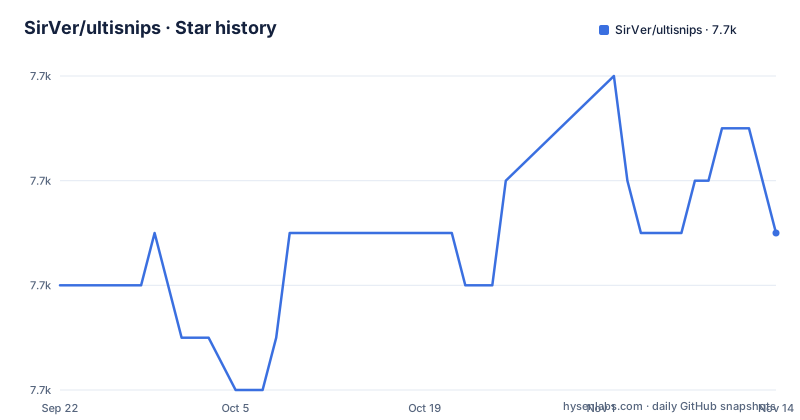
Star history
- SirVer/ultisnips7,697 ★ · +1
| Repository | 2026-09-22 | 2026-11-14 |
|---|---|---|
| SirVer/ultisnips | 7.7k | 7.7k |
1 Stars in the last 53 days, measured from the daily GitHub snapshot. Compare with other projects
Editorial analysis
A snippet stays active while you edit around it
The behaviour that separates UltiSnips from a plain text expansion is shown in the readme demo, and it is worth walking through rather than skimming. The author expands a class snippet in a Python file. Adding Animal as a base class updates __init__ so it calls the base class constructor. Adding arguments to the constructor makes them assigned to instance variables as well.
Then the part that surprises people: the author leaves insert mode, inserts a separate snippet for print debugging, comes back to add another argument to __init__, and the class snippet is still active and adds yet another instance variable. Placeholders are not a one-shot fill-in form. The snippet stays bound to the buffer while you work inside and around it, which is why the project describes itself as a snippet solution rather than a snippet file format.
The expand trigger defaults to tab, which two completers also want
The quick start is written for Vundle and expects you to adapt it for whichever plugin manager you use. Its most important lines are the trigger settings:
Plugin 'SirVer/ultisnips'
Plugin 'honza/vim-snippets'
let g:UltiSnipsExpandTrigger="<tab>"
let g:UltiSnipsJumpForwardTrigger="<c-b>"
let g:UltiSnipsJumpBackwardTrigger="<c-z>"
let g:UltiSnipsEditSplit="vertical"
The comment attached to the expand trigger is the part to notice: you need to change it away from tab if you use YouCompleteMe or completion-nvim, because those want the same key. The forward and backward triggers are what let you step through placeholders without leaving the keyboard, and g:UltiSnipsEditSplit decides whether :UltiSnipsEdit opens the snippet file beside your window or above it.
The engine and the snippets are two different plugins
The configuration separates what runs from what you wrote. The SirVer/ultisnips entry tracks the engine, and the honza/vim-snippets entry is added only if you want a snippet collection as well. The readme marks that distinction with a comment of its own: snippets are separated from the engine.
That split has consequences beyond installation. It means a snippet file is data you can maintain separately from the code that expands it, and it means the project does not have to ship someone else's snippet set to be useful. The documentation points at doc/UltiSnips.txt as comprehensive enough to deserve a skim, and the readme calls out two areas of that file as worked examples: snippet aliases, and dynamic tabstop generation.
Maintenance has moved twice, and the version gaps show it
The project started in June 2009 with SirVer. Maintenance was handed over in December 2015 to seletskiy, who ran out of time in early 2017. Since June 2019 SirVer has been maintaining it again. The readme is straightforward about all three periods rather than presenting a single continuous history.
The release dates line up with that story. UltiSnips 3.1 was published on 7 December 2015, right at the handover, 3.2 on 5 November 2019 after the return, and 4.0 on 10 May 2026. Between 3.1 and 3.2 there is a four year gap, and between 3.2 and 4.0 another six. The last push to master is dated 6 September 2026, so the current work sits on top of a version that shipped five months ago. A ChangeLog file sits at the root for the detailed sequence.
Python 3.11 is the floor, and ruff decides the style
The manifest is small and opinionated. It declares requires-python as 3.11 or newer, sets the ruff target version to py311 and the line length to 88, and configures mypy against python_version 3.11 with mypy_path pointing into pythonx/UltiSnips. Two modules are exempted from missing import errors, vim and unidecode, because neither is a declared dependency.
The ruff configuration is more revealing than the dependency list. It selects pycodestyle, pyflakes, isort, pyupgrade, bugbear, simplify, comprehensions, return rules, perf and eradicate rules, and its ignore list is annotated with reasons: E501 because the formatter owns line length, E731 because lambdas are used intentionally for skip_if in tests, E741 because single-letter names are common in Vim plugin code, RUF001 because the language map test data contains ambiguous unicode. Package __init__ files are exempted from F401 because they re-export symbols on purpose.
make image_repro compiles Vim from git to test against
There are three Dockerfiles in the tree, and the Makefile target image_repro is the one to understand first:
docker build -t ultisnips:repro --build-arg PYTHON_IMAGE=3.13-bookworm --build-arg VIM_VERSION=git .Vim is not installed from a package. The build runs scripts that install packages, download Vim and compile it, with the version chosen by the VIM_VERSION build argument, and the Python base image chosen by PYTHON_IMAGE. uv is copied in from its own image, unidecode is installed system wide, and the last step is the interesting one: ./test_all.py --clone-plugins runs the full suite inside the image, pulling the plugins the tests need. The Makefile also offers repro for an interactive shell with the source mounted, shell_in_repro to open another shell in a running container, and format, lint and test_unit for the uv-driven local loop.
Completion engines are treated as collaborators
The demo is not a claim that UltiSnips replaces your completion plugin. In the readme the completion menu comes from YouCompleteMe, and the project states integration with deoplete and vim-easycomplete as well. Snippet expansion and completion both claim tab, which is exactly why the quick start tells you to move the expand trigger if YouCompleteMe or completion-nvim is installed.
The learning material follows the same division of labour. Four screencast episodes run from what snippets are through Python interpolation, with blog posts carrying the advanced examples, and Vimcasts devoted three episodes to UltiSnips including Python interpolation and using selected text as a visual placeholder. Read those before writing your own, because the tabstop and interpolation behaviour is where the engine differs from a text macro.
The tree carries four editor dialects of plugin layout
A Vim plugin repository spreads its files across several conventions, and this one has all of them. autoload/, plugin/ and ftdetect/ are classic Vim layout. ftplugin/ holds per-filetype behaviour, syntax/ holds syntax files, and after/ holds code that runs after other plugins load. lua/ and rplugin/ are also in the tree.
The Python side lives in pythonx/, with tests beside it under test/ and an all-in-one runner at test_all.py. Around that sit doc/ for the help file and docs/, ctags/, docker/, scripts/, a uv.lock for reproducible environments, and CLAUDE.md next to the README. The two extra Dockerfiles, Dockerfile.nvim and Dockerfile.repro, plus a separate docker/ directory of helper scripts, exist because the test matrix spans more than one Vim build and more than one editor.
Editorial conclusion
UltiSnips fits people who write boilerplate with structure rather than fixed text: class skeletons whose constructor grows with your arguments, form fields that repeat, anything where one edit should propagate. It does not fit if you only want to paste a saved block of text, and it is Vim and Neovim only, with no editor-agnostic path. Before adopting, read doc/UltiSnips.txt, change g:UltiSnipsExpandTrigger away from tab if you run YouCompleteMe or completion-nvim, and confirm your Python is 3.11 or newer.
Frequently asked questions
How do you install ultisnips?
It is a Vim and Neovim plugin, so installation is a plugin manager entry. With Vundle you add Plugin 'SirVer/ultisnips' to your .vimrc, and add Plugin 'honza/vim-snippets' if you want a snippet collection too, since snippets are kept separate from the engine.
How do you use ultisnips day to day?
Configure the triggers first. The quick start sets g:UltiSnipsExpandTrigger to tab, g:UltiSnipsJumpForwardTrigger and g:UltiSnipsJumpBackwardTrigger for stepping between placeholders, and g:UltiSnipsEditSplit for how :UltiSnipsEdit opens the snippet file. Change the expand trigger away from tab if you run YouCompleteMe or completion-nvim.
Is there an alternative to ultisnips?
The readme names no alternative and compares nothing. Its own scope is Vim and Neovim, with completion integration for YouCompleteMe, deoplete and vim-easycomplete, plus snippet aliases and dynamic tabstop generation documented as worked examples under doc/examples.
Official sources
Add this badge to your README
If you maintain this project, the badge below links readers to this analysis and shows its maintenance status from the daily GitHub snapshot. Paste the markdown into your README; add ?metric=license or ?metric=stars to the image URL for a different field.

[](https://hysenlabs.com/projects/sirver-ultisnips)Star history chart for your README
[](https://hysenlabs.com/projects/sirver-ultisnips)Was this useful?