StreamJsonRpc and the case for JSON-RPC 2.0 over a plain stream
The StreamJsonRpc library offers JSON-RPC 2.0 over any .NET Stream, WebSocket, or Pipe. With bonus support for request cancellation, client proxy generation, and more.
At a glance
- What is it?
- StreamJsonRpc is a C# library that speaks the JSON-RPC 2.0 wire protocol over any .NET Stream, a WebSocket, or System.IO.Pipelines pipes, and adds request cancellation, .NET events as notifications, dynamic proxies and MessagePack serialization on top of the spec. It ships as the NuGet package StreamJsonRpc under a custom licence, so the licence file deserves a look before you adopt it in a product.
- Who is it for?
- StreamJsonRpc fits a team that already speaks JSON-RPC 2.0 and wants one protocol implementation over several transports, especially inside .NET tooling where an in-process pipe is easier than a socket server. It is the wrong choice if you need a protocol other than JSON-RPC, or if you want a library under a recognised permissive licence, since the licence field on the repository says Other and the LICENSE file governs.
- Can I use it commercially?
- Check first. The repository uses a licence we do not classify automatically, so read its LICENSE file before any commercial use.
- Is it still maintained?
- Yes. The repository last received commits 2 days ago.
- What is it written in?
- Mainly C#, according to GitHub's language statistics.
Answers come from the project's GitHub data, last synced on November 7, 2026, and from our analysis. They are not legal advice.
Star history
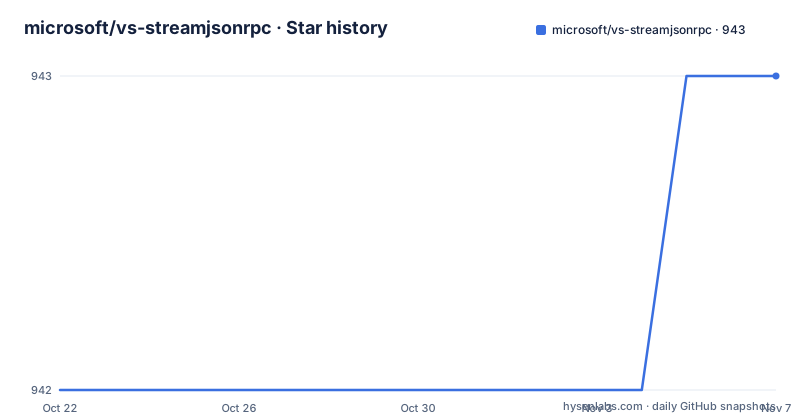
- microsoft/vs-streamjsonrpc943 ★ · +1
| Repository | 2026-10-22 | 2026-11-07 |
|---|---|---|
| microsoft/vs-streamjsonrpc | 942 | 943 |
1 Stars in the last 16 days, measured from the daily GitHub snapshot. Compare with other projects
Editorial analysis
One protocol implementation, three kinds of transport
JSON-RPC 2.0 is a small, well-specified wire format for calling methods across a network boundary, and the hard part of using it in practice is rarely the message format. It is the transport, the framing, the cancellation semantics, and the thousand small decisions about what happens when a peer goes away mid-call.
StreamJsonRpc is a C# library that implements the JSON-RPC 2.0 wire protocol and separates that protocol from the channel underneath it. According to the README it works over `Stream`, over `WebSocket`, and over System.IO.Pipelines pipes, independent of the underlying transport. That independence is the design decision worth understanding before you choose it. The same client and server code, and the same message and notification types, run over a TCP socket, over a named pipe between two processes on one machine, or over a WebSocket to a browser, because the protocol layer only ever sees a byte stream.
The audience is .NET developers who need RPC between processes or between a process and a web front end, and who want to avoid hand-rolling a JSON-RPC parser. It is described as a cross-platform .NET portable library, and the topic list for the repository includes netstandard, which places it in the portable library category rather than tying it to one runtime version. The project also hosts documentation at microsoft.github.io/vs-streamjsonrpc, and the README describes those docs as covering the use cases for JSON-RPC as well as how to use the library.
The five extras that the spec does not give you
The README lists its additions to the JSON-RPC specification as a numbered set, and they are the substance of the library, because the spec itself is thin.
Request cancellation is first. Having a way to signal cancellation on the wire is not the same as having the plumbing. In this library, a pending call can be cancelled, which matters most for the case where a caller loses interest in a slow operation and the server is holding resources for it.
Second,.NET events can be surfaced as notifications, so a plain C# event on the server side travels to the client as a JSON-RPC notification rather than requiring a hand-built message.
Third, dynamic client proxy generation: a client can be handed an object that looks like the server's interface without the client project sharing that interface's assembly. That is the feature that removes a shared-types dependency between two components.
Fourth, compact binary serialization via MessagePack, linked from the extensibility page in the documentation. JSON on the wire is verbose, and for chatty protocols or large payloads that cost is real.
Fifth, and least visible but most structural, a pluggable architecture for custom message handling and formatting. The message layer is an extension point, which is what makes the MessagePack support possible in the first place and what would let you add another encoding without forking the library.
MessagePack and the pluggable message layer
The extensibility point deserves its own look, because it is where the library stops being a JSON-RPC parser and starts being a framework for one.
The README points at a documentation page for extensibility as the place where the compact binary serialization support is described, and lists pluggable architecture for custom message handling and formatting as a feature in its own right. The practical meaning is that the encoding is not baked into the protocol implementation. The default is JSON, as JSON-RPC 2.0 requires, and MessagePack is an option layered on top of the same message pipeline.
That matters for a specific and common scenario: two processes on the same machine that exchange thousands of messages. JSON has to be serialised and parsed on both sides, and the result is a lot of text on a pipe. Switching the formatter changes what goes on the wire without changing the method names, the parameters, the notification semantics, or the cancellation behaviour, since those all live above the formatter.
There is a cost to that flexibility, and it is the usual one. A custom formatter is code you own, and it has to agree with the peer on the encoding, because a mismatch produces a parse error rather than a readable error message. The README does not document a configuration surface for the formatter, so the entry point for that is the extensibility page in the documentation rather than the README itself.
Getting the library and running the samples
The README carries a NuGet package badge for `StreamJsonRpc` and links to the package page, but it does not contain a package manager command, so there is nothing to copy into a terminal from it. The package identifier is `StreamJsonRpc` and the documentation site the README links to is microsoft.github.io/vs-streamjsonrpc.
The repository itself is the better place to see the library in use, because it ships samples for two languages. The tree contains `samples/cs/` and `samples/fs/`, meaning C# and F# sample projects, along with their own `Directory.Build.props`, `Directory.Build.targets` and `Directory.Packages.props` under `samples/`, so the samples are built with the same central package management settings as the rest of the repository rather than with loose version numbers per project.
For a first use, the samples are the intended entry point, and the F# sample is the interesting one for a .NET team, since a dynamic proxy in F# is not a common sight and it demonstrates how much of the type shape the proxy mechanism can synthesise. What the samples demonstrate is not spelled out in the README, so treat the two directories as the place to read actual usage rather than expecting a guided tour.
The main solution is `StreamJsonRpc.slnx`, the newer XML form of a solution file, and the source lives under `src/`. A contributor working from a fresh clone also has `init.cmd` and `init.ps1` scripts at the root, which are the conventional place for a repository to put one-time checkout initialisation, and `global.json`, the file .NET reads to select an SDK version for the build.
What the repository layout says about how the project is built
The tree of this repository is more informative about the project's engineering than its short README is, so it is worth reading as a set of signals.
Build and dependency management are centralised. There is `Directory.Build.props`, `Directory.Build.targets`, `Directory.Build.rsp`, `Directory.Packages.props` and `Directory.Packages.Analyzers.props`, which is the standard.NET pattern for applying one set of compiler options, package versions and analyser settings across every project in the repository. `version.json` next to them is where the release number lives, and the release tags run through the v2.25 and v2.26 range. `nuget.config` controls package sources.
Quality gates are visible. `stylecop.json` configures StyleCop, `CodeQL.yml` wires up GitHub's code scanning, `BannedSymbols.txt` lists symbols that must not be used, and `azure-pipelines.yml` together with the `azure-pipelines/` directory describes the build pipeline, with separate files for coverage. `SUPPORT.md` and `SECURITY.md` sit at the root, so the project states where to ask for help and where to report a vulnerability, which is the detail a security review of a dependency will look for.
Documentation is generated with `docfx/` and the `loc/` directory suggests localized content. The `.agents/` and `AGENTS.md` entries are recent additions of the kind used to give coding agents repository instructions. The build is driven by Azure Pipelines rather than by GitHub Actions, with a `.github/` directory present for the other, mostly community and funding, files.
A custom licence and a fast-moving version number
The licence field on the repository says Other, with a note that GitHub cannot classify it and pointing to the LICENSE file. That is unusual for a widely used library, and it is the first thing to check before you depend on it in a shipped product. The README itself does not describe the terms, and this is not the place to guess at them. What can be said is that the licence file is present in the repository root and is the only authoritative statement of what you may do with the code, so a product organisation should read it before vendoring the package into a closed-source application.
Maintenance activity is current. The last push to the repository was on 2026-10-19, and the release v2.26.150 was published the same day. Before that came v2.25.29 on 2026-06-15 and v2.25.28 on 2026-06-12. Two patch releases three days apart in June followed by a minor version in October is the shape of a library that is still moving, and it also means the version you adopt today may be superseded within months.
The upgrade cost for a consumer is therefore the cost of moving with a v2.x line. The library is still on version 2, so a new adopter is not facing a v3 migration. Pinning to an exact version and reading the release notes for each bump is the safe habit with a package that moves this quickly.
Where StreamJsonRpc is the wrong tool
There are clear cases where the wrong library is the right decision.
If you need a protocol other than JSON-RPC 2.0, this library does not help. It implements one wire protocol, and while the message layer is pluggable, the method invocation, notification and cancellation semantics are those of JSON-RPC. A team that has standardised on gRPC or on protocol buffers for service to service calls will not gain anything here, and will gain a second RPC stack to maintain.
If you are not on .NET, the library is not usable at all. It is a C# library with an F# sample, and the transport bindings are .NET specific (`System.IO.Stream`, `System.Net.WebSockets.WebSocket`, System.IO.Pipelines). A JavaScript or Go service on the other end of the socket has to implement the protocol itself, which is exactly the work this library is meant to save.
There is also a size and dependency question. A protocol library that supports JSON, MessagePack, dynamic proxies, cancellation and pluggable formatters pulls in more than a minimal JSON-RPC parser would, and the central package management setup means the transitive dependency set is decided centrally rather than per project. For a small in-house tool that needs one method over a local socket, a hand-written parser over a `Stream` may be smaller and easier to reason about.
The honest comparison with the alternative approach is this: a minimal implementation that speaks JSON-RPC 2.0 over one transport, written by you, has no third-party dependency and no upgrade path to manage, but it also has no cancellation plumbing, no proxy generation, and no MessagePack option. StreamJsonRpc is worth its weight when several of those extras are needed at once, which is exactly when a team reaches for a library instead of a weekend project.
Editorial conclusion
StreamJsonRpc fits a team that already speaks JSON-RPC 2.0 and wants one protocol implementation over several transports, especially inside .NET tooling where an in-process pipe is easier than a socket server. It is the wrong choice if you need a protocol other than JSON-RPC, or if you want a library under a recognised permissive licence, since the licence field on the repository says Other and the LICENSE file governs. Before you commit, check the package identifier StreamJsonRpc against the NuGet page the README links to, and read the cancellation and notification semantics in the documentation at microsoft.github.io/vs-streamjsonrpc, because the behaviour there is what your client code will depend on.
Frequently asked questions
What is StreamJsonRpc used for?
It is a .NET library that implements the JSON-RPC 2.0 wire protocol over a Stream, a WebSocket, or System.IO.Pipelines pipes, independent of the underlying transport. It also adds request cancellation, .NET events as notifications, dynamic client proxies and MessagePack serialization.
How do I install StreamJsonRpc?
The project ships as the NuGet package StreamJsonRpc, and the README links to the package page on nuget.org. The README does not contain a package manager command, so the package page is where the installation details come from.
Does StreamJsonRpc support request cancellation and events?
Yes. The README lists request cancellation and .NET events surfaced as notifications among the features it adds beyond the JSON-RPC specification, along with dynamic client proxy generation, MessagePack support and a pluggable message layer.
Can StreamJsonRpc use MessagePack instead of JSON?
Yes. Support for compact binary serialization via MessagePack is listed as one of the features beyond the spec, and it is described in the extensibility page of the project documentation.
What licence is StreamJsonRpc released under?
The licence field on the repository says Other, because GitHub could not classify it, and points to the LICENSE file in the repository root. The README does not state the terms, so the LICENSE file is the only authoritative source.
Official sources
Add this badge to your README
If you maintain this project, the badge below links readers to this analysis and shows its maintenance status from the daily GitHub snapshot. Paste the markdown into your README; add ?metric=license or ?metric=stars to the image URL for a different field.

[](https://hysenlabs.com/projects/microsoft-vs-streamjsonrpc)Star history chart for your README
[](https://hysenlabs.com/projects/microsoft-vs-streamjsonrpc)Was this useful?