XamlBehaviorsWpf: reusable WPF interactivity from one NuGet package
Home for WPF XAML Behaviors on GitHub.
At a glance
- What is it?
- XamlBehaviorsWpf is the WPF port of the XAML Behaviors idea, a library that lets a XAML developer attach reusable interaction logic to controls without writing a view model. Adoption is simple on the consuming side, but the documentation is thin and the build is a Visual Studio era msbuild job.
- Who is it for?
- XamlBehaviorsWpf is a reasonable choice for WPF teams that want interactive controls, such as popups, transitions and validation, declared in XAML rather than wired up in code behind. It is the wrong tool if you need behaviour documentation, since the README does not show a single attached property in a XAML file, and it is the wrong tool if your build is not Visual Studio based.
- Can I use it commercially?
- Yes. MIT is a permissive licence: you can use, modify and sell software built on it, as long as you keep its copyright and licence notices.
- Is it still maintained?
- Yes. The repository last received commits 23 days ago.
- What is it written in?
- Mainly C#, according to GitHub's language statistics.
Answers come from the project's GitHub data, last synced on November 7, 2026, and from our analysis. They are not legal advice.
Star history
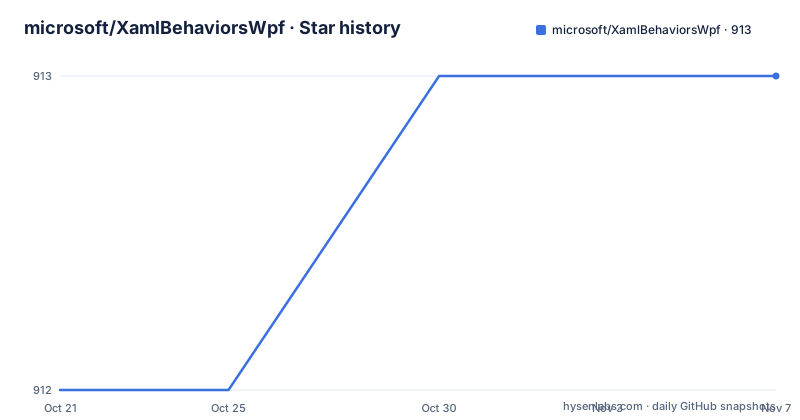
- microsoft/XamlBehaviorsWpf913 ★ · +1
| Repository | 2026-10-21 | 2026-11-07 |
|---|---|---|
| microsoft/XamlBehaviorsWpf | 912 | 913 |
1 Stars in the last 17 days, measured from the daily GitHub snapshot. Compare with other projects
Editorial analysis
XamlBehaviorsWpf exists because WPF XAML has no built in attachment point
XAML Behaviors is described in the project documentation as an easy to use means of adding common and reusable interactivity to WPF applications with minimal code. That is the entire pitch, and the reason it matters is structural rather than cosmetic. Plain WPF gives you a markup language and a control model, but the way to make a control do something extra is to write a class, attach it, and wire it up. A library that provides the attachment mechanism and a set of common behaviours moves that work into the XAML file, where the relationship between control and behaviour is visible next to the rest of the layout.
The audience is narrow and identifiable. This is for WPF developers on Windows who write XAML, who are not building a web frontend or a cross platform UI, and who want the same interaction patterns to be reusable across a suite of applications rather than reimplemented in each product. The library is C#, primary language of the repository, and the use of XAML Behaviors is governed by the MIT License.
There is one more detail worth flagging up front, because it says something about the project's direction. The documentation states that the team is working with a committee of Microsoft MVP leaders to guide the Behaviors project and evaluate incoming pull requests. That is a governance arrangement described in the source, and it is the closest thing to a statement about how the project intends to accept outside contributions.
What you consume is the Microsoft.Xaml.Behaviors.Wpf NuGet package
Adoption on the consuming side is a single package reference. The documentation says that to use behaviors in your project, you add the Microsoft.Xaml.Behaviors.Wpf NuGet package to your project. There is no runtime configuration, no service registration and no installer step, which is what makes the library cheap to try in an existing solution.
The repository is described as the home for WPF XAML Behaviors on GitHub, and the getting started section points to three resources: the source code at the repository itself, a samples folder in the repository, and the issues tracker for reporting a bug. The licence link points at the MIT licence text on opensource.org, matching the stated terms.
The repository layout backs this up. At the top level there is a src/ directory, a Test/ directory, a samples/ directory containing an XAMLBehaviorsSample project, an azure-pipelines/ directory for continuous integration, a version.json file, and shared build configuration in Directory.Build.props and Directory.Build.targets. That combination tells you the standard Microsoft shape: the packaging metadata is driven from version.json, the shared properties are applied across all projects, and the pipeline builds and publishes.
The samples tree is the piece most adopters will look at first, and it is worth saying plainly what the documentation does not tell you: it does not walk through the sample code, and it does not show a XAML file with a behaviour attached to it. If you are evaluating the library, that gap matters, and the wiki linked from the getting started section is where more detail is likely to live.
Packing the library yourself is one msbuild invocation
The build instructions are for contributors rather than for consumers, and they assume a specific Microsoft toolchain. The stated requirement is Visual Studio 2019, and the repository is cloned through the Team Explorer interface in Visual Studio, by going to View, then Team Explorer, then Local Git Repositories, then Clone, and pasting the repository URL. Older habits die hard, but the requirement is explicit in the documentation.
The actual build runs from a Visual Studio developer command prompt, so that the MSBuild environment variables are on the path, and the single command is:
msbuild src\Microsoft.Xaml.Behaviors\Microsoft.Xaml.Behaviors.csproj /t:PackThe /t:Pack target is the interesting part. It does not merely compile the project, it produces a NuGet package, which is exactly what a maintainer or a team that wants to publish an internal version needs. You should expect a .nupkg file as the output, and the target name tells you the build is packaging rather than installing.
Two practical notes on this flow. The command is written with Windows path separators and a project file under src\Microsoft.Xaml.Behaviors, so it assumes a Windows shell rather than a cross platform one. And the whole thing depends on the developer command prompt, meaning the build environment comes from the installed Visual Studio rather than from a standalone dotnet CLI invocation. Anyone planning to run this in a Linux container or on a build agent without Visual Studio will need a different route, and the documentation does not offer one.
The repository leans on version.json, Directory.Build.props and azure-pipelines
The root of the repository explains how this library is versioned and shipped, even though the documentation does not spell it out. The version.json file at the root is the standard mechanism for driving NuGet package versions in this family of Microsoft projects, and the release list matches that pattern: v1.1.161 published on 2026-09-15, v1.1.158 on 2026-09-02, and v1.1.142 on 2026-03-02. The build numbers increment across releases, which is the signature of a continuous delivery pipeline rather than a hand numbered release.
The azure-pipelines/ directory confirms that reading. Pipeline definitions sit in the repository, so the build and publish path is versioned alongside the code rather than being a script held somewhere else. The practical implication for an adopter is that the published package is a by-product of a pipeline run, and the version number on the package tells you which commit state you are getting.
Directory.Build.props and Directory.Build.targets apply shared settings to every project in the tree, which is how the version, the assembly metadata and the packaging conventions stay consistent between src/, Test/ and the samples. The presence of an .editorconfig at the root and a PULL_REQUEST_TEMPLATE.md alongside a CONTRIBUTING.md shows the repository is set up for outside contributions, and the project has adopted the Microsoft Open Source Code of Conduct with [email protected] listed as the contact for questions or comments about it. SECURITY.md at the root indicates there is a defined path for reporting security issues separately from ordinary bugs.
The README never shows a behaviour attached to a control, and that is the real limitation
A library whose value is expressed in XAML, and whose getting started section consists entirely of links, is the weak point of this project. The documentation does not include a single XAML snippet, a single property name, a single behaviour class, and no statement of which behaviours ship in the package. The samples directory is offered as a pointer, but the contents are not described either.
That has practical consequences. You cannot, from the documentation alone, answer the first question a new adopter asks, which is which behaviours are available. You also cannot tell whether the package targets a specific .NET Framework version, which WPF target frameworks are supported, or what the dependency surface is. The documentation is silent on all of these, and silence is not a licence to guess.
There is a second limitation that is structural rather than editorial. This is a WPF library, and WPF is a Windows technology, so the package has limited value outside a Windows desktop application. If your team is evaluating a shared UI approach across Windows, Linux and browser targets, this package solves a problem you do not have. The repository's own scope statement, a home for WPF XAML Behaviors, is honest about that boundary, and it is worth respecting rather than trying to stretch.
The version numbers also hint at a stability question. The project is on the 1.1 line, and the release history shows releases in 2026 that are close together and far apart. Nothing in the documentation promises compatibility guarantees across versions of WPF or .NET, so a team with a long-lived desktop product should pin the version rather than float on the latest.
The alternative is writing the attachment plumbing yourself, once per application
There is a second way to get the same result, and it is worth naming because it involves no dependency at all. Instead of taking the Microsoft.Xaml.Behaviors.Wpf package, a team can implement its own behaviour attachment, either as a custom base control that exposes a property, or as a small set of attached properties on a control, and keep that code inside the product. The approach differs from the library in three concrete ways.
First, ownership. With the package, the attachment contract and the shipped behaviours are maintained by the upstream project, and a version bump is somebody else's release. With your own implementation, the code sits in your repository and is reviewed on your schedule. Second, the scope of the dependency. Adding a NuGet package to a WPF application brings transitive dependencies into your build and your assembly binding, whereas an internal base class adds a source file. Third, the available behaviour set. The package exists to ship common and reusable interactivity, so its value depends entirely on which behaviours it actually contains, and the documentation does not list them. Your own implementation gives you exactly the behaviours you write and nothing else.
The choice comes down to how many behaviours you actually need. A product with two custom interactions is usually better served by its own small code, because the attachment plumbing is not the hard part. A suite of desktop applications that all need the same set of interactions is where the packaged approach starts to pay for itself, assuming the behaviours you need are in the box. Since the documentation does not enumerate the contents, the practical first step is to look at the samples project and count what is there before committing to a dependency.
Editorial conclusion
XamlBehaviorsWpf is a reasonable choice for WPF teams that want interactive controls, such as popups, transitions and validation, declared in XAML rather than wired up in code behind. It is the wrong tool if you need behaviour documentation, since the README does not show a single attached property in a XAML file, and it is the wrong tool if your build is not Visual Studio based. Before adopting it, confirm that the Microsoft.Xaml.Behaviors.Wpf package version resolves in your feed, check that the samples project under samples/ actually opens in the Visual Studio version you use, and read the wiki on the team committee before assuming the governance model matches your organisation's.
Frequently asked questions
How do I add XamlBehaviorsWpf to a WPF project?
Add the Microsoft.Xaml.Behaviors.Wpf NuGet package to your project. That single package reference is the whole integration step described in the project documentation.
What licence is XamlBehaviorsWpf released under?
The use of XAML Behaviors is governed by the MIT License, and the repository links to the MIT licence text on opensource.org.
How do I build the XAML Behaviors NuGet package from source?
Clone the repository in Visual Studio 2019, open a Visual Studio developer command prompt, navigate to the repository, and run msbuild src\Microsoft.Xaml.Behaviors\Microsoft.Xaml.Behaviors.csproj /t:Pack.
Where can I find example code for XamlBehaviorsWpf?
The getting started section points at a samples folder in the repository, which contains an XAMLBehaviorsSample project. The documentation does not walk through the sample code itself.
Is XamlBehaviorsWpf actively maintained?
The repository is not archived and the last push was on 2026-10-15. Releases include v1.1.161 on 2026-09-15 and v1.1.158 on 2026-09-02.
Official sources
Add this badge to your README
If you maintain this project, the badge below links readers to this analysis and shows its maintenance status from the daily GitHub snapshot. Paste the markdown into your README; add ?metric=license or ?metric=stars to the image URL for a different field.

[](https://hysenlabs.com/projects/microsoft-xamlbehaviorswpf)Star history chart for your README
[](https://hysenlabs.com/projects/microsoft-xamlbehaviorswpf)Was this useful?