r2, the promise-based HTTP client built on fetch instead of Node core
GitHub describes it as HTTP client. Spiritual successor to request.. The repository metadata lists JavaScript as its primary language. The metadata lists the Apache-2.0 license. This article stays within the project description and details documented in the GitHub repository README.
At a glance
- What is it?
- r2 is Mikeal Rogers' attempt to replace the request module with a promise-based client that runs on the Fetch API in both browsers and Node.js. The design is thin and readable, but the project has sat without a push since 2019.
- Who is it for?
- Adopt r2 if you are writing a small client that must run unchanged in a browser bundle and in Node.js, and you can accept owning the shim yourself. Do not adopt it for a server fleet that needs retries, timeouts or a maintained dependency tree, since the last push was on 2019-09-01.
- Can I use it commercially?
- Yes. Apache-2.0 is a permissive licence: you can use, modify and sell software built on it, as long as you keep its copyright and licence notices.
- Is it still maintained?
- Probably not. The repository last received commits 86 months ago, on September 1, 2019.
- What is it written in?
- Mainly JavaScript, according to GitHub's language statistics.
Answers come from the project's GitHub data, last synced on October 23, 2026, and from our analysis. They are not legal advice.
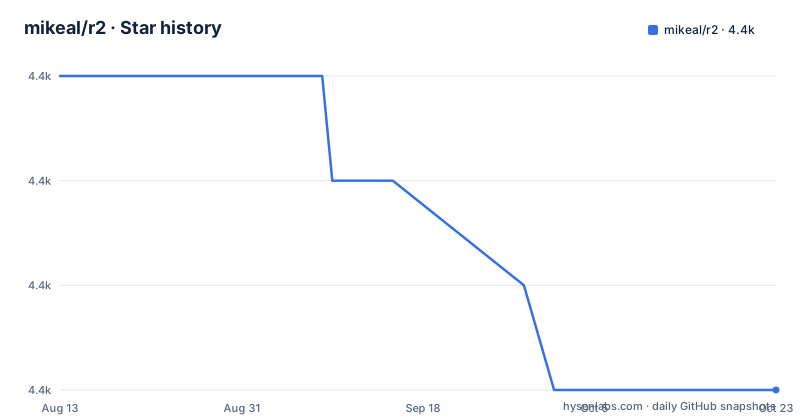
Star history
- mikeal/r24,401 ★ · -3
| Repository | 2026-08-13 | 2026-10-23 |
|---|---|---|
| mikeal/r2 | 4.4k | 4.4k |
-3 Stars in the last 71 days, measured from the daily GitHub snapshot. Compare with other projects
Editorial analysis
A rewrite of request from the same author
r2 exists because its author already wrote the module most Node.js developers used for a decade. Mikeal Rogers says in the README that he wrote request early in Node.js, that it evolved alongside the runtime, and that it became very widely depended upon. He then decided that a lot had changed since 2010 and that a simple HTTP client library should be thought through again. The result is described in package.json as an HTTP client and spiritual successor to request, written in JavaScript, with index.js as the entry point and the default branch named master.
So the audience is narrow and self-selecting: you already know request, you have inherited code that used it, and you want the same mental shape of call with modern control flow. What you are not getting is a drop-in migration. There is no compatibility layer described, no request-style callback signature, and no option bag carried over. r2 is a separate package with its own idea of what an HTTP call returns.
That framing matters for the licence question. The project is Apache-2.0, which is the same permissive licence family request shipped under, so a licence review is unlikely to be the thing that stops you.
Fetch in the browser, node-fetch in Node.js
The central design decision is a reversal of the usual direction. Most Node libraries are written against the Node.js core HTTP module and then shimmed so a bundler can pretend they run in a browser. r2 does the opposite: the README states that it is built on top of the browser's Fetch API and shimmed for Node.js. The whole library is written to the standard, and the non-standard runtime gets the adapter.
The dependency list in package.json shows how thin that shim is. There are exactly three runtime dependencies: caseless at ^0.12.0, node-fetch at ^2.1.2 and typedarray-to-buffer at ^3.1.2. caseless normalises header names, node-fetch supplies the spec-shaped implementation on Node.js, and typedarray-to-buffer converts the response body type Node.js hands back. A browser field then sets node-fetch to false, which tells the bundler to drop the Node.js implementation entirely. The same code path, one switch.
The consequence is size. The README gives a specific comparison: run through browserify, request is about 2M uncompressed and about 500K compressed, while r2 is only 66K uncompressed and 16K compressed. Those are the author's own numbers from his environment, not a benchmark you can generalise, but they point at the mechanism: nothing Node-specific is dragged into the bundle.
Every call returns a promise with body accessors
APIs here are meant for async and await, which the README ties directly to promises. There is no callback form. A call returns the response, and the useful part hangs off it as properties rather than arriving as arguments.
The README's first example awaits the text property directly on the call. The second shows a PUT with a json option and reads .json back. The third sets headers and reads .response. Three examples, three accessors: .text for a body as string, .json for a parsed body, .response for the full response object when you need the status and headers.
Note what those examples do not show. There is no status check, no error branch, and no timeout. Nothing in the README throws on a 404 or 500, which means a caller that awaits .json on a failed request is reading the failure body as if it were the payload. A catch around the promise covers network failures only. Deciding what to do about a bad status code is left to you, and it is the part you will write by hand in every call site.
Getting r2 and making the first call
The README contains no install line and no command to fetch the package, so there is nothing to copy here. The name to use is the one in package.json, r2, with a main entry point of index.js.
Once it is installed, the first call is two lines. Require the module, await the call, read the body accessor.
const r2 = require('r2')

let html = await r2('https://www.google.com').text
That code needs top-level await or a wrapping async function, which is exactly the cost the author is asking you to accept for a promise-first API. If you want to send a body rather than fetch one, the json option is the documented path.
let obj = {ok: true}

let resp = await r2.put('http://localhost/test.json', {json: obj}).json
Headers are passed as an object in the same options position.
let headers = {'x-test': 'ok'}

let res = await r2('http://localhost/test', {headers}).response
Expect to see the request fail rather than return if you are still on a Node.js release whose globals do not match what node-fetch ^2.1.2 expects. The repository targets the Node.js of its era.
A test suite that runs tap and standard, and nothing else
The scripts in package.json describe how the project is checked. The test script is tap test/test-*.js --100, which fails the build if coverage drops below 100 percent. Posttest runs standard, so style violations break the same command. A coverage variant writes an lcov report, and a separate script pipes that into coveralls. The badges at the top of the README point at travis-ci and coveralls.
Two details are worth the reader's time. The --100 threshold means every line has to be exercised, which is an unusual bar for a library of this size and explains a lot about how much of the surface is deliberately minimal. And the precommit and prepush hooks both run npm test, with husky in the dev dependencies to install them.
There is no lint rule for promises beyond what standard applies, no type checking, and no matrix of Node.js versions visible in the files described here. The repository is flat: index.js, package.json, README.md, LICENSE, .travis.yml, .gitignore and a test directory. There is no examples folder and no documentation site.
No push since 2019 and a version string that never shipped
The last push to the repository was on 2019-09-01. That is the fact to plan around, and no amount of good intent in the README changes it. A dependency you cannot get fixes for is a decision you make once and live with.
The version field in package.json reads 0.0.0-development, which is the placeholder semantic-release writes when the real version lives in git tags. The released tags are v2.0.1 from 2018-04-06, v2.0.0 from 2017-09-27 and v1.1.0 from the same day. So the newest published artifact is older than the newest commit, and anyone pinning an exact version pins code that predates the current index.js.
The dependency ranges compound this. node-fetch ^2.1.2 and caseless ^0.12.0 are 2017-era caret ranges on packages that have moved on since. Your lockfile will pin whatever was current when you installed, and you own the upgrade path from there.
Where node-fetch or undici alone differ
Since r2 is roughly a header normaliser plus three dependencies wrapped around node-fetch, using node-fetch directly is the obvious comparison. The difference in approach is that you give up the response accessors and the caseless header handling, and you assemble both yourself per call site. If your project has two or three HTTP calls, that is a reasonable trade. If it has two hundred, the accessor sugar stops being the reason you chose anything.
On Node.js 18 and later, the runtime ships its own fetch, so undici or the built-in global removes the shim question entirely. That is the sharper contrast: r2's whole premise is that the standard is the target and Node.js is the adapter, while the built-in global inverts that again for anyone already on a modern runtime.
Where r2 still wins is the browser-first case. The same source file runs under a bundler with node-fetch swapped out by the browser field, and the 66K README figure is what that costs.
Editorial conclusion
Adopt r2 if you are writing a small client that must run unchanged in a browser bundle and in Node.js, and you can accept owning the shim yourself. Do not adopt it for a server fleet that needs retries, timeouts or a maintained dependency tree, since the last push was on 2019-09-01. Before committing, run npm test against your own target Node.js version and read the test directory to see which fetch behaviours are actually covered.
Frequently asked questions
What is r2 and what is it meant to replace?
r2 is Mikeal Rogers' promise-based HTTP client, described in package.json as the spiritual successor to request, his earlier and far more widely used Node.js HTTP library. It is a separate package rather than a drop-in replacement, with no callback API and no documented compatibility layer.
How do I install and run r2 in Node.js?
The README gives no install command, so the name to use is the one in package.json: r2, with index.js as the main entry point. The first call is a require followed by an awaited call that reads a body accessor such as .text or .json.
Does r2 handle retries, timeouts or HTTP error statuses?
Nothing in the README documents retries, timeouts or automatic throwing on a bad status. Awaiting .json on a 404 reads the error body as the payload, so status handling is left to each call site.
Is r2 still maintained?
The repository is not archived, but the last push was on 2019-09-01 and the newest release tag is v2.0.1 from 2018-04-06. Expect to own any fixes or dependency upgrades yourself.
Official sources
Add this badge to your README
If you maintain this project, the badge below links readers to this analysis and shows its maintenance status from the daily GitHub snapshot. Paste the markdown into your README; add ?metric=license or ?metric=stars to the image URL for a different field.

[](https://hysenlabs.com/projects/mikeal-r2)Star history chart for your README
[](https://hysenlabs.com/projects/mikeal-r2)Was this useful?