OSA: A Local AI Agent That Classifies Your Work and Routes It to the Right Model
An AI agent that lives on your computer and does the work you ask for, in plain words — from writing code to running your business busywork. Local, one command, any model.
At a glance
- What is it?
- OSA is a two-part local AI agent built in Elixir and Rust that turns plain-language requests into tool-driven actions. It classifies each request, picks a model tier, and runs a ReAct loop with permission modes, all on your machine.
- Who is it for?
- Adopt OSA if you want a local, permission-gated AI agent that can run code edits, commands, and business busywork across many providers, and you are comfortable with a young project whose license is unconfirmed. Do not adopt it if you need a stable license, macOS Intel or Linux arm64 support, or a fully offline setup with no cloud dependency.
- Can I use it commercially?
- Yes. Apache-2.0 is a permissive licence: you can use, modify and sell software built on it, as long as you keep its copyright and licence notices.
- Is it still maintained?
- Yes. The repository last received commits 13 days ago.
- What is it written in?
- Mainly Elixir, according to GitHub's language statistics.
Answers come from the project's GitHub data, last synced on October 20, 2026, and from our analysis. They are not legal advice.
Star history
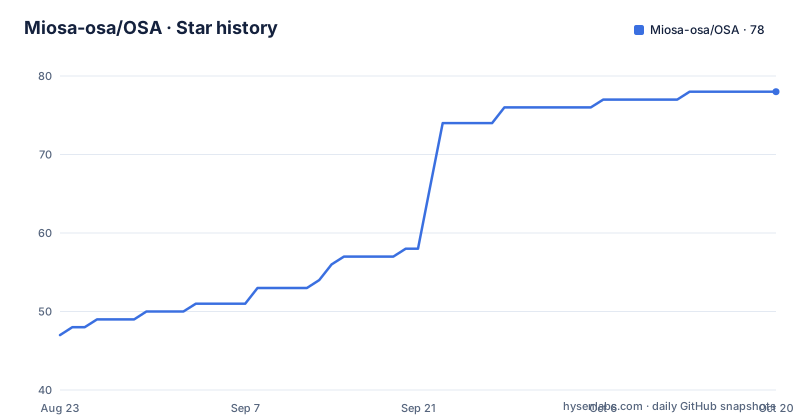
- Miosa-osa/OSA78 ★ · +31
| Repository | 2026-08-23 | 2026-10-20 |
|---|---|---|
| Miosa-osa/OSA | 47 | 78 |
31 Stars in the last 58 days, measured from the daily GitHub snapshot. Compare with other projects
Editorial analysis
What OSA Actually Solves
OSA addresses a specific pain: you have work across code, ops, and admin tasks, and you want an AI agent that does it on your machine, not in a cloud dashboard. The README frames it as finding the signal in your work, classifying what you ask, filtering noise, and routing the work to the right model. That means OSA is not just a chat wrapper. It is designed for people who want a persistent agent that can edit files, run commands, and manage multi-step tasks, with the agent living locally as a background daemon. The target user is a developer or technical operator who wants one command to install, no Elixir or Rust toolchain, and the freedom to plug in any model provider. The description mentions running your business busywork, so the intended audience extends beyond pure coding to tasks like organizing files, drafting documents, or handling repetitive workflows.
Two Programs, One Command: The Engine and the TUI
OSA is not a single binary. It is an Elixir/OTP application that acts as the engine, and a Rust TUI built on ratatui that acts as the interface. The engine is the brain: it runs the agent loop, tools, LLM providers, memory, permissions, and persistence. Because it runs on the BEAM, the README says thousands of lightweight processes run concurrently and supervise each other, so one failure does not take the whole agent down. The Rust TUI is what you see and type into: composer, streaming message view, dialogs, and an agent tree. The two halves communicate over an HTTP and SSE API bound to 127.0.0.1 on port 9089 by default. The TUI never reaches the internet directly. It only speaks to the local engine, and the engine is the only component that talks to model providers. Nothing leaves your machine unless a tool you approved makes it happen. That separation is a clean architectural choice: the UI stays dumb, the engine holds all the state and security boundaries.
The Turn Lifecycle: Classification, ReAct, and Streaming
The README describes the life of a turn in concrete steps. You type a message, and it goes via HTTP POST to 127.0.0.1:9089. The engine then classifies the signal, ranks relevant skills, builds context, and picks a model tier. After that, it enters a ReAct loop: think, call a tool, observe, repeat. Every tool call clears a permission check first, with modes ranging from ask to overdrive. Tokens, tool results, and diffs stream back over SSE live into the TUI. This streaming design means the TUI always mirrors the engine's real state. The README mentions that skill use, goal state, tool stalls, context occupancy, normalized reasoning state, and reconnect health remain visible without widening the terminal. That is a useful property for debugging: you can watch the agent's reasoning in real time, not just the final output. The system also mentions compaction, fallback chains, hooks, and guardrails in the architecture section, though the truncated README does not detail them.
Installation and First Run: One Command, But Platform Limits
Installation is designed to be a one-liner. On macOS and Linux, you paste a curl command that pipes a script into sh, and then run osa. On Windows, you use PowerShell with irm and iex. The installer detects your OS and CPU, downloads a prebuilt Elixir/OTP release that bundles its own runtime, plus the prebuilt Rust TUI, verifies a checksum, and unpacks everything under ~/.osa or %USERPROFILE%\.osa. It puts the osa command on your PATH. The first run drops you into a setup wizard: pick a provider, paste a key, or take the local Ollama default. The README recommends Ollama Cloud with the model glm-5.2:cloud, which needs no GPU and gives a 1,000,000 token context window. Prebuilt targets are limited to linux-x64, macOS arm64, and windows-x64. On macOS Intel or Linux arm64, the installer stops and points you to a from-source script. That is a real constraint. If you are on a Mac with an Intel chip, you cannot use the simple install path. You can pin a specific release with OSA_VERSION=vX.Y.Z, and there is a bin/install script if you already cloned the repo. Docker is also available via docker compose up -d.
Permission Modes and Workspace Trust: The Safety Model
OSA's safety model is built around permission modes and workspace trust. By default, OSA asks before it touches anything consequential. The modes are ask (default), auto-edit, plan, overdrive, and auto. Ask approves each edit and command as it comes. Auto-edit runs file edits automatically but commands still prompt. Plan proposes a plan and waits, with no writes until you approve. Overdrive is full auto with no prompts, and it shows a red warning and a one-time confirmation the first time. Auto is a safety-guardian mode where OSA classifies each call and only stops for risky ones. You cycle modes with Shift+Tab, even mid-turn, or set the mode at launch with --permission-mode. There is also a direct osa overdrive command with --overdrive and --yolo flags. Workspace trust is another layer: a directory you have never used OSA in is untrusted, and an untrusted project's config is withheld rather than obeyed. Specifically, .osa/settings.json and the project hooks, permission rules, and MCP settings it carries are ignored until you accept trust. This prevents a malicious project from silently changing your agent's behavior. The README warns to only use overdrive in a directory you trust. That is a sensible boundary, though the trust prompt itself could become a nuisance if you work across many directories.
Built-in Tools, Providers, and the Claim of 82 Tools
The README lists 82 built-in tools, deferred-loaded, and 27 providers with fallback. It also mentions proactive skill discovery, durable goals, queues, and recovery. The tool count is a feature claim, but the README does not enumerate the tools. You would have to inspect the repository to see what they are. The provider list is similarly vague: it mentions OpenRouter, Anthropic, and fully local Ollama, but not the full list. The fallback mechanism is interesting: if one provider fails, the engine can route to another. That is a practical feature for reliability, especially if you use multiple models. The deferred-loading of tools suggests that tools are only loaded when needed, which could reduce memory and startup time. However, without seeing the actual tool list, you cannot judge whether the 82 tools cover your specific needs. The README also claims cross-session memory and learning, which implies the agent remembers context across sessions, but the details of how that memory is stored or pruned are not provided.
Limitations and Wrong-Tool Cases
OSA has clear limitations. First, the license is NOASSERTION, which means the repository does not declare a standard open-source license. That is a red flag for adoption in a company or even a personal project that cares about legal clarity. You cannot assume you have rights to use or modify the code. Second, the prebuilt binaries only cover linux-x64, macOS arm64, and windows-x64. If you are on macOS Intel or Linux arm64, you must compile from source, which the README says installs toolchains as needed. That adds friction and potential build failures. Third, the recommended setup uses Ollama Cloud, which means your data goes to a cloud provider for processing, even though the agent runs locally. If your requirement is absolute data locality, you would need to configure a fully local Ollama model, which may have lower quality or require significant hardware. Fourth, the README mentions that the daemon idles down when unused, but it does not specify how quickly or how much memory it uses while idle. Finally, the project is young: the latest release is v1.0.154, and the last push is from August 2026, which suggests active development, but also that the API and behavior may change. If you need a stable, long-term tool, you may want to wait for more maturity.
Alternatives and How They Differ
A direct alternative is a tool like Open Interpreter, which also runs locally and lets an LLM execute code and commands on your machine. The key difference is that Open Interpreter typically runs in a terminal with a Python-based architecture and relies on a single model session, whereas OSA is built on the BEAM for concurrency and separates the engine from the TUI with a local HTTP API. OSA also emphasizes classification and model routing across 27 providers, which Open Interpreter does not do in the same way. Another alternative is a traditional agent framework like LangChain, but that is a library you build with, not a ready-to-run agent. OSA is a packaged product with a TUI, permission modes, and a daemon, so it is closer to a turnkey solution. If you want a simpler tool that just runs Python code, Open Interpreter might be easier. If you want a full agent with persistent memory and multi-provider routing, OSA's architecture is more ambitious. The trade-off is that OSA's complexity means more moving parts, and the lack of a declared license makes it risky to build on.
Maintenance, Upgrade Cost, and License Implications
The project shows active maintenance: releases are frequent, with three versions in a single day (v1.0.152, v1.0.153, v1.0.154). That suggests a fast iteration cycle, which can be good for bug fixes but also means you will need to update often to stay current. The launcher automatically restarts a running daemon when it is older than the installed version, so upgrades are partly automated. That reduces the manual cost of keeping the agent fresh. However, frequent releases also mean the configuration or API may change, so you should read the release notes before upgrading. The license is NOASSERTION, which means there is no standard open-source license. This is not legal advice, but it means you cannot assume you have the right to use, modify, or redistribute the software. For a commercial setting, that is a blocker until the authors clarify the license. The README links to a LICENSE file, but the repository metadata says NOASSERTION, so the file may be missing, empty, or non-standard. You should verify that before using OSA for anything beyond a personal experiment.
Editorial conclusion
Adopt OSA if you want a local, permission-gated AI agent that can run code edits, commands, and business busywork across many providers, and you are comfortable with a young project whose license is unconfirmed. Do not adopt it if you need a stable license, macOS Intel or Linux arm64 support, or a fully offline setup with no cloud dependency. Before adopting, verify the actual license terms in the repository, test the permission modes on a disposable directory, and confirm that the prebuilt binary for your exact OS and CPU exists.
Frequently asked questions
How do I install OSA without Elixir, Erlang or Rust?
Pipe the install script to a shell on macOS or Linux, or use the PowerShell version on Windows. The installer detects your OS and CPU, downloads the prebuilt release, verifies its checksum, unpacks under ~/.osa and puts osa on your PATH. The first run opens a short wizard to pick a provider.
Which platforms have a prebuilt OSA release?
linux-x64, macOS arm64 and windows-x64. On macOS Intel or Linux arm64 the installer stops and points you at the from-source script, which installs the toolchains it needs. A specific release can be pinned with OSA_VERSION=vX.Y.Z.
What must I set before putting the OSA port on a network?
OSA_REQUIRE_AUTH=true and a strong OSA_SHARED_SECRET, generated with openssl rand -hex 32. The project states that running without these on a network-accessible port allows unauthenticated access to the full agent API.
Does the OSA TUI send anything to a model provider directly?
No. The TUI only speaks to your local engine over an HTTP and SSE API bound to 127.0.0.1, and the engine is the only component that talks to model providers. The project states that nothing leaves your machine unless a tool you approved makes it happen.
Can OSA run under Docker, and what does the compose file start?
Yes, docker compose up -d builds the image, maps 9089 on the host and starts ollama/ollama:latest alongside with a healthcheck gate. A named volume is mounted at /home/osa/.osa so the non-root user's SQLite database, sessions and skills persist across rebuilds.
Official sources
Add this badge to your README
If you maintain this project, the badge below links readers to this analysis and shows its maintenance status from the daily GitHub snapshot. Paste the markdown into your README; add ?metric=license or ?metric=stars to the image URL for a different field.

[](https://hysenlabs.com/projects/miosa-osa-osa)Star history chart for your README
[](https://hysenlabs.com/projects/miosa-osa-osa)