misode.github.io: the browser that generates Minecraft data packs without installing Minecraft
Data Pack Generators and Tools for Minecraft 1.15, 1.16, 1.17, 1.18, 1.19, 1.20, 1.21, 26.1
At a glance
- What is it?
- misode.github.io is a Preact and Vite single page application that builds Minecraft Java Edition data packs, loot tables, advancements and more straight from a web form. The interesting part is the architecture: the game data lives in mcdoc files, the site is a forkable template, and the whole thing runs in the browser.
- Who is it for?
- misode.github.io fits a Minecraft modder or server operator who needs a data pack built without installing the game, and a developer who wants a maintained generator site to fork. It does not fit a modder working from the vanilla game files, since the site depends on the mcdoc definitions rather than on local resources, and it does not fit a project that needs offline generation.
- Can I use it commercially?
- Yes. MIT is a permissive licence: you can use, modify and sell software built on it, as long as you keep its copyright and licence notices.
- Is it still maintained?
- Yes. The repository last received commits 4 days ago.
- What is it written in?
- Mainly TypeScript, according to GitHub's language statistics.
Answers come from the project's GitHub data, last synced on November 7, 2026, and from our analysis. They are not legal advice.
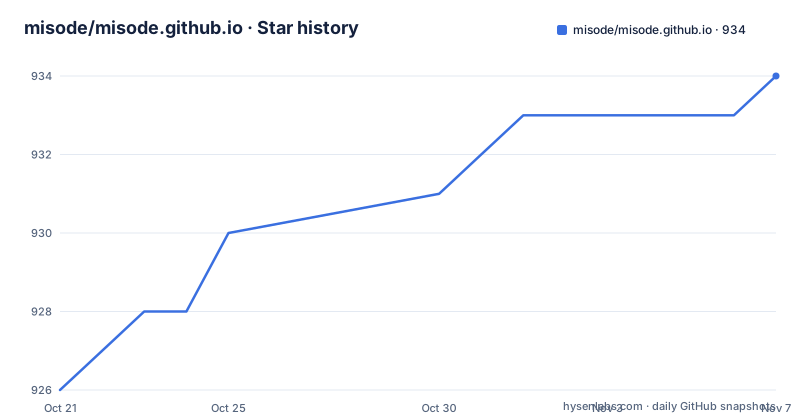
Star history
- misode/misode.github.io934 ★ · +8
| Repository | 2026-10-21 | 2026-11-07 |
|---|---|---|
| misode/misode.github.io | 926 | 934 |
8 Stars in the last 17 days, measured from the daily GitHub snapshot. Compare with other projects
Editorial analysis
Data pack generators that need no game install and no Java
A Minecraft data pack is a folder of JSON files that the game reads to override recipes, loot tables, advancements, tags and function behaviour. Producing one by hand means understanding the exact JSON schema of the game version you are on, which is verbose and unforgiving.
misode.github.io is a web application that removes both halves of that problem. It presents a form for each generator, and it produces the JSON directly. The homepage describes it as data pack generators for Minecraft Java Edition, and the repository description lists the game versions it covers, from 1.15 through 1.21 and on to a version numbered 26.1.
The audience is a broad one in practice: modpack authors, server operators tuning loot tables, and map makers who need an advancement or a predicate they would rather not write by hand. The distinguishing feature is that everything happens in the browser. There is no server that receives your data and no Java runtime to install, which matters because the traditional way of generating these files has involved either the game itself or a separate modding toolchain.
The site also carries the things a generator site accumulates around it: a predicate generator for condition expressions, a set of non-vanilla generators for mods, links to sibling projects in the same family such as the DNS and other tools, and a comment section on the homepage.
What it is not is an editor for existing packs. It is a set of forms that emit files.
mcdoc is the data source, and that choice defines the whole architecture
The architecture is visible in the dependency list, and the interesting dependency is @spyglassmc/mcdoc.
An mcdoc file is a custom language describing the JSON and NBT structures of the game. The project documentation says plainly that apart from the technical specification there is no documentation for the format, so the guidance for contributors is to read how the existing modded generators define their types and, for the vanilla set, to look at the vanilla mcdoc definitions in the SpyglassMC repository.
That is the pivot of the whole design. The site does not parse the game files. It consumes type definitions, and the type definitions are the schema. A generator page is therefore a rendering of a schema plus a form, and a new generator is a new mcdoc file plus a config entry.
The supporting packages follow the same logic. @spyglassmc/core and @spyglassmc/java-edition provide the core and the Java Edition specific model, @spyglassmc/json and @spyglassmc/nbt handle the two serialization formats the game uses, and @spyglassmc/locales supplies the translation strings. The Minecraft library itself is deepslate, and the package manifest pins several historical versions of it under npm aliases, including deepslate-1.18, deepslate-1.18.2, deepslate-1.19 and deepslate-1.20.4, alongside the current deepslate.
Those aliases are the answer to a problem every generator site has. The NBT and data pack formats changed across game versions, so each supported version needs its own library version, and the aliases let one dependency list carry all of them at once. The NBT reading and writing itself runs through deepslate, and the browser side of the application uses @zip.js/zip.js to produce the archive that a player drops into their world folder.
Running the dev server is one npm command
The contributing instructions are short because the build tooling is standard. You need node, npm and git installed, then clone the repository and start the development server.
npm run devThe site then opens on localhost:3000. The script behind that command is `vite`, so the dev server is Vite with the Preact preset, and the project configuration files at the root confirm the stack: vite.config.js, postcss.config.js, tailwind.config.js, tsconfig.json and .eslintrc.cjs.
The other scripts are equally conventional. The production build runs the TypeScript compiler before Vite:
npm run buildwhich is `tsc && vite build`, so a type error stops the build rather than shipping a broken bundle. Linting is `eslint . --ext .ts,.tsx`, and there is a `preview` script for serving the built output.
End to end tests are configured as well. The repository root carries a cypress.json, and the package manifest names cypress in the development dependencies, so browser level testing of the generated output is part of the setup rather than an afterthought.
The interesting part of the development loop is not the tooling but the data. A generator page is registered in `src/app/config.json`, and each entry names the mcdoc file it depends on, so adding a generator means writing a schema and pointing a config entry at it.
Adding a generator: a schema file, a config entry and translation keys
The contribution guide for modded generators is the clearest description of how the site is put together, and it is worth reading in full because it exposes the separation of concerns.
Step one is a new file at `public/mcdoc/<your_project>.mcdoc`, which holds the definitions. Step two is a new generator entry in `src/app/config.json` for each generator page you want to add, with its `dependency` field set to the name of the mcdoc file you created. Step three is translation keys: one named `generator.<id>` for each generator in `src/locales/en.json`, and one named `partner.<dependency>`.
Step four is the type definitions themselves, written in the mcdoc format. The instruction there is unusually direct about the difficulty: the project recommends looking at how the other modded generators define their types, and the vanilla definitions are pointed to as the reference for the format itself.
Step five is the one that sets the tone of the whole guide. The project invites you to open a pull request even when your types are not finished, or when you want help writing them. That is a maintainer who would rather review an incomplete schema in the open than receive a finished one as a surprise.
The alternative path is forking. If you want to build custom generators without them appearing on the main site, the repository is explicitly forkable as a base for publishing your own generator site, and the forking section spells out what to change first.
Forking means removing the analytics, the ads and the comment section
The forking checklist is unusually specific, and its content tells you something about how the site is funded and how its author wants forks to behave.
First, change the links that point back to the original repository, which is done at the top of `Utils.ts` by changing the `SOURCE_REPO_URL` constant. Second, remove or replace the Google Analytics tracking code in the root `index.html` file, and the project offers the exact replacement to paste, which is a stub function:
<script>
    function gtag() {}
</script>
Third, the ads. The checklist asks you to remove two lines from `index.html`, the ethical ads script tag and the ad placeholder div, and then to remove the ad component itself, either by returning an empty fragment in `Ad.tsx` or by removing the render line in `SchemaGenerator.tsx`.
Fourth, remove the contributors block and the giscus comment section from the homepage by deleting the two components from `Home.tsx`. Fifth, adjust the homepage content, with the note that you might want to drop `<WhatsNew />` and `<Tools />` as well. Sixth, edit `Footer.tsx`, where the donation link can be removed, but the author asks that a note crediting the original work stays in place, by linking to their GitHub profile or to the repository. Seventh, change some translations in `src/locales/en.json`, in particular the `title.home` key.
The pattern is consistent. The infrastructure, the analytics, the ads and the social proof all belong to the original site and should go. The attribution should stay. A fork is expected to look like its own project.
Where the site stops being the right tool
The limits are visible in the dependency list and in the design decisions.
The first is the dependency on mcdoc. The generator forms are rendered from type definitions, not from the game. If a construct exists in your game version but is not described in the vanilla mcdoc definitions, the site cannot offer it, and if your modpack relies on a schema that differs from vanilla, you are outside the tool. The `predicate` generator for condition expressions, and the non-vanilla generators for mods, exist precisely because vanilla coverage is not total.
The second is that everything runs in the browser, with the corresponding trade. Nothing is uploaded, which is good for privacy and for working on an air-gapped machine, but it also means the site cannot read your existing world files, cannot validate a pack against the game, and cannot tell you the pack will load. You get correct JSON for the schema it knows, not a tested result.
The third is version drift in the dependency list. The manifest pins deepslate under a chain of npm aliases for 1.18, 1.18.2, 1.19 and 1.20.4 alongside the current release, and the site covers versions from 1.15 upward. Each alias is a pin to a specific old release of the library, and a pin that exists to serve an old game version is exactly the kind of thing that stops receiving fixes. The package manifest also carries a spread of other packages that a reader should treat as pinned history rather than a curated list.
The fourth is the browser support floor implied by the stack, Vite with the Preact preset and modern ES modules, combined with features such as copy to clipboard on generated output. Nothing in the documentation promises support for an old browser.
The fifth is the licensing of the site content itself. The MIT licence covers the code in the repository. The generator pages, however, are the product, and the project handles that through the forking checklist rather than through the licence.
MIT licensed, pushed weekly, and translated through Weblate
The licence is MIT, confirmed both by the repository entry and by the `license` field in the package manifest. For the code, that means you can fork, modify and publish without any obligation to publish your changes back, which is exactly what the forking section invites you to do.
The repository is not archived and the last push was on 2026-10-18, so the site is being worked on as the game moves. There are no GitHub releases, so the site deploys from the branch rather than from tagged artifacts, and there is nothing to pin a fork to.
Translation is handled outside the repository, through a Weblate instance hosted by SPGoding. The flow is: register on the localization site by linking a GitHub account, which the documentation notes will expose your username and email in the repository's commit log, or by using an email address. Then find the components of the site in the Weblate project list and start translating. If your language is not on the list, the guidance is to open an issue asking for it.
That arrangement has a practical consequence for anyone evaluating the site in a language other than English. The set of languages available, and how current each translation is, is a property of the Weblate project rather than of the repository, and it can change without a commit to the code.
The other moving part is the comments. The site uses giscus, which stores discussion as GitHub issues on the repository, configured through the giscus.json file at the root. Forking removes it, which also removes the traffic it generates.
Editorial conclusion
misode.github.io fits a Minecraft modder or server operator who needs a data pack built without installing the game, and a developer who wants a maintained generator site to fork. It does not fit a modder working from the vanilla game files, since the site depends on the mcdoc definitions rather than on local resources, and it does not fit a project that needs offline generation. Before adopting it, check the mcdoc definitions for the game version you target, read the forking checklist in full since the site ships analytics and ads, and confirm that the deepslate version you need is one of the pinned ones in package.json.
Frequently asked questions
What is misode.github.io and what does it generate?
It is a set of data pack generators for Minecraft Java Edition, presented as web forms that produce the JSON for recipes, loot tables, advancements and other pack contents directly in the browser. The site covers game versions from 1.15 through 1.21 and on to 26.1.
How do I run misode.github.io locally?
You need node, npm and git installed. Clone the repository and run `npm run dev`, which starts the Vite dev server, then open localhost:3000 in the browser. The production build is `npm run build`, which runs `tsc` before `vite build`.
How do I add a new generator to misode.github.io?
Create an mcdoc file under `public/mcdoc/`, add a generator entry in `src/app/config.json` whose `dependency` field names that file, add the `generator.<id>` and `partner.<dependency>` translation keys in `src/locales/en.json`, and then write the type definitions in the mcdoc format.
Can I fork misode.github.io to publish my own generator site?
Yes, and the project lists what to change first: repoint the source repository link in `Utils.ts`, remove or replace the Google Analytics code and the ads in `index.html`, remove the ad component and the contributors and giscus blocks, adjust the homepage, and change translations in `src/locales/en.json`.
How is misode.github.io translated into other languages?
Translations are handled on a Weblate instance hosted by SPGoding. You register there, optionally linking your GitHub account, then pick the site components and translate. Languages that are not yet listed can be requested by opening an issue.
Official sources
Add this badge to your README
If you maintain this project, the badge below links readers to this analysis and shows its maintenance status from the daily GitHub snapshot. Paste the markdown into your README; add ?metric=license or ?metric=stars to the image URL for a different field.

[](https://hysenlabs.com/projects/misode-misode-github-io)Star history chart for your README
[](https://hysenlabs.com/projects/misode-misode-github-io)Was this useful?