Mithril.js: a small JavaScript framework with routing and XHR built in
A JavaScript Framework for Building Brilliant Applications
At a glance
- What is it?
- Mithril.js is an MIT-licensed client-side framework for single page applications, shipped as one 8.93 KB gzipped file with a router and an XHR utility included. Here is what its mechanism looks like, how to install it, and where it stops being the right choice.
- Who is it for?
- Adopt Mithril.js when you want one small dependency that already carries a router and an XHR wrapper, and when you are comfortable writing views as JavaScript. Do not adopt it if you need a large component ecosystem, server-side rendering, or a build step that transpiles templates.
- Can I use it commercially?
- Yes. MIT is a permissive licence: you can use, modify and sell software built on it, as long as you keep its copyright and licence notices.
- Is it still maintained?
- Yes. The repository last received commits 94 days ago.
- What is it written in?
- Mainly JavaScript, according to GitHub's language statistics.
Answers come from the project's GitHub data, last synced on November 15, 2026, and from our analysis. They are not legal advice.
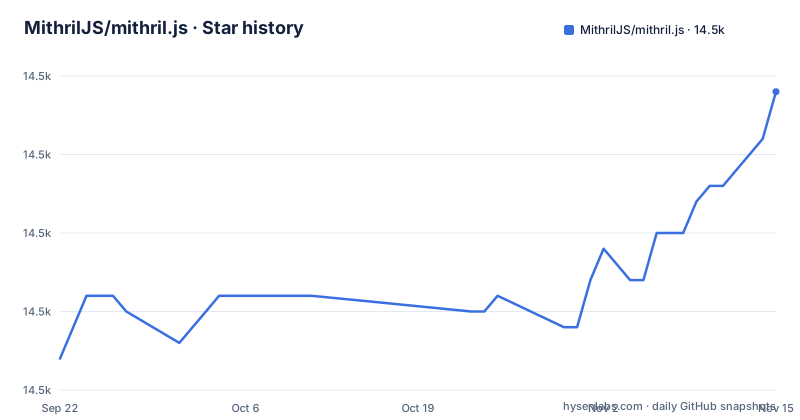
Star history
- MithrilJS/mithril.js14,519 ★ · +17
| Repository | 2026-09-22 | 2026-11-15 |
|---|---|---|
| MithrilJS/mithril.js | 14.5k | 14.5k |
17 Stars in the last 54 days, measured from the daily GitHub snapshot. Compare with other projects
Editorial analysis
What Mithril.js solves, and for whom
The pitch in the README is narrow and specific: a modern client-side JavaScript framework for building Single Page Applications, small at 8.93 KB gzipped, fast, with routing and XHR utilities out of the box. That last clause is the interesting one. Most view libraries leave navigation and network calls to you, which means a router, a fetch wrapper and a state convention assembled from three unrelated projects. Mithril.js ships those as part of the same package, versioned together, documented on the same site.
The audience follows from that shape. You are building a single page application, you want the routing and request layers to come from the same maintainers as the renderer, and you are willing to write views as JavaScript function calls rather than as a template syntax. The README notes the framework is used by companies like Vimeo and Nike, and by open source platforms like Lichess. Treat that as a signal about the scale of application the framework has been pointed at, not as a guarantee about your own use case.
It is a poor fit for teams whose main requirement is a hiring pool that already knows the framework, or who want a component library to drop in. Mithril.js gives you a rendering primitive and a router. Everything above that is yours to write or to find elsewhere.
The m() hyperscript call and the redraw loop
Mithril.js is built around a hyperscript function, conventionally imported as m, that returns a virtual DOM node. You describe the tree in JavaScript; the framework diffs it against the previous tree and patches the real DOM. The repository layout mirrors that decomposition: the top level holds browser.js, hyperscript.js, render.js, mount.js, redraw.js, route.js, request.js and stream.js, with directories of the same names beside them. That is not a monolith with a single entry point. Each concern has its own module, and browser.js appears to be the bundle that ties them together for the published build.
The redraw loop is the part worth understanding before you write anything. A component's view function runs, produces a virtual tree, and Mithril.js patches the DOM. When state changes, something has to tell the framework to run that cycle again. The package ships redraw.js and mount-redraw.js, and the repository also has stream.js and a stream/ directory. The practical consequence is that you do not hand-write DOM updates; you change data and let the framework re-render.
The build itself is plain Node. The package.json scripts run a bundler over browser.js to produce mithril.js, then minify it to mithril.min.js, and a separate script minifies the stream module. Tests run under ospec, the project's own test runner, and the pretest hook runs eslint first. If you are evaluating the project's engineering discipline, that pretest hook is a small but real detail: lint failures block the test run.
Installing Mithril.js and rendering a first component
There are two documented installation paths. The npm route is a single dependency, and the README shows the save flag alongside it.
npm install mithril --saveAfter that, mithril is importable in your bundle. If you prefer no build step at all, the README gives CDN script tags, with a development file and a minified production file on both unpkg and jsDelivr.
<script src="https://unpkg.com/mithril/mithril.js"></script>
<script src="https://cdn.jsdelivr.net/npm/mithril/mithril.min.js"></script>
TypeScript users are pointed at DefinitelyTyped rather than at types shipped inside the package.
npm install @types/mithril --save-devWhat you should see after the npm install is one package in your dependency tree, not a family of packages. The README directs new users to the "Getting started" guide on mithril.js.org, and the site also carries API docs, a simple application walkthrough and an examples page. Those are the concrete next steps; the README itself does not walk through writing a component, so plan to read the site rather than the repository front page.
Where Mithril.js is the wrong tool
The framework's selling point is also its constraint. Because routing and XHR are bundled and the whole thing is under 9 KB gzipped, there is no room for the surrounding apparatus that larger frameworks treat as part of the product: no server-side rendering story appears in the README, no component library, no build-time template compiler, no state management layer beyond streams. If your application needs any of those, you are adding them yourself, and at that point you are assembling a stack where Mithril.js is one part rather than the frame.
Browser support is stated as a closed set: Firefox ESR, the last two versions of Firefox, Edge, Safari and Chrome, with no polyfills required. The no-polyfills claim is only true inside that set. If you must support an older browser, the framework is not offering you a fallback path, and the README does not document one.
There is also a scale question the documentation does not answer. Nothing in the README discusses conventions for large codebases, code splitting, or how the router behaves in a deeply nested application. The API docs and the simple application guide are where that would live, and you should read them before assuming the answer is yes. A framework this small asks you to make more structural decisions yourself, and that is a cost, not a neutral fact.
Mithril.js against React and Alpine.js
The two comparisons people search for are against React and against Alpine.js, and the differences are about where the framework sits, not about which is faster.
React is a rendering library plus a surrounding ecosystem. It has its own component model, a large third-party component market, and tooling that assumes a build pipeline. Mithril.js is smaller and self-contained: one package, a hyperscript function, a router and an XHR utility, and the README's 8.93 KB gzipped figure is for the whole thing. The trade is that React hands you more decisions already made and more code already written by other people, while Mithril.js hands you a smaller surface and expects you to fill the rest.
Alpine.js takes the opposite approach to Mithril.js in almost every respect. Alpine.js is designed around markup, with behaviour expressed as attributes in existing HTML, so it fits pages that are mostly server-rendered with pockets of interactivity. Mithril.js is designed around a JavaScript view function producing a virtual DOM, which fits an application whose structure lives in code. If your HTML is the source of truth, Alpine.js is the closer match. If your application state and routing are the source of truth, Mithril.js is.
The honest summary is that these are not interchangeable. Choosing Mithril.js means choosing to write views in JavaScript and to accept a small ecosystem in exchange for a small dependency.
Maintenance, releases and the MIT licence
The repository is not archived, and the last push was on 2026-08-13. The most recent release listed is v2.3.8 from 2025-11-08, preceded by v2.3.7 and v2.3.6 on 2025-09-02. That is a maintenance cadence of patch releases rather than a stream of features, and the version numbers are consistent with a project that has settled rather than one that is being redesigned.
Upgrade cost is the practical question. The package has no runtime dependencies at all; the devDependencies are build and test tooling (eslint, terser, ospec, chokidar and similar). That matters because it means upgrading Mithril.js does not drag a dependency tree behind it. The published artifacts are mithril.js and mithril.min.js, with unpkg and jsdelivr fields in package.json pointing at the minified file, so a script-tag deployment can move versions by changing the URL.
The licence is MIT, which is permissive and short. The repository carries a LICENSE file at the top level. What MIT permits and requires in your specific distribution is a question for your own legal review; the framework's own documentation does not give guidance on that, and it should not be treated as doing so.
One thing the documentation does not establish is a support window. The README states browser support in terms of current versions, but nothing states how long a given Mithril.js major version will receive fixes. If you need that commitment in writing, the Zulip chat and the contributing FAQ are the places the project points to, and the answer is not in the README.
Editorial conclusion
Adopt Mithril.js when you want one small dependency that already carries a router and an XHR wrapper, and when you are comfortable writing views as JavaScript. Do not adopt it if you need a large component ecosystem, server-side rendering, or a build step that transpiles templates. Before committing, check that the browsers you must support fall inside the documented set (Firefox ESR, the last two versions of Firefox, Edge, Safari and Chrome, no polyfills) and read the router and request docs at mithril.js.org, since those two modules are the parts you would otherwise replace with separate libraries.
Frequently asked questions
What is Mithril.js?
It is a client-side JavaScript framework for building single page applications. The README describes it as small (8.93 KB gzipped), fast, and providing routing and XHR utilities out of the box.
Is Mithril.js dead?
The repository is not archived, the last push was on 2026-08-13, and the most recent release listed is v2.3.8 from 2025-11-08. That indicates maintenance rather than abandonment, though the README does not state a support window for any given version.
How does Mithril.js compare with Alpine.js?
Alpine.js is built around behaviour written into existing HTML markup, while Mithril.js is built around JavaScript view functions that produce a virtual DOM. The choice follows from whether your HTML or your application code is the source of truth.
Official sources
Add this badge to your README
If you maintain this project, the badge below links readers to this analysis and shows its maintenance status from the daily GitHub snapshot. Paste the markdown into your README; add ?metric=license or ?metric=stars to the image URL for a different field.

[](https://hysenlabs.com/projects/mithriljs-mithril-js)Star history chart for your README
[](https://hysenlabs.com/projects/mithriljs-mithril-js)Was this useful?