mldangelo/personal-site: a static portfolio built with Next.js
My personal website - built with Next for Static-Export, and GitHub Pages.
At a glance
- What is it?
- This repository is a reusable, MIT-licensed foundation for a personal portfolio, résumé, writing archive, and project site. Its static Next.js export, validation commands, and GitHub Pages deployment suit developers who want a content-focused site without a server runtime, but the identity and design require substantial customization.
- Who is it for?
- Adopt this repository if you want a statically exported portfolio with Markdown, résumé filtering, metadata checks, and GitHub Pages deployment. Do not choose it unchanged, because the content and visual identity belong to Michael D'Angelo and the README says a fork needs a full rebrand.
- Can I use it commercially?
- Yes. MIT is a permissive licence: you can use, modify and sell software built on it, as long as you keep its copyright and licence notices.
- Is it still maintained?
- Yes. The repository last received commits 3 days ago.
- What is it written in?
- Mainly TypeScript, according to GitHub's language statistics.
Answers come from the project's GitHub data, last synced on November 6, 2026, and from our analysis. They are not legal advice.
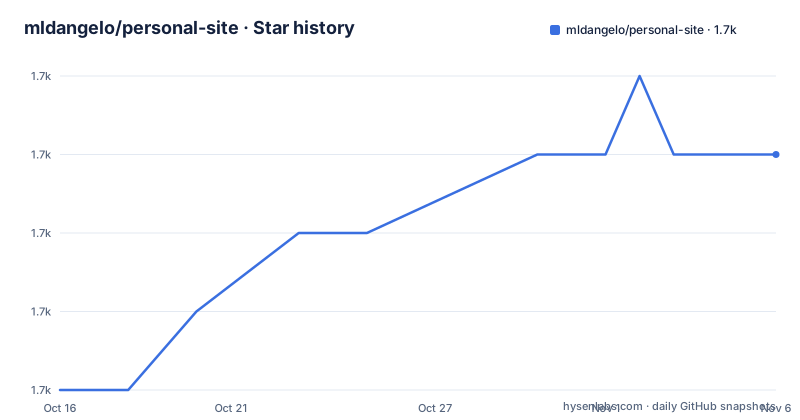
Star history
- mldangelo/personal-site1,696 ★ · +3
| Repository | 2026-10-16 | 2026-11-06 |
|---|---|---|
| mldangelo/personal-site | 1.7k | 1.7k |
3 Stars in the last 21 days, measured from the daily GitHub snapshot. Compare with other projects
Editorial analysis
Why the personal-site foundation exists
mldangelo/personal-site provides a starting point for a portfolio, résumé, project archive, and writing site. It is aimed at developers who want to publish personal material through GitHub Pages without operating a separate application server. The source for the live site uses Next.js, React, TypeScript, and Tailwind CSS, while the repository itself adds tests for components, content, metadata, and the final static export.
This is more than a collection of page components. The README describes responsive light and dark themes built from semantic CSS tokens, Markdown writing with drafts and RSS, page metadata, and a résumé that can be filtered on screen but still prints in full. Those are concrete publishing requirements, so the project fits someone building a public technical profile rather than a generic marketing page.
The reuse boundary is equally important. The architecture is MIT licensed, but the README explicitly warns that the content and visual design are personal. A complete fork therefore requires more than changing a name in one component. Posts, résumé entries, project descriptions, images, metadata, social cards, and every visible identity surface need an ownership review. The repository includes `AGENTS.md` and `docs/adapting-guide.md`, with the guide providing a file map for this work.
How static export shapes the site architecture
The defining mechanism is a statically exported Next.js 16 site. `next.config.mjs` sits at the repository root, and the package scripts separate development, production export, and verification work. Development uses `next dev --turbopack`, while the production command uses `next build --webpack`. The README describes the deployable result as a static build hosted on GitHub Pages.
That design means the repository is organized around producing inspectable output rather than depending on a permanently running Next.js server. The `out` artifact is checked by repository scripts after the build. `npm run verify-export` inspects generated HTML and XML, while `npm run measure-export` checks the export against `scripts/budget.json`. The available `npm start` script runs `next start`, but the documented deployment path is GitHub Pages, not a server deployment model.
The application code lives in `app/` and `src/`, while authored material is separated into `content/`. Static assets are kept under `public/`, and maintenance utilities live in `scripts/`. This layout gives a fork clear places to inspect routes, source components, prose, images, export checks, and deployment logic. It also creates real limits. Any feature that depends on a server runtime would need a different architecture, because the documented site is built around a static artifact.
Forking the repository and starting development
The manual setup path uses GitHub CLI and `nvm`. Fork and clone the repository, move into its directory, install the Node version specified by `.nvmrc`, install the locked dependencies, and start the development server. The README does not document a fixed local URL, so do not assume one merely from the command name.
gh repo fork mldangelo/personal-site --clone
cd personal-site
nvm install
npm ci
npm run dev
The `nvm install` step reads the repository's Node configuration, while `npm ci` installs from `package-lock.json`. The package metadata accepts `^22.22.2`, `^24.15.0`, or `>=26.0.0` under `engines.node`. If you use another version manager, select one of those accepted release lines. GitHub Codespaces provides `nvm`, so a codespace can use the shorter local setup.
nvm install
npm ci
npm run dev
The first useful customization step is not to edit isolated React components. The README points adopters to `AGENTS.md` and `docs/adapting-guide.md`, then calls for an inventory of posts, external writing, résumé entries, and projects before shared identity changes. That inventory matters because the same identity may appear in navigation, metadata, generated share cards, and archived content.
Validating content, types, images, and export output
The validation surface is broader than a normal unit test command. Formatting is divided between Biome for the repository and Prettier for Markdown, CSS, and SCSS. Static types are checked with TypeScript, and Vitest covers the configured test suite. The README also identifies dedicated checks for generated social cards and the final exported site.
Use these commands in the order suggested by their scopes:
npm run format
npm run lint
npm run type-check
npm test
`npm run format` modifies files with Biome and Prettier, so it should be treated as a write operation rather than a read-only check. `npm run lint`, `npm run type-check`, and `npm test` then check the formatted source. Share-card integrity has two documented levels: `npm run og:check:ledger` verifies the ledger without network access, while `npm run og` regenerates the site and per-post cards.
npm run og:check:ledger
npm run og
The README states that pull request CI checks formatting, linting, types, share cards, tests, the production build, exported files, and export size. This makes the repository attractive to contributors who want publishing failures caught in automation. It does not, however, replace reviewing whether the original author's content or attribution remains somewhere in the fork.
Production export and GitHub Pages deployment
Build the production artifact with the exact script declared in `package.json`. This is not the Turbopack development command: production uses Webpack.
npm run build
npm run verify-export
npm run measure-export
The build command is `next build --webpack`. The next two commands inspect generated HTML and XML, then weigh the export against the size budget in `scripts/budget.json`. The repository also includes `npm run og:check`, which first checks the card ledger and then verifies a fresh byte-for-byte rendering through the generation script.
npm run og:checkDeployment is tied to pushes on `main`: the README says those pushes deploy the same static build that CI validates. Domain and URL changes are delegated to `docs/adapting-guide.md#deployment-reference`. The README does not document a rollback command, rollback environment variable, or separate preview deployment flow, so those mechanisms should not be assumed during adoption planning.
The repository was not archived, and the last push was on 2026-10-14. Recent releases include `v4.1.0` on 2026-01-03 and `v4.0.0` on 2026-01-02, whose release description identifies the move to the Next.js App Router and React 19. Upgrade work includes dependency review through `package-lock.json`, rebuilding share cards, running tests, and accepting static export changes.
The rebrand cost and the static-export trade-off
The strongest reason to use this repository is the amount of publishing infrastructure already represented in its layout: Markdown content, RSS, metadata, a printable résumé, responsive themes, social-card checks, and static export validation. The strongest reason not to adopt it unchanged is equally direct. The README says that the content and visual design are personal and that a fork needs a full rebrand.
A server-hosted Next.js site is a different approach when requirements include runtime data or server behavior. The package metadata contains `next start`, but this project's documented production target is a GitHub Pages static export. A fork that keeps that deployment model accepts the limitation that the published result is generated files rather than a persistent application server. The repository's own build and verification commands fit that model; they do not document a migration path for server-only features.
The MIT license permits use of the reusable architecture under its terms, but license compliance is separate from editorial cleanup. A technical fork can satisfy the license while still misrepresenting the original résumé, projects, or writing if those materials remain. Review generated assets and all identity surfaces before deployment. The site is not archived, and the last push was on 2026-10-14, but maintenance status does not remove that attribution work.
Editorial conclusion
Adopt this repository if you want a statically exported portfolio with Markdown, résumé filtering, metadata checks, and GitHub Pages deployment. Do not choose it unchanged, because the content and visual identity belong to Michael D'Angelo and the README says a fork needs a full rebrand. Verify the accepted Node version, replacement content and assets, generated routes, domain configuration, and the output of the export validation commands before publishing.
Frequently asked questions
How do I install and run mldangelo/personal-site locally?
Fork and clone the repository, then run `nvm install`, `npm ci`, and `npm run dev`. With another Node version manager, use a version accepted by `engines.node` in `package.json`.
Does mldangelo/personal-site use server-side rendering?
The documented production architecture is a statically exported Next.js 16 site deployed to GitHub Pages. A server-dependent feature would therefore require reconsideration of that deployment model.
What should I change before publishing a fork of mldangelo/personal-site?
Perform a full rebrand and inventory the posts, external writing, résumé, projects, metadata, and generated assets. The README explicitly warns that the original content and visual design are personal.
Official sources
Add this badge to your README
If you maintain this project, the badge below links readers to this analysis and shows its maintenance status from the daily GitHub snapshot. Paste the markdown into your README; add ?metric=license or ?metric=stars to the image URL for a different field.

[](https://hysenlabs.com/projects/mldangelo-personal-site)Star history chart for your README
[](https://hysenlabs.com/projects/mldangelo-personal-site)Was this useful?