MobileGlues for Minecraft Java on Android
MobileGlues, which stands for "(on) Mobile, GL uses ES", is a GL implementation running on top of host OpenGL ES 3.2, with running Minecraft Java Edition in mind.
At a glance
- What is it?
- MobileGlues is an Android compatibility layer for running Minecraft Java Edition with OpenGL ES, including support for Sodium, Iris, Optifine, shaders, and selected rendering mods. Its usefulness depends on the host device, shader conversion, and the project’s device-by-device compatibility records.
- Who is it for?
- Adopt MobileGlues when running Minecraft Java Edition on Android with shaders, Sodium, or a custom-rendering mod is important enough to require an OpenGL ES layer. Do not assume that every shader or mod will work on every phone.
- Can I use it commercially?
- Not without permission. GitHub finds no licence file in the repository, and without a licence all rights are reserved by default: you may read the code but not reuse it. Check the README, or ask the authors, before using it.
- Is it still maintained?
- Yes. The repository last received commits 88 days ago.
- What is it written in?
- GitHub does not report a main language for this repository.
Answers come from the project's GitHub data, last synced on November 7, 2026, and from our analysis. They are not legal advice.
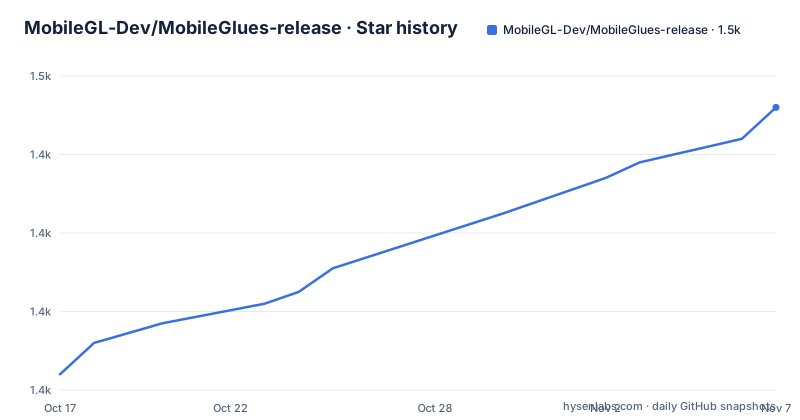
Star history
- MobileGL-Dev/MobileGlues-release1,452 ★ · +68
| Repository | 2026-10-17 | 2026-11-07 |
|---|---|---|
| MobileGL-Dev/MobileGlues-release | 1.4k | 1.5k |
68 Stars in the last 21 days, measured from the daily GitHub snapshot. Compare with other projects
Editorial analysis
MobileGlues and the Minecraft Java graphics gap
MobileGlues addresses a specific mismatch. Minecraft: Java Edition expects a desktop graphics stack, while many Android devices expose OpenGL ES instead of desktop OpenGL. The project describes itself as “(on) Mobile, GL uses ES” and implements its graphics layer on top of the host’s OpenGL ES. The repository states that OpenGL ES 3.2 is preferred, with 3.0 as the minimum, but compatibility still depends on the device driver.
The intended audience is not ordinary Android users who only want the Bedrock edition. It is Minecraft Java players who want to run the Java client on mobile hardware, especially players using Sodium, shaders, or mods that contain their own rendering logic. The README says MobileGlues can run Sodium, render most Minecraft shaders through Iris or Optifine, and support some mods with custom rendering routines, including JourneyMap and Create.
That support should be read as conditional. MobileGlues does not make every Java rendering convention equivalent to OpenGL ES. Shader syntax, driver behavior, mod code, and Android GPU implementations can all affect the result. This is why the release repository keeps separate compatibility records for devices, shaders, and mods instead of claiming one universal result.
Inside MobileGlues shader translation and logging
The documented architecture has two broad layers. MobileGlues supplies a GL implementation over host OpenGL ES, while its shader tooling adapts desktop GLSL for an ES environment. According to the README, the project automatically converts desktop GLSL to GLSL ES, removes `layout(binding)`, handles version directives, and adds explicit precision declarations. That is a translation step, not a guarantee that every desktop shader has equivalent behavior on a mobile GPU.
MobileGlues also injects environment macros into shaders. The README identifies `MG_MOBILEGLUES` as the environment marker and `MG_MOBILEGLUES_VERSION 2000` as the version representation for V2.0.0. A shader author can use those macros to select MobileGlues-specific logic. The documented version check is:
#ifdef MG_MOBILEGLUES
    #if MG_MOBILEGLUES_VERSION >= 2000
        // Logic for MobileGlues (version >= V2.0.0)
    #else
        // Logic for MobileGlues (version < V2.0.0)
    #endif
#else
    // ...
#endif
When a shader or program fails, the README instructs users to enable `Ignore shader/program error` and inspect `/sdcard/MG/latest.log`. Continuing after an error may expose the later failure, but the README does not explain which classes of errors are safe to ignore or how to repair a failed conversion. The log is therefore a diagnostic source, not a complete troubleshooting guide.
Installing the MobileGlues plugin and verifying its APK
The README directs users to the project’s GitHub Releases page and identifies V2.0.0 as the latest version in the README. It does not give a complete installation tutorial with exact package-management commands, Gradle coordinates, Android version requirements, or an APK filename. It would therefore be misleading to invent an `adb install` command or a Maven dependency here. Obtain the intended plugin artifact from the Releases page and follow any instructions included with that artifact.
The documented first-use verification concerns release provenance rather than graphics configuration. Android build-tools provides `apksigner`, which can inspect the signer certificate of a local APK. Substitute the actual file path for the path shown by the README:
apksigner verify --print-certs path/to/MobileGlues-plugin.apkThe README expects the output to identify the signer as `CN=MGDev, OU=MGDev, O=MGDev, L=Unknown, ST=Unknown, C=CN`. It also lists SHA-256 digest `324f4efaff81632373dec9bc714a904b64740249410b551b61805340e42ff5d5`. Compare the complete certificate DN and digest with the values published by the project. The repository also provides `pub.cer` and `pub.pem`, although the README says users may use their preferred utility to check an APK against those files.
For the first Minecraft use, the README does not document a universal launcher sequence or required Minecraft configuration. The practical starting point is to select the shader or mod in the compatibility matrix for the exact device before enabling it in Minecraft.
Checking MobileGlues compatibility across devices and mods
MobileGlues treats compatibility as device-specific data. The repository contains `ShaderSupportMatrix.md`, `ModSupportMatrix.md`, `CompatibleShaders.md`, and `CompatibleMods.md`, with additional reports under `DeviceReports/`. The README says to consult the matrices to determine how a device works. This is more informative than assuming success from the host’s advertised OpenGL ES version because drivers, plugins, and shader behavior can differ between Android GPUs.
The contribution instructions define explicit matrix states. A check mark means the item is compatible, a cross means it is fully incompatible and requires an associated issue or link, a question mark means it was not tested, and an asterisk means it works with missing features or graphical glitches. Additional columns can record drivers or plugins such as Turnip or ANGLE. A device codename can be obtained through `adb shell getprop ro.product.name`.
adb shell getprop ro.product.nameThis command identifies the product name that contributors use when adding a device row. It does not, by itself, prove compatibility. The matrix still needs a result for the relevant shader or mod, and an untested question mark must not be interpreted as success.
The project also asks contributors to include additional driver or plugin details and, where applicable, add a file named for the device codename. That reporting model is useful because MobileGlues can work with its optional ANGLE ES driver or with other named drivers, while a vendor-provided result may reflect a different execution path.
MobileGlues failure cases and device boundaries
The clearest limitation is that MobileGlues is a compatibility layer, not a complete implementation of every desktop graphics feature. Its shader stage rewrites selected GLSL syntax, but the README does not claim to preserve arbitrary desktop shader behavior. A shader can therefore fail because of unsupported constructs, driver differences, missing precision behavior, or a mod integration issue. The release repository’s separate matrices and device reports exist because these outcomes vary.
The host requirement also narrows where the project can run. The README identifies OpenGL ES 3.x as the underlying API, with 3.2 preferred and 3.0 the minimum. It does not document behavior on devices that expose only an older or nonstandard graphics implementation, nor does it promise identical performance across SoCs. GPU percentage reporting and shader caching are listed as additional features, but the README gives no performance measurements or frame-rate targets.
MobileGlues is the wrong choice when a shader or mod requires a desktop-only rendering path that its shader translation cannot represent. It is also a poor fit for users who require an already documented, device-independent support claim. The project’s own wording is narrower: it supports Sodium, most shaders through Iris or Optifine, and some custom-rendering mods. “Some” and “most” leave room for incompatible cases.
Logging is important when that happens. The prescribed path is `/sdcard/MG/latest.log`, after enabling `Ignore shader/program error`. The README does not document crash reporting, automatic shader repair, or rollback, so those should not be assumed.
MobileGlues versus ANGLE, Turnip, and ordinary ES drivers
MobileGlues has a real alternative within the Android graphics stack: use another ES driver and judge compatibility without the MobileGlues-specific shader environment. The README identifies ANGLE as an optional MobileGlues ES driver and lists Turnip as an example of an additional driver that matrix contributors may record. The difference is the execution path. MobileGlues provides the Minecraft-oriented GL layer and performs the documented GLSL-to-GLSL ES transformations. ANGLE is an alternative ES driver option within that environment. A vendor or Turnip result represents a different driver context, so its compatibility result should not be copied to MobileGlues without checking.
A second practical alternative is to avoid MobileGlues when the required mod or shader already has a documented native mobile path, or when device-specific testing shows that the combination does not work. The README does not describe a different Minecraft Java compatibility project in detail, so a named competitor comparison would go beyond its material. The meaningful comparison here is architectural: MobileGlues adds translation and a compatibility layer, whereas a directly supported mobile configuration can avoid that translation step, but it may not provide the same Java Edition or mod capability.
The LGPL-2.1 license covers MobileGlues and its plugin application. The README also lists third-party components with their own licenses, including Apache License 2.0, MIT, BSD 2-Clause, and Boost Software License 1.0 components. Those notices matter for redistribution and compliance, although they do not establish whether a particular deployment satisfies every license obligation.
MobileGlues releases, maintenance signals, and upgrade work
The repository is not archived. Its last push was on 2026-08-11, and the release history lists V2.0.0 on 2026-08-09, V1.3.5 on 2026-07-11, and V1.3.4 on 2026-02-11. Those dates show recent repository activity around the V2 release, but they do not by themselves guarantee support for every device or shader. The README identifies V2.0.0 as the latest version in its note.
For users, upgrading can affect more than the APK. Shader authors use `MG_MOBILEGLUES_VERSION`, and MobileGlues injects that macro into shaders. A version change may therefore matter to shaders that contain conditional logic. The README recommends checking the matrices and reporting device-specific results because the maintainers say the team cannot own every distinct device.
The repository’s contribution model shows where maintenance effort currently goes. Contributors can add device rows and compatibility columns, mark results as compatible, incompatible, untested, or impaired, and attach device notes. A new release should therefore be evaluated against the exact device, Minecraft mod or shader, driver choice, and log output rather than treated as a universal upgrade.
For redistribution, the project states that MobileGlues and its plugin use GNU LGPL-2.1, while bundled or referenced components have separate license notices. Organizations that modify or redistribute those components should review the applicable license files. The README does not provide legal guidance, so it cannot determine a deployment’s compliance.
Editorial conclusion
Adopt MobileGlues when running Minecraft Java Edition on Android with shaders, Sodium, or a custom-rendering mod is important enough to require an OpenGL ES layer. Do not assume that every shader or mod will work on every phone. Before adoption, check the device entry in ModSupportMatrix.md or ShaderSupportMatrix.md, confirm that the host exposes at least OpenGL ES 3.0, and inspect /sdcard/MG/latest.log when shader conversion or rendering fails.
Frequently asked questions
What is MobileGlues used for?
MobileGlues is a GL implementation for running Minecraft: Java Edition on top of a host OpenGL ES implementation. The README identifies support for Sodium, most shaders through Iris or Optifine, and some mods with custom rendering routines.
Does MobileGlues work with every Minecraft shader or mod?
No universal support is claimed. The README says MobileGlues can render most shaders and run some custom-rendering mods, while the device, shader, and mod matrices record compatibility and possible graphical glitches.
Where should I check MobileGlues problems?
Enable `Ignore shader/program error` and inspect the log at `/sdcard/MG/latest.log`, as specified in the README. The README does not document automatic rollback or a general repair procedure.
How do I verify a MobileGlues plugin APK?
Use Android build-tools’ `apksigner` command and compare the certificate DN and digest with the values published in the README. The repository also provides `pub.cer` and `pub.pem` for checking against the public key.
Official sources
Add this badge to your README
If you maintain this project, the badge below links readers to this analysis and shows its maintenance status from the daily GitHub snapshot. Paste the markdown into your README; add ?metric=license or ?metric=stars to the image URL for a different field.

[](https://hysenlabs.com/projects/mobilegl-dev-mobileglues-release)Star history chart for your README
[](https://hysenlabs.com/projects/mobilegl-dev-mobileglues-release)Was this useful?