MockServer 9.2: One Port for HTTP, gRPC, WebSockets, and Chaos Testing
MockServer is an HTTP(S) mock server and proxy for testing that lets you mock APIs, inspect and modify live traffic, and inject failures. It supports HTTP/1.1, HTTP/2, gRPC, WebSockets, TCP and more on a single port, with additional support for HTTP/3, message brokers, and AI/LLM APIs.
At a glance
- What is it?
- MockServer is a Java-based HTTP(S) mock server and proxy that auto-detects protocols from the first bytes of a connection, so a single port can handle HTTP/1.1, HTTP/2, gRPC, WebSockets, and raw TCP. It also adds chaos injection, LLM mocking, and an MCP server, making it a broad tool for testing dependencies.
- Who is it for?
- Adopt MockServer if you need a single tool that mocks and proxies multiple protocols, especially if your stack mixes HTTP/2, gRPC, WebSockets, or raw TCP and you want to inject failures without running several dedicated mocks. Teams that only need simple REST mocking might find the configuration overhead and the breadth of features excessive; a lighter tool like WireMock or a language-specific stub would be simpler.
- Can I use it commercially?
- Yes. Apache-2.0 is a permissive licence: you can use, modify and sell software built on it, as long as you keep its copyright and licence notices.
- Is it still maintained?
- Yes. The repository received new commits within the last day.
- What is it written in?
- Mainly Java, according to GitHub's language statistics.
Answers come from the project's GitHub data, last synced on November 14, 2026, and from our analysis. They are not legal advice.
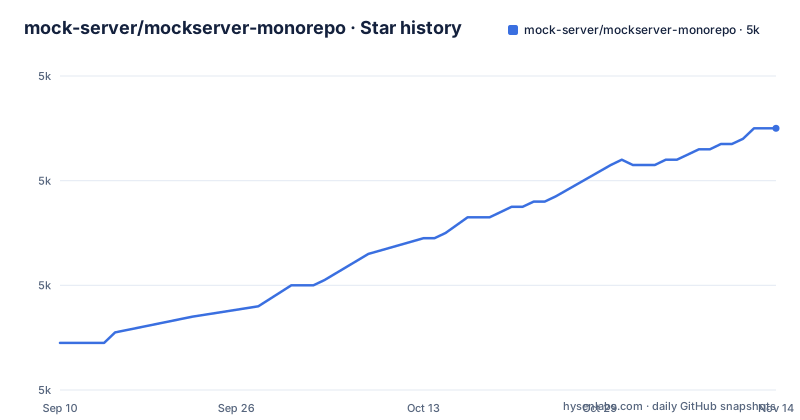
Star history
- mock-server/mockserver-monorepo5,010 ★ · +41
| Repository | 2026-09-10 | 2026-11-14 |
|---|---|---|
| mock-server/mockserver-monorepo | 5k | 5k |
41 Stars in the last 65 days, measured from the daily GitHub snapshot. Compare with other projects
Editorial analysis
What MockServer Actually Solves
MockServer addresses a common testing problem: your application depends on APIs that are unavailable, incomplete, or hard to reproduce. Instead of standing up a separate stub for each protocol, MockServer acts as both a mock server and a proxy. It lets you mock the APIs you depend on, proxy real traffic to record and inspect it, and inject failures like latency and dropped connections for chaos testing. The intended users are developers and testers who need to simulate dependencies across a range of protocols, not just HTTP. The README positions it as a tool for testing how your application copes when the systems it relies on degrade or fail. That is a broader claim than most mocking tools make, and it shapes the entire design.
One Port, Auto-Detected Protocols
The core mechanism is protocol auto-detection from the first bytes of each connection. MockServer listens on a single port and figures out whether the incoming traffic is HTTP/1.1, HTTPS, HTTP/2, gRPC, gRPC-Web, WebSockets, or raw TCP. This is a significant design choice because it removes the need to configure separate ports or listeners for each protocol. The README states that no per-protocol configuration is required. For example, a gRPC client and a WebSocket client can both point to the same MockServer address, and the server routes them correctly. This is different from tools that require you to declare a protocol upfront. The trade-off is that auto-detection must be reliable; if a protocol is not in the supported list or the first bytes are ambiguous, the connection may not be handled correctly. The README lists HTTP/3 (QUIC) as experimental and places it outside the auto-detected protocol set.
Getting It Running: Docker and the Control Plane
The fastest path is Docker. The README shows a three-step process: start MockServer with `docker run -d --rm -p 1080:1080 mockserver/mockserver`, then create an expectation with a `curl` PUT to `http://localhost:1080/mockserver/expectation`, and finally call the mocked endpoint. The control plane is a REST API on the same port, which is a practical design because you do not need a separate admin port. For local development on macOS or Linux, you can install via Homebrew with `brew install mockserver` and run `mockserver run --port 1080`. The README also points to a self-hosting guide that covers a JVM-less binary bundle, Helm/Kubernetes, a JAR, and Testcontainers. There are also docker-compose recipes in the `examples/docker-compose` directory that provide one-command setups for mocking from an OpenAPI spec, a record/replay proxy, a contract-validating proxy, and a chaos proxy. That is a useful way to see real configurations without reading the full documentation.
Expectations, Templating, and Verification
MockServer's model is based on expectations: you define an `httpRequest` matcher and an `httpResponse`. The matcher can use method, path, query, headers, cookies, and body, with support for JSON, XML, JSONPath, XPath, regex, and OpenAPI. Responses can be static or dynamic. Dynamic responses can be templated or produced by a callback. This is more flexible than a simple static file server. Verification is also built in: the client libraries can verify the requests MockServer received. That is essential for contract testing. But the presence of verification as a first-class feature distinguishes MockServer from a basic stub.
Chaos Engineering and Failure Injection
MockServer explicitly supports chaos engineering. You can inject latency, dropped connections, and errors to test how your application copes with a misbehaving dependency. This is not a side feature; it is one of the three main things the README lists. The repository ships an examples/chaos/ directory. But the docker-compose chaos proxy recipe suggests that you can set up a proxy that modifies live traffic in a controlled way. This is a different value proposition from pure mocking: MockServer can sit between your application and a real dependency, then alter the traffic to simulate failures. That makes it a tool for resilience testing, not just for stubbing out unavailable services.
Beyond HTTP: gRPC, WebSockets, Message Brokers, and LLMs
The README lists support for gRPC and gRPC-Web, WebSockets, raw TCP, message brokers (Kafka and MQTT via AsyncAPI), and AI/LLM APIs. The message broker support is described as "AsyncAPI-driven testing against Kafka/MQTT brokers." For LLM mocking, it can mock chat-completion APIs for OpenAI, Anthropic, Gemini, Bedrock, Azure OpenAI, and Ollama, including streaming. There is also a built-in MCP server at `/mockserver/mcp` for AI coding assistant integration. This is a broad scope. The risk is that each of these integrations may not be as deep as a dedicated tool. For example, if you need to test a complex Kafka consumer with specific partitioning behavior, a dedicated Kafka mock might be more appropriate. But if you want a single test environment that simulates an LLM API and a gRPC service on the same port, MockServer is one of the few tools that attempts that.
Limitations and Wrong-Tool Cases
The most obvious limitation is that HTTP/3 is experimental and sits outside the single-port auto-detection. If your application relies heavily on HTTP/3, you should verify that the experimental support meets your needs. Since MockServer is a Java application, it may be heavier than a lightweight Node.js or Python mock server. For simple REST mocking with a small number of endpoints, MockServer might be overkill. The expectation model is powerful but has a learning curve. Also, the project is a monorepo with many clients and integrations, which means the codebase is large and the upgrade path may require updating multiple components if you use the Java or Node client. The license is Apache-2.0, which is permissive and does not impose copyleft obligations, but you should still review the license file for any notices.
Alternatives and the Difference in Approach
A common alternative is WireMock, which is also a Java-based HTTP mock server. Another alternative is a protocol-specific mock, such as a dedicated gRPC mock server or a Kafka mock. Those tools are often simpler and more precise for their protocol, but they require you to run multiple processes. MockServer's difference is the auto-detection of protocols on one port and the proxy/chaos capabilities. If you need to test a system that talks to a mix of HTTP, gRPC, and WebSockets, MockServer reduces the number of moving parts. But if you only need to mock a single REST API, a tool like WireMock is likely easier to configure and lighter to run.
Editorial conclusion
Adopt MockServer if you need a single tool that mocks and proxies multiple protocols, especially if your stack mixes HTTP/2, gRPC, WebSockets, or raw TCP and you want to inject failures without running several dedicated mocks. Teams that only need simple REST mocking might find the configuration overhead and the breadth of features excessive; a lighter tool like WireMock or a language-specific stub would be simpler. Before adopting, verify that the auto-detection of protocols works for your exact traffic patterns, test the experimental HTTP/3 support, and check the changelog for breaking changes between 9.1.0 and 9.2.0. If you rely on message brokers or LLM APIs, confirm that the Kafka/MQTT integration and the AI/LLM mocking endpoints match your expected request formats. MockServer is not a single-purpose mock; it is a multi-protocol proxy and control plane that requires you to learn its expectation model and REST API, but that investment pays off when your dependencies span many protocols.
Frequently asked questions
What is a mockserver?
In this project's terms, it is a single binary that mocks, records and chaos-tests the HTTP(S) dependencies your application talks to. Protocol detection for HTTP/1.1, HTTPS, HTTP/2, gRPC and gRPC-Web, WebSockets and raw TCP happens from the first bytes of each connection, and HTTP/3, broker testing and AI endpoints are offered on top of that.
How do I install MockServer, and which Java version does it need?
Five channels are listed: Docker, Homebrew, Helm, Maven Central and npm. The runtime requires Java 17 or newer, raised from Java 11 in MockServer 6.0.0, and the guidance is to pin to 5.15.x if you need Java 11; the official Docker image bundles its own JVM.
Can MockServer record and replay traffic instead of only returning mocks?
Yes. The proxy modes cover port forwarding, HTTP proxying, HTTPS tunnelling and SOCKS, and record, inspect and modify real traffic in flight including TLS-encrypted exchanges. A record and replay proxy recipe ships in examples/docker-compose alongside mock-from-openapi, a contract-validating proxy and a chaos proxy.
What can MockServer match on when it decides whether to serve an expectation?
Method, path, query, headers, cookies and body, with JSON, XML, JSONPath, XPath and regular expression available for the body. Responses can be canned, templated or produced by a callback, and mocks can be generated from an OpenAPI or Swagger spec.
Is MockServer safe to expose outside a development machine?
The project labels itself a development and testing tool only and points to SECURITY.md. The control plane that creates expectations shares the port with your application traffic.
Official sources
Add this badge to your README
If you maintain this project, the badge below links readers to this analysis and shows its maintenance status from the daily GitHub snapshot. Paste the markdown into your README; add ?metric=license or ?metric=stars to the image URL for a different field.

[](https://hysenlabs.com/projects/mock-server-mockserver-monorepo)Star history chart for your README
[](https://hysenlabs.com/projects/mock-server-mockserver-monorepo)Was this useful?