Nexent: A Zero-Code Agent Platform That Puts Deployment First
Nexent is a zero-code platform for auto-generating production-grade AI agents using Harness Engineering principles, unified tools, skills, memory, and orchestration with built-in constraints, feedback loops, and control planes.
At a glance
- What is it?
- Nexent is a Python-based, MIT-licensed platform for generating AI agents from natural language prompts. Its main differentiator is a heavy emphasis on repeatable Docker and Kubernetes deployment, with offline package support and a TUI-driven configuration flow.
- Who is it for?
- Adopt Nexent if you need a self-hosted, zero-code agent platform and your team can meet the resource floor (4 cores, 8 GiB RAM, 40 GiB disk for Docker) and tolerate a young project with a rapidly changing version history. Do not adopt it if you require deep per-agent code-level customization or if your workloads are small enough that a managed API suffices.
- Can I use it commercially?
- Yes. MIT is a permissive licence: you can use, modify and sell software built on it, as long as you keep its copyright and licence notices.
- Is it still maintained?
- Yes. The repository received new commits within the last day.
- What is it written in?
- Mainly Python, according to GitHub's language statistics.
Answers come from the project's GitHub data, last synced on November 13, 2026, and from our analysis. They are not legal advice.
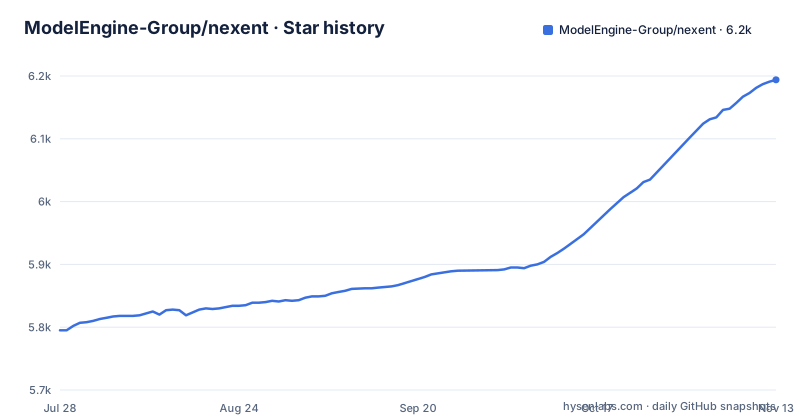
Star history
- ModelEngine-Group/nexent6,194 ★ · +399
| Repository | 2026-07-28 | 2026-11-13 |
|---|---|---|
| ModelEngine-Group/nexent | 5.8k | 6.2k |
399 Stars in the last 108 days, measured from the daily GitHub snapshot. Compare with other projects
Editorial analysis
What Nexent Actually Solves
Nexent targets teams that want to build AI agents without writing orchestration code or dragging boxes in a visual editor. The README describes a zero-code platform where you describe requirements in natural language and the system generates executable agents. That pitch is common, but the project's real focus, judging by the repository layout and deployment scripts, is operational reproducibility. The documentation goes into unusual depth about how to deploy, uninstall, and package the platform for offline use. That suggests the intended audience is not hobbyists but engineers who run agents in private infrastructure and need a predictable install path. The problem it solves is not just agent generation; it is getting the whole platform, including its dependencies, onto a server or cluster without surprises.
The Harness Engineering Mechanism
The README claims the platform is built on Harness Engineering principles. Those principles translate into concrete features listed in the core features table: unified tools, skills, memory, and orchestration with built-in constraints, feedback loops, and control planes. The core features table also lists progressive skill disclosure. Another mechanism is the layered memory: two tiers, user-level and user-agent-level, that persist context across conversations. The A2A agent collaboration protocol is also mentioned, which allows multiple agents to cooperate in a distributed workflow. These are the building blocks the features table names.
Two Deployment Paths, One Configuration Model
Nexent offers Docker and Kubernetes deployment, and both share the same configuration file: deploy/env/.env. That is a practical design. The root deploy.sh forwards to either deploy/docker/deploy.sh or deploy/k8s/deploy.sh. Both scripts read the same environment file, which reduces the chance of configuration drift between a small-team install and an enterprise cluster. The Docker path requires 4 cores, 8 GiB RAM, and 40 GiB disk minimum, while Kubernetes asks for 16 GiB RAM and 100 GiB disk minimum. The scripts present a Bash TUI for interactive selection of components, port policy, and image source. You can skip the TUI with --defaults or pass explicit flags like --components, --port-policy, and --image-source. This is a concrete, scriptable flow. The Kubernetes script renders values into Helm ConfigMap and Secret overrides, and it supports three persistence modes: local, dynamic, and existing.
Offline Packages and Air-Gapped Deployment
A standout feature is the offline deployment package. You can build a tarball with bash build.sh --package --target docker --compress true or the equivalent for Kubernetes. The package includes image tar files, load-images.sh, push-images.sh, deployment scripts, SQL files, manifest.yaml, and checksums.txt. That is a complete bundle for air-gapped environments. On the target host, you run bash deploy.sh --load-images docker ... to load images locally, or you push them to an internal registry with --push-images and an image prefix. The README notes that when --push-images is used without a prefix, deploy.sh asks for it before push-images.sh prompts for credentials. That is a thoughtful ordering.
Uninstall and Data Management
The project pays attention to teardown, which is rarer than it should be. Docker uninstall is bash uninstall.sh docker, and you can preserve or delete data volumes with --delete-volumes true|false or the delete-all variant. Kubernetes uninstall is bash uninstall.sh k8s; by default it removes the nexent release first and nexent-infrastructure second, and --release-scope supports application-only removal and dependency-protected infrastructure removal. This is a concrete operational story: you can remove the platform without leaving orphaned volumes or namespaces. The scripts also save non-sensitive deployment choices to deploy.options in each deploy directory, so a reinstall can reuse the same configuration. That consistency reduces the cost of rebuilding an environment after a failure. For teams that treat infrastructure as disposable, this is a genuine advantage.
What the README Does Not Tell You
The README is long on deployment and short on runtime behavior. The core features list mentions multi-model integration with OpenAI-compatible providers and full LLM, Embedding, VLM, STT, and TTS coverage, but it does not specify which providers were tested or how model switching works. The A2A protocol is named but not detailed. If you are evaluating this for production, you will need to run your own load tests and read the source code. The project is under active development, with three releases in about a week (v2.8.2 on 2026-10-28 to v2.8.3.1 on 2026-11-02), and the default branch is develop. That cadence suggests fast iteration but also potential instability. The MIT license is permissive, but you must track upstream changes yourself.
The Wrong Tool for Some Jobs
Nexent is not for everyone. If you need fine-grained control over agent logic, such as custom Python functions or specific model call patterns, a zero-code platform will likely frustrate you. The README emphasizes no orchestration and no drag-and-drop, but that also means you surrender low-level control. The resource requirements are non-trivial: 8 GiB RAM minimum for Docker, 16 GiB for Kubernetes. A small prototype on a laptop may struggle. Also, the deployment flow, while scriptable, is still a collection of Bash scripts and Helm overrides. If your organization has strict security policies around running arbitrary shell scripts, you may need to audit deploy.sh and its children before use. For a quick experiment, a managed API might be simpler, but Nexent is explicitly self-hosted, so you own the operational burden.
Alternatives and How They Differ
A direct alternative is LangChain with LangGraph, which is a code-first framework for building agents. LangChain gives you Python-level control over chains, tools, and memory, and it integrates with many model providers. The difference in approach is fundamental: Nexent is zero-code and generates agents from prompts, while LangChain requires you to write orchestration logic in code. If your team is comfortable with Python and needs custom logic, LangChain is more flexible. Another alternative is a managed platform like OpenAI's Assistants API, which handles state and tool use for you but runs in someone else's cloud. Nexent's self-hosted nature and offline package support are the key differentiators. For teams that cannot send data to external APIs, Nexent's air-gapped deployment is a concrete advantage that neither LangChain nor a managed API offers out of the box.
Editorial conclusion
Adopt Nexent if you need a self-hosted, zero-code agent platform and your team can meet the resource floor (4 cores, 8 GiB RAM, 40 GiB disk for Docker) and tolerate a young project with a rapidly changing version history. Do not adopt it if you require deep per-agent code-level customization or if your workloads are small enough that a managed API suffices. Before committing, verify that the current release (v2.8.3.1) matches your target Kubernetes version (1.24+) and that the offline package flow works in your air-gapped environment.
Frequently asked questions
How much memory does a Nexent Docker deployment need?
The Docker path asks for 8 GiB minimum and 16 GiB recommended, alongside 4 CPU cores minimum with 8 recommended and 40 GiB of disk minimum with 100 GiB recommended. The Kubernetes path raises memory to 16 GiB minimum and 64 GiB recommended.
Does a Nexent install need Kubernetes and Helm?
Not for the Docker path, which needs Docker 24+ and Docker Compose v2+ only. Kubernetes 1.24+ and Helm 3+ are prerequisites for the separate k8s target of the same deploy.sh, which installs the nexent-infrastructure and nexent Helm releases.
What does deploy.sh do to deploy/env/.env?
It reads it as the runtime configuration file for both targets, and leaves an existing copy untouched. If the file is missing, the scripts first reuse docker/.env and then fall back to deploy/env/.env.example, so changing a variable later is a manual edit.
Can Nexent be installed on a host that cannot reach a public registry?
Yes, `bash build.sh --package --target docker --compress true` produces a package containing image tar files, load-images.sh, push-images.sh, SQL files, manifest.yaml and checksums.txt. Deploy it with `bash deploy.sh --load-images docker ...`, or push those images to an internal registry with `--push-images --image-registry-prefix`.
Official sources
Add this badge to your README
If you maintain this project, the badge below links readers to this analysis and shows its maintenance status from the daily GitHub snapshot. Paste the markdown into your README; add ?metric=license or ?metric=stars to the image URL for a different field.

[](https://hysenlabs.com/projects/modelengine-group-nexent)Star history chart for your README
[](https://hysenlabs.com/projects/modelengine-group-nexent)Was this useful?