MoeKoeMusic: a Vue and Electron KuGou client whose Docker image hides its own API
An open-source, concise and aesthetically pleasing third-party client for KuGou Music, supporting Windows, macOS, Linux and Web.
At a glance
- What is it?
- MoeKoeMusic is a GPL-2.0 third-party client for KuGou Music that runs as an Electron desktop app or a web app in Docker. The desktop path is straightforward; the web deployments split frontend and API in ways that catch people out, and a few build scripts do less than their names suggest.
- Who is it for?
- MoeKoeMusic fits KuGou users who want a cleaner desktop or self-hosted web player with lyrics, desktop lyrics, daily recommendations and no social features, and who accept that it depends on KuGou's servers and is offered for learning use only. It is the wrong choice for anyone needing an official client, commercial use, or a published Docker image.
- Can I use it commercially?
- Yes, with conditions. GPL-2.0 is a copyleft licence: if you distribute software that includes it, you must release that software's source code under the same licence. Running it internally without distributing it does not trigger that obligation.
- Is it still maintained?
- Yes. The repository last received commits 5 days ago.
- What is it written in?
- Mainly Vue, according to GitHub's language statistics.
Answers come from the project's GitHub data, last synced on November 15, 2026, and from our analysis. They are not legal advice.
Star history
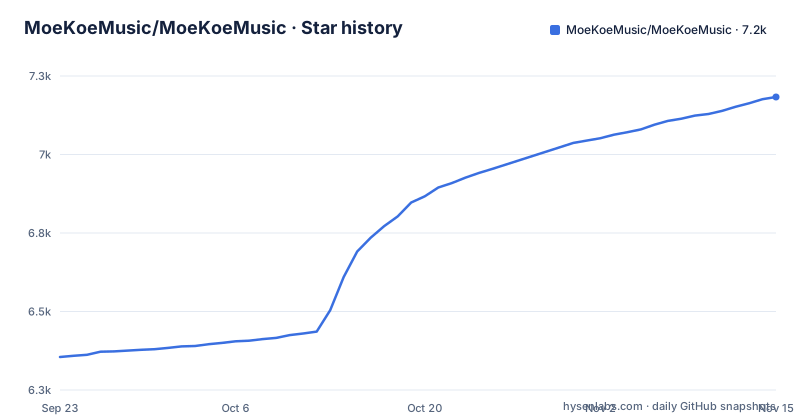
- MoeKoeMusic/MoeKoeMusic7,183 ★ · +828
| Repository | 2026-09-23 | 2026-11-15 |
|---|---|---|
| MoeKoeMusic/MoeKoeMusic | 6.4k | 7.2k |
828 Stars in the last 53 days, measured from the daily GitHub snapshot. Compare with other projects
Editorial analysis
A Vue front end talking straight to KuGou's servers
MoeKoeMusic is a third-party client for KuGou Music, built with the Vue.js toolchain and packaged with Electron for Windows, macOS and Linux, plus a web version. The author's motivation was personal: a KuGou library collected over roughly ten years, mostly Japanese anime opening themes that imports into NetEase Cloud Music or QQ Music could not match, and a macOS KuGou client that sometimes would not play. The README credits KuGou's Concept edition as one of the few players that offers VIP songs for free.
The client logs in with a KuGou account by QR code, phone or account credentials, and connects directly to the official servers rather than through a relay. The feature list adds lyrics, daily recommended songs, theme colour switching, a startup greeting, layout customisation, a plugin system, hidden features and easter eggs, and an onboarding guide. It also promises that VIP is claimed automatically each day, so a logged-in account plays as VIP. One deliberate omission: it has no social features of any kind.
The api script runs kugoumusicapi on port 6521 with the lite platform
The piece that talks to KuGou is a separate package, kugoumusicapi, started by the api script in package.json:
kugoumusicapi --platform=lite --port=6521The dev script runs that API and the Vite dev server side by side through run-p, so browser development needs both. The client development script, dev:client, pairs serve:client with electron:serve instead, and the two Vite modes are separated by an environment flag: VITE_APP_ENV=web for the browser build and VITE_APP_ENV=client for the Electron build. Port 6521 and platform=lite reappear in every Docker variant as the PORT and platform environment variables, so they are the two values to keep consistent if you change anything.
The local workflow from a fresh clone is short:
cd MoeKoeMusic
pnpm install --frozen-lockfilepnpm run devNode.js has to be 20.0.0 or newer; package.json enforces this with an engines entry of node >=20. pnpm-workspace.yaml and .gitmodules sit at the top level, so the checkout is a pnpm workspace with at least one git submodule.
The Docker image builds locally and keeps port 6521 off the host
The recommended web install is a clone followed by Compose:
git clone --depth=1 https://github.com/MoeKoeMusic/MoeKoeMusic.git
cd MoeKoeMusic
docker compose up -d &
The trailing ampersand backgrounds a command that -d already detaches, so it adds nothing. docker-compose.yml has no image line; it builds from the local Dockerfile every time, restarts with unless-stopped, sets PORT=6521 and platform=lite, and publishes only 8080:8080. The 6521:6521 mapping for the API service is commented out.
That works because the Docker frontend is compiled with build:docker, which sets VITE_APP_API_URL=/api, a relative path on the same origin as the page. The consequence is that the API inside the container is not reachable from the host on 6521, and you cannot point a separately hosted frontend or desktop build at it without uncommenting that line. The README adds that after deployment you must open the corresponding server port or put a reverse proxy in front for domain access; Compose alone does not make the app reachable from outside a firewalled server.
The Dockerfile strips Electron from package.json before installing
The Dockerfile has two stages, both on node:20-alpine. The first copies package*.json, then runs an inline node script that rewrites package.json, deleting electron and electron-builder from devDependencies and electron-is-dev, electron-log, electron-store, electron-updater and kugoumusicapi from dependencies. It then runs pnpm install --frozen-lockfile, copies the source and runs pnpm run build:docker.
Two details matter if the build fails for you. The glob package*.json matches package.json but not pnpm-lock.yaml, so that first frozen install runs before the lockfile is copied into the image, and against a package.json the script has just edited. And corepack enable appears only in the second stage, not before the first stage's pnpm call.
The second stage enables corepack, copies the contents of the repository's docker/ directory into /app, copies the built dist/ from the first stage, runs pnpm install --frozen-lockfile again and starts with pnpm run start. The server that serves the frontend and API in the container is therefore defined in docker/, not in the root package.json.
The docker run line is struck out and the Baota image may lag
The README lists two more web options, and neither is a clean substitute for Compose. The second method is crossed out with a note that the image has not yet been uploaded officially:
docker run -d --name MoeKoeMusic -p 8080:8080 -e PORT=6521 -e platform=lite iajue/moekoe-music:latestThe third method is a compose file meant to be pasted into the Baota panel's container orchestration under the name MoeKoeMusic. It pulls registry.cn-wulanchabu.aliyuncs.com/youngxj/moekoe-music:latest, a remote image that the README warns may fall behind the official version, while also carrying a build section pointing at the local Dockerfile. Unlike the main compose file it publishes both 8080 for the frontend and 6521 for the API.
The fourth route is a one-click deploy to EdgeOne Pages, which runs npm install and npm run build with dist as the output directory. That deploys the static frontend only. You must fill VITE_APP_API_URL with your own API address, which means running kugoumusicapi somewhere else; without it the deployed page has no backend to call.
electron:build:linux-arm64 runs the same command as electron:build:linux
Prebuilt installers come from the Releases page. If none fits your device, you build your own: install dependencies, run pnpm run build:client, then package with electron-builder. Output lands in /dist_electron. The macOS options cover universal, Intel only and Apple Silicon only:
pnpm run electron:build -- --mac --universalpnpm run electron:build -- --mac --arm64Windows defaults to an NSIS installer, with a portable EXE as an option:
pnpm run electron:build -- --win --portableLinux defaults to AppImage, with snap, deb and rpm targets:
pnpm run electron:build -- --linux --target debThe shortcut scripts deserve a closer look. electron:build:macos passes --mac --x64 --arm64, which is the dual-architecture build, while the universal binary has its own script. More importantly, electron:build:linux-arm64 is defined as pnpm run electron:build -- --linux --publish never, character for character the same as electron:build:linux. It passes no arm64 flag, so it produces whatever the default Linux architecture is on the build machine. On an x64 host, do not expect an ARM64 package from it. Every shortcut script also passes --publish never, so local builds are not uploaded to the GitHub publish target configured in package.json.
A learning-only licence posture on top of GPL-2.0
The code is GPL-2.0, but the README's disclaimer sets tighter expectations on use. It states that MoeKoeMusic is a third-party KuGou client, not an official one, and that users wanting fuller features should install the official client. The project is offered for learning only, and users are asked to respect copyright and not use it for commercial or illegal purposes. Copyrighted data may be produced while using it; the project claims no ownership of that data, and users are told to clear it within 24 hours to avoid infringement.
The practical consequence is that MoeKoeMusic is not something to embed in a product or run as a public music service. It also depends entirely on KuGou's official servers through kugoumusicapi and on a KuGou account for login, so anything KuGou changes on its side is outside the client's control. The disclaimer is the author's statement of intent, not legal clearance, and it does not change what your own jurisdiction allows.
MV playback, desktop lyrics and a three-month release rhythm
The completed checklist shows what has shipped beyond basic playback: MV playback, automatic light and dark mode switching, Touch Bar support, PWA support, global keyboard shortcuts, multiple interface languages, desktop lyrics, an architecture overhaul, and adding or removing songs, playlists and favourites. The README itself is available in Simplified Chinese, Traditional Chinese, Japanese, English, Korean and Russian, and the plugins/ directory at the top level backs the plugin system claim. The changelog lives on the project site at music.moekoe.cn rather than in the repository.
Releases have arrived every one to two months: v1.6.9 on 2026-07-21, v1.7.0 on 2026-08-26 and v1.7.1 on 2026-10-14, matching the 1.7.1 in package.json. The last push to main was on 2026-11-02, and the repository is not archived. Issues and pull requests are the channel for bugs and suggestions. Because the main compose file always builds from your checkout, a web install only picks up these releases when you pull and rebuild.
Editorial conclusion
MoeKoeMusic fits KuGou users who want a cleaner desktop or self-hosted web player with lyrics, desktop lyrics, daily recommendations and no social features, and who accept that it depends on KuGou's servers and is offered for learning use only. It is the wrong choice for anyone needing an official client, commercial use, or a published Docker image. Before relying on it, check that a Release build exists for your platform (an ARM64 Linux build in particular), decide where your API will live if you deploy the web version, and read the disclaimer on copyrighted data.
Frequently asked questions
Is MoeKoeMusic an official KuGou app?
No. MoeKoeMusic is a third-party KuGou client, and its disclaimer tells users who want fuller features to use the official KuGou client. It is offered for learning use only.
How do I install MoeKoeMusic on Windows, macOS or Linux?
Download an installer from the project's GitHub Releases page. If none fits your device, install Node.js 20 or newer, run pnpm install --frozen-lockfile and pnpm run build:client, then package with pnpm run electron:build plus your platform flags; output goes to /dist_electron.
Can MoeKoeMusic run in a browser instead of as a desktop app?
Yes. Cloning the repository and running docker compose up -d builds a container that serves the web version on port 8080. You still need to open that port on the server or put a reverse proxy in front of it.
Official sources
Add this badge to your README
If you maintain this project, the badge below links readers to this analysis and shows its maintenance status from the daily GitHub snapshot. Paste the markdown into your README; add ?metric=license or ?metric=stars to the image URL for a different field.

[](https://hysenlabs.com/projects/moekoemusic-moekoemusic)Star history chart for your README
[](https://hysenlabs.com/projects/moekoemusic-moekoemusic)Was this useful?