Moltis: A Rust-Based Personal Agent Server That Keeps Your Keys Local
A secure persistent personal agent server in Rust. One binary, sandboxed execution, multi-provider LLMs, voice, memory, Telegram, WhatsApp, Discord, Teams, and MCP tools. Secure by design, runs on your hardware.
At a glance
- What is it?
- Moltis is a single-binary personal agent server in Rust that sandboxes tool execution and supports multiple LLM providers, chat channels, and MCP. It targets users who want an auditable, self-hosted alternative to Node or Python agent frameworks.
- Who is it for?
- Adopt Moltis if you want a self-hosted agent server with a small trusted computing base, sandboxed tool execution, and a Rust codebase you can audit. It suits developers comfortable with Docker or Podman, and those who need Telegram, WhatsApp, Discord, Teams, or Signal integration without a Node runtime.
- Can I use it commercially?
- Yes. MIT is a permissive licence: you can use, modify and sell software built on it, as long as you keep its copyright and licence notices.
- Is it still maintained?
- Yes. The repository last received commits 31 days ago.
- What is it written in?
- Mainly Rust, according to GitHub's language statistics.
Answers come from the project's GitHub data, last synced on October 4, 2026, and from our analysis. They are not legal advice.
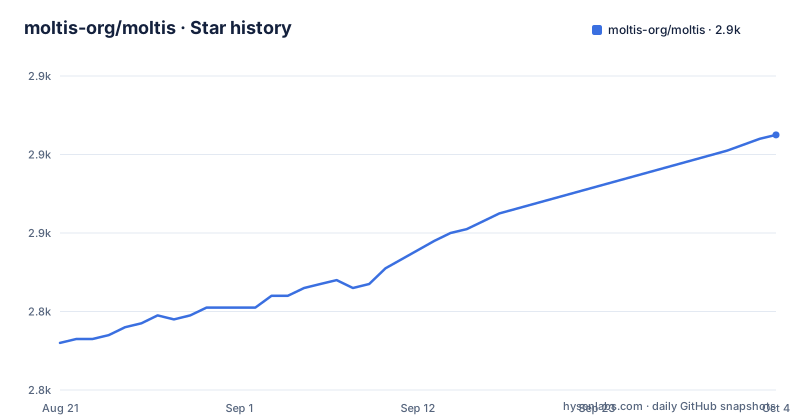
Star history
- moltis-org/moltis2,885 ★ · +53
| Repository | 2026-08-21 | 2026-10-04 |
|---|---|---|
| moltis-org/moltis | 2.8k | 2.9k |
53 Stars in the last 44 days, measured from the daily GitHub snapshot. Compare with other projects
Editorial analysis
What Moltis Solves and Who It Is For
Moltis addresses a specific pain point: running a persistent personal agent without handing your API keys to a third party or maintaining a sprawling Node.js or Python stack. The README states that your keys never leave your machine and that every command runs in a sandboxed container. This is for people who want an agent that can chat over Telegram, WhatsApp, Discord, Teams, or Signal, remember past conversations, and execute tools, all on hardware they own. The target user is a developer or technical hobbyist who can run a Rust binary and is comfortable with Docker or Podman. The project explicitly contrasts itself with OpenClaw and Hermes Agent, which rely on Node.js and Python runtimes respectively. Moltis compiles to a single binary, which removes the need for a language runtime on the host. That is a meaningful advantage for a Raspberry Pi or a small server where you do not want to manage npm or pip dependencies.
Architecture: A 59-Crate Workspace with a Clear Core
The repository is organized as a Rust workspace with about 270K lines of code across 59 crates. The core runtime is split into small crates: molt-gateway for the HTTP/WS server and auth, molt-tools for tool execution and sandboxing, molt-providers for LLM integrations, and molt-agents for the agent loop. This modular layout is not just for show. It allows independent auditing of each piece. The README highlights that the agent runner and model interface fit in roughly 7.5K lines, with providers in another 19K. That is a small surface for the most security-sensitive parts. The rest of the workspace is feature crates for channels, memory, voice, and browser automation. The separation means you can review the agent loop without wading through the Telegram or Discord bindings. One trade-off: a 59-crate workspace adds build complexity. Cargo handles it, but first-time contributors may find the crate map intimidating. The README provides a table grouping crates by role, which helps, but the sheer number of crates is a cognitive load.
How It Works: Sandboxed Execution and Multi-Provider LLMs
Moltis runs as a server process that listens for HTTP and WebSocket connections. The gateway crate handles RPC and authentication. When a user sends a message via a channel like Telegram or Discord, the chat engine orchestrates the agent loop. The agent calls tools, which execute in a sandbox. The README lists Docker, Podman, Apple Container, and WASM as sandbox backends. Per-session isolation is mentioned, meaning each session gets its own container or WASM boundary. This is a stronger model than simply running commands on the host. For LLMs, the providers crate implements multiple providers, so you can plug in different models without changing the core. Memory is handled by SQLite with full-text search and vector support, which enables cross-session recall. The agent can also import skills from OpenClaw, which lowers the barrier for migrating from that ecosystem. The actual data flow is not fully documented in the README, but the crate names suggest a clear pipeline: gateway receives input, chat orchestrates, agents call tools, tools run in sandbox, and results flow back through the same path.
Getting It Running: Installation and Configuration
The README provides several installation methods. The one-liner is `curl -fsSL https://www.moltis.org/install.sh | sh` for macOS and Linux. Homebrew users can run `brew install moltis-org/tap/moltis`. Docker users can pull `ghcr.io/moltis-org/moltis:latest`, which is multi-arch for amd64 and arm64. For building from source, the command is `cargo install moltis --git https://github.com/moltis-org/moltis`. There is also a feature flag for constrained devices: `--no-default-features --features lightweight`. This is useful for a Raspberry Pi. Configuration is handled by the molt-config crate, though the README does not show the config file format. The web UI includes a Settings to Tools inventory and managed deploy keys with host pinning. That suggests configuration is partly done through the web interface. If you want to use voice, there are built-in STT and TTS providers. For MCP, it supports stdio and HTTP/SSE. The setup includes an onboarding crate and a provider setup crate, so first-run configuration is likely guided. The exact commands to start the server are not in the README, but the CLI crate is the entry point, so running `moltis` after installation is the obvious next step.
Security Features and Their Limits
The security model is the project's main selling point. The README lists several concrete mechanisms: `secrecy::Secret` for zeroing secrets on drop, redaction from tool output, rate-limited authentication with per-IP throttle, passkey support via WebAuthn, SSRF protection that blocks loopback and private addresses, origin validation for WebSocket upgrades, and hook gating that can block tool calls before execution. Unsafe Rust is isolated to FFI and precompiled runtime boundaries, not the core agent loop. These are real, verifiable features. But there are limits. Sandboxing depends on Docker or Podman being installed and correctly configured. If you run on a host without those, the sandbox may not be available. The README mentions Apple Container for macOS, but that is platform-specific. WASM tools are precompiled, which reduces runtime risk but means you cannot run arbitrary native tools without a container. The network filter blocks private addresses, which is good for SSRF, but it may also block legitimate internal services you want to reach. The hook gating is powerful, but it requires you to write hooks, which adds complexity. The project does not claim to be a hardened security appliance; it is a secure-by-design server that still requires you to manage your own infrastructure.
Limitations and Where It Is the Wrong Tool
Moltis is not for everyone. It is a self-hosted server, so you need to maintain your own hardware, updates, and backups. The README does not mention a managed cloud offering, so if you want a zero-ops agent, look elsewhere. The sandbox requirement is a real constraint. On a Raspberry Pi, Docker may be too heavy, and the lightweight feature flag likely disables some sandboxing, which weakens the security model. The project is written in Rust, so extending it requires Rust knowledge. If you prefer Python or TypeScript for agent development, the learning curve is steep. The README claims auditable code, but auditing 270K lines is a significant task. The agent loop is small, but the full workspace is large. Also, the project is under active development with daily releases (20260827.01, 20260826.01, 20260824.01). That fast cadence means APIs may change frequently, and you should pin a version. The comparison table shows that OpenClaw has a much larger codebase, but Moltis is still young, and the feature set may not match more mature projects. For example, browser automation is built-in, but the README does not detail its capabilities or limitations.
Alternatives: OpenClaw and Hermes Agent
The README directly compares Moltis to OpenClaw and Hermes Agent. OpenClaw is a TypeScript-based agent with a broad ecosystem of npm packages and companion apps. It runs on Node.js, which means a heavier runtime and a larger checkout (~1.1M lines of app code). Hermes Agent is Python-based with a TUI and web surfaces, using uv/pip for dependencies. Both support sandboxing, but OpenClaw uses app-level permissions and browser/node tools, while Hermes supports local, Docker, SSH, Daytona, Singularity, and Modal backends. Moltis distinguishes itself by being a single Rust binary with no runtime dependencies. That is a real difference in deployment simplicity. However, the alternatives may have larger communities and more third-party integrations. If you need a mature ecosystem of plugins, OpenClaw or Hermes might be better. If you value a minimal footprint and auditable code, Moltis is the stronger choice. The README also mentions OpenClaw import, so you can migrate skills from OpenClaw to Moltis, which reduces switching cost.
Maintenance and Upgrade Costs
The project is actively maintained, with releases almost daily. That is a double-edged sword. Frequent releases mean bug fixes and features land quickly, but they also mean you need to track updates carefully. The README does not provide a changelog or migration guide, so upgrading between versions may require reading release notes. The 59-crate workspace means a full rebuild from source takes time, but the Docker image avoids that. The license is MIT, which is permissive and allows commercial use without restrictions, but you should review the license file for any caveats. The project uses artifact attestations with Sigstore, which helps verify the integrity of releases. For maintenance, you need to keep the container runtime updated and monitor the security posture of your host. The web UI provides a Settings to Tools inventory, which helps you see what is enabled. The project does not mention a built-in update mechanism, so you will likely need to pull new Docker images or rebuild manually. The fast release cadence suggests you should pin to a specific version in production and test before upgrading.
Editorial conclusion
Adopt Moltis if you want a self-hosted agent server with a small trusted computing base, sandboxed tool execution, and a Rust codebase you can audit. It suits developers comfortable with Docker or Podman, and those who need Telegram, WhatsApp, Discord, Teams, or Signal integration without a Node runtime. Do not use it if you require a managed cloud service, if you cannot run containers on your target hardware, or if you need a GUI-based configuration tool beyond the web UI. Before deploying, verify the sandbox configuration for your container runtime, review the secret handling and network filter settings, and check the compatibility of your chosen LLM provider with the built-in provider implementations. The project is under active development with frequent releases, so pin a specific version and track the changelog for breaking changes in the 59-crate workspace.
Frequently asked questions
moltis vs openclaw
The README carries its own comparison table. It lists OpenClaw as TypeScript with Swift and Kotlin companion apps on Node.js, with app-level permissions, pairing and local gateway controls, and Moltis as a single Rust binary of roughly 270,000 lines in 59 workspace crates, with Docker, Podman, Apple Container and WASM backends, and password, passkey, API key and vault access control.
How do I install moltis?
Four ways. A one-line script piped to sh on macOS or Linux, the Homebrew tap with brew install moltis-org/tap/moltis, the container image from ghcr.io/moltis-org/moltis, or cargo install moltis from the Git repository.
How many crates does the moltis workspace contain?
The README says 59 modular crates. The workspace manifest's default-members list names 75 entries, counting four WebAssembly tool sub-crates and the courier app separately, and twenty of those paths are not mentioned in the README's architecture tables at all.
How does moltis sandbox command execution?
Commands run in Docker or Apple Container with per-session isolation rather than on the host. Inside a container you enable that by mounting the runtime socket, with the Podman socket mounted at the Docker path so the same code works on either.
Does moltis need Node.js?
Not to run. It ships as a single Rust binary with no Node.js, npm or runtime dependency. Building does need it, because the container image installs Node.js for the Vite and esbuild steps and the web assets are not committed to the repository.
Official sources
Add this badge to your README
If you maintain this project, the badge below links readers to this analysis and shows its maintenance status from the daily GitHub snapshot. Paste the markdown into your README; add ?metric=license or ?metric=stars to the image URL for a different field.

[](https://hysenlabs.com/projects/moltis-org-moltis)Star history chart for your README
[](https://hysenlabs.com/projects/moltis-org-moltis)Was this useful?