Thaw: a GPL-3.0 macOS menu bar manager in the middle of its 3.0 rewrite cycle
The menu bar manager for macOS. Open source, GPL-3.0. Read the code, build it yourself, fork it.
At a glance
- What is it?
- Thaw hides, groups and searches macOS menu bar items, and exposes every action as a thaw:// link for automation. It is free with no account or tracking, but the version you can run depends on your macOS release, and the newest line is still in alpha and beta.
- Who is it for?
- Thaw suits a Mac user on macOS 15 or later who wants to hide and regroup menu bar items without paying, signing in or being tracked, and who may want to script it through thaw:// links from Raycast, Shortcuts or a shell. It does not suit anyone on macOS 14 or earlier, since the install badges only cover macOS 15 and up, or anyone who needs a settled release while the 3.0 line is still shipping alpha and beta builds.
- Can I use it commercially?
- Yes, with conditions. GPL-3.0 is a copyleft licence: if you distribute software that includes it, you must release that software's source code under the same licence. Running it internally without distributing it does not trigger that obligation.
- Is it still maintained?
- Yes. The repository received new commits within the last day.
- What is it written in?
- Mainly Swift, according to GitHub's language statistics.
Answers come from the project's GitHub data, last synced on November 14, 2026, and from our analysis. They are not legal advice.
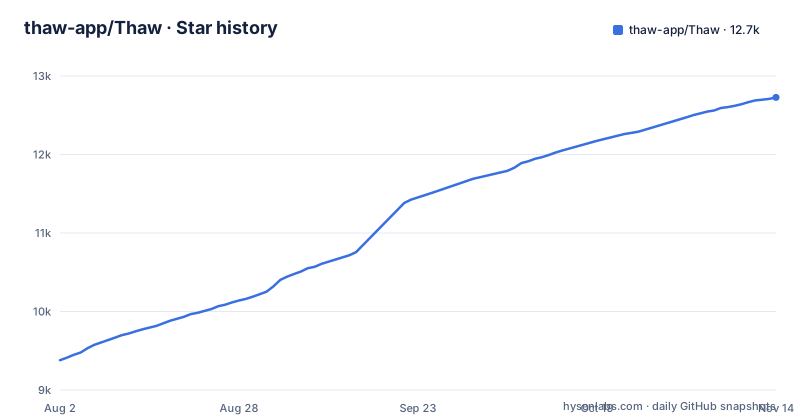
Star history
- thaw-app/Thaw12,727 ★ · +3,347
| Repository | 2026-08-02 | 2026-11-14 |
|---|---|---|
| thaw-app/Thaw | 9.4k | 12.7k |
3,347 Stars in the last 104 days, measured from the daily GitHub snapshot. Compare with other projects
Editorial analysis
Hiding items, then finding them again by keystroke
Thaw's core job has three parts: it hides the menu bar items you do not need, brings them back when you ask, and lets you find any of them with a keystroke. That last part matters on a crowded bar, because a hidden item is only useful if you can reach it without first revealing everything. On top of hiding, Thaw organizes items into groups, switches between profiles, lets you customize the layout, and has a Zen Mode for keeping distractions out of sight. Profiles are the feature to look at if you move between contexts such as work and presentation, since a profile is a saved arrangement rather than a set of manual toggles. The full feature tour lives at getthaw.app under the features section, and the project also offers a Try it in your browser page, so you can see the interaction model before installing anything on your Mac.
Every action is a thaw:// link that other tools can call
The automation story is short and specific: every Thaw action is also a thaw:// link. Anything that can open a URL can therefore drive it, and the project names Raycast, Floe, Shortcuts and plain shell scripts as examples. In practice this means you can bind a profile switch to a Raycast command, trigger Zen Mode from a Shortcuts automation, or call Thaw from a script that also changes other settings when you start a meeting. There is no separate plugin API to learn and no daemon to configure; the link scheme is the interface. The limit for the reader is discoverability. The README states that the links exist but does not print the link syntax or the list of actions, so you will need the documentation at getthaw.app/docs/thaw to find the exact URL for each action before you can wire anything up. Plan on reading those docs before promising yourself a working automation.
Two Homebrew formulas and a disk image
Thaw installs through Homebrew or a disk image. The README gives two formulas:
brew install thaw
brew install thaw@beta
The first is the regular release channel; the second follows the beta channel. The alternative is to download the disk image from the GitHub releases page and drag Thaw into Applications, which is the route for anyone who does not use Homebrew. Choosing a channel deserves a moment of thought right now, because the three most recent tags are all 3.0.0 pre-releases: 3.0.0-alpha.12 on 2026-10-30, 3.0.0-alpha.12.1 on 2026-10-31 and 3.0.0-beta.5 on 2026-11-02. If you download a disk image from the releases page, check that the build you pick is the one meant for your system rather than grabbing the top entry. Homebrew users get the channel choice through the formula name instead.
Thaw 2 and Thaw 3 split along macOS versions
The install badge carries the compatibility rule that matters most: Thaw 2 targets macOS 15 through 26, and Thaw 3 targets macOS 27. That split has two consequences. First, a Mac on macOS 14 or earlier is not covered by either line in the README, so owners of older machines have no listed version to install and should not expect the current builds to run there. Second, moving to macOS 27 means moving to Thaw 3, which is the line currently shipping as alpha and beta tags. If you upgrade the operating system early, you are also signing up for pre-release menu bar software on the same day. The project's promise that a new macOS never costs an upgrade is about price: Thaw is free and stays free. It is not a promise that one build spans every macOS release, and the badge makes clear that it does not.
Free with no account, and the license is GPL-3.0
Thaw has no subscription, no account and no tracking, and the code is licensed under GPL-3.0. For an app that sits in the menu bar all day and sees which other apps you run, the absence of an account and of tracking is the relevant privacy fact. The license matters to a different reader: anyone who forks Thaw and distributes the result inherits the GPL-3.0 obligations, including publishing source for the modified version. The repository root also holds a LICENSE-EXCEPTION file next to LICENSE. The README does not explain what that exception covers, so read the file itself before assuming the plain GPL text is the full set of terms for redistribution or for linking against Thaw code. The project description invites you to read the code, build it yourself and fork it, and the license is what makes all three allowed.
Release provenance you can check yourself
Thaw puts its supply chain claims on the front page. Badges show an OpenSSF Best Practices Gold rating, an OpenSSF Scorecard result, and SLSA Build Level 3, with the SLSA badge linking to docs/VERIFYING_RELEASES.md in the repository. The useful part for a user is that last link: it is the place to learn how to verify that a downloaded release was built from this source. That is relevant for an app that needs to observe and rearrange other apps' menu bar items. The repository root shows the tooling behind those claims, including osv-scanner.toml for dependency vulnerability scanning, sonar-project.properties, .swiftlint.yml with a .swiftlint.baseline file and a pinned .swiftlint-version, and .swiftformat. None of this replaces your own judgment about granting a menu bar utility access to your Mac, but it does give you a documented way to confirm that the binary you install matches the published code instead of taking the download on trust.
Building from source means Xcode and the development branch
Thaw is written in Swift and the repository is organized around an Xcode project: Thaw.xcodeproj sits at the root with Thaw/, ThawTests/ and ThawUI/ beside it, plus packages/, targets/ and scripts/. The default branch is development, not main, and pull requests go against development. If you clone the repository and build without switching branches, you get the branch where contributions land, not a tagged release; check out a release tag if you want to build what you would otherwise download. The repository was last pushed on 2026-11-02. Contributors start with the contributing guide in the thaw-app/.github repository and issue 316, Ways to contribute, which lists open work. Translations do not go through pull requests at all; they run through Crowdin, configured by crowdin.yml. FREQUENT_ISSUES.md and CHANGELOG.md at the root are the first places to check when something breaks after an update. AGENTS.md and CLAUDE.md are present too, so the maintainers have written instructions for coding agents working in the tree.
Editorial conclusion
Thaw suits a Mac user on macOS 15 or later who wants to hide and regroup menu bar items without paying, signing in or being tracked, and who may want to script it through thaw:// links from Raycast, Shortcuts or a shell. It does not suit anyone on macOS 14 or earlier, since the install badges only cover macOS 15 and up, or anyone who needs a settled release while the 3.0 line is still shipping alpha and beta builds. Before installing, match your macOS version to Thaw 2 or Thaw 3 and decide whether you want the plain thaw formula or thaw@beta.
Frequently asked questions
What is the best menu bar manager for Mac, and where does Thaw fit?
Thaw is an open source menu bar manager for macOS under GPL-3.0 that hides, groups and searches menu bar items, with profiles and a Zen Mode. It is free with no subscription, account or tracking, and every action is a thaw:// link for automation.
Which macOS versions does Thaw support?
Thaw 2 targets macOS 15 through 26, and Thaw 3 targets macOS 27. The README lists no version for macOS 14 or earlier.
How do I install Thaw?
Run brew install thaw for the regular channel or brew install thaw@beta for the beta channel. You can also download the disk image from the GitHub releases page and drag Thaw to Applications.
Can Thaw be controlled from Raycast or Shortcuts?
Yes. Every Thaw action is a thaw:// link, so Raycast, Floe, Shortcuts or a shell script can drive it. The exact link syntax is in the documentation at getthaw.app.
Official sources
Where developers are discussing it
Posts on Hacker News, dev.to and Lobsters that link to this repository, found by our scan of those communities. 1 in the last 30 days; newest first.
- Thaw: Open-source macOS menu bar managerHacker News · Oct 16, 2026 · 1 points · 0 comments
Add this badge to your README
If you maintain this project, the badge below links readers to this analysis and shows its maintenance status from the daily GitHub snapshot. Paste the markdown into your README; add ?metric=license or ?metric=stars to the image URL for a different field.

[](https://hysenlabs.com/projects/thaw-app-thaw)Star history chart for your README
[](https://hysenlabs.com/projects/thaw-app-thaw)Was this useful?