Carrier IMS for Pixel: TurboIMS configuration and diagnostics
Carrier IMS for Pixel (TurboIMS): multilingual (中文/English) pixel ims / ims / carrierconfig / volte / vowifi / 5G+ toolkit for Google Pixel.
At a glance
- What is it?
- TurboIMS is an Android 13 or later Kotlin application for Pixel devices that need access to IMS registration, carrier capability controls, 5G display settings, and network diagnostics through Shizuku. It is most relevant to Pixel Tensor owners troubleshooting VoLTE, VoWiFi, VoNR, captive portal access, or mainland China SIM behavior.
- Who is it for?
- Pixel Tensor owners who need a guided interface for IMS registration, carrier capability changes, and network diagnostics should evaluate TurboIMS, while users who need guaranteed carrier behavior, non-Pixel support, or a conventional system policy should avoid it. Before adoption, verify device and Android compatibility, ensure that Shizuku starts correctly, and note that failed changes are rolled back and logged by the app.
- Can I use it commercially?
- Yes. Apache-2.0 is a permissive licence: you can use, modify and sell software built on it, as long as you keep its copyright and licence notices.
- Is it still maintained?
- Yes. The repository last received commits 6 days ago.
- What is it written in?
- Mainly Kotlin, according to GitHub's language statistics.
Answers come from the project's GitHub data, last synced on October 23, 2026, and from our analysis. They are not legal advice.
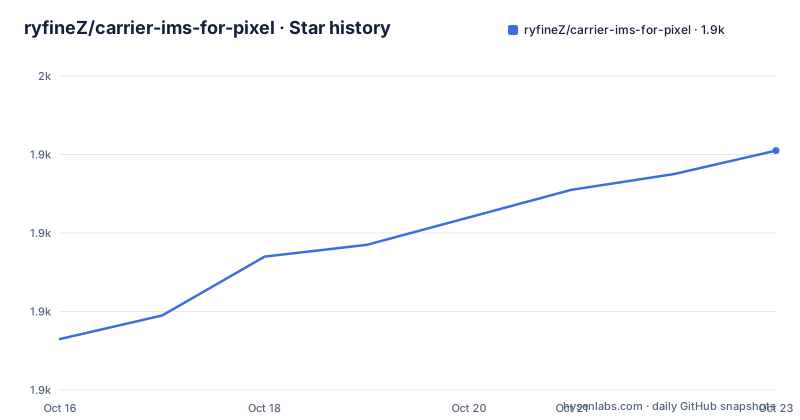
Star history
- ryfineZ/carrier-ims-for-pixel1,941 ★ · +48
| Repository | 2026-10-16 | 2026-10-23 |
|---|---|---|
| ryfineZ/carrier-ims-for-pixel | 1.9k | 1.9k |
48 Stars in the last 7 days, measured from the daily GitHub snapshot. Compare with other projects
Editorial analysis
TurboIMS targets Pixel carrier settings, not general phone tuning
Carrier IMS for Pixel, also called TurboIMS, addresses a specific Android problem: Pixel users often need to inspect or adjust IMS-related settings that are not exposed through the ordinary system interface. The documented targets include VoLTE, VoWiFi, ViLTE, VoNR, UT, Cross-SIM, IMS registration, 5G indicators, and carrier configuration. The application presents these as switches and diagnostic panels rather than requiring users to discover individual Android settings independently.
The stated audience is owners of Pixel Tensor devices, including Pixel 6, 7, 8, 9, 10, Fold, and Tablet models. The supported system floor is Android 13, with Android 14, 15, and 16 described as recommended. Languages are Simplified Chinese and English. This is therefore not a broad Android carrier editor with an unspecified device matrix. Its scope is centered on Pixel hardware and the carrier and IMS problems those devices commonly expose.
TurboIMS also includes tasks that are not purely IMS operations. It can display device and patch information, show Shizuku status, trigger manual IMS registration when registration is absent, repair captive portal network verification, and collect configuration or diagnostic information for an Issue. A TikTok repair option is shown only for mainland China SIMs. That narrow condition matters because it identifies the SIM context for which the project considers the feature relevant.
The application modifies system carrier-related configuration, so the README limits its intended use to learning, testing, and tuning owned devices. It does not present itself as a service-level fix or as a way to bypass carrier policy. The actual result still depends on the SIM, network, Android build, Pixel model, and whether the relevant carrier exposes the requested capability.
Shizuku gates TurboIMS configuration changes
The documented access model is based on Shizuku. The quick-start sequence requires Shizuku to be installed and launched before the user opens TurboIMS and authorizes it. This dependency explains why the application can offer system-level controls while presenting them through an Android app. The README does not describe a mode that performs the full documented workflow without Shizuku authorization.
The visible data flow is organized around selecting a SIM, reading the current environment, and applying a feature switch. The system information area groups version, device, patch, and Shizuku status so a user can verify the execution context before changing anything. The IMS registration panel can query the state and initiate registration manually when it is not registered. Carrier capability switches then cover the listed VoLTE, VoWiFi, ViLTE, VoNR, UT, and Cross-SIM items.
According to the project documentation, failed capability changes are rolled back automatically and recorded in logs. The repository also describes a diagnostic path that compares application configuration with a `CarrierConfig` readback. That comparison is useful when a switch appears to change in the app but the resulting system state is unclear. The README does not expose the internal service names, permission sequence, exact write order, or whether every diagnostic screen is available in every release, so those implementation details should not be inferred from the feature matrix.
The TikTok control is deliberately different from a generic country-code editor. The README explains that the older `sim_country_iso_override_string` CarrierConfig override does not reliably change baseband MCC/MNC values. TurboIMS instead exposes a targeted repair control. The project says this is based on an observed application-recognition branch rather than a true change of network identity.
Installing TurboIMS and performing a first Pixel IMS check
The README directs users to the repository Releases page to download an APK. It then requires Shizuku, authorization from TurboIMS, and selection of a SIM. No command-line installation procedure is documented for ordinary users, so there is no justified `adb install` command to include in that first-use path. The README does state Android 13 or later and Pixel Tensor compatibility, which should be checked before downloading.
After installation, the meaningful first action is to open the app and confirm that Shizuku is ready. Select the SIM that corresponds to the line being diagnosed. IMS registration status should be checked before changing unrelated switches. If registration is absent, the manual registration control can trigger the documented registration flow. For a network with signal but no usable connection, the README directs the user to inspect APN configuration first and then consider the network verification repair control.
Developers can build the debug APK with the Gradle wrapper and install it on a connected device. The README gives these exact commands:
./gradlew :app:assembleDebugThe expected output path in the documented installation command is:
adb install -r app/build/outputs/apk/debug/app-debug.apkThe second command installs the generated debug APK over an existing installation on the connected device. The README does not document a release-signing command, device setup command, or troubleshooting command for a missing Shizuku connection. A locally signed build requires values in `local.properties` using the following keys:
SIGN_KEY_STORE_FILE=/path/to/your.keystore
SIGN_KEY_STORE_PASSWORD=***
SIGN_KEY_ALIAS=***
SIGN_KEY_PASSWORD=***
These are signing configuration keys, not runtime settings. The README does not provide real credential values, so they must be supplied by the developer.
TurboIMS logs and rollbacks shape its diagnostic value
The diagnostic design is more useful than a bare collection of toggles because the README identifies logging, configuration inspection, system information copying, and Issue submission as part of the workflow. When a capability switch fails, the project says the change is rolled back automatically and the failure is recorded. That gives the user a specific artifact to inspect instead of relying only on the visible state of a switch.
For network access problems, the README separates two checks. A phone can show cellular signal while still failing internet access because APN configuration is missing or incorrect. Network verification repair is presented as the next action after that configuration check. This ordering matters because repairing captive portal validation does not, by itself, establish that APN settings are valid.
The TikTok repair is narrower still. The option appears only for a mainland China SIM, and the README advises restarting the target application or clearing its session cache after a change. The project explicitly says that behavior depends on the target application version and risk-control strategy. Consequently, this feature should be treated as compatibility troubleshooting, not as a permanent network guarantee.
The diagnostics can help distinguish an IMS registration issue from a configuration or network-validation issue. They do not prove that a carrier will preserve a modified setting after a reboot, software update, SIM swap, or network re-registration. The README does not document rollback behavior for every operation, so the stated automatic rollback should be verified for the specific control being used.
TurboIMS differs from manual CarrierConfig editing
The most relevant alternative is manual inspection and modification of Android carrier configuration through system settings, ADB workflows, or separate carrier configuration tools. Manual work can expose the exact keys and current values to an experienced user, while TurboIMS focuses on selected controls, status displays, and guided actions. The trade-off is control versus interpretation. Manual editing requires more knowledge of the device and Android build, while TurboIMS packages common IMS and network tasks into a narrower interface.
TurboIMS is also a maintained branch of `Mystery00/TurboIMS`, according to the README. The project describes added interaction and compatibility changes for mainland China and cross-region use, including more direct network capability diagnostics, 5G display handling, and failure logging. Those are repository-specific distinctions, not a claim that TurboIMS supports every feature of every related IMS project.
This approach is less suitable when an operator needs a formally supported configuration policy, an exhaustive CarrierConfig editor, or guaranteed behavior across every Pixel build. It is also a poor fit for devices outside the documented Pixel Tensor and Android 13 or later range. The application is designed for a controlled personal-device troubleshooting workflow, not for fleet policy or carrier certification.
TurboIMS releases, Android compatibility, and Apache-2.0
The repository is not archived. Its last push was on 2026-07-04, and the release list includes `3.9.0.r106.e9035ac9` on 2026-07-04, `3.9.0.r105.0ea26079` on 2026-06-21, and `3.9.0.r104.1569067f` on 2026-06-21. These dates establish recent project activity, but they do not establish that every Pixel model or Android release remains compatible. Users should read the release notes and changelog for the exact build they download.
The README records a repository migration from `ryfineZ/TurboIMS` to `ryfineZ/carrier-ims-for-pixel`. It recommends version `3.8.5` or later because update checks, Issue links, and repository links use the new repository. If an older release cannot reach those destinations, the documented fallback is to download an APK manually from the new repository's Releases page.
The project is released under `Apache-2.0`. That license grants permissions and conditions for use, modification, and distribution, subject to its terms. It does not remove the operational risk of changing carrier configuration, and it should not be read as a guarantee that a device, carrier, or application will accept a modified setting. The README's disclaimer assigns responsibility for the operation and its results to the user.
Editorial conclusion
Pixel Tensor owners who need a guided interface for IMS registration, carrier capability changes, and network diagnostics should evaluate TurboIMS, while users who need guaranteed carrier behavior, non-Pixel support, or a conventional system policy should avoid it. Before adoption, verify device and Android compatibility, ensure that Shizuku starts correctly, and note that failed changes are rolled back and logged by the app. For `carrier-ims-for-pixel`, the first practical acceptance check is whether IMS registration and the selected carrier controls behave as expected on the user's actual SIM and network.
Frequently asked questions
What does TurboIMS do on Google Pixel?
TurboIMS provides Pixel-focused controls and diagnostics for IMS registration, VoLTE, VoWiFi, ViLTE, VoNR, UT, Cross-SIM, 5G display, and network verification. It is designed for Pixel Tensor devices running Android 13 or later and uses Shizuku authorization.
How do I install TurboIMS and set up Shizuku?
The README directs users to download an APK from the repository Releases page, install and start Shizuku, open TurboIMS, authorize Shizuku, and select the SIM to use. Developers can build the debug APK with `./gradlew :app:assembleDebug` and install it with `adb install -r app/build/outputs/apk/debug/app-debug.apk`.
Why does the TikTok repair option appear only for a mainland China SIM?
The project exposes the TikTok repair control only for mainland China SIMs because it is intended as a targeted compatibility workaround. The README says its behavior depends on the target application version and risk-control strategy, so it is not guaranteed to remain effective.
Official sources
Add this badge to your README
If you maintain this project, the badge below links readers to this analysis and shows its maintenance status from the daily GitHub snapshot. Paste the markdown into your README; add ?metric=license or ?metric=stars to the image URL for a different field.

[](https://hysenlabs.com/projects/ryfinez-carrier-ims-for-pixel)Star history chart for your README
[](https://hysenlabs.com/projects/ryfinez-carrier-ims-for-pixel)Was this useful?