MomenSherif/react-oauth: Google Authentication for React Apps
Google OAuth2 using the new Google Identity Services SDK for React 🚀
At a glance
- What is it?
- MomenSherif/react-oauth is a TypeScript monorepo that packages Google Identity Services for React, with a separate GitHub OAuth hook. The Google package reduces direct SDK integration work, but token validation and OAuth configuration still belong in the application architecture.
- Who is it for?
- Application teams using React and Google Identity Services can adopt @react-oauth/google when its provider and component model fit their UI, while teams needing broader OAuth control may prefer direct SDK integration. Before adoption, verify the configured Google client ID, selected OAuth flow, callback behavior, backend token validation, and whether the repository's changes between 2026-04-08 and your pinned npm version affect your application.
- Can I use it commercially?
- Yes. MIT is a permissive licence: you can use, modify and sell software built on it, as long as you keep its copyright and licence notices.
- Is it still maintained?
- Activity is slowing. The repository last received commits 7 months ago.
- What is it written in?
- Mainly TypeScript, according to GitHub's language statistics.
Answers come from the project's GitHub data, last synced on November 7, 2026, and from our analysis. They are not legal advice.
Star history
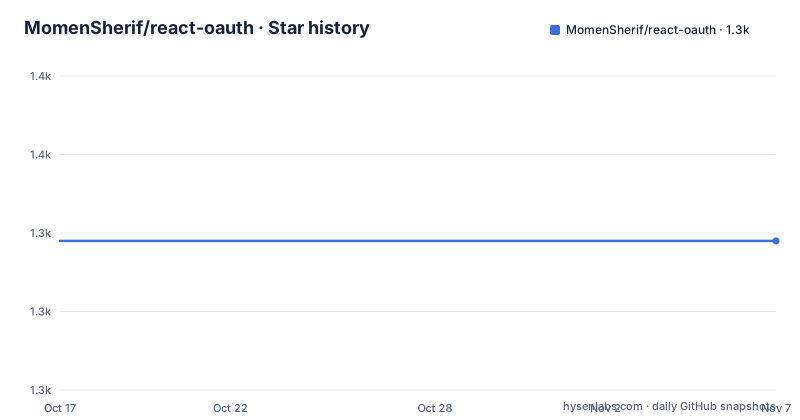
- MomenSherif/react-oauth1,339 ★ · +0
| Repository | 2026-10-17 | 2026-11-07 |
|---|---|---|
| MomenSherif/react-oauth | 1.3k | 1.3k |
0 Stars in the last 21 days, measured from the daily GitHub snapshot. Compare with other projects
Editorial analysis
Where @react-oauth/google fits in a React authentication stack
MomenSherif/react-oauth solves a narrow but common integration problem: adding Google sign-in to a React interface without requiring each application to reproduce the same provider setup, button configuration, callback handling, and TypeScript declarations. Its main audience is React developers who want Google Identity Services presented through React components and hooks rather than calling the Google client directly throughout an interface.
The repository is a monorepo rather than a single Google package. It contains `@react-oauth/google` for Google OAuth2 and `@react-oauth/github` for GitHub authentication. The top-level `package.json` defines workspaces under `packages/*` and `packages/@react-oauth/*`, while its scripts use Turborepo to run builds across those packages. Consumers normally install one published package instead of installing or building the entire monorepo.
The Google package handles the browser-facing integration. That boundary matters. Receiving a credential response in React does not, by itself, establish a trusted server-side session. An application still needs to decide what its backend accepts, how it validates any relevant token or code, and how the resulting user session is managed. The repository README focuses on the React package rather than defining a complete application authentication system.
The Google Identity Services component and credential flow
The documented Google setup has two layers. `GoogleOAuthProvider` receives the Google `clientId` and establishes the context used by the login component. `GoogleLogin` then renders the sign-in interface and receives event callbacks through `onSuccess` and `onError`.
According to the README, the package supports the Sign In With Google button, one-tap sign-up, automatic sign-in, custom login buttons, implicit and authorization code flows, and TypeScript support. Those features describe several possible interaction and flow choices within Google Identity Services. The root README does not show how each flow is configured, so an adopter cannot select one solely from this overview. The linked Google package documentation and Google's Identity Services documentation are the places to check the exact prop and script-loading requirements.
The success callback receives `credentialResponse`, and the README example writes it to the console. That is an integration example, not a session implementation. In a production application, the application should interpret the returned value according to the chosen Google flow and send any required data to its backend for verification. The package does not claim to create application cookies, store user accounts, or complete a server session, and the README does not document those responsibilities.
Installing @react-oauth/google and rendering the first login button
The README lists npm and Yarn as installation options. For a React application using npm, add the Google-specific package rather than the monorepo root package:
npm install @react-oauth/googleThe root documentation also gives Yarn as an alternative. Use this form in a project that resolves dependencies through Yarn:
yarn add @react-oauth/googleNext, wrap the login UI in `GoogleOAuthProvider` and supply the client ID created for the Google integration. The README leaves the value as `<your_client_id>` rather than documenting a command for creating or retrieving it.
import { GoogleOAuthProvider, GoogleLogin } from '@react-oauth/google';

function App() {
  return (
    <GoogleOAuthProvider clientId="<your_client_id>">
      <GoogleLogin
        onSuccess={credentialResponse => {
          console.log(credentialResponse);
        }}
        onError={() => {
          console.log('Login Failed');
        }}
      />
    </GoogleOAuthProvider>
  );
}
When the provider is configured, the rendered interface should expose Google's login control. A successful interaction invokes `onSuccess` with a `credentialResponse`; a failure invokes `onError`. The root README does not define the environment variables used by its demo, token storage conventions, redirect URIs, or backend routes, so the application team must obtain those details from the package-specific documentation and its own Google project configuration.
Monorepo release machinery and the cost of pinning a version
The repository uses Yarn 4.6.0 and Changesets for release management. The `release` script first runs the package build through `yarn build:packages`, then invokes `changeset publish`. The `.changeset/` directory is part of the repository layout, while `turbo.json` coordinates tasks across the workspaces. This structure is relevant to maintainers who intend to change the source, but it does not add runtime complexity to an npm consumer of `@react-oauth/google`.
The latest listed Google package release is `@react-oauth/[email protected]`, dated 2026-04-08. A preceding Google release, version `0.13.4`, is dated 2025-12-22. The repository is not archived, and its last push was on 2026-04-08. That supports describing the project as recently changed at that point, although it does not by itself establish compatibility with every React setup or Google configuration.
License changes should be checked when a new package version is pinned, but the repository identifies the project as MIT licensed. The README points to the `LICENSE` file rather than documenting exceptions by package. For an organization, the practical upgrade cost includes reviewing the package diff, checking the application's React and TypeScript setup, and validating the exact Google login flow in its own deployment. The root README does not provide a support-policy table or a compatibility matrix, so those checks cannot be replaced by the release listing.
Where @react-oauth/google is the wrong integration boundary
The package is a poor fit for a React application that wants direct control over every stage of Google's client initialization and callback handling. Direct use of Google Identity Services may be more appropriate when the React wrapper's provider or login component does not match an existing authentication shell. The root README does not publish a detailed props reference or migration guide for the Google package, so compatibility with an unusually customized integration cannot be inferred from the short example.
It is also the wrong abstraction if the requirement is a complete identity platform rather than a Google login control. The repository does not document user provisioning, account linking, session persistence, role assignment, refresh handling, or organization-wide access policy. Those concerns extend beyond receiving a credential response in the browser.
There is also a scope distinction between the repository's packages. A team looking specifically for GitHub OAuth should not assume that installing `@react-oauth/google` supplies a GitHub flow. The repository publishes `@react-oauth/github` separately, and its documented hook uses `initiateGitHubLogin`, returns an authorization code through `onSuccess`, and says that code exchange belongs on the backend. The shared repository does not make the two provider implementations interchangeable.
React OAuth compared with direct Google Identity Services integration
The main alternative is direct Google Identity Services integration. Google provides the underlying web SDK, while `@react-oauth/google` supplies React-specific imports, a provider component, a login component, callbacks, and TypeScript-oriented usage. That layer can reduce repeated UI setup, but it also inserts another abstraction between the application and Google's client API.
For a conventional React login page, the package has a clear advantage in expressiveness: the documented example requires two imported components and two callbacks. The application does not need to reproduce the provider wrapper in that example. Direct SDK integration may be preferable when the team needs behavior not covered by the root README, such as a custom script-loading arrangement, precise control over initialization timing, or an interface structure that does not use `GoogleLogin`.
The repository itself links to Google's official Identity Services documentation, which makes that the appropriate comparison point for flow semantics. It also lists a live demo, but the demo demonstrates the Google package rather than proving compatibility with every backend or deployment target. Neither approach can be judged solely from the presence of a login button. The decision depends on whether the wrapper's documented contract matches the application's required flow and whether the backend accepts the resulting credential in the same way.
Editorial conclusion
Application teams using React and Google Identity Services can adopt @react-oauth/google when its provider and component model fit their UI, while teams needing broader OAuth control may prefer direct SDK integration. Before adoption, verify the configured Google client ID, selected OAuth flow, callback behavior, backend token validation, and whether the repository's changes between 2026-04-08 and your pinned npm version affect your application.
Frequently asked questions
How do I install @react-oauth/google in a React project?
Run `npm install @react-oauth/google`, or use `yarn add @react-oauth/google` in a Yarn project. Then import `GoogleOAuthProvider` and `GoogleLogin` from `@react-oauth/google` and provide the configured Google `clientId`.
What does the Google success callback receive?
The README example passes a `credentialResponse` value to `onSuccess`. It does not state in the root documentation how that value should be stored or exchanged for an application session.
Does react-oauth create a complete backend login session?
No such behavior is documented. The repository describes browser-facing React OAuth components and, for its separate GitHub package, says authorization code exchange belongs on a backend. The application remains responsible for its server-side session design and token verification.
Does react-oauth include both Google and GitHub authentication?
The monorepo contains separate packages for the two providers. Install `@react-oauth/google` for Google Identity Services or `@react-oauth/github` for the documented GitHub hook; installing one package does not imply that the other is included.
Official sources
Add this badge to your README
If you maintain this project, the badge below links readers to this analysis and shows its maintenance status from the daily GitHub snapshot. Paste the markdown into your README; add ?metric=license or ?metric=stars to the image URL for a different field.

[](https://hysenlabs.com/projects/momensherif-react-oauth)Star history chart for your README
[](https://hysenlabs.com/projects/momensherif-react-oauth)Was this useful?