MMEX translates the toolkit's own strings, not just its own
Money Manager Ex is an easy to use, money management application built with wxWidgets
At a glance
- What is it?
- Money Manager Ex is a wxWidgets desktop finance application with a SQLite file, an AES option, and a mobile companion. Its localization setup includes a separate catalogue for the toolkit itself, which most projects never bother with.
- Who is it for?
- MMEX suits someone who wants a single local file holding their accounts, budgets and reports, on any of the three desktop platforms, with no service to run. It does not suit a household that needs shared multi-user access or automatic bank sync, neither of which the feature list mentions.
- Can I use it commercially?
- Yes, with conditions. GPL-2.0 is a copyleft licence: if you distribute software that includes it, you must release that software's source code under the same licence. Running it internally without distributing it does not trigger that obligation.
- Is it still maintained?
- Yes. The repository last received commits 3 days ago.
- What is it written in?
- Mainly C++, according to GitHub's language statistics.
Answers come from the project's GitHub data, last synced on October 22, 2026, and from our analysis. They are not legal advice.
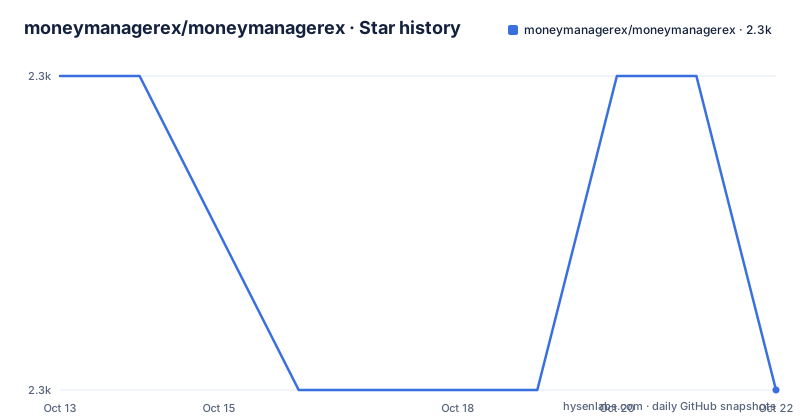
Star history
- moneymanagerex/moneymanagerex2,278 ★ · -1
| Repository | 2026-10-13 | 2026-10-22 |
|---|---|---|
| moneymanagerex/moneymanagerex | 2.3k | 2.3k |
-1 Stars in the last 9 days, measured from the daily GitHub snapshot. Compare with other projects
Editorial analysis
The screenshots predate the current build by two versions
A detail that rewards reading the image captions: most screenshots are labelled MMEX 1.7.1-RC.1 64-bit on Linux Mint 21.3 Cinnamon, and the last one is 1.8.1-Beta.1. The published versions are newer than both, with v1.9.4 from 2026-08-31 ahead of v1.9.3 in August and v1.9.2 in January 2026. So the visual evidence for the interface is roughly a year and a half behind what you would download. That does not mean the interface changed, it means the README was written while that build was current and the captions were never refreshed. The captions do tell you something useful regardless: the screenshots come from a 64-bit Linux build on Mint with the Cinnamon desktop, which is what the layout was tuned against, and one of them is deliberately showing the Hungarian user interface to illustrate translation coverage.
One SQLite file, optionally encrypted with AES
The data model is the reason to look at this application. It stores everything in a nonproprietary SQLite database, which means your financial history is a file you can copy, back up and open without the program running. Encryption is available through AES, so the file can be protected at rest rather than only by disk encryption on the machine holding it. The account types cover the ordinary personal finance set: checking, credit card, savings, stock investment and assets. Above that sit two structures that do the real work. Categories support unlimited nested multi-level depth, so a category tree can follow whatever structure your household actually has. Split transactions can carry multiple tags, which is how one payment is attributed to several categories at once instead of forcing a single choice. Both of those are import decisions that are painful to retrofit, so they matter when you are comparing against another tool.
Budgeting, forecasting and reminders share the same file
The remaining feature set is what turns a transaction list into something you plan with. Budgeting and cash flow forecasting are both built in, rather than one being an export. Reminders exist for scheduled bills and deposits, so an application that knows about recurring obligations can tell you about them. Reporting is described as one-click, with graphs and charts, and it is extendable: custom reports live in a separate general-reports repository that the feature list links to directly, which is a stronger signal than a checkbox because the reports have their own home and can evolve independently of the core application. Data comes in through import from CSV and from Quicken Interchange Format, so moving from a bank export or from a Quicken-era file does not require manual entry. Installation is not required if you take the portable build, which runs from a USB stick or a flash drive, and that is the option to pick if you want your file to travel with you rather than sit in a home directory.
Four distribution channels from one project
The distribution story is broader than a single desktop application. Desktop builds cover GNU/Linux, macOS and Windows, with a stable download link for all three and separate developmental builds per platform. Linux also has a Flatpak with an app id of org.moneymanagerex.MMEX, and the repository carries the corresponding manifest file org.moneymanagerex.MMEX.yml at the root alongside an .appimage-builder.yml. Mobile is a separate codebase with its own cycle: an App Store build for iPad and iPhone, and both F-Droid and Google Play for Android, using the package id com.money.manager.ex.android on the Play side. Continuous integration spans CircleCI and AppVeyor, and there is also a dockers/ directory, so a containerized deployment is at least contemplated even though the README frames the product as a desktop application. A separate general-reports repository holds the custom reports the feature list links to, which is a stronger arrangement than embedding report templates in the core application.
Compiling means CMake, a 3rd directory and submodules
The build system is CMake, with CMakeLists.txt and CMakeSettings.json at the root, and the developer documentation lives in BUILD.md and INSTALL.md rather than in the README. That separation is the practical shape of the project: the README is aimed at people choosing an application, and the two markdown files are aimed at people compiling it. The repository makes the input list visible at the top level. There is a 3rd/ directory for third-party code, a .gitmodules file indicating that some build inputs are fetched as submodules, and po/ plus po_wxstd/ for translations. Style is pinned too, with .clang-format, .editorconfig and .gitattributes, and CI runs on CircleCI and AppVeyor with a .travis.yml still present in the tree. If you plan to build from source rather than download a binary, read INSTALL.md first, because the submodule and third-party steps are not described anywhere in the README.
The localization tree has a second catalogue for wxWidgets
The translation setup is the part of this repository that most projects skip. International support is routed through Crowdin, configured by a crowdin.yml at the root, and the translations land in two separate trees. po/ holds the application's own strings, referenced from a desktop icon file, an AppData metainfo file and a set of MIME type associations under resources/dist/linux/share. po_wxstd/ is the second tree, and it is the interesting one: it holds translations for the wxWidgets toolkit's own user-visible strings, not for MMEX. When a menu label, a file dialog or a date picker comes from the toolkit rather than from the application code, that text has to be translated somewhere else. The user interface language entry in the same list is the gettext catalogue for the application itself. The second catalogue is the notable part of this layout.
Where Money Manager Ex is the wrong tool
Four boundaries are visible in what the README does and does not claim. The first is synchronization. There is no bank connection, no Plaid-style aggregator, and no multi-device sync in the feature list, which means every device holds its own file and reconciling two copies is manual. A household with two people entering shared expenses needs a different answer. The second is multi-user access. The database is a file, not a server, and the product is described as something an individual opens every day, so concurrent editing from two machines is a file conflict rather than a supported workflow. The third is scope versus ambition. The stated design goal is to concentrate on the basic features that 90 percent of users would want, and simplicity and user friendliness are named as goals, so features a power user considers mandatory are absent by choice rather than by omission. The fourth is build complexity for anyone who wants to compile it themselves: CMake plus a third-party tree plus submodules plus translations, which is why the prebuilt binaries and the Flatpak matter. On cost, the project is GPL-2.0, so anyone embedding MMEX code into a closed product inherits copyleft obligations and should take their own advice on that.
Editorial conclusion
MMEX suits someone who wants a single local file holding their accounts, budgets and reports, on any of the three desktop platforms, with no service to run. It does not suit a household that needs shared multi-user access or automatic bank sync, neither of which the feature list mentions. Before adopting, decide whether the portable build or the installed build suits you, check that the AES database encryption is enabled if the file leaves the machine, and read INSTALL.md and BUILD.md before compiling.
Frequently asked questions
What database does Money Manager Ex use?
A nonproprietary SQLite database, with Advanced Encryption Standard (AES) encryption available. That makes the data a file you can copy and back up without the application running.
Which platforms does Money Manager Ex run on?
Desktop builds for GNU/Linux, macOS and Windows, plus a Flatpak with the app id org.moneymanagerex.MMEX. Mobile builds exist for iPad and iPhone on the App Store and for Android on F-Droid and Google Play.
Can I run Money Manager Ex from a USB stick?
Yes. Portable versions run from a USB or flash drive and installation is not required for them, according to the feature list.
Does Money Manager Ex import data from my bank?
Import is documented for CSV and Quicken Interchange Format (QIF) files. No automatic bank connection or synchronization is listed among the features.
How are custom reports added to Money Manager Ex?
Through the separate general-reports repository, which the feature list links to directly rather than keeping report templates inside the core application.
How does Money Manager Ex handle translations?
Through Crowdin, with translations in two trees: po/ for the application's own strings and po_wxstd/ for the wxWidgets toolkit's user-visible text. Interface strings are referenced from desktop, AppData and MIME type files.
Official sources
Add this badge to your README
If you maintain this project, the badge below links readers to this analysis and shows its maintenance status from the daily GitHub snapshot. Paste the markdown into your README; add ?metric=license or ?metric=stars to the image URL for a different field.

[](https://hysenlabs.com/projects/moneymanagerex-moneymanagerex)Star history chart for your README
[](https://hysenlabs.com/projects/moneymanagerex-moneymanagerex)