QDirStat 2.0 is a Qt6 port whose own release notes call the user benefit underwhelming, and its translations live in somebody else's repository
QDirStat - Qt-based directory statistics (KDirStat without any KDE - from the original KDirStat author)
At a glance
- What is it?
- A graphical disk usage analyser that shows where space went as a tree and a treemap, written in Qt with a qmake project file and no KDE dependencies. Version 2.0 is a framework port rather than a feature release, and the translation plan it introduced is still being worked out in public.
- Who is it for?
- QDirStat suits a Linux, BSD or macOS user who wants to see disk usage as a treemap and to clean up interactively, and it is a good fit for a machine where package ownership matters because the packages and unpackaged files views answer a question a plain treemap cannot. Two things to know before you rely on it.
- Can I use it commercially?
- Yes, with conditions. GPL-2.0 is a copyleft licence: if you distribute software that includes it, you must release that software's source code under the same licence. Running it internally without distributing it does not trigger that obligation.
- Is it still maintained?
- Yes. The repository last received commits 2 days ago.
- What is it written in?
- Mainly C++, according to GitHub's language statistics.
Answers come from the project's GitHub data, last synced on November 13, 2026, and from our analysis. They are not legal advice.
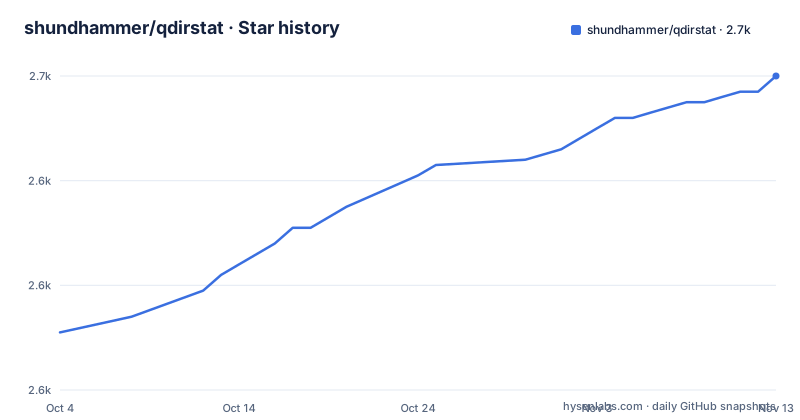
Star history
- shundhammer/qdirstat2,660 ★ · +49
| Repository | 2026-10-04 | 2026-11-13 |
|---|---|---|
| shundhammer/qdirstat | 2.6k | 2.7k |
49 Stars in the last 40 days, measured from the daily GitHub snapshot. Compare with other projects
Editorial analysis
The headline feature of 2.0 is a port, and the notes call it underwhelming
The news entry dated 2025-12-26 is the port to Qt6, and it is unusually honest. Yes, this took quite a while. The overall end user benefit may really be underwhelming. The reason to do it anyway is stated as longevity rather than delight: it makes QDirStat future proof, Qt5 is being phased out in many Linux distributions, and Qt6 has already advanced to version 6.10.
The discussion about whether to do it at all lived in issue 280, which the entry links, so the decision has a public record rather than being made quietly.
The stable release followed on 2026-01-18, and the same announcement adds two smaller things. You can now select the ISO date and time format, in the shape of 2024-12-28 17:38, with a checkbox in the General tab, so an English locale no longer forces a format like Dec 28, 2025 5:38 PM on you. And the infrastructure for program translations was added, which is the subject of its own section here.
Translations are designed to live outside this repository, and the packaging is unfinished
The plan and the reality are two different documents. The plan, announced with 2.0: added infrastructure for program translations, consisting of a translator class based on QTranslator and using GNU gettext, imported from the author's own Myrlyn project, plus a makepot script to generate the .pot files that translations start from. Translations will not be hosted in the QDirStat source repository, so source code and translations are kept separate, and the intention is that a translations maintainer will create a separate project and repository called qdirstat-lang.
The reality, from the news entry dated 2026-09-24: program translations are starting to arrive, with the Portuguese translation for pt_PT by Ricardo Simões, tracked in issue 318. And the practical instructions are not a package manager. Interested users have to install the qdirstat-lang package from his GitHub repository, the maintainers admit they will have to work out the packaging workflow, and in the meantime it is as simple as copying the relevant qdirstat.mo file to the correct path below /usr/share/locale, for Portuguese to /usr/share/locale/pt_PT/LC_MESSAGES/qdirstat.mo.
So today a translated QDirStat depends on one contributor's repository and a manual copy, which is a fair trade for keeping the source tree free of translation churn and a poor trade for anybody who expects their package manager to handle it.
Two views answer a question a treemap cannot
The treemap and the tree answer where the space went. Two of the newer views answer who owns it, which is a different question and the more useful one on a machine that has been installed for years.
The packages view shows disk usage of installed software packages and their individual files. The unpackaged files view shows what files in system directories do not belong to any installed software package. Between them they separate what you installed from what a package manager put there from what nobody claims, which is exactly the information you need before deleting anything outside your home directory.
The rest of the new views are conventional: disk usage per file type by filename extension, a file size histogram, a file age view, and a free, used and reserved disk size view for each mounted filesystem, described as being like df. Several of these have their own documents under `doc/`, including `Pkg-View.md`, `Unpkg-View.md` and `File-Age-Stats.md`.
Cleanup actions are user defined, and they are the destructive half
Everything up to this point is observation. The cleanup actions are the part that changes your disk, and the feature list describes them in three places.
There is an unlimited number of user defined cleanup actions, which means the deletion patterns are configuration rather than code. In the treemap, clicking a file shows where it is in the tree, and you can instantly move it to the trash. And errors of cleanup actions are now properly shown, along with their output if desired.
That last item is the one to notice. Reporting the errors of a cleanup action, and being able to see its output, arrived with a recent release, which means earlier versions could fail quietly. It also means the configuration screen for cleanups is worth reading before you point it at a directory, since exclude rules, file categories by MIME type, treemap colours and tree columns are all configurable in the same place, and those settings decide what a rule matches.
Four years between releases, and a header dated after the last commit
The release history explains the rhythm. Version 2.0 is dated 2026-01-18, version 1.9 is dated 2024-01-14 and version 1.8.1 is dated 2022-06-30. That is a two year gap before the Qt6 release and a four year span across the three, and the gap is not inactivity so much as a single large piece of work followed by a release to match it.
The last push on the default branch is dated 2026-09-20, and the news entry about the first translation is dated 2026-09-24, so post-release work is landing in small pieces rather than as a new version number.
The header of the file has a smaller inconsistency. The copyright line reads 2015 to 2025 for Stefan Hundhammer, and the line under it says Updated: 2026-09-26. Both are stale or forward dated in opposite directions, since the stated update date is later than the newest commit in the repository.
It is a KDirStat rewrite, and the rewrite is the feature
QDirStat describes itself as KDirStat without any KDE, from the author of the original KDirStat. The overview is specific about what that means: a Qt-only port of the old Qt3 and KDE3 based KDirStat, now based on the latest Qt6, needing no KDE libraries or infrastructure, and running on every X11 based desktop on Linux, BSD and other Unix-like systems, as well as in a Docker container. Target platforms are listed as Linux, BSD and other Unix-like systems, plus macOS.
The documentation keeps the comparison honest rather than pretending to be new software. The table of contents carries a related software entry naming KDirStat, WinDirStat, K4DirStat and more, a motivation section titled as a rant about why the port exists at all, and separate sections for macOS compatibility and Windows compatibility.
The build system is a single qmake project file, `qdirstat.pro`, with `src/`, `test/`, `man/`, `package/`, `scripts/` and `doc/` beside it, which is a smaller and older arrangement than a CMake tree would be.
The treemap is the interface, and colour is configuration
The central idea is small. A large file is shown as a large rectangle, small files as small rectangles, and the colour corresponds to the file type, described as images, videos or whatever. Clicking a rectangle shows where in the tree the file sits, and from there you can move it to the trash. Sizes are shown both as a traditional tree view and in that treemap, with a details panel beside them, and the screenshot in the documentation deliberately shows a multi-selection in both the tree and the treemap at once.
Because colour carries meaning, it is configurable. File categories are defined by MIME type, and the treemap colours, exclude rules and tree columns are all settings rather than constants. The treemap has its own document, `doc/Treemap.md`, separate from the main file.
Multi-selection in both views is listed as a new feature compared with KDirStat, and it is the feature that changes how the tool is used, since a cleanup can then be aimed at a set of rectangles rather than one at a time.
Editorial conclusion
QDirStat suits a Linux, BSD or macOS user who wants to see disk usage as a treemap and to clean up interactively, and it is a good fit for a machine where package ownership matters because the packages and unpackaged files views answer a question a plain treemap cannot. Two things to know before you rely on it. The project ships translations through a separate language package whose packaging workflow the maintainers describe as still to be worked out, so plan for a manual file copy rather than an update. And treat the cleanup actions as destructive: they are user defined, they run against the trash, and error reporting was added recently enough that you should watch the output pane.
Frequently asked questions
What are the key differences between KDirStat and QDirStat?
QDirStat is a Qt-only port of the old Qt3 and KDE3 based KDirStat by the same author, now on Qt6, with no KDE libraries or infrastructure. Newer features include multi-selection in the tree and treemap, unlimited user defined cleanup actions with error reporting, configurable file categories and exclude rules, packages and unpackaged files views, and views for usage per file type, file size histogram, file age and free space per filesystem.
How do I install QDirStat?
Target platforms are Linux, BSD and other Unix-like systems plus macOS. The file points to ready-made binary packages for various Linux distributions, a section on running it in a Docker container, and a building section, and it links the release announcement for version 2.0.
Which platforms does QDirStat run on?
Every X11 based desktop on Linux, BSD and other Unix-like systems, macOS, and inside a Docker container. Windows compatibility has its own section in the documentation.
Does QDirStat need KDE?
No. It is a Qt-only port that needs no KDE libraries or infrastructure, which is the whole point of the rewrite from the Qt3 and KDE3 based original.
Where do QDirStat translations live?
Not in the source repository. The plan is a separate qdirstat-lang project and repository. Until its packaging workflow is worked out, users are told to copy the relevant qdirstat.mo file under /usr/share/locale, for example to /usr/share/locale/pt_PT/LC_MESSAGES/qdirstat.mo.
What changed in the QDirStat 2.0 release?
Migration to Qt6, a checkbox for selecting the ISO date and time format instead of the locale's own, and the infrastructure for program translations, including a translator class based on QTranslator and a makepot script.
Official sources
Add this badge to your README
If you maintain this project, the badge below links readers to this analysis and shows its maintenance status from the daily GitHub snapshot. Paste the markdown into your README; add ?metric=license or ?metric=stars to the image URL for a different field.

[](https://hysenlabs.com/projects/shundhammer-qdirstat)Star history chart for your README
[](https://hysenlabs.com/projects/shundhammer-qdirstat)Was this useful?