TigerVNC gives Unix admins a virtual framebuffer server and calls its Windows server unmaintained
High performance, multi-platform VNC client and server
At a glance
- What is it?
- TigerVNC is a GPL-2.0 C++ descendant of the RealVNC 4 and X.org code bases, pairing the FLTK based vncviewer client with Unix servers built around the virtual framebuffer inside Xvnc. Its own text warns that the Windows server, winvnc, is unmaintained.
- Who is it for?
- Reach for it when you want a Unix desktop parked on a server and are willing to build from CMake and set the password yourself. Leave it if you need a maintained Windows server, since winvnc is called out as unmaintained and can fail while Fast user switching or Remote Desktop is active.
- Can I use it commercially?
- Yes, with conditions. GPL-2.0 is a copyleft licence: if you distribute software that includes it, you must release that software's source code under the same licence. Running it internally without distributing it does not trigger that obligation.
- Is it still maintained?
- Yes. The repository last received commits 1 day ago.
- What is it written in?
- Mainly C++, according to GitHub's language statistics.
Answers come from the project's GitHub data, last synced on November 13, 2026, and from our analysis. They are not legal advice.
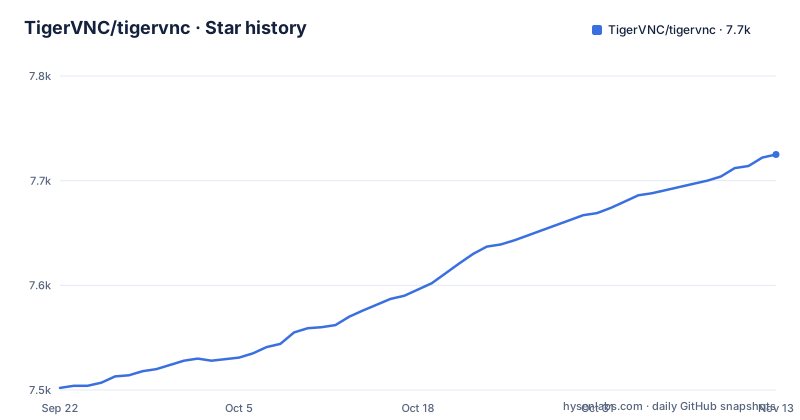
Star history
- TigerVNC/tigervnc7,725 ★ · +223
| Repository | 2026-09-22 | 2026-11-13 |
|---|---|---|
| TigerVNC/tigervnc | 7.5k | 7.7k |
223 Stars in the last 52 days, measured from the daily GitHub snapshot. Compare with other projects
Editorial analysis
Xvnc is an X server with a virtual framebuffer, and vncserver is the normal way in
The core of the Unix side is Xvnc, and its description does two jobs at once: it is a VNC server and it is also an X server with a virtual framebuffer. That second half is what makes a headless machine able to hold a desktop at all, since the display exists only in memory and no graphics card is involved. The project's own advice is to start it through the vncserver service rather than by hand, and for systemd there is a matching template unit, [email protected], which starts a user session with Xvnc plus one of the desktop environments already present on the system. The practical consequence is that a hand launched Xvnc gives you the server without the session handling that the service provides, so the mismatch between what you ran and what the unit would have run is on you.
vncpasswd has to run before VNC authentication works on any server
Authentication has one entry point. vncpasswd changes the password used to access VNC server sessions, and it assumes VNC authentication is the scheme in play. The ordering matters more than the tool itself: a password must be set before VNC authentication is used with any of the servers or services, so a session created ahead of that step has nothing to authenticate against. Two limits are worth stating plainly. The overview ties this to VNC authentication specifically, and nothing in it covers how the connection itself is protected once a session is reachable across a network, which leaves that decision with you. And the password is a session password rather than a user account credential, so anyone holding it reaches that session, not a named login.
winvnc is flagged unmaintained and breaks on Fast user switching
The Windows program list is one entry long and it carries a warning. winvnc is the TigerVNC server for Windows, letting a Windows desktop be reached remotely with a VNC viewer, and the text states plainly that it is currently unmaintained and may not function correctly. A second failure condition follows: winvnc may not work if the Fast user switching or Remote desktop features are in use. Both of those are common settings on a Windows desktop, so the case for winvnc narrows quickly. If you arrive at TigerVNC wanting a Windows host to serve a desktop, this project does not currently offer a maintained server for that, and the client half, vncviewer, is the part that is still current.
x0vncserver polls an X display and is offered as a demonstration
x0vncserver takes a different route from Xvnc. Instead of owning a virtual framebuffer, it continuously polls any X display and lets that display be controlled over VNC, which means it can attach to a session that already exists rather than creating one. The project's own word for it is inefficient, and its stated purpose is mainly as a demonstration of a simple VNC server. Read that as a scope marker rather than a performance footnote. Polling an existing display is the easy way to see whether your network path, your viewer and your password setup work at all, and it is not the shape you want under load or holding a session open indefinitely. vncconfig is the piece that goes with Xvnc, configuring and controlling a running instance of it.
w0vncserver covers Wayland, and the Unix list is headed not Mac
w0vncserver is the newer surface in the program list, a VNC server for Wayland compositors that gives control over your local Wayland session, which is a different model from owning a virtual framebuffer. It is the answer for a session the compositor already has. The gap worth noticing sits in the section heading itself, because the Unix and Linux group is labelled as not Mac. Read across the three groups and the asymmetry is clear: every build has vncviewer, Unix and Linux adds Xvnc and friends, Windows adds winvnc, and no Mac server appears in any list. So on a Mac this project gives you the client side, and the direction of the connection is out to a Windows or Unix host rather than in from one.
Tight encoding accelerated by libjpeg-turbo is the one performance claim
The performance story is stated in one sentence: TigerVNC supports a variant of Tight encoding that is greatly accelerated by the use of the libjpeg-turbo JPEG codec. That is the whole of it. No frame rates, no resolution ceilings and no comparison against another VNC implementation appear anywhere in the overview, so treat the encoding line as a design fact rather than a benchmark. The lineage explains why the code looks the way it does. TigerVNC began as a next generation development effort for TightVNC on Unix and Linux, split from that parent project in early 2009 so TightVNC could focus on Windows, and is built on the RealVNC 4 and X.org code bases. The copyright list is also described in the text as incomplete and generally out of date, with the TigerVNC team entry running 2009 to 2026.
The overview names no install command, and BUILDING.txt is where that lives
The README gives no install line to copy. The repository is source, laid out the way a CMake project expects: CMakeLists.txt and a cmake/ directory at the root, common/, unix/, win/ and vncviewer/ for the code, plus doc/, tests/, contrib/, po/, media/, java/ and release/ around it. The build writeup is BUILDING.txt, and the programme names you will actually type are these:
vncpasswd
vncserver
Xvnc
vncconfig
w0vncserver
The java/ directory sits at the top level while the programme list names one client, vncviewer, and no Java implementation, so do not assume the tree and the shipped binaries match. Release tags 1.16.0, 1.16.1 and 1.16.2 landed in January and March 2026, and the last push is dated 2026-10-31.
Editorial conclusion
Reach for it when you want a Unix desktop parked on a server and are willing to build from CMake and set the password yourself. Leave it if you need a maintained Windows server, since winvnc is called out as unmaintained and can fail while Fast user switching or Remote Desktop is active. Before depending on it, read BUILDING.txt for the build steps the README leaves out, and decide separately whether the network path is acceptable, because the README does not cover the connection.
Frequently asked questions
What is TigerVNC used for?
TigerVNC implements VNC, a remote display system that lets you view and interact with a virtual desktop running on another computer on the network. Graphical applications run on the remote machine and only the display is sent to your local machine, on a platform independent basis for both servers and clients.
how to use tigervnc server
On Unix and Linux, Xvnc acts as both the VNC server and an X server with a virtual framebuffer, and the vncserver service is the normal way to start it, with [email protected] available as a systemd unit. If you use VNC authentication, vncpasswd must set the password before any server or service uses it.
how to use tigervnc viewer
vncviewer is the cross-platform TigerVNC viewer, written using FLTK. It connects to a VNC server and lets you interact with the remote desktop being displayed, and that server can be running on a Windows or a Unix/Linux machine.
Is TigerVNC safe to use?
The overview states that VNC authentication requires a password set with vncpasswd before it is used with any of the servers or services, and it does not describe how the connection itself is protected across a network. Third party code ships inside the distribution, including public domain DES software and X Window System code, each under its own terms.
Official sources
Add this badge to your README
If you maintain this project, the badge below links readers to this analysis and shows its maintenance status from the daily GitHub snapshot. Paste the markdown into your README; add ?metric=license or ?metric=stars to the image URL for a different field.

[](https://hysenlabs.com/projects/tigervnc-tigervnc)Star history chart for your README
[](https://hysenlabs.com/projects/tigervnc-tigervnc)Was this useful?