PyMongo: how the Python driver turns MongoDB wire traffic into objects
PyMongo - the Official MongoDB Python driver
At a glance
- What is it?
- A close look at the official MongoDB Python driver, its three shipped packages, the sync and async surfaces it exposes, and the install traps that catch newcomers.
- Who is it for?
- Adopt PyMongo if you are writing Python against MongoDB and want the sync and async surfaces from one vendor-maintained package with typing support. Do not adopt it if you want an ORM that hides collections and indexes behind Python classes, because the driver deliberately exposes the server's query language as-is.
- Can I use it commercially?
- Yes. Apache-2.0 is a permissive licence: you can use, modify and sell software built on it, as long as you keep its copyright and licence notices.
- Is it still maintained?
- Yes. The repository last received commits 1 day ago.
- What is it written in?
- Mainly Python, according to GitHub's language statistics.
Answers come from the project's GitHub data, last synced on November 14, 2026, and from our analysis. They are not legal advice.
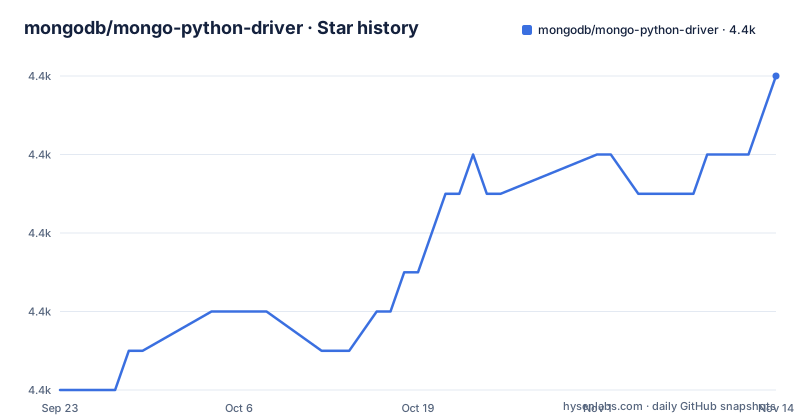
Star history
- mongodb/mongo-python-driver4,364 ★ · +8
| Repository | 2026-09-23 | 2026-11-14 |
|---|---|---|
| mongodb/mongo-python-driver | 4.4k | 4.4k |
8 Stars in the last 52 days, measured from the daily GitHub snapshot. Compare with other projects
Editorial analysis
Three packages ship in one distribution, and one of them shadows a PyPI name
Install once and you get three importable packages. The `pymongo` package is the driver itself, the `bson` package implements the Binary JSON Object Notation format that MongoDB speaks on the wire, and `gridfs` implements the GridFS specification for storing files larger than a document's 16 MB ceiling. They are not separate downloads. They live side by side in the repository root as `pymongo/`, `bson/` and `gridfs/`.
That arrangement has one sharp edge, and the README names it plainly. Do not install the `bson` package from PyPI, because PyMongo bundles its own and the PyPI package of that name is a third-party project that is incompatible with the driver.
The `pyproject.toml` marks the distribution as typed via a `Typing :: Typed` classifier, and requires Python `>=3.11`. Supported CPython versions run through 3.15, and the driver declares support for server versions 4.4, 5.0, 6.0, 7.0, 8.0 and 9.0.
MongoClient is a lazy handle, so a bad host does not fail at import
`pymongo.MongoClient` returns immediately. It opens sockets on demand, in the background, and the constructor argument is where topology, replica set discovery and TLS settings get resolved. The connection is a pool inside the client, and the pool is what makes `MongoClient` safe to hold as a long-lived module-level object rather than rebuilding per request.
Laziness cuts both ways. A hostname that does not resolve, a replica set name that is wrong, or a certificate that does not verify will not raise at the point you construct the client. The failure arrives on the first operation that needs the network, which means the traceback points at your query code rather than at your configuration.
The `pymongo` package offers both synchronous and asynchronous APIs, which is worth understanding before you pick a style.
insert_one returns the ObjectId the server assigned, which is the first thing worth checking
The shortest example in the README is a `pycon` transcript rather than a script, and it shows the shape of every basic operation. Create the client, reach into a database, and collection access is attribute-style. Inserting returns a result object whose `inserted_id` is an `ObjectId`, so your application does not have to supply a primary key. Reading one document back returns a plain dict with `_id` present.
That transcript matters for another reason. The last line of the README's example is truncated mid-loop, `>>> for item in d`, and the README points at the docs for the full example. So the one place the driver shows iteration does not actually finish the iteration. Attribute access for databases and collections is the mechanism to remember, not the loop.
This is a document database, and PyMongo does not pretend otherwise. `find_one()` hands back a dictionary, not a model instance, which is the single biggest difference between this driver and an ORM layer built on top of it.
Optional extras pull in one dependency per capability, and mongodb+srv needs one you did not install
Only one dependency is required, and it is easy to overlook because `requirements.txt` contains a single line: `dnspython>=2.7.0,<3.0.0`. It is required for `mongodb+srv://` connection strings, which resolve a seed hostname through DNS SRV records before any server is contacted. Without it, an SRV URI is the first thing that fails.
Everything else is opt-in through extras. Authentication and compression and encryption each map to a named extra: `pymongo[gssapi]`, `pymongo[aws]`, `pymongo[ocsp]`, `pymongo[snappy]`, `pymongo[zstd]`, `pymongo[encryption]`. The full set installs in one command. Note that the zstandard compression extra points at `backports.zstd` only for Python versions before 3.14, so the same extra means different things across interpreters.
Run this from a shell to get the baseline install, then the same command again whenever you decide you need TLS certificate status checking or AWS workload identity:
python -m pip install pymongopython -m pip install "pymongo[gssapi,aws,ocsp,snappy,zstd,encryption]"Install the one the deployment needs.
Building a checkout raises RuntimeError on purpose in setup.py
`setup.py` in the repository root does not build anything. It imports `__future__`, composes a message, and raises `RuntimeError`. The message explains that PyMongo 4.8 and later no longer support building through `setup.py`, that installs should use `python -m pip install <path/to/pymongo>` instead, and that editable installs need pip 21.3 or newer.
Read this as a deliberate migration guard rather than a bug. Older pip versions and CI images that still shell out to the legacy build path get an error message telling them exactly what to do, instead of a subtly broken build. Anyone vendoring this driver into a build pipeline that predates modern packaging will hit it on the first build after the upgrade.
Building from a checkout is otherwise straightforward. The README gives `pip install .` as the source path, and for running the test suite it gives `pip install -e ".[test]"` followed by `pytest`. The build backend is hatchling, declared in `pyproject.toml` alongside `hatch-requirements-txt>=0.4.1`, and version, dependencies and optional dependencies are dynamic fields.
PyPy support is deprecated, so the interpreter choice narrows over time
The README states that PyMongo supports CPython 3.11+, and the `pyproject.toml` classifiers list only the CPython implementation.
The diagnostic the README asks issue reporters to run prints `pymongo.has_c()`, which reports whether the accelerated C extension is present.
The repository's own tooling leans on uv. `justfile` defines `uv run --group typing --extra aws --extra encryption --with numpy --extra ocsp --extra snappy --extra test --extra zstd` as the shared command prefix for typing checks, and `uv.lock` pins the resolved graph. `just typing` runs both mypy and pyright; the linkcheck target runs a Sphinx linkcheck build to catch dead documentation URLs.
Where PyMongo stops and Motor starts
PyMongo's asynchronous API exists, so the natural comparison is with Motor, the async driver that MongoDB published separately for years. The difference in approach is not that one can await and the other cannot. Both offer async. It is that PyMongo is a driver that offers sync and async APIs in the same package, while Motor was a distinct package built around its own client and its own event loop integration. Code written against one does not port to the other by changing an import.
For teams that want their MongoDB access to look like every other database call in an async web framework, Motor's shape is the one that matches their expectations. For teams that want one release train and one dependency to track, PyMongo's combined surface removes that choice. The README itself routes readers to `support.mongodb.com` and to Stack Overflow with a `mongodb` tag rather than pointing at either package, so the documentation will not make this decision for you.
Bugs and feature requests go through JIRA under the PYTHON project, not GitHub Issues. A team planning an upstream contribution needs a JIRA account, which is a real difference from most GitHub-first projects.
Editorial conclusion
Adopt PyMongo if you are writing Python against MongoDB and want the sync and async surfaces from one vendor-maintained package with typing support. Do not adopt it if you want an ORM that hides collections and indexes behind Python classes, because the driver deliberately exposes the server's query language as-is. Before writing the first query, confirm that python -c "import pymongo; print(pymongo.version); print(pymongo.has_c())" reports the version and C extension state you expect for your deployment.
Frequently asked questions
What is the Python driver for MongoDB?
PyMongo is MongoDB's official Python driver, distributed as the `pymongo` package together with its own `bson` implementation of the BSON format and a `gridfs` package for GridFS storage on top of it. It offers both synchronous and asynchronous APIs.
What is the purpose of MongoDB drivers?
A driver is the language-specific layer that turns a database's protocol into native calls, so Python code works with MongoClient, database and collection objects instead of hand-built requests. In PyMongo's case that protocol layer also means encoding and decoding BSON.
Does PyMongo require the dnspython package to be installed manually?
No. It is listed as a required dependency: support for `mongodb+srv://` URIs requires dnspython, and requirements.txt pins it as `dnspython>=2.7.0,<3.0.0`. Every other dependency, such as the OCSP, snappy, zstd, aws, gssapi and encryption packages, is optional and installed through extras.
Which MongoDB server versions does PyMongo support?
The README states support for MongoDB 4.4, 5.0, 6.0, 7.0, 8.0 and 9.0. Releases follow semantic versioning, with 4.19.0 published on 2026-10-14.
Why does building PyMongo from a checkout raise a RuntimeError?
setup.py exists only to fail deliberately. PyMongo 4.8 and later no longer support building through setup.py, so the file raises a RuntimeError pointing you at `python -m pip install <path/to/pymongo>` instead, and telling editable-install users to upgrade to pip 21.3 or newer first.
Official sources
Add this badge to your README
If you maintain this project, the badge below links readers to this analysis and shows its maintenance status from the daily GitHub snapshot. Paste the markdown into your README; add ?metric=license or ?metric=stars to the image URL for a different field.

[](https://hysenlabs.com/projects/mongodb-mongo-python-driver)Star history chart for your README
[](https://hysenlabs.com/projects/mongodb-mongo-python-driver)Was this useful?