Qdrant Client: local mode runs the same API in memory, and two extras cannot coexist
Python client for Qdrant vector search engine
At a glance
- What is it?
- The Qdrant Python client ships one API surface across three execution modes, an in-process local store, a REST or gRPC server, and a cloud endpoint. The dependency metadata is where the sharp edges sit: Python 3.14 needs a numpy that barely exists yet, the two FastEmbed extras are mutually exclusive by design, and pydantic is pinned with two excluded minor versions and a comment explaining why.
- Who is it for?
- Qdrant Client is worth reaching for if you want to write vector search code once against a typed API and run it first in memory for tests and then against a server for production, because the local mode uses the same client object and the same method names rather than a parallel testing API. Three things to check before you pin a version.
- Can I use it commercially?
- Yes. Apache-2.0 is a permissive licence: you can use, modify and sell software built on it, as long as you keep its copyright and licence notices.
- Is it still maintained?
- Yes. The repository last received commits 4 days ago.
- What is it written in?
- Mainly Python, according to GitHub's language statistics.
Answers come from the project's GitHub data, last synced on November 13, 2026, and from our analysis. They are not legal advice.
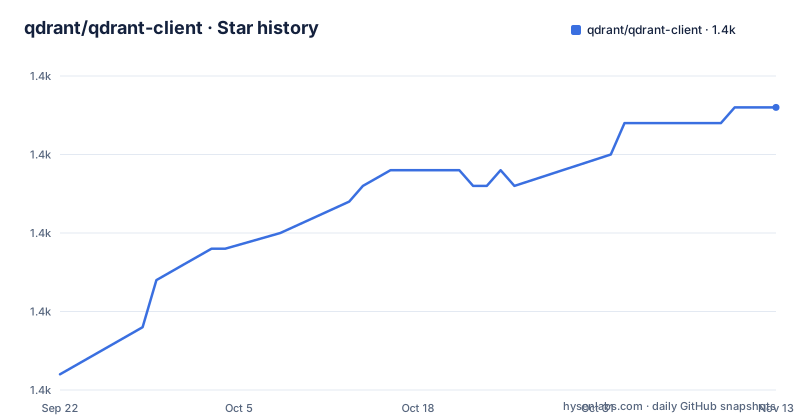
Star history
- qdrant/qdrant-client1,378 ★ · +17
| Repository | 2026-09-22 | 2026-11-13 |
|---|---|---|
| qdrant/qdrant-client | 1.4k | 1.4k |
17 Stars in the last 52 days, measured from the daily GitHub snapshot. Compare with other projects
Editorial analysis
One client object, three places it can point
The local mode is the part that makes this client unusual. The same class is constructed three ways:
from qdrant_client import QdrantClient

client = QdrantClient(":memory:")
# or
client = QdrantClient(path="path/to/db")  # Persists changes to disk
Against a server it takes a host and a port, or a URL:
client = QdrantClient(host="localhost", port=6333)
# or
client = QdrantClient(url="http://localhost:6333")
and against Qdrant Cloud it takes a URL, an API key, and sometimes a flag that changes what the client does with your vectors:
qdrant_client = QdrantClient(
    url="https://xxxxxx-xxxxx-xxxxx-xxxx-xxxxxxxxx.us-east.aws.cloud.qdrant.io:6333",
    api_key="<your-api-key>",
)
There is no separate testing interface. A test written against the in-memory instance calls the same methods a production client calls, which is the stated point of the feature. The listed uses are running tests in a pipeline, working in a notebook with no extra dependencies, and switching to server mode when scale demands it.
What local mode does not cover is the server itself. Port limits, payload size limits, network failures and concurrent writers are properties of the server, and none of them exist in the same process as your test.
The two FastEmbed extras are declared mutually exclusive
Local inference comes from FastEmbed, described as a library for creating fast vector embeddings on CPU, based on ONNX Runtime, able to run on CPU and GPU. It installs as an extra:
pip install qdrant-client[fastembed]GPU support is a separate extra:
pip install 'qdrant-client[fastembed-gpu]'and the file states plainly that fastembed-gpu and fastembed are mutually exclusive, that you can only install one of them, and that if you previously installed fastembed you might need to start from a fresh environment to install the GPU variant.
That last sentence is the one to notice. Two extras of the same package cannot coexist by design, and the recovery path is discarding the environment rather than uninstalling one package. In a shared virtual environment or a locked CI image, that is a much larger operation than switching a flag, so the choice between CPU and GPU embedding belongs in your environment definition from the start rather than in a later experiment.
Enabling GPU is otherwise a per-document option rather than a global setting, passed inside the document options as a cuda flag. So within one process you can send some documents to the GPU and others not, which is finer grained than the install-time split implies.
Remote inference costs money and images need base64
The remote path uses predefined models hosted by Qdrant Cloud, so no library is installed and no model is hosted locally. The availability is qualified in the same sentence: currently available only on paid plans.
The API is identical to the local one, with one constructor argument added:
client = QdrantClient(
    url="https://xxxxxx-xxxxx-xxxxx-xxxx-xxxxxxxxx.us-east.aws.cloud.qdrant.io:6333",
    api_key="<your-api-key>",
    cloud_inference=True,  # Enable remote inference
)
So the choice between running a model yourself and paying for one is expressed as a boolean at construction, not as a different method call. Code written against the local Inference API keeps working, which is the point of the design and also its cost: a test that constructs the client without that flag will silently take the local path, and a production run that forgets it will fail differently rather than warn.
The note attached to remote inference is a data format constraint. Images have to be provided as base64 encoded strings or as URLs, which means a multimodal pipeline through this path differs from the plain text path in how it prepares its input before any embedding happens.
Python 3.14 requires a numpy that the newest interpreter may not have shipped yet
The dependency metadata pins python to 3.10 and above, and then gives numpy a separate constraint per interpreter version:
numpy = [
    { version = ">=1.21,<2.3.0", python = ">=3.10,<3.11" },
    { version = ">=1.21", python = ">=3.11,<3.12" },
    { version = ">=1.26", python = ">=3.12,<3.13" },
    { version = ">=2.1.0", python = ">=3.13,<3.14" },
    { version = ">=2.3.0", python = ">=3.14" },
]
Five rows for one dependency. The effect is that the oldest supported interpreter is held below numpy 2.3 while the newest is held at or above it, so the two ends of the support range cannot resolve to the same numpy. That is a deliberate trade to keep an old interpreter working, and it means a resolver on 3.14 needs a numpy release at or past 2.3.0 specifically.
The same style of pinning appears elsewhere with a different purpose. pydantic is constrained to at least 1.10.8 with three exclusions, and the comment beside it explains the reason: poetry's alternative range syntax was rejected because pip complained about it. urllib3 is held below 3, portalocker between 2.7 and 4.0, and grpcio is allowed to take prereleases. Every one of those is a compatibility decision recorded in the dependency list rather than in a changelog entry.
The README's two largest code samples stop mid-call
Two of the examples in the file are cut off partway through. The FastEmbed sample builds a document list, a list of ids, and then opens a call to create_collection with an opening parenthesis and nothing after it. The upsert sample builds a numpy array, opens the upsert call, lists the points, and ends on the word for with no expression following it.
Neither sample can be pasted and run. In the first, the reader never learns which collection is being created or what vector size and distance metric it uses; in the second, the reader never learns what type the point vectors are meant to be.
That second gap is the more consequential one, because the surrounding prose is where the advice actually is. The comment above the upsert call says to consider splitting data into chunks to avoid hitting the server's payload size limit, or to use the upload_collection or upload_points methods which handle this for you, and the line below warns that uploading points one by one is not recommended because of request overhead.
So the example that would show you how to batch an upload is the one that stops before the batching, while the prose around it tells you batching is what you should be doing. The named alternatives, upload_collection and upload_points, are the actionable part of that section.
The package excludes two paths from the published distribution
The packaging metadata names the package qdrant-client at version 1.19.1, licensed Apache 2.0, with the description reading client library for the Qdrant vector search engine. It also carries an exclude list:
exclude = [
    "qdrant_client/hybrid/test_reranking.py",
    "qdrant_client/local/tests",
]
Two paths, and they are both tests. One is a single file under a hybrid module and the other is an entire tests directory inside the local implementation. Neither is application code, so excluding them is a size decision rather than a correctness one, and it is the kind of detail that is easy to miss and occasionally matters, because it means a subset of the repository's own tests does not run against the installed package.
The rest of the tree explains the shape of the project. There is a mypy.ini at the root alongside a separate types group in the dependency metadata carrying pyright, mypy and type stubs for protobuf, so type checking is run by two independent tools. The dev group pins ruff at an exact version, pytest, coverage, pytest-asyncio, pytest-timeout and autoflake, and there is a pre-commit configuration file.
The release line moves slowly relative to the commit line. Tags run v1.18.0 in May 2026, v1.19.0 in August, and v1.19.1 in September, while the last push to master was 2026-10-01.
Query and upsert are named after what they do, and filtering is nested four deep
The search example uses a method named for the operation and takes a plain vector:
query_vector = np.random.rand(100)
hits = client.query_points(
    collection_name="my_collection",
    query=query_vector,
    limit=5  # Return 5 closest points
)
The filtered version adds a filter built from a must list of field conditions, each naming a key and a range, imported from the models module. So a payload predicate is expressed as a filter containing a required-conditions list containing conditions containing a key and a range object.
Creating a collection is the other half of the pair, and it is where the vector geometry is declared:
from qdrant_client.models import Distance, VectorParams

client.create_collection(
    collection_name="my_collection",
    vectors_config=VectorParams(size=100, distance=Distance.COSINE),
)
Vector size and distance metric are fixed at collection creation, and the type definitions for the whole API are the reason the nesting reads the way it does. Everything imported above comes from a models module whose contents mirror the API rather than the Python side of the library, which is what lets one client serve both a server over REST or gRPC and an in-process store.
The features list is short: type hints for all API methods, local mode, REST and gRPC support, minimal dependencies, and extensive test coverage.
Editorial conclusion
Qdrant Client is worth reaching for if you want to write vector search code once against a typed API and run it first in memory for tests and then against a server for production, because the local mode uses the same client object and the same method names rather than a parallel testing API. Three things to check before you pin a version. The local mode is an in-process store, so a test that passes against it has not exercised your server, its network path or its payload limits. The two FastEmbed extras are declared mutually exclusive, and the file says you may need a fresh environment to move between them, so treat switching inference backends as an environment change rather than a pip flag. And the Python floor is 3.10 while the newest interpreter in the support matrix needs a numpy release at the very top of the allowed range, which is a sign of a compatibility chase you should verify rather than inherit. On cost, the free tier described here is a cloud account with 1GB RAM, and remote inference is called out as available only on paid plans, so the embedding bill is a separate line from the storage bill.
Frequently asked questions
Can Qdrant be run locally?
Yes, and not only as a server. The client has a local mode where you construct the client with an in-memory marker or a path, and the same API is used without running a Qdrant server. A server can also be started locally with a Docker command mapping port 6333.
how to install qdrant client
The base install is pip install qdrant-client. Local embedding support comes from the extra: pip install qdrant-client[fastembed], or pip install 'qdrant-client[fastembed-gpu]' for GPU. The two extras are mutually exclusive, and moving from one to the other may require a fresh environment.
what is qdrant client
It is the Python client library and SDK for the Qdrant vector search engine. It contains type definitions for the whole Qdrant API, allows both sync and async requests, exposes calls for all API methods directly, and adds helper methods for frequent operations such as initial collection uploading.
Is Qdrant DB free?
The client library itself is Apache 2.0 licensed and installs from PyPI without a key. On the hosted side, the file describes a free tier account with 1GB RAM, and it states separately that remote inference through Qdrant Cloud is currently available only on paid plans, so hosted embedding and hosted storage are billed differently.
What is Qdrant used for?
It is the vector search engine this client talks to. The examples in the file cover creating a collection with a declared vector size and distance metric, upserting points that carry a vector and a payload, and querying for the nearest points, optionally with a payload filter built from field conditions and ranges.
Official sources
Add this badge to your README
If you maintain this project, the badge below links readers to this analysis and shows its maintenance status from the daily GitHub snapshot. Paste the markdown into your README; add ?metric=license or ?metric=stars to the image URL for a different field.

[](https://hysenlabs.com/projects/qdrant-qdrant-client)Star history chart for your README
[](https://hysenlabs.com/projects/qdrant-qdrant-client)Was this useful?