tmux-fingers: Hint-Based Clipboard Copying in tmux
copy pasting in terminal with vimium/vimperator like hints.
At a glance
- What is it?
- tmux-fingers adds Vimium-style hints to matches inside the current tmux pane, then copies a path, address, identifier, or other selected text through its letter keys. It suits tmux users who often reuse terminal output but depend on tmux 3.0 or newer and may need platform-specific installation or clipboard behavior.
- Who is it for?
- Adopt tmux-fingers if terminal work repeatedly involves copying paths, URLs, addresses, or identifiers and you already use tmux 3.0 or newer. Do not choose it if clipboard access, opening files, or automatic pasting depends on system integration that your platform does not support.
- Can I use it commercially?
- Yes. MIT is a permissive licence: you can use, modify and sell software built on it, as long as you keep its copyright and licence notices.
- Is it still maintained?
- Yes. The repository last received commits 138 days ago.
- What is it written in?
- Mainly Crystal, according to GitHub's language statistics.
Answers come from the project's GitHub data, last synced on November 7, 2026, and from our analysis. They are not legal advice.
Star history
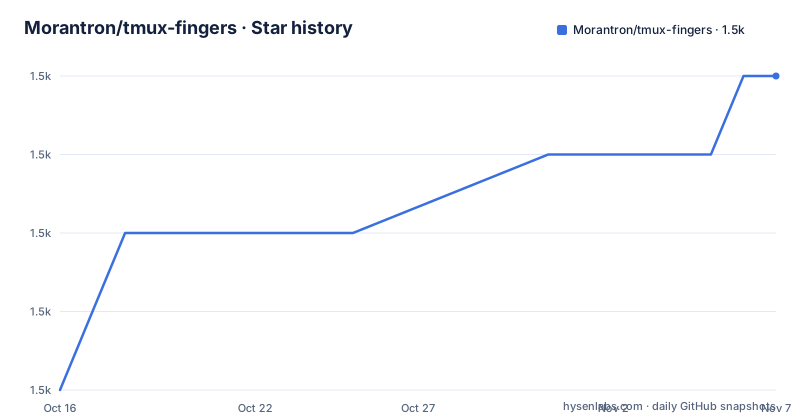
- Morantron/tmux-fingers1,485 ★ · +4
| Repository | 2026-10-16 | 2026-11-07 |
|---|---|---|
| Morantron/tmux-fingers | 1.5k | 1.5k |
4 Stars in the last 22 days, measured from the daily GitHub snapshot. Compare with other projects
Editorial analysis
Why tmux-fingers Changes Copying Inside a tmux Pane
tmux-fingers addresses a specific terminal problem: useful text is often visible but difficult to select accurately with a mouse inside a tmux pane. File paths, long numeric values, IP addresses, UUIDs, Kubernetes resources, SHAs, and Git output can require coordinated mouse movement or inaccurate manual selection. The plugin instead places letter hints over relevant matches. The user enters a hint mode, presses the letters assigned to a match, and the selected content goes to the clipboard.
The default entry command is prefix + F. While the plugin is active, a letter from a to z copies one selected match. Modifier keys change what happens after selection. Ctrl defaults to the `:open:` action, which opens URLs in the browser and files in the operating system's file navigator. Shift defaults to `:paste:`, copying the match and pasting it automatically. Alt has no default action. Tab supports selecting several matches before exiting fingers mode.
This design is aimed at users who navigate and inspect work through tmux, especially developers moving between Git output, deployment information, network addresses, and command-line diagnostics. It is not a general-purpose clipboard manager. Its scope is the visible content of the current tmux pane, with the documented jump mode providing a related way to place the cursor at a selected match.
The Hint Engine and tmux Data Flow
The repository identifies Crystal as its primary language. Based on the repository layout, the executable implementation is under `src/`, while `tmux-fingers.tmux` provides the tmux integration. The project-wide entry sequence is straightforward: tmux invokes fingers mode, the plugin scans relevant content in the current pane, matches receive visible hints, and a keyboard selection triggers an action.
The built-in recognizers cover file paths, SHAs, numbers containing at least four digits, hexadecimal numbers, IP addresses, Kubernetes resources, UUIDs, and Git status or diff output. These categories matter because they remove the need to manually identify the exact selection boundaries. A path selected from a command result or an IP address inside a diagnostic can be copied as one match rather than through a manually adjusted text selection.
Users can add regular expressions through numbered `@fingers-pattern-N` settings. Patterns use PCRE syntax, and a named `match` capture group can restrict the copied portion when the full regular-expression match is broader than the text of interest. The project also documents a jump key, whose default is J. Jump mode places the cursor at the position of the chosen match rather than treating cursor movement as the primary task.
Custom actions receive selected text through stdin. The action also receives `MODIFIER` and `HINT` environment variables, with `MODIFIER` indicating ctrl, alt, or shift and `HINT` containing the selected hint letters. That interface gives commands enough context to distinguish the way a user selected a match.
Installing tmux-fingers Through TPM
The documented prerequisite is tmux 3.0 or newer. Tmux Plugin Manager, or TPM, is the first installation path documented by the project. Add the repository to the plugin list in `.tmux.conf`, then reload plugins with prefix + I. The README says the first invocation starts an installation wizard and offers source builds, Homebrew on macOS, or standalone binaries for the supported Linux and macOS architectures.
Add this exact setting to `.tmux.conf`:
set -g @plugin 'Morantron/tmux-fingers'Then use prefix + I in tmux. The project says this fetches and sources the plugin. During the first run, select one of the installation methods offered for the current platform. A source build requires Crystal. Homebrew is documented as macOS-only, while the standalone binary path is documented for Linux x86_64 and macOS arm64.
The wizard matters because "installable" does not mean the same delivery mechanism is available on every host. A Crystal dependency is required for the source route, while the other routes are limited to the platforms named in the README. The plugin also requires users to source `.tmux.conf` again after configuration changes.
Manual Installation and First tmux-Fingers Selection
The manual path clones the repository into the tmux plugins directory. This approach leaves the installation location and source command explicit. The README gives the following clone command:
git clone https://github.com/Morantron/tmux-fingers ~/.tmux/plugins/tmux-fingersSource the plugin from `.tmux.conf` with the included tmux script:
run-shell ~/.tmux/plugins/tmux-fingers/tmux-fingers.tmuxReload the configuration:
tmux source-file ~/.tmux.confThe first invocation displays the installation wizard. After setup, run tmux and press prefix + F. Recognized matches should appear with letter hints. Press the displayed letters for the wanted path, URL, address, or identifier to copy it. Press Tab to select multiple matches, then press Tab again to exit multi mode with the selections copied.
For an initial check, use text with an unambiguous boundary, such as a single file path, rather than a dense output block containing several similar identifiers. That makes it easier to confirm whether the intended built-in pattern recognized the text and whether the system clipboard integration is available.
Pattern Configuration and Regex Boundaries
Custom patterns extend recognition beyond the documented built-in list. The configuration uses sequential keys such as `@fingers-pattern-0`, `@fingers-pattern-1`, and so on. Single-quoted values avoid some escaping requirements, while double-quoted or unquoted values need backslashes preserved through the tmux configuration parser.
A pattern can identify complete text:
set -g @fingers-pattern-0 'git rebase --(abort|continue)'A named capture group can narrow the copied output:
set -g @fingers-pattern-2 'capture (?<match>only this)'These settings depend on PCRE regular-expression behavior. A malformed expression produces an error when the plugin is invoked, according to the README. This is useful for correction, but it also means custom rules should be kept narrow enough to avoid excessive hints or unexpected selections.
The built-in number recognizer requires at least four digits, so shorter values are not automatically treated as matches. Users who need different thresholds or domain-specific syntax must add explicit patterns rather than assuming every numeric value is covered. Configuration changes require sourcing `.tmux.conf` again before they take effect.
Actions, Clipboard Integration, and Operational Limits
The default main action is `:copy:`. The plugin documentation states that it copies matches to both the tmux clipboard and the system clipboard. Modifier actions can replace this behavior. `:open:` delegates opening to the host system, while `:paste:` copies and pastes automatically inside tmux. User-defined commands are also accepted through `@fingers-main-action`, `@fingers-ctrl-action`, `@fingers-alt-action`, and `@fingers-shift-action`.
This introduces clear host dependencies. Browsers, file navigators, tmux paste behavior, and system clipboard access are separate integration points. The README documents those actions but does not promise support for every clipboard provider, display server, remote tmux session, or headless environment. A remote session is especially worth checking because the visible tmux host and the local operating-system clipboard may not share the same boundaries.
The plugin is also unsuitable when selection must include arbitrary prose spanning several matches. It is designed around recognized patterns and hinted selections, not free-form rectangular or streaming text selection. Tab provides multi selection for supported matches, but the README does not describe combining those matches into a custom user-defined transform beyond configuring an action.
The practical difference is automation: tmux-fingers identifies known categories and assigns them to keyboard hints, while ordinary copy-mode requires the user to navigate and select the desired text directly.
Maintenance, Build Files, and MIT Licensing
The repository is not archived, and its last push was on 2026-06-22. Recent listed releases include 2.7.1 on 2026-06-09, 2.7.0 on 2026-05-31, and 2.6.2 on 2026-02-15. These dates indicate recent project activity, but they do not guarantee compatibility with every future tmux, terminal, or operating-system release.
The repository includes a Dockerfile based on `crystallang/crystal:1.19-alpine`. It installs development and test dependencies and copies tmux test helpers into the image. The `Makefile` exposes commands for building the `fingers` image, opening a shell, running a development environment, and running Crystal specs. The documented test command executes `shards install` followed by `crystal spec` inside Docker.
Those files indicate a reproducible development path, but the README does not present `make test` as an end-user installation procedure or describe CI results. Upgrade work may require reviewing `CHANGELOG.md`, rebuilding from source, or rerunning the installation path after tmux configuration changes.
The repository uses the MIT license. The license permits use, modification, distribution, and sublicensing subject to its conditions, while the project itself provides no warranty. This is a licensing summary, not legal advice.
Editorial conclusion
Adopt tmux-fingers if terminal work repeatedly involves copying paths, URLs, addresses, or identifiers and you already use tmux 3.0 or newer. Do not choose it if clipboard access, opening files, or automatic pasting depends on system integration that your platform does not support. Before adoption, verify the available installation method, clipboard behavior, built-in patterns, and the action assigned to each modifier on your host.
Frequently asked questions
What does tmux-fingers copy from a tmux pane?
By default it highlights file paths, SHAs, numbers with at least four digits, hexadecimal numbers, IP addresses, Kubernetes resources, UUIDs, and Git status or diff output. Users can add PCRE patterns.
How do I install tmux-fingers?
The README documents installation through Tmux Plugin Manager or by cloning the repository and sourcing `tmux-fingers.tmux`. Both routes start an installation wizard on first use, with available methods depending on the platform.
Can tmux-fingers open or paste a selected match?
Ctrl defaults to the `:open:` action, while Shift defaults to `:paste:`. These behaviors are configurable, and Alt has no default action.
Official sources
Add this badge to your README
If you maintain this project, the badge below links readers to this analysis and shows its maintenance status from the daily GitHub snapshot. Paste the markdown into your README; add ?metric=license or ?metric=stars to the image URL for a different field.

[](https://hysenlabs.com/projects/morantron-tmux-fingers)Star history chart for your README
[](https://hysenlabs.com/projects/morantron-tmux-fingers)Was this useful?