Git package tracking only covers what paru installed itself
Feature packed AUR helper
At a glance
- What is it?
- Paru is an AUR helper for Arch written in Rust, wrapping pacman and libalpm. Its version tracking for -git packages depends on a database it builds, and it can only monitor packages paru itself put on the machine.
- Who is it for?
- Paru suits an Arch user who installs from the AUR regularly and wants pacman flag semantics instead of a second mental model, or a team that wants PKGBUILD review through the FileManager setting. It does not suit a machine fed entirely from official repositories, and it will not track -git packages it did not install without paru --gendb.
- Can I use it commercially?
- Yes, with conditions. GPL-3.0 is a copyleft licence: if you distribute software that includes it, you must release that software's source code under the same licence. Running it internally without distributing it does not trigger that obligation.
- Is it still maintained?
- Yes. The repository last received commits 18 days ago.
- What is it written in?
- Mainly Rust, according to GitHub's language statistics.
Answers come from the project's GitHub data, last synced on October 20, 2026, and from our analysis. They are not legal advice.
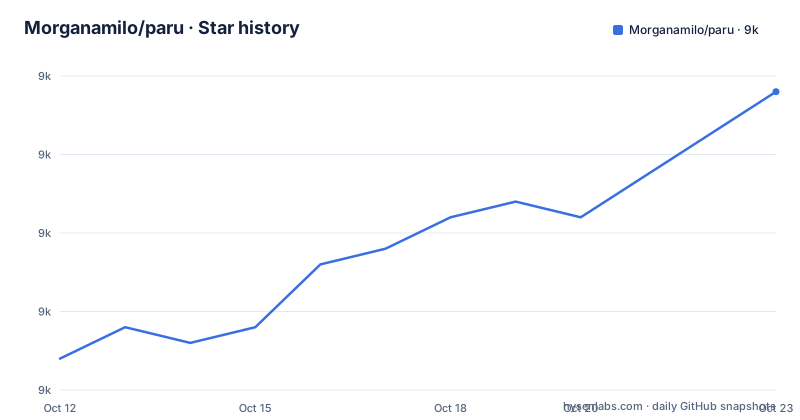
Star history
- Morganamilo/paru9,036 ★ · +9
| Repository | 2026-10-12 | 2026-10-20 |
|---|---|---|
| Morganamilo/paru | 9k | 9k |
9 Stars in the last 8 days, measured from the daily GitHub snapshot. Compare with other projects
Editorial analysis
The helper is a Rust wrapper around libalpm, not a second package manager
Paru describes itself as a standard pacman wrapping AUR helper with lots of features and minimal interaction. The dependency list shows what that means concretely: alpm 5.0.2 and alpm-utils 5.0.0 are the Arch package manager library bindings, pacmanconf 3.1.0 parses the pacman configuration, and raur 7.0.0 plus aur-fetch 0.11.3, aur-depends 5.0.0 and srcinfo 2.1.0 handle the AUR side, where srcinfo is the metadata format AUR packages are judged by. Anything that touches the actual installation goes through the same library pacman itself uses rather than by shelling out to it, which is why the flag letters in the examples look familiar: -S, -u, -a, -Q, -G, -p and -c all mean what they mean in pacman. The package itself is paru at version 2.1.0, edition 2021, requiring rust-version 1.87 to build, with async-trait as an optional dependency and the async runtime set to a multi-threaded tokio.
Installing the AUR helper uses the AUR
There is no binary download step, which is the ordinary bootstrap paradox of AUR helpers and is resolved in the usual way:
sudo pacman -S --needed base-devel
git clone https://aur.archlinux.org/paru.git
cd paru
makepkg -si
base-devel is installed from the official repositories with --needed so nothing already present is reinstalled, then the package files are cloned from aur.archlinux.org and built locally with makepkg, where -s installs missing dependencies through pacman and -i installs the resulting package. Three packages exist in the AUR for paru itself, which the badges at the top of the README show: paru, paru-bin for a prebuilt binary, and paru-git tracking the repository. That is a small decision with a large effect on how you upgrade the tool itself, since paru-git rebuilds on every upstream commit while paru follows tagged versions. The same three-way choice applies to how quickly your package manager changes underneath you, which is worth deciding deliberately rather than by copying a command from a forum post.
Six flags cover most of what people actually do
The examples section is short enough to memorize. paru with no target is an alias for paru -Syu, the full system upgrade. paru <target> searches interactively and installs what you pick. paru -S <target> installs a specific package. paru -Sua upgrades AUR packages, paru -Qua prints available AUR updates without installing them, and paru -G <target> downloads the PKGBUILD and related files. Three more are read-only: -Gp prints the PKGBUILD, -Gc prints the AUR comments for a package, and -Bi . builds and installs a PKGBUILD sitting in the current directory, which is the command you want when you cloned a recipe to look at it and then decided to install it. paru --gendb generates the devel database used for tracking -git packages, and the README is explicit that this is only needed when you first start using paru. Everything else lives in the man pages, paru(8) for the options and paru.conf(5) for the configuration file.
The default configuration ships as paru.conf in the repository
The configuration is a file, and the repository root contains paru.conf as the shipped default rather than leaving you to start from an empty one. The general tips section names the settings people actually change. Color is off unless pacman itself has color enabled, so the knob is in your pacman.conf, not in paru.conf, and that is the second thing to check when paru looks monochrome while your package manager does not. FileManager enables opening PKGBUILDs in your file manager during review, and it is described as the way to get a more advanced review process, which is the most substantive tip on the page. BottomUp flips the search list so results start at the bottom, a small quality-of-life change that people notice immediately. The rest of the surface is documented in paru.conf(5) rather than in the README, so the file at the root is the starting point and the man page is the reference.
Editing a PKGBUILD is expected, and git is the merge strategy
Two workflow decisions are described that change how you interact with the helper. The first is that edits to a PKGBUILD are meant to be committed, because when the package is upgraded git will try to merge your changes with upstream's. That is a specific and useful policy: it makes your local modification a commit rather than an untracked file, which is the state where a rebuild silently overwrites your patch. It also means you now have merge conflicts to resolve when upstream rewrites the recipe, which is the cost. The second is review tooling: installing bat gives you syntax highlighting while reviewing a PKGBUILD, which turns a wall of shell into something you can actually check. Neither is required, and both are the difference between reviewing what you are about to build and running makepkg on a recipe you have not read.
Git package tracking has a scope limit stated plainly
The -git tracking feature monitors the upstream repository for packages built from a moving source, which is how you learn that the package you have installed from a branch has been updated. The limitation is stated without hedging: paru can only do this for packages that paru itself installed. Paru tracks what it put on the machine, because the tracking data lives in its database, and a package installed by hand or by another tool has no row there. The remedy is paru --gendb, which makes paru aware of packages it did not install by generating the devel database. The README marks it as a one-time step when you start using paru, and treating it that way is correct: run it once after migrating, not every session. If you skip it, the symptom is that some of your git packages never report updates, which looks like the feature being broken rather than like a database that was never populated.
Where paru is the wrong tool
Four cases. The first is a machine that does not use the AUR. Everything paru adds is for packages that are not in the official repositories, and if your packages come from pacman and your distribution's own repositories, the helper is overhead with a bootstrap requirement of base-devel and a locally built binary. The second is someone who wants interactive review as the default. Paru describes itself as minimal interaction, and review is opt-in through the FileManager setting, so if your threat model is that every build gets opened in an editor and read, paru will not give you that by default and you would be adding a wrapper you have to fight. The third is the debugging path, and the README is refreshingly direct about it: paru is not an official tool, so if a package fails to build, check whether makepkg can build it, and only if makepkg succeeds is the fault in paru and belongs in that repository rather than upstream. The fourth is reproducibility across many machines. A helper that pulls from the AUR at build time inherits whatever the recipe does that day, which is the property that makes the AUR useful and the property that makes a curated internal mirror valuable in a controlled environment.
Editorial conclusion
Paru suits an Arch user who installs from the AUR regularly and wants pacman flag semantics instead of a second mental model, or a team that wants PKGBUILD review through the FileManager setting. It does not suit a machine fed entirely from official repositories, and it will not track -git packages it did not install without paru --gendb. Before adopting, read paru(8) and paru.conf(5), turn on FileManager so builds are reviewed in an editor, and run paru --gendb once after migrating from another helper.
Frequently asked questions
How do I install paru on Arch Linux?
Install base-devel with sudo pacman -S --needed base-devel, then git clone https://aur.archlinux.org/paru.git, cd paru and run makepkg -si. Three AUR packages exist: paru, paru-bin and paru-git.
What does paru do with no arguments?
It is an alias for paru -Syu, the full system upgrade. AUR-only operations have their own flags, with paru -Sua upgrading AUR packages and paru -Qua printing available AUR updates.
How do I make paru open PKGBUILDs for review?
Enable FileManager with your file manager of choice in paru.conf, which the README describes as giving a more advanced review process. Installing bat adds syntax highlighting during that review.
Why does paru not track updates for some of my -git packages?
Paru can only track packages that paru itself installed. Run paru --gendb once to generate the devel database so packages installed by other means become visible.
A package fails to build through paru. What should I check?
Check whether makepkg can build it. If makepkg also fails, report it to the package maintainer; if makepkg succeeds, the problem is in paru and should be reported in that repository.
Official sources
Add this badge to your README
If you maintain this project, the badge below links readers to this analysis and shows its maintenance status from the daily GitHub snapshot. Paste the markdown into your README; add ?metric=license or ?metric=stars to the image URL for a different field.

[](https://hysenlabs.com/projects/morganamilo-paru)Star history chart for your README
[](https://hysenlabs.com/projects/morganamilo-paru)Was this useful?