qingjian: a Rust input method that puts a translation beside every candidate, and a workspace version behind its own tags
Qingjian: a Pinyin input method written in Rust that shows a translation into the language you're learning alongside each candidate word.
At a glance
- What is it?
- A pinyin input method written in Rust whose candidate list carries a second word beside each option, the translation of that candidate into a language you are learning. The README is short and offered in several languages, and the interesting details are in the configuration: cloud suggestion off by default and pointed at a provider you supply, a Linux build that needs a service started by hand, and a workspace manifest whose version number sits below the newest release tag.
- Who is it for?
- Use it if you type Chinese and are learning a second language through vocabulary you meet anyway, since the mechanism is a translation shown next to candidates rather than a separate study tool, and the page is explicit that the translation never overrides what you are typing. Two things to check first.
- Can I use it commercially?
- Yes, with conditions. GPL-3.0 is a copyleft licence: if you distribute software that includes it, you must release that software's source code under the same licence. Running it internally without distributing it does not trigger that obligation.
- Is it still maintained?
- Yes. The repository last received commits 2 days ago.
- What is it written in?
- Mainly Rust, according to GitHub's language statistics.
Answers come from the project's GitHub data, last synced on November 15, 2026, and from our analysis. They are not legal advice.
Star history
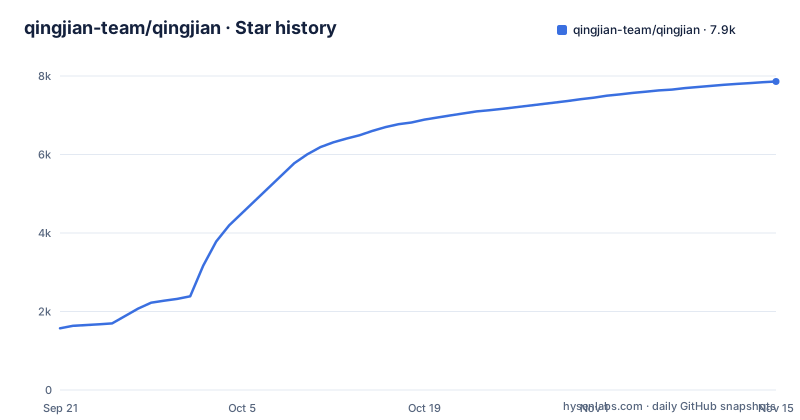
- qingjian-team/qingjian7,859 ★ · +6,286
| Repository | 2026-09-21 | 2026-11-15 |
|---|---|---|
| qingjian-team/qingjian | 1.6k | 7.9k |
6,286 Stars in the last 55 days, measured from the daily GitHub snapshot. Compare with other projects
Editorial analysis
One translation language at a time, and never over the text you typed
The candidate window is the whole idea, and the page shows it in three lines.
1  开发        development
2  编程        programming
3  架构        architecture
On the left is what you would type anyway: pinyin input with the characters you chose. On the right is the same candidate's translation. The design constraint the page states is that the translation is auxiliary information and never covers or displaces the text being typed, which is what keeps a vocabulary aid from turning into an editing hazard. You choose one learning language and only that language's words appear, currently English, Japanese, Spanish, Vietnamese or German, and you can turn the column off. Behind the window is a local sentence-level model that reshapes sentence candidates after you pause, so the input method also covers whole-sentence entry alongside abbreviated pinyin, spelling correction, double pinyin, and one of the older shape-based layouts. A statistics page then reports today's volume, the last seven days, and the running total, plus a vocabulary record for the language you picked.
Cloud suggestion goes to a provider you type in yourself
The privacy section is unusually specific, and one sentence in it is the design decision worth knowing about. Pinyin conversion, dictionary lookup, the local model, and the learning of your typing habits all happen on your own machine, and typing volume and vocabulary statistics are stored locally and not uploaded. There is no account. Input logs are kept separately from the statistics, so you can turn the logs off or clear them without losing the counts. Update checks ask the project's own site for a version list, and that can also be switched off in settings.
Then the optional cloud feature, which is off by default. When you enable it, the input method sends your current input and the text around it directly to an AI provider you have filled in yourself, to fetch candidates or to complete a sentence. The requests do not pass through the project's servers.
That last clause is the whole point. A cloud-assisted input method could route everything through its own backend and call that private, and this one cannot, because the destination is a field you set. What you are trusting is the provider you named, not the input method. The page links to a document covering exactly what gets sent and what is stored locally, which is the right place to check before turning it on.
The Linux build needs a service started by hand
Four platforms, different states of finish, and the page is candid about each.
macOS and Windows are downloaded from the project's own site and described as still in a testing phase. After installing you select the input method, then choose the language you want to learn under the general section of preferences. The page suggests starting from a first-input walkthrough if this is new.
Linux is behind in a specific, fixable way. It is installed from source for Fcitx5 and Fcitx4 and uses the system's default candidate panel. On top of that, the background service currently has to be started manually. Android is a preview with fewer features than the desktop builds, with an arm64 APK on GitHub Releases.
The demonstration material is a video of the macOS build doing whole-sentence entry, candidate reordering, and showing candidate translations, so the feature claims are illustrated on the platform that is still in testing. Feedback runs through an issue chooser on the repository plus a group chat for the beta, and anyone wanting to contribute is pointed at a developer document and a conventions file.
The workspace version sits below the newest tag
The release stream is unusual in two ways, and both are visible from the tag list. The version tags are pre-1.0, with v0.3.2 the newest. The second is that one tag in the list is not a version at all: it names a product data release, and its title says so.
[workspace.package]
version = "0.1.1"
edition = "2024"
license = "GPL-3.0-or-later"
So the manifest says 0.1.1 while the published tags include v0.3.1 and v0.3.2. That is the reverse of the common arrangement, where the manifest leads the release, and it means you cannot read the version you are building from the manifest, and a version comparison between a tarball and a tag will disagree. For an input method that also ships data files, having a data tag in the same stream as code tags is defensible on its own, since the two move at different rates, but it does mean the tag list is not a single ordered version history.
The rest of the manifest is disciplined in a way worth copying. The workspace uses the third resolver, the 2024 edition, and a single blanket clippy setting at warn across all members.
Eleven library crates, three desktop targets, three different integrations
The workspace member list explains most of the architecture. There are seventeen library crates under crates/, including core, dictionary, translate, learning, platform, predict, voice, a language model crate, format, neural, render, update, clipboard and code, plus bamboo-slip, a self-drawn UI engine that the manifest says draws the candidate window, status bar and settings app.
members = [
    "crates/qingjian-core",
    "crates/qingjian-dictionary",
...
    "apps/linux/server", "apps/linux/ibus", "apps/android/core", "apps/cli", "apps/settings", "apps/clipboard", "apps/macos", "apps/windows/server", "apps/windows/tsf", "apps/windows/settings", "tools/dict-convert", "tools/gloss-gen", "tools/release-sign",
]
The application crates show how differently the three platforms integrate, which is the interesting part of the list. The macOS app is a single crate. The Windows side is three: a server, an interface layer named after the platform's own text services framework, and a settings app. The Linux side has a server and an ibus crate, and there is an Android core crate. There is also a command line application, and three tools: one to convert dictionary data, one to generate the glossary that supplies the translations, and one to sign releases. The glossary generator sitting beside the dictionary converter explains where the translation column's words come from, and the licence section points at a data source manifest for their provenance.
Copyleft for the code, nothing for the name, and a separate licence for the data
The licence paragraph has three sentences and three different scopes. The code is copyleft, at the same or later version, which is the normal choice for an input method whose dictionary and models are the hard part.
The second sentence carves the name and the logo out of that grant. The project's own marks are not covered by its code licence, which is a common and sensible arrangement for a trademark, and it means a fork cannot call itself by the same name without a separate permission.
The third is the one that matters most for anyone who wants to reuse the parts. The data shipped with the package has its own sources and its own licences, listed in a data source manifest in the design documents. An input method is mostly data, so the practical reading is that the code licence tells you almost nothing about what you may redistribute: the dictionary, the glossary, and whatever model weights or frequency lists are bundled each carry terms of their own. Anyone planning to fork this should read that manifest before the licence file.
The repository also carries a security policy, a changelog, agent instruction files, a hooks directory for commit-time checks, and a pinned toolchain file, which together describe a project that expects contributions as well as bug reports.
Editorial conclusion
Use it if you type Chinese and are learning a second language through vocabulary you meet anyway, since the mechanism is a translation shown next to candidates rather than a separate study tool, and the page is explicit that the translation never overrides what you are typing. Two things to check first. If you are on Linux, the build is installed from source for Fcitx5 or Fcitx4 and its background service has to be started manually, which is a rougher path than the two desktop builds that are still described as being in testing. And if you intend to build from source, read the licence split: the code is copyleft, the name and logo are not included in that grant, and the bundled data carries its own licences listed separately.
Frequently asked questions
What is the qingjian input method?
A pinyin input method written in Rust. You type pinyin and choose candidates as usual, and beside each candidate it shows that candidate's translation in one language you are learning. The translation is auxiliary information and never overrides the text you are typing.
Does qingjian need an account or upload my typing?
No account, and no upload. Pinyin conversion, dictionary lookup, the local model, and habit learning all run on your device, and typing volume and vocabulary statistics stay local. Optional cloud suggestion is off by default and, when enabled, sends your input directly to an AI provider you configured yourself.
Which platforms does qingjian support?
macOS and Windows builds from the project's own download page, both described as still in testing, plus a Linux source install for Fcitx5 and Fcitx4 that uses the system's default candidate panel and currently requires its background service to be started manually, and an Android preview with fewer features, distributed as an arm64 APK on GitHub Releases.
Which languages can qingjian show candidate translations for?
English, Japanese, Spanish, Vietnamese or German, one language at a time beside the candidates, and the translation display can be switched off entirely.
Official sources
Add this badge to your README
If you maintain this project, the badge below links readers to this analysis and shows its maintenance status from the daily GitHub snapshot. Paste the markdown into your README; add ?metric=license or ?metric=stars to the image URL for a different field.

[](https://hysenlabs.com/projects/qingjian-team-qingjian)Star history chart for your README
[](https://hysenlabs.com/projects/qingjian-team-qingjian)Was this useful?