bluetui: six install routes, a patched font as a prerequisite, and a config with a missing section
🛜 TUI for managing bluetooth on Linux
At a glance
- What is it?
- Bluetui is a terminal Bluetooth manager written in Rust, and its page is a practical document rather than a pitch: six ways to install it, a keymap organised by which panel you are looking at, and a configuration file you can edit. What it shows along the way is a tool whose interface depends on a patched font being installed, one key that does opposite things depending on the panel, and a config file with sections for two of the three panels.
- Who is it for?
- Use bluetui if you manage Bluetooth from a terminal and want pairing, trust, connection and renaming in one place rather than through a desktop applet. Three things to check.
- Can I use it commercially?
- Yes, with conditions. GPL-3.0 is a copyleft licence: if you distribute software that includes it, you must release that software's source code under the same licence. Running it internally without distributing it does not trigger that obligation.
- Is it still maintained?
- Yes. The repository received new commits within the last day.
- What is it written in?
- Mainly Rust, according to GitHub's language statistics.
Answers come from the project's GitHub data, last synced on November 22, 2026, and from our analysis. They are not legal advice.
Star history
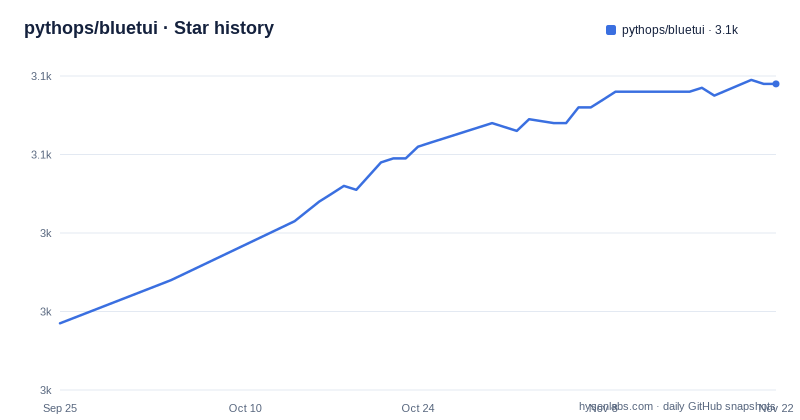
- pythops/bluetui3,078 ★ · +61
| Repository | 2026-09-25 | 2026-11-22 |
|---|---|---|
| pythops/bluetui | 3k | 3.1k |
61 Stars in the last 58 days, measured from the daily GitHub snapshot. Compare with other projects
Editorial analysis
The first prerequisite is a font, not a package
The prerequisites section is two sentences and the second one is the one that matters. You need a Linux system with the Bluetooth stack installed. And then a note saying you might need to install a patched icon font for the icons to be displayed correctly, with a link to a collection of them. So the first thing a new user meets is a visual fault that is not a fault in the program but in the terminal's font configuration, and the page deals with it in one sentence. For a tool whose entire interface is a grid of icons representing adapters, paired devices and newly discovered ones, that is a load-bearing prerequisite filed as an aside. It also means that on a stock terminal configuration the program looks broken, which is a poor first impression for something whose job is to be quicker than opening a settings panel.
Six documented install routes, and a seventh one in the repository
Installation is the longest section of the page and it lists six ways in. A prebuilt binary from the release page. A package-manager install from the language's own registry, which for a compiled language means the toolchain compiles it. A distribution package for one specific distribution, from its main repository. The same for a second distribution under its own package category. Then a third-party command runner with a one-word install. And finally a from-source recipe of three commands that ends by telling you the result is an executable you should copy into a directory on your path. The clone address in that last recipe is written without the usual suffix, which is a small inconsistency in an otherwise careful document. Meanwhile the repository tree carries a development-environment file for a directory-based shell, a lock file and a package expression for a declarative package manager. That is a seventh route, complete with its own pinned inputs, which the page never mentions.
One key does opposite things depending on which panel you are in
Read the keybindings as a table rather than as a list, because the interesting information is in the columns. Movement takes four keys: two to move between sections and two to move within one, with each having a second binding, so both a tab-and-shift pair for sections and the usual arrow keys work. Then the action key changes meaning three times. In the panel for paired devices, space and enter connect or disconnect. In the panel for newly found devices, the same two keys pair. In the panel for adapters, they do nothing at all. So the entire action surface of the program is one key whose behaviour depends on what is selected, plus three adapter toggles for pairing, power and discovery, plus six device operations for unpairing, trust, favourite and renaming. It is a compact design and it is also the thing that makes a first session confusing. The escape key is the exception to the compactness: it quits only if a configuration flag says so, and otherwise does nothing, which is a deliberate safety margin against a muscle-memory key.
The configuration has sections for two panels and none for the third
Keybindings are editable in a configuration file at a fixed path or wherever you point the command-line flag, and the documented file sets out the shape:
toggle_scanning = "s"
esc_quit = false  # Set to true to enable Esc key to quit the app

[adapter]
toggle_pairing = "p"
Two top-level values sit at the top, one for the scanning toggle and one for whether escape quits. Then there is a section for adapters with three bindings, for pairing, power and discovery. Then a section for paired devices with four, for unpairing, trust, favourite and renaming. There is no section for newly discovered devices, even though the usage section documents a binding for pairing them. So the one operation that gives the panel for new devices its purpose cannot be rebound by anyone. Two smaller oddities sit in the same file. The layout setting's own comment lists six accepted values, one of which is called legacy, which is either a deprecated alias kept for compatibility or a value nobody removed. And the width setting is written as a quoted string while its comment says a positive integer is acceptable too, so one key accepts two types.
A vendored D-Bus build and a deliberately small async runtime
The dependency list is short and two entries explain most of the design. The Bluetooth library is requested with the feature that talks to the system's own daemon, which makes this a client of the host Bluetooth service rather than something that drives a controller directly, and that is why the prerequisite is the host's Bluetooth stack rather than a raw adapter. The D-Bus system bindings are requested in their vendored form, so the project compiles its own copy of that C library instead of linking the one the system provides. That removes a system dependency and a version negotiation problem, and it pays for them with a longer build and a bundled library. The async runtime is the third clue: it asks for exactly two features, the macros and the single-threaded scheduler. That is what you would expect from a terminal program driving one event loop with a key handler, not from something doing concurrent work.
The release profile trades build time for a small binary, and seven lints are silenced
The release profile is tuned hard for size and speed: symbols are stripped, the crate is compiled as a single unit, full link-time optimisation is on and the optimisation level is turned up to three. That is the standard recipe when the deliverable is a single binary you copy onto your path, and it is paid for in build time, which is why the from-source route in the documentation will feel slower than installing a package. The lint configuration is the more revealing block. An entire pedantic group is switched on as warnings, which is unusual strictness. One lint is then denied outright. And after that, seven individual lints are explicitly allowed, among them the requirement to document errors and to document panics on public functions, the requirement to mark functions as having effects, the one that complains about copying small types by reference, and the one about too many lines in a function. The pair about error and panic documentation means this program's public surface makes no promise about documented failure modes, which is a normal choice for an application and a poor one if you ever wanted to reuse its internals.
Contributions must not be written by a language model
The contributing section is three bullets and the first one is a blanket prohibition on language models in contributions. The other two are ordinary process: open an issue or a discussion before submitting a pull request, and keep changes small and focused. A written no-model rule is rare enough to be worth reading twice, and it is enforced socially rather than technically, because nothing in a diff can prove or disprove how a change was written. The rest of the page closes with two small things. The readme file is named with only its first letter capitalised, and the manifest points at that exact filename, which works but is not the name that most tooling and most habits look for. And the closing note recommends a companion project by the same author for managing WiFi, with a doubled word in the sentence pointing at it.
Editorial conclusion
Use bluetui if you manage Bluetooth from a terminal and want pairing, trust, connection and renaming in one place rather than through a desktop applet. Three things to check. Whether the icons render, because the page's own note says a patched icon font may be needed and most default terminal configurations do not have one. Whether the key you want to change is one of the rebindable ones, because the configuration covers adapters and paired devices but has no section for newly discovered devices, which is where pairing happens. And which install route you take, since six are documented and a seventh exists in the repository as a Nix package that the page never mentions. If you submit changes, read the contributing section first: it opens by prohibiting language-model-generated contributions and asks for a prior issue before a pull request. The default branch was last pushed on 2026-08-28 and the newest release is v0.8.1 from 2026-01-17.
Frequently asked questions
What is the Linux Bluetooth GUI?
This repository is not a graphical interface, it is a terminal one, and it says nothing about any graphical tool. What it provides is a keyboard-driven view of the system's Bluetooth adapters, the devices already paired, and devices newly discovered, with actions for pairing, connecting, trusting, favouriting, renaming and unpairing, plus power and discovery toggles on each adapter and a key that starts and stops scanning.
What is TUI in Linux?
The page assumes you know the term rather than defining it, which is consistent with a document aimed at people who already live in a terminal. What it does add is the practical consequence of being one: the interface is built from icons, so a patched icon font may need to be installed for them to display, and every action has a single-key binding you can change in a configuration file.
How do I pair a Bluetooth device using bluetoothctl?
The page does not mention that tool at all. Its own pairing action is a key: in the panel listing newly discovered devices, the space bar or enter pairs the selected device, and the same keys connect or disconnect a device that is already paired. The prerequisite is that the system's Bluetooth stack is installed, since the program talks to the system's own Bluetooth service.
What is a Bluetooth application?
Not something this page defines. The repository describes one specific application: a terminal program for a Linux system, written in Rust, that shows the adapters on the machine, the devices already paired and the ones newly discovered, and lets you act on them without leaving the keyboard.
Can I change the bluetui keybindings?
Yes, in a configuration file at a fixed path under your home directory or wherever you point the command-line flag. You can rebind the scanning toggle, whether escape quits, three adapter actions and four paired-device actions. What you cannot rebind is the pairing action on newly discovered devices, because there is no configuration section for that panel.
Official sources
Add this badge to your README
If you maintain this project, the badge below links readers to this analysis and shows its maintenance status from the daily GitHub snapshot. Paste the markdown into your README; add ?metric=license or ?metric=stars to the image URL for a different field.

[](https://hysenlabs.com/projects/pythops-bluetui)Star history chart for your README
[](https://hysenlabs.com/projects/pythops-bluetui)Was this useful?