The QuickClipboard README starts with a notice that it is finished
QuickClipboard is a cross-platform clipboard manager (Windows, Android) built with Tauri 2, Rust and React. It starts working the moment you copy, automatically recording text, images, rich text and files so you can retrieve anything you've copied. It also integrates screenshot pinning, OCR and LAN sync to boost everyday office productivity.
At a glance
- What is it?
- QuickClipboard is a Tauri 2 clipboard manager for Windows and Android, and the first thing on its front page is a statement that development has stopped because the WebView dependency made performance and memory poor. The repository description above it still advertises native performance and low memory use.
- Who is it for?
- QuickClipboard suits someone on Windows who wants clipboard history with OCR, a desktop pinboard and WebDAV sync today, and who has read the notice at the top of the repository. It does not suit a team that needs ongoing updates, since the project states it will receive no further functional updates or maintenance at all.
- Can I use it commercially?
- Yes. Apache-2.0 is a permissive licence: you can use, modify and sell software built on it, as long as you keep its copyright and licence notices.
- Is it still maintained?
- Yes. The repository last received commits 9 days ago.
- What is it written in?
- Mainly Rust, according to GitHub's language statistics.
Answers come from the project's GitHub data, last synced on October 22, 2026, and from our analysis. They are not legal advice.
Star history
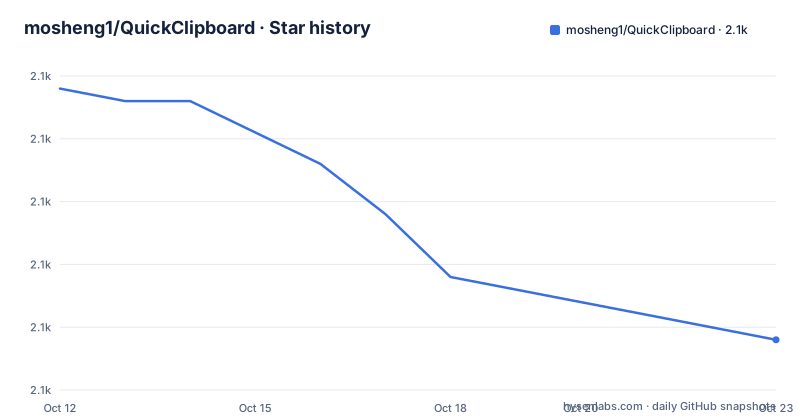
- mosheng1/QuickClipboard2,065 ★ · -19
| Repository | 2026-10-12 | 2026-10-22 |
|---|---|---|
| mosheng1/QuickClipboard | 2.1k | 2.1k |
-19 Stars in the last 10 days, measured from the daily GitHub snapshot. Compare with other projects
Editorial analysis
Discontinuation comes before the logo and the badges
The most important text on the repository is at the very top, above the logo and the badges, and it is a discontinuation notice in large type. The stated reasons are specific: the project is built on Tauri, depends on a WebView to run, and its performance and memory use are not good as a result. On top of that, iterating on it repeatedly left behind a growing number of problems and the maintenance cost became too high. The conclusion given is that no further functional updates or maintenance will happen. A successor is announced rather than shipped: a separate native clipboard application is under development, built with a pure Rust framework and described as completely free of the WebView dependency, to be published in a new repository when it is ready, with progress available in the project chat group. This is the rare case where the front page tells you not to plan around the tool, and it is stated more clearly than most projects manage.
The repository description contradicts the notice above it
The one-line description attached to the repository is still the pitch from before, and it is worth reading next to the notice because the two say different things about the same program. The description calls QuickClipboard a cross-platform clipboard enhancement tool built on Tauri 2, Rust and React, promising that it starts working the moment you copy something, automatically recording text, images, rich text and files so you can retrieve anything you ever copied, and it describes pasted images, OCR and local network sync as an overall lift to daily office productivity. The README body repeats part of that with a line claiming native performance, low memory use and being ready immediately on launch. The notice at the top says the WebView dependency makes performance and memory poor. So the marketing copy is stale rather than misleading by intent, and the practical rule is that the notice is authoritative and the description is not.
What the clipboard manager records, and how it stores it
The feature table is organized by module, and the clipboard management row is the core. Everything is recorded across types: text, HTML, images and files. Deduplication is described as intelligent rather than exact, so repeated copies of the same content collapse. Search and filtering work across the history, and the list is virtualized, which is the mechanism that keeps a long history from becoming slow to scroll. Entries can be dragged into order and pinned to the top. Persistence is SQLite, so the history is a file you can back up, move or clear. Preview is separate and happens on hover, covering text, HTML, images and file lists, with mouse wheel scrolling and zooming under Ctrl, and with a control to switch between the formats a single clipboard entry carries, since copying from a browser puts text and HTML on the clipboard at the same time.
Pasting has more modes than most clipboard managers offer
The quick paste row is the longest in the table and describes a lot of small decisions. You can paste from the list, or with numeric shortcuts 1 through 9, and the paste can be plain text or keep the original formatting. There is a merge copy and a merge paste, a one-time paste, a dedicated paste window, and support for the Windows shortcut Win+V. Combined with the grouping row, which supports favorites, custom groups with icons and colors, group sorting, moving items between groups in bulk, and switching groups by keyboard, the intent is a clipboard you can work through without the mouse. The emoji and symbol row adds a full emoji set, a full symbol set and a custom image and GIF gallery with recent items. The pinboard row puts a screenshot or pinned image on top of the desktop with drag-to-resize and pin-on-top, plus copy and save-as. OCR sits alongside it, extracting text from an image in one action so the text can be copied onward.
Sync runs over WebDAV or a local HTTP connection
The sync and transfer row describes two mechanisms with different characters. WebDAV provides full synchronization, which means your history lives somewhere you control and can be reached from more than one machine. Local area network sync works by direct HTTP connection, with pairing code connection, automatic push and pull, and file sending. The pairing code is the interesting part: it replaces typing addresses or credentials between machines with a short code, which is what makes the feature usable across a desk rather than across a network you administer. Both belong to the same row, so a deployment can use one, the other or neither. It is worth pairing that with the data management row, which covers ZIP import and export, backup and restore, a custom storage path, data migration and merge, clearing history, and a portable mode. A clipboard history is sensitive in a way that a document library is not, and the combination of ZIP export, WebDAV and LAN transfer is the surface where that sensitivity lives.
Memory numbers appear twice and they are not the same measurement
Two separate rows talk about memory, and reading them together gives the most useful technical information in the README. The low memory mode row offers an automatic or manual lightweight mode that restores the full interface immediately on exit, and claims roughly 10MB of memory in that mode. The background optimization row says the app clears memory when it goes to the background, pauses front-end updates and lowers resource use, with roughly 50MB while in the background. So there are two figures for two different states rather than one contradictory claim, and the second is the one that matches the WebView complaint in the maintenance notice: a webview-backed desktop app sitting idle in the tray will not be at 10MB. The edge snapping row adds the window behavior that pairs with this: automatic hiding at the screen edge, appearing next to the cursor, always on top, remembering position and size, and switching the title bar direction.
What decides what gets recorded, and where it runs
The application filtering row is the one that matters most for anyone evaluating this on a work machine, because a clipboard manager records everything you copy by default. There is a list of filtered applications, clipboard monitoring filters, a way to disable all functionality when a given application is in the foreground, and process-level rules. That is the mechanism for keeping passwords out of a searchable history, and it is per-process rather than per-category, which is both more precise and more work to configure. The system integration row covers the rest of the operating-system relationship: staying in the tray, starting at login, automatic updates, running with administrator rights and a startup notification. Running with administrator rights is worth noticing on its own, since a clipboard manager with elevation is a larger surface than the same tool without it, and it is listed as a supported mode rather than as an edge case.
Editorial conclusion
QuickClipboard suits someone on Windows who wants clipboard history with OCR, a desktop pinboard and WebDAV sync today, and who has read the notice at the top of the repository. It does not suit a team that needs ongoing updates, since the project states it will receive no further functional updates or maintenance at all. Before adopting, check whether the announced successor, a native Rust clipboard application in a new repository, has landed, and configure the application filtering list before you start recording everything you copy.
Frequently asked questions
Is QuickClipboard still being developed?
No. The README opens with a notice that the project will receive no further functional updates or maintenance, citing its WebView dependency, performance and memory problems, accumulated issues and the resulting maintenance cost.
What platforms does QuickClipboard support?
Windows and Android. It is built with Tauri 2, Rust and React, and the repository describes it as cross-platform while the description limits current support to those two.
Can QuickClipboard sync my clipboard between machines?
Yes, two ways. WebDAV provides full synchronization, and local area network sync uses a direct HTTP connection with a pairing code, automatic push and pull, and file sending.
Can I stop QuickClipboard from recording copies from a specific app?
Yes. Application filtering supports a list of filtered applications, clipboard monitoring filters, disabling all functionality when an application is in the foreground, and process-level rules.
What does QuickClipboard do beyond storing clipboard history?
It adds OCR text extraction from images, a desktop pinboard for screenshots, an emoji, symbol and image gallery, favorites and custom groups, hover previews of text, HTML, images and files, and themed appearance with custom backgrounds and fonts.
Official sources
Add this badge to your README
If you maintain this project, the badge below links readers to this analysis and shows its maintenance status from the daily GitHub snapshot. Paste the markdown into your README; add ?metric=license or ?metric=stars to the image URL for a different field.

[](https://hysenlabs.com/projects/mosheng1-quickclipboard)Star history chart for your README
[](https://hysenlabs.com/projects/mosheng1-quickclipboard)