create-tauri-app for Scaffolding Tauri Projects
Rapidly scaffold out a new tauri app project.
At a glance
- What is it?
- create-tauri-app generates Tauri application projects through interactive prompts or command-line options. It supports Rust, JavaScript, TypeScript, and .NET frontends across several UI frameworks, but it creates a starting template rather than a complete application architecture.
- Who is it for?
- create-tauri-app is appropriate for developers who want a documented Tauri project skeleton and can work within the listed templates. It is not a substitute for application architecture, native platform configuration, or release engineering.
- Can I use it commercially?
- Yes. Apache-2.0 is a permissive licence: you can use, modify and sell software built on it, as long as you keep its copyright and licence notices.
- Is it still maintained?
- Yes. The repository last received commits 1 day ago.
- What is it written in?
- Mainly Rust, according to GitHub's language statistics.
Answers come from the project's GitHub data, last synced on October 24, 2026, and from our analysis. They are not legal advice.
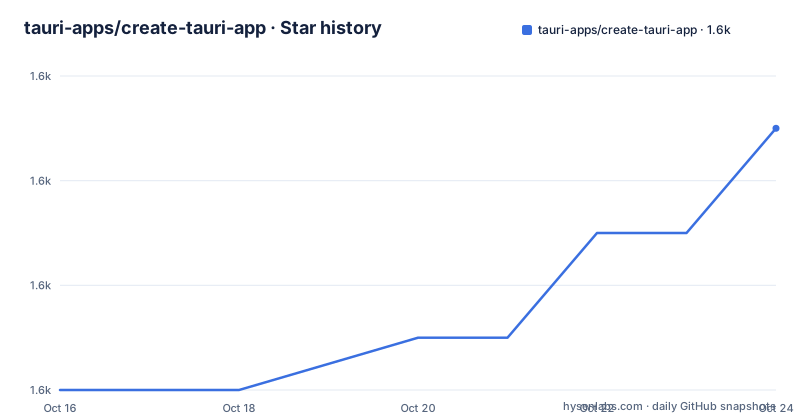
Star history
- tauri-apps/create-tauri-app1,645 ★ · +5
| Repository | 2026-10-16 | 2026-10-24 |
|---|---|---|
| tauri-apps/create-tauri-app | 1.6k | 1.6k |
5 Stars in the last 8 days, measured from the daily GitHub snapshot. Compare with other projects
Editorial analysis
What create-tauri-app Solves
create-tauri-app addresses the initial setup problem faced by developers starting a Tauri application. A Tauri project requires decisions about the frontend language, package manager, project name, bundle identifier, and UI framework. The generator collects those choices and creates a project directory from a selected template.
The tool is intended for developers who have already chosen Tauri and want a repeatable starting point. Its README describes it as a way to “Rapidly scaffold out a new tauri app project.” It does not present the tool as an application builder, visual editor, migration utility, or deployment tool. The generated project remains something the developer must extend and adapt.
The choices are broad. The documented frontend languages are Rust, TypeScript or JavaScript, and .NET. UI choices include Vanilla, Yew, Leptos, and Sycamore for Rust; Vanilla, Vue, Svelte, React, Solid, Angular, and Preact for JavaScript or TypeScript; and Blazor for .NET. This breadth makes the generator useful for different team backgrounds, but it also means the generated structure and commands depend on the selected combination.
Interactive Setup and Template Selection
In interactive mode, the generator asks for a project name and an identifier. The identifier is described as a unique ID for the app. It then asks which frontend language to use and presents the available framework choices. For TypeScript or JavaScript, it asks for a package manager when several are available.
The prompt sequence is significant because the later choices are conditional. A JavaScript or TypeScript project can use `pnpm`, `yarn`, `npm`, or `bun`. A TypeScript or JavaScript template can then select a framework and, where applicable, a TypeScript or JavaScript flavor. Rust projects select a Rust UI template, while .NET projects select Blazor.
The documented TypeScript or JavaScript presets include framework-specific variants such as `react-ts`, `vue-ts`, `svelte-ts`, `preact-ts`, and `solid-ts`. Plain JavaScript or TypeScript variants are also listed. These names are template presets, not evidence that the generator will customize application logic. The README says the utility creates the selected template and prints how to run it with the configured package manager.
Installing Through Cargo, npm, or Package Runners
The README provides several installation and launch paths. The simplest documented npm command is `npm create tauri-app@latest`. It can be run from the folder where the project should be created. The generator then enters its interactive setup flow.
For a Rust installation, the README documents installing the command with Cargo and invoking the Cargo create command:
cargo install create-tauri-app --locked
cargo create-tauri-app
The first line installs the `create-tauri-app` command. The second starts project creation. Other documented launch paths include `pnpm create tauri-app`, `yarn create tauri-app`, `deno run -A npm:create-tauri-app`, and `bunx create-tauri-app`.
The project also provides shell and PowerShell entry points. The README uses these commands:
sh <(curl https://create.tauri.app/sh)For PowerShell, it documents:
irm https://create.tauri.app/ps | iexThe shell examples execute a remote script, so the exact behavior depends on the script retrieved from that URL. The repository also contains `create-tauri-app.sh` and `create-tauri-app.ps1`, but the README does not document local installation instructions for running those files directly.
Creating a Non-Interactive Tauri Project
For repeatable project creation, the README documents command-line options for a project name and template. The following examples create a Svelte project in a `my-tauri-app` directory:
# curl
sh <(curl https://create.tauri.app/sh) my-tauri-app --template svelte
# cargo
cargo create-tauri-app my-tauri-app --template svelte
# npm 7+, extra double-dash is needed:
npm create tauri-app@latest my-tauri-app -- --template svelte
The npm examples show an important syntax difference. The README labels one form for npm 6.x and the other for npm 7 and later, where an extra double dash is needed before the generator arguments. The yarn, pnpm, Deno, and Bun examples use the project name and `--template svelte` directly.
For PowerShell, arguments can be supplied through `CTA_ARGS`:
$env:CTA_ARGS="--template svelte";irm https://create.tauri.app/ps | iexThe generator also accepts `.` as the project name for scaffolding in the current directory. The README does not document a complete option reference beyond the project name and template options, so automation should use only the documented interface unless the command's help output is checked separately.
Supported Presets and Project Boundaries
The README lists the current template presets as `vanilla`, `vanilla-ts`, `vue`, `vue-ts`, `svelte`, `svelte-ts`, `react`, `react-ts`, `preact`, `preact-ts`, `solid`, `solid-ts`, `angular`, `yew`, `leptos`, `sycamore`, and `blazor`. This is a concrete selection boundary for adoption. A developer who needs a framework outside this list would need another template source or a different project setup.
The tool does not document how templates are customized beyond the interactive choices and the template preset argument. It also does not claim to generate application-specific services, persistence, authentication, tests, or deployment pipelines. Those concerns must come from the selected Tauri framework and the developer's own project code.
The repository layout includes a `templates` directory, Rust source under `src`, and Node-related code under `node`, which is consistent with a generator containing reusable templates and multiple package entry points. The documentation does not explain the internal rendering pipeline in detail, so the exact template-copy and interpolation steps should not be inferred beyond the observable CLI behavior.
Maintenance, Compatibility, and Licensing
The repository is not archived, and its last push was on 2026-10-16. Recent releases listed for `create-tauri-app` include version 4.8.0 on 2026-10-09 and version 4.7.4 on 2026-09-04. The repository follows Semantic Versioning 2.0, as stated in the README.
The Rust package metadata sets the package version to 4.8.0, uses Rust edition 2024, and declares a minimum Rust version of 1.85. The Cargo command in the README includes `--locked`, which uses the package's locked dependency versions for the documented install path. The README does not explain the upgrade procedure for an existing generated project, so version compatibility should be checked before regenerating or copying configuration.
The Cargo metadata declares `Apache-2.0 OR MIT`. The README adds that the logo is licensed as `CC-BY-NC-ND` and credits the original Tauri logo designs. These are license notices, not legal advice. The code and logo have different stated terms, so an organization should review both when distributing a generated project or branding an application.
When a Direct Tauri Setup Is Better
create-tauri-app is the wrong tool when the project already has an established structure and only needs one missing file or a narrowly scoped configuration change. In that case, adding a generator can create unnecessary differences between environments or overwrite conventions chosen by the team. The README does not describe incremental updates or migration of an existing project, so it should not be treated as an upgrade command.
It is also a poor fit when the required UI framework is not among the documented presets. The supported list covers common JavaScript and TypeScript frameworks, several Rust UI options, and Blazor, but it does not claim to cover every framework or a custom internal template.
Compared with assembling a Tauri project manually, the generator reduces setup decisions and provides repeatable preset names. Compared with a full application framework or project-management platform, it does not address ongoing architecture, release automation, or maintenance of application code. Its value is concentrated at project creation.
Practical Adoption Checks for Tauri Projects
The first adoption check is the command path. Teams that standardize on `pnpm`, `npm`, `yarn`, Cargo, or another runner can invoke the generator through a corresponding documented command. The second check is template fit. Confirm that the chosen language, package manager, framework, and TypeScript or JavaScript flavor match the application plan before accepting the generated files.
The third check is identifier scope. The interactive flow asks for an identifier that is a unique ID for the app, so naming decisions should be made before scaffolding. The fourth check is local dependency availability. The utility can print missing dependencies and prompt for installation, but the README does not promise that every target operating system or toolchain is already present.
The generated project should then be opened and run using the commands the generator displays. That output is the first project-specific confirmation that the selected package manager and template were wired together. The README does not document rollback, automated updates, or compatibility testing for previously generated applications, so those boundaries should be considered before using the generator as part of a larger project workflow.
Editorial conclusion
create-tauri-app is appropriate for developers who want a documented Tauri project skeleton and can work within the listed templates. It is not a substitute for application architecture, native platform configuration, or release engineering. Verify the selected template, package manager, identifier, and local dependencies before building on the generated project.
Frequently asked questions
How do I install create-tauri-app?
The README documents installing it with Cargo using `cargo install create-tauri-app --locked`, or launching it through npm, pnpm, Yarn, Deno, Bun, shell, or PowerShell commands.
Which frontend frameworks does create-tauri-app support?
The documented presets include Vanilla, Vue, Svelte, React, Preact, Solid, Angular, Yew, Leptos, Sycamore, and Blazor. TypeScript-specific variants are also listed for several JavaScript frameworks.
Can create-tauri-app scaffold a project without prompts?
Yes. The README documents non-interactive commands that accept a project name and a `--template` option, including `cargo create-tauri-app my-tauri-app --template svelte` and the npm equivalent.
What does create-tauri-app do after generation?
The README says the utility reports that the template has been created and displays how to run it using the configured package manager. It can also identify missing dependencies and prompt for their installation.
Official sources
Add this badge to your README
If you maintain this project, the badge below links readers to this analysis and shows its maintenance status from the daily GitHub snapshot. Paste the markdown into your README; add ?metric=license or ?metric=stars to the image URL for a different field.

[](https://hysenlabs.com/projects/tauri-apps-create-tauri-app)Star history chart for your README
[](https://hysenlabs.com/projects/tauri-apps-create-tauri-app)Was this useful?