moul/sshportal: transparent SSH bastion for controlled server access
:tophat: simple, fun and transparent SSH (and telnet) bastion server
At a glance
- What is it?
- moul/sshportal is a Go SSH and telnet bastion that separates portal users from backend hosts, manages invitations and permissions, and records sessions. It fits teams that need a shared access layer, but the documented SQLite and MySQL choices, broad feature set, and recent release dates require careful operational review.
- Who is it for?
- Adopt moul/sshportal when you need a self-hosted access layer that separates portal identities from backend credentials and requires invitations, ACLs, or session history. Do not choose it solely for its broad feature list without checking deployment topology, database choice, backup procedures, and the security of the portal-to-target relationship.
- Can I use it commercially?
- Yes. Apache-2.0 is a permissive licence: you can use, modify and sell software built on it, as long as you keep its copyright and licence notices.
- Is it still maintained?
- Yes. The repository last received commits 49 days ago.
- What is it written in?
- Mainly Go, according to GitHub's language statistics.
Answers come from the project's GitHub data, last synced on November 7, 2026, and from our analysis. They are not legal advice.
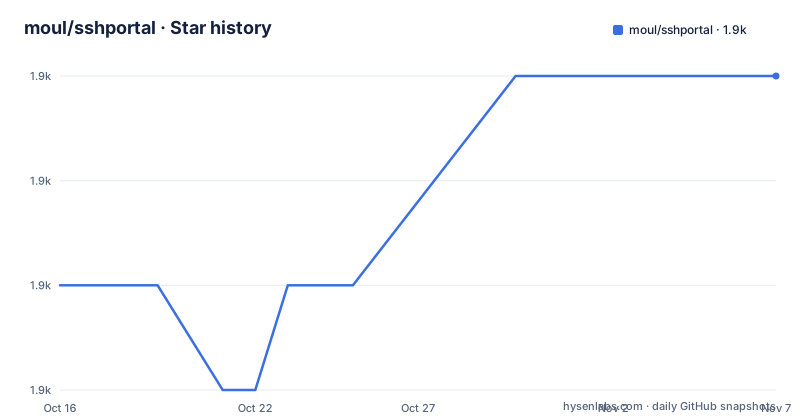
Star history
- moul/sshportal1,945 ★ · +2
| Repository | 2026-10-16 | 2026-11-07 |
|---|---|---|
| moul/sshportal | 1.9k | 1.9k |
2 Stars in the last 22 days, measured from the daily GitHub snapshot. Compare with other projects
Editorial analysis
Why sshportal sits between SSH users and target machines
moul/sshportal is a bastion server, but its interface is designed to make the jump host less visible to users. A user connects to the portal with an SSH login, then selects a host that has been configured for that portal account. The portal database keeps portal users separate from the credentials required by the remote servers. This distinction is important because an invited person does not need to receive the target host's private key or operating-system account in advance.
The documented use cases include temporary access for students, server and router administration within a technical organization, centralized connection monitoring, and event-based access for courses or hackathons. The README also describes a hosting use case in which sessions are logged and introspectable, producing a history of who performed which action. Those examples describe intended and reported use, not a guarantee that every deployment has the same retention, isolation, or review process.
The portal supports SSH targets through an embedded client and server. It also lists telnet in the repository description, while the README focuses on SSH compatibility. Administrators can store backend authentication using keys or passwords, manage portal users independently, and generate a command for installing the appropriate key on a remote server. This model is useful when access needs to be temporary, delegated, or reviewed without distributing the same backend credentials to every user.
The portal connection path and control model
Based on the repository structure, sshportal is a Go application with server entry points at `main.go` and `server.go`, while database, protocol, and feature logic is organized under `internal/` and `pkg/`. The `go.mod` file shows dependencies for an embedded SSH implementation, a Telnet implementation, GORM, SQLite, MySQL, PostgreSQL support, terminal handling, pseudo-terminals, and CLI handling. That structure is consistent with a single process that accepts connections, maintains portal state, and proxies sessions to configured hosts.
The README documents user groups, host groups, ACLs, roles such as `admin`, `trusted`, and `standard`, user invitations, multiple keys per portal user, and automatic remote host-key learning. It also lists IPv4 and IPv6, `scp`, `rsync`, tunneling, `sftp`, and `ssh-agent` support. Tunneling includes local, remote, and dynamic forwarding according to the compatibility list.
Session management is part of the control plane rather than an optional reporting note. The README lists active connections, history, statistics, stopping connections, audit logs for user actions, and TTY recording in `ttyrec` format. It also documents logging for tunnels and sharing host-key verification results across users. The exact retention policy, replay workflow, and operational details of audit review are not specified in the README, so those points need confirmation from the deployment documentation or source before treating the records as a complete compliance system.
Installing sshportal and creating the first host
The README's shortest documented path is to start the server binary with the `server` command. The example output shows an initial admin account invitation and an SSH server listening on port 2222. The generated invite is temporary setup information and should be treated as an administrative secret until it is associated with a key.
The documented startup command is:
sshportal serverThe example reports an SSH server accepting connections on `:2222`. Associate your SSH public key with the generated administrator invitation:
ssh localhost -p 2222 -l invite:BpLnfgDsc2WD8F2qAfter the key is accepted, connect with the administrator account and enter the built-in configuration shell:
ssh localhost -p 2222 -l adminCreate a host with the documented `host create` command:
config> host create [email protected]
1
config>
The host command returns an ID and stores the target URL, which the README displays as `[email protected]:22`. The next documented step installs the portal's generated public key on the target:
ssh [email protected] "$(ssh localhost -p 2222 -l admin key setup default)"The final connection uses the portal's host alias rather than requiring the user to connect directly to the backend:
ssh localhost -p 2222 -l fooThe README warns that a password prompt during invite association usually means the local machine does not have a usable SSH key. It gives `ssh-keygen -t rsa` as the suggested generation command.
Docker, databases, and deployment choices
The repository includes a multi-stage `Dockerfile`. It builds with `golang:1.18.0`, copies the application into `/go/bin/sshportal`, uses Alpine for the runtime image, sets the entry point to `/bin/sshportal`, defaults the command to `server`, exposes port `2222`, and defines a healthcheck. The exact container image name is not specified by the repository files, so a deployment should use the project's published image or build the Dockerfile rather than inventing a tag.
The README states that data can be stored in SQLite3 or MySQL. It also describes sshportal as stateless and horizontally scalable when MySQL is used. That distinction matters. SQLite is convenient for a single instance, while MySQL is the documented option for a horizontally scaled deployment. The presence of a PostgreSQL GORM driver in `go.mod` does not by itself establish that PostgreSQL is a supported configuration, because the README specifically names SQLite3 and MySQL.
The `Makefile` contains development and backup targets. Its `backup` target copies `sshportal.db` into a timestamped directory under `data/backups`, including the database version in the filename. The repository also contains `examples/mysql/`, `examples/integration/`, and `examples/homebrew/`, which indicate additional deployment and integration material. The README excerpt does not document production backup scheduling, restore commands, database migration steps, or the precise configuration syntax for selecting MySQL.
Access control, invitations, and audit capabilities
The feature list gives sshportal a broader scope than a simple TCP proxy. Portal users can be invited, assigned to groups, associated with one or more keys, and connected to hosts through ACLs. Host keys can be created, removed, updated, imported, and learned automatically. The README also describes roles and host-key verification shared across users.
The invitation flow is deliberately different from creating an account on a target server. `user invite [email protected]` creates an account in the sshportal database and returns an SSH login such as `invite:NfHK5a84jjJkwzDk` for key association. The backend account is not created by that command. This is a clear administrative boundary, but it also means operators must decide how backend credentials are provisioned, rotated, and removed.
Audit and session features may support investigations after a connection ends. The README states that every session is logged and that an audit log records user actions. It also lists active connection inspection, stopping connections, statistics, and TTY recording. However, it does not specify access to the audit interface, how users see one another's history, retention limits, or whether recording includes all command output. The project is therefore a candidate for centralized review, not proof of a complete audit policy.
The documented administration model also creates a concentration of privilege. The portal account, its groups, target definitions, keys, and ACL rules determine who can reach what. A deployment should treat configuration changes to hosts, groups, roles, and keys as security-sensitive operations.
Practical limits and suitable alternatives
The first practical constraint is operational complexity. sshportal manages portal identities, backend credentials, host keys, ACLs, invitations, sessions, audit records, and optional recording. A single-user SSH configuration is simpler. sshportal earns its extra configuration work when several people need controlled access to shared infrastructure or when centralized connection history is required.
The second constraint is backend compatibility. The README says sshportal supports key or password connections to remote hosts, but it does not claim universal support for every SSH authentication method, network appliance, or restricted server. Automatic remote host-key learning also requires an administrator to decide how discovered keys are trusted and rotated. A deployment involving routers, appliances, or servers with unusual key policies should verify those cases before migration.
A VPN or dedicated identity-aware access gateway is another approach when network-level access and centralized authentication are more important than a transparent SSH alias.
sshportal's single-process design also does not automatically remove every operational dependency. A Docker deployment still needs persistent storage for its database, a reliable AES key, network routing to targets, and an operational plan for backup and recovery. The README does not document high-availability behavior beyond the claim that MySQL enables horizontal scaling.
Maintenance, licensing, and adoption boundaries
The repository is not archived, and the last push was on 2026-09-19. That indicates recent repository activity, although the published release history shown here lists `v1.19.5` on 2023-05-20, `v1.19.4` on 2023-05-19, and `v1.19.3` on 2022-02-08. The gap between repository activity and listed releases means operators should inspect the current commit history and release process rather than assuming that the latest listed tag represents every recent change.
The project uses the Apache-2.0 license. That permits use and modification under the license's conditions, but this review does not provide legal advice. Organizations should review the repository `LICENSE` file and any notices for their own distribution and compliance requirements.
Upgrade cost depends on deployment choice. A binary or container deployment may simplify packaging, but upgrades still require attention to database migrations, encryption keys, host-key changes, and saved ACLs. The `go.mod` file declares Go 1.14, while the Dockerfile builds with Go 1.18.0. That mismatch is not necessarily a runtime requirement, but it is a packaging fact worth checking when reproducing the container build.
Editorial conclusion
Adopt moul/sshportal when you need a self-hosted access layer that separates portal identities from backend credentials and requires invitations, ACLs, or session history. Do not choose it solely for its broad feature list without checking deployment topology, database choice, backup procedures, and the security of the portal-to-target relationship. The first verification should be whether the selected Go build or binary, storage backend, AES key configuration, and target host keys match the deployment's requirements.
Frequently asked questions
How do I start moul/sshportal and connect as an administrator?
Run `sshportal server`, then connect using the generated `invite:` login shown in the server output. After associating your SSH key, connect with `ssh localhost -p 2222 -l admin` to open the administrator shell.
Which database backends does moul/sshportal support?
The README documents SQLite3 and MySQL storage. It describes MySQL as the option for horizontally scalable, stateless operation, while the repository's `go.mod` also contains a PostgreSQL GORM driver, but the README does not confirm PostgreSQL as a supported configuration.
Does moul/sshportal record SSH sessions and user actions?
The README lists session history, audit logs, active connection management, tunnel logging, and TTY recording in `ttyrec` format. It does not document retention periods or whether every command output is included in those records.
Official sources
Add this badge to your README
If you maintain this project, the badge below links readers to this analysis and shows its maintenance status from the daily GitHub snapshot. Paste the markdown into your README; add ?metric=license or ?metric=stars to the image URL for a different field.

[](https://hysenlabs.com/projects/moul-sshportal)Star history chart for your README
[](https://hysenlabs.com/projects/moul-sshportal)Was this useful?