ESP32-HUB75-MatrixPanel-DMA for ESP32 LED Matrix Displays
An Adafruit GFX Compatible Library for the ESP32/S2/S3/P4 to drive HUB75 LED matrix panels using DMA for high refresh rates. Supports panel chaining.
At a glance
- What is it?
- ESP32-HUB75-MatrixPanel-DMA is an Arduino and ESP-IDF library for driving compatible HUB75 and HUB75E RGB LED panels through the ESP32 hardware LCD DMA mode. It fits projects needing Adafruit GFX integration, panel chaining, binary-code modulation, or scan-panel configuration beyond the common two-row format.
- Who is it for?
- Adopt this library for ESP32, ESP32-S2, or ESP32-S3 projects using compatible shift-register panels and a need for DMA-driven display output or GFX integration. Do not choose it for S-PWM, PWM, SM1620B, RUL5358, ICN2053, or FM6353 panels.
- Can I use it commercially?
- Yes. MIT is a permissive licence: you can use, modify and sell software built on it, as long as you keep its copyright and licence notices.
- Is it still maintained?
- Yes. The repository last received commits 6 days ago.
- What is it written in?
- Mainly C++, according to GitHub's language statistics.
Answers come from the project's GitHub data, last synced on October 23, 2026, and from our analysis. They are not legal advice.
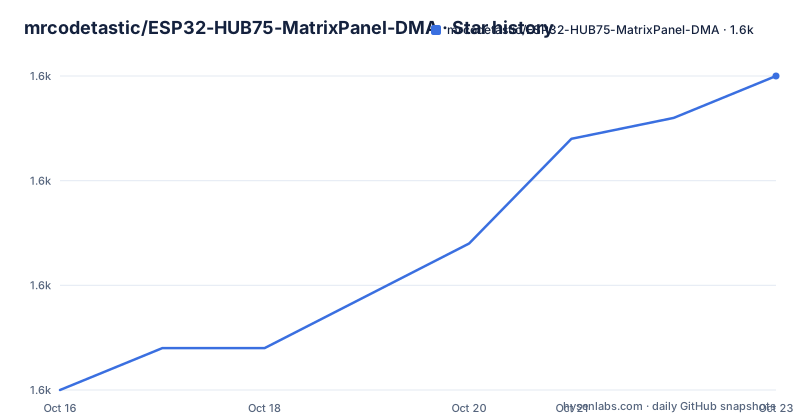
Star history
- mrcodetastic/ESP32-HUB75-MatrixPanel-DMA1,635 ★ · +15
| Repository | 2026-10-16 | 2026-10-23 |
|---|---|---|
| mrcodetastic/ESP32-HUB75-MatrixPanel-DMA | 1.6k | 1.6k |
15 Stars in the last 7 days, measured from the daily GitHub snapshot. Compare with other projects
Editorial analysis
What ESP32-HUB75-MatrixPanel-DMA Handles
ESP32-HUB75-MatrixPanel-DMA targets people building LED matrix displays with an ESP32, ESP32-S2, or ESP32-S3 and panels that expose a conventional HUB75-style shift-register interface. It addresses the timing problem of repeatedly transferring rows of RGB pixel data at a rate that keeps the panel refreshed. The README says the library uses the ESP32 hardware DMA LCD mode, sending pixel data without assigning the transfer work to the CPU.
The library is not tied to Adafruit GFX. It can work with Adafruit GFX, a simplified GFX implementation, or no GFX library. That gives an existing graphics-oriented sketch a familiar drawing surface while leaving room for applications that only need direct panel output. This matters for projects that use the matrix as a status display, animation screen, text panel, or a custom output device without standardizing every drawing operation on Adafruit GFX.
Binary-code modulation across the matrix is a central feature. The README also lists variable color depth, up to 24-bit TrueColor subject to panel size and refresh rate, and CIE 1931 luminance correction for perceived brightness. Panel chaining is supported, so a display can extend across multiple physical panels. The README does not state the maximum chain length or a formula for its memory use. The repository's `doc/memcalc.md` is the source to consult when sizing a chain against SRAM and PSRAM constraints.
DMA Output and Panel Scan Compatibility
The implementation is designed around the ESP32 hardware LCD mode rather than repeated GPIO toggling. Pixel data is prepared in a DMA buffer, and the hardware streams that data to the panel. The README describes fast bitwise operations on the buffer and says they avoid CPU resources and blocking calls during output. The documented data path is application drawing code followed by DMA transfer, rather than a per-pixel blocking write for every panel refresh.
Panel support depends on how many rows the driver updates at once. The common case is a two-scan panel, where two rows are updated in parallel. The README gives 64x32 indoor panels at a 1/16 scan rate and 64x64 indoor panels at a 1/32 scan rate as examples. Four-scan panels are also supported. Documented cases include 32x16 indoor panels at 1/4 scan, some 128x64 panels using SM5266P, and 80x40 panels at 1/10 scan with eight-pixel column reversal. The `VirtualMatrixPanel` and `Four_Scan_Panel` examples are the starting points documented for these arrangements.
The driver chip matters as much as the panel dimensions. The README lists ICND2012, RUC7258, FM6126A, ICN2038S, FM6124, SM5266P, and DP3246 with SM5368 row registers as tested chips. It advises buyers to confirm that a panel is not S-PWM and uses standard shift-register chips such as FM6124. New driver chips appear frequently, so an unlisted chip should not be treated as supported merely because its connector, row count, and dimensions resemble a known panel.
Installing the Library and Running the Shape Test
For Arduino IDE, the README gives a Library Manager installation path. Install `Adafruit_GFX` first, then search Library Manager for this library and install it. For PlatformIO, the visible instructions say to add the library to the `lib/` folder or declare it through `lib_deps` in `platformio.ini`. The README is truncated before it shows the complete PlatformIO declaration, so it would be inaccurate to invent a package name or dependency line.
After wiring the ESP32 to a compatible panel, the first practical example is `examples/1_SimpleTestShapes/`. Select the exact ESP32 board in Arduino IDE, compile the sketch for that board, upload it, and observe the shapes and colors on the panel. The repository's examples and `examples/README.md` are the authoritative source for the complete sketch and its configuration. The top-level README does not provide a complete pin assignment table in the visible installation section, so copying an arbitrary set of GPIO values would risk mismatching the wiring.
The repository also contains ESP-IDF integration files, including `CMakeLists.txt`, `Kconfig.projbuild`, `component.mk`, `idf_component.yml`, and `examples/esp-idf/`. Those entries establish an ESP-IDF path, but the README excerpt does not show a complete build command. `doc/BuildOptions.md` documents the project-specific build choices and is the place to verify configuration before using the `examples/esp-idf/` project.
DMA Buffer Memory and ESP32 Board Constraints
The library's DMA buffers use microcontroller SRAM, making memory placement part of the display design. The README points to `doc/memcalc.md` for expected SRAM usage. On the standard ESP32 and ESP32-S2, the DMA buffer must use internal SRAM. The documentation describes approximately 200 KB of free internal memory as the practical limit, regardless of attached external PSRAM.
The ESP32-S3 has an additional option with a precise hardware condition. The README says the DMA buffer can be stored in external PSRAM only with Octal SPI PSRAM, such as an ESP32-S3-N8R8. In that configuration, maximum output frequency is limited to about 13 MHz to avoid image flickering. Quad-SPI PSRAM is explicitly described as too slow. This makes the memory bus type relevant when selecting an ESP32-S3 module.
The library does not support RISC-V ESP32 variants such as the ESP32-C3 because they lack the required hardware LCD mode. Board layout can affect other components even on a supported chip. The README warns that high-frequency DMA signals may interfere with Wi-Fi on some board designs. It specifically advises against the Adafruit MatrixPortal S3 when reliable Wi-Fi operation is required. A display project that already depends on a network connection therefore needs hardware validation before the matrix becomes part of the enclosure or product.
Brightness, Latch Timing, Clock Phase, and Power
Brightness adjustment is a documented feature, but its visible effect still depends on the selected panel and refresh configuration. The README also lists `latch blanking` and `clock phase` as configuration areas. These settings matter because panel rows are shifted, latched, and scanned with exact timing. A panel can produce visible output and still show flicker, ghosting, or unstable pixels when its scan arrangement or timing does not match the hardware.
The library includes CIE 1931 luminance correction for perceived brightness. That correction does not determine the panel's electrical current or replace a correctly sized power supply. The visible portion of the README does not provide a supported supply voltage, current budget, or regulator recommendation. Since panel size, scan design, brightness, color depth, and refresh rate affect power demand, those values need to come from the panel seller or datasheet rather than from this library's API.
Begin with `examples/1_SimpleTestShapes/` and confirm that the expected rows, columns, and colors appear. The repository includes `examples/Pixel_Mapping_Test/` for investigating pixel order and `examples/4_OtherShiftDriverPanel/` for another documented shift-driver configuration. The `examples/3_DoubleBuffer/` example is relevant when separate source and display buffers are needed. Their source files are the correct place to obtain exact GPIO, timing, and buffer settings because the README does not supply a complete panel-neutral configuration table.
Unsupported Hardware, Alternatives, and Upgrade Cost
The library has a clear hardware boundary. The README says S-PWM and PWM chipset panels, including RUL6024, MBI6024, HX6158SP, MBI5051, MBI5052, MBI5053, and ICND2055CP, are not supported because they act as their own framebuffers with on-chip PWM. It also lists SM1620B, RUL5358, `SHIFTREG_ABC_BIN_DE`, ICN2053, and FM6353 as unsupported. For ICN2053 and FM6353 panels, the README directs users to a separate library fork rather than this one.
For other unsupported panels, the README names `PxMatrix` as an alternative. It does not provide a detailed comparison, so the relevant distinction is the panel interface. ESP32-HUB75-MatrixPanel-DMA is built around compatible conventional shift-register panels and the ESP32 LCD DMA path. A panel whose driver owns PWM and buffering may require a library designed around that different mechanism. Matching the library to the panel chipset is more important than matching its nominal width and height.
The repository is not archived, and its last push was on 2026-10-15. Version 3.1.0 was released on 2026-10-12, following versions 3.0.14 and 3.0.13. This indicates recent repository activity, but the README does not document a semantic-version compatibility policy, migration guide, or rollback procedure. Upgrade cost therefore includes reviewing example and build-option changes, not merely editing a library version string. The repository uses the MIT license. The `LICENSE.txt` file contains the applicable permission and disclaimer terms for redistribution.
Editorial conclusion
Adopt this library for ESP32, ESP32-S2, or ESP32-S3 projects using compatible shift-register panels and a need for DMA-driven display output or GFX integration. Do not choose it for S-PWM, PWM, SM1620B, RUL5358, ICN2053, or FM6353 panels. Before committing hardware, verify the panel driver, scan arrangement, DMA buffer placement, GPIO mapping, and power requirements against the selected example.
Frequently asked questions
Which ESP32 chips can run ESP32-HUB75-MatrixPanel-DMA?
The README lists the original ESP32, ESP32-S2, and ESP32-S3 as supported. It says RISC-V variants such as the ESP32-C3 are unsupported because they lack the required hardware LCD mode.
Does ESP32-HUB75-MatrixPanel-DMA support chaining multiple LED panels?
Yes. Panel chaining is listed as a supported feature. The README does not state the maximum supported chain length, so a specific chain should be checked against `doc/memcalc.md` and the panel configuration.
What should I check before using ESP32-HUB75-MatrixPanel-DMA with a new panel?
Confirm that the panel uses standard shift-register chips rather than an S-PWM or PWM chipset. Then verify its scan type, dimensions, driver chip, wiring, and expected DMA SRAM use against the repository examples and `doc/memcalc.md`.
Official sources
Add this badge to your README
If you maintain this project, the badge below links readers to this analysis and shows its maintenance status from the daily GitHub snapshot. Paste the markdown into your README; add ?metric=license or ?metric=stars to the image URL for a different field.

[](https://hysenlabs.com/projects/mrcodetastic-esp32-hub75-matrixpanel-dma)Star history chart for your README
[](https://hysenlabs.com/projects/mrcodetastic-esp32-hub75-matrixpanel-dma)Was this useful?