mubeng: one Go binary that both checks a proxy list and rotates through it
An incredibly fast proxy checker & IP rotator with ease.
At a glance
- What is it?
- A self-contained proxy rotator with no configuration file, where the same tool that verifies your proxy pool also serves it, plus the rotation semantics that decide whether it actually helps.
- Who is it for?
- mubeng is at its best in the gap it was written for: you have a list of proxies of unknown quality, you want them both validated and then reused through a single local endpoint. Because the proxy server mode and the check mode share one binary and one input format, a dead proxy can be filtered out and the survivors consumed without a second tool or a format conversion.
- Can I use it commercially?
- Yes. Apache-2.0 is a permissive licence: you can use, modify and sell software built on it, as long as you keep its copyright and licence notices.
- Is it still maintained?
- Yes. The repository last received commits 59 days ago.
- What is it written in?
- Mainly Go, according to GitHub's language statistics.
Answers come from the project's GitHub data, last synced on November 7, 2026, and from our analysis. They are not legal advice.
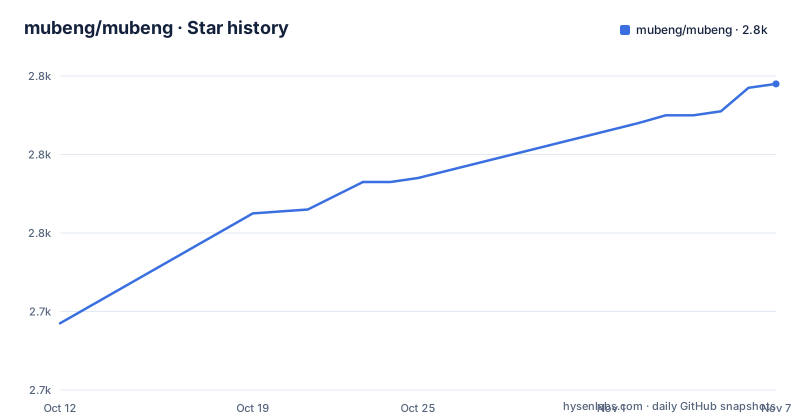
Star history
- mubeng/mubeng2,798 ★ · +61
| Repository | 2026-10-12 | 2026-11-07 |
|---|---|---|
| mubeng/mubeng | 2.7k | 2.8k |
61 Stars in the last 26 days, measured from the daily GitHub snapshot. Compare with other projects
Editorial analysis
Two functions, one input file
The README makes the pitch in a single line: an incredibly fast proxy checker and IP rotator with ease. Underneath that is exactly two capabilities, and the structure of the tool follows from keeping them in one binary.
The first is running as a proxy server for IP rotation, which the README frames as useful for avoiding different kinds of IP ban, naming bruteforce protection, API rate-limiting and WAF blocking based on IP. It is explicit that sourcing the proxy pool is left entirely to the user. The second is performing proxy checks, described as meaning you do not need a separate proxy checking tool for your pool.
That pairing is the actual product decision. Most tools in this space are one or the other, and the ones that are both usually pipe text between two programs with slightly different formats. Here the same `-f` file is both the thing you validate and the thing you serve, which removes the most common failure in a pipeline: a working list that gets mangled between stages.
The features list adds the compatibility surface. HTTP and SOCKS v4(A) and v5 are supported, along with Amazon API Gateway as a proxy protocol, all HTTP and HTTPS methods pass through, and parameters and URIs are forwarded rather than rewritten. Cross-platform support covers Windows, Linux, Mac and Raspberry Pi, which is the natural range for something deployed next to a browser or a scanner.
The repository is Go under Apache-2.0, with 2,713 stars, 271 forks, 31 open issues, no archive flag, a last push of 2026-09-10, and a default branch still named `master`.
Installing it takes one of four routes, all one-liners
The installation section is short enough to reproduce exactly, which is the mark of a tool intended to be dropped onto a box and run. There are four routes and none of them needs a configuration decision.
The first is a pre-built binary from the releases page, which is the whole instruction: download and run. The second is the container image on GitHub's registry:
▶ docker pull ghcr.io/mubeng/mubeng:latestThe last two both build from source, either straight through the Go toolchain:
▶ go install -v github.com/mubeng/mubeng@latestor by hand, which is the route worth knowing because it is the only one that gives you the `make build` target and a destination you control:
▶ git clone https://github.com/mubeng/mubeng
▶ cd mubeng
▶ make build
▶ (sudo) install ./bin/mubeng /usr/local/bin
That final install line is the only place in the setup with any friction, and it is a deliberate choice: putting the binary in a system path under sudo is what makes the `-u, --update` flag and daemonization behave predictably later.
The flag table is where the real configuration lives
Usage is one line, and it is the only mandatory argument:
▶ mubeng [-c|-a :8080] -f file.txt [options...]Everything after that is a flag, and the options table is the most complete part of the README. The two mode selectors are `-c, --check` for a live check and `-a, --address <ADDR>:<PORT>` to run the proxy server, so the two core functions are mutually exclusive flags on the same invocation rather than subcommands.
The rotation controls are where the interesting behaviour lives. `-r, --rotate <AFTER>` rotates the proxy IP for every `AFTER` requests and defaults to 1, meaning a different proxy per request unless you say otherwise. `-m, --method <METHOD>` picks between sequent and random rotation, defaulting to sequent. Then there is the failure handling, which is three separate flags rather than one policy: `--rotate-on-error` rotates and retries failed HTTP requests, `--remove-on-error` removes the proxy from the pool on failure, and `--max-errors <N>` caps how many errors are tolerated during rotation, defaulting to 3, with a negative value meaning rotation continues indefinitely.
The remaining flags cover the input and output plumbing. `-f, --file <FILE>` is the proxy file, `-o, --output <FILE>` saves output from the server or the live check, `-w, --watch` watches the proxy file and live-reloads on changes, and `-t, --timeout` sets the maximum time for the server or check, defaulting to 30s. Filtering exists via `--only-cc <AA>,<BB>` for specific country codes. Concurrency is `-g, --goroutine <N>`, defaulting to 50, and `-s, --sync` makes the server wait for the previous request to complete, which is the setting that converts a concurrent rotator into a sequential one.
Two operational flags are worth calling out. `-A, --auth <USER>:<PASS>` sets authorization on the proxy server, so a rotating proxy need not be open. And `-d, --daemon` daemonizes it. `-v, --verbose` dumps HTTP requests and responses during use, or shows dead proxies during a check, which makes it the flag to reach for when rotation is misbehaving.
Rotations count failed requests too, and that changes your math
The first item in the notes section following the flag table is short and it undercuts an assumption most people bring to a rotating proxy:
Rotations are counted for all requests, even if the request fails.This matters more than it first appears. If you configure rotation every 10 requests and your upstream returns errors on 20 percent of calls, you have consumed your pool twice as fast as you expected, because a request that burned a proxy without producing output still counts. In a scanning or scraping context where failures are common early on, that is the difference between a pool lasting an hour and lasting twenty minutes.
The interaction with `--max-errors` is where this becomes actionable. The cap applies to errors during rotation, so a high error rate will trip it and stop the rotation rather than silently burning through the list. Setting that to a negative number makes rotation continue indefinitely, which sounds tolerant and is in fact the opposite: it means a failing proxy chain is never abandoned. For a long job against a flaky pool, a positive cap with `--remove-on-error` is the combination that keeps the surviving proxies in rotation.
The two optional behaviours also interact. `--rotate-on-error` retries on a different proxy, which keeps throughput up at the cost of masking upstream failures behind proxy churn. `--remove-on-error` prunes the list, which is self-healing but means a transient network blip can permanently discard a good proxy. Neither is wrong, but they should be chosen deliberately rather than both enabled on autopilot.
`-s, --sync` is the other one worth understanding before load testing. Without it the server handles requests concurrently across the pool, which is faster and means the proxy used by request N is not predictable from request N minus one. With it, each request waits for the previous to finish, which makes rotation deterministic and debuggable at the cost of throughput.
Amazon API Gateway support and a custom output format from v0.23.0
Two features arrived in recent releases that the options table does not show, which is a real gap between the README and the shipped binary.
The first is Amazon API Gateway, added in v0.21.0 alongside a repository migration. It works as another proxy protocol in the pool file rather than as a separate mode, with entries written as an `aws://` URL carrying an access key, a secret and a region. The stated benefit is routing traffic through multiple AWS regions for redundancy and geographic distribution. One implementation detail is worth knowing if you build entries by hand: because the AWS entries go through a custom parser, any component can be wrapped in double quotes for readability, which matters a great deal for a secret access key since the raw base64-ish string is otherwise unreadable. That quoting only applies to the `aws` scheme, so it is not a general escape mechanism for the rest of the pool file.
The second is `--output-format`, added in v0.23.0 as a checker-only option, which lets you shape the checker's output with fasttemplate placeholders instead of taking the fixed format. The point of it is composability: the default output is for humans reading a terminal, and this turns it into something you can parse, sort or feed into another tool. The variables it exposes are the proxy URL, protocol, host, port, the external IP, country, city, organisation, region, timezone, latitude and longitude pair, and hostname, with duration among them as well.
What makes both of these worth flagging is that neither appears in the README's options table. The table is presented as complete, and in every entry it lists, it is accurate. But a reader who configures from the README alone will not know `--output-format` exists, and will not have the syntax for an AWS pool entry. Both are only discoverable in the changelog, which is the practical argument for reading `CHANGELOG.md` before assuming the README describes the binary you have.
A year of commits after the last tagged release
The activity numbers deserve reading together rather than separately. The last push was 2026-09-10, which is recent. The most recent GitHub release is v0.23.0, published 2025-08-02, which is not. In between sit v0.22.0 from February 2025 and v0.21.0 from January 2025.
Both facts are consistent with a project that is maintained but released infrequently, and the content of v0.22.0 explains a lot of that. It is almost entirely dependency and build maintenance: bumping the golang base image in Docker to 1.22, enabling http2 by default in the server, go mod tidy, and a long run of automated dependency bumps across the gomod group. Releases that consist of one meaningful change and eleven bot commits are naturally infrequent.
The one behaviour change in that release, enabling http2 by default, is worth noting because it affects the proxy server rather than the checker. Anything asserting on protocol behaviour against a local mubeng endpoint may see different results after upgrading.
The default branch being `master` rather than `main` is a smaller observation but it tells you something about age, and it sits oddly next to the v0.21.0 entry about a repository migration.
For a tool you are likely to drop onto a host and run against an untrusted proxy list, the practical implication is to pin a version rather than build from the tip. A year of unreviewed changes on `master` is not a released artifact, and the `-u, --update` flag, which updates to the latest stable version, will get you a tagged release rather than the newest commit.
Editorial conclusion
mubeng is at its best in the gap it was written for: you have a list of proxies of unknown quality, you want them both validated and then reused through a single local endpoint. Because the proxy server mode and the check mode share one binary and one input format, a dead proxy can be filtered out and the survivors consumed without a second tool or a format conversion. The rotation flags are where the real design lives, and the one detail to read before trusting throughput is that rotations count for all requests including failed ones. Treat the release cadence as a signal too: the last tagged version is from August 2025 while commits continue into September 2026, so pin a version deliberately and read `CHANGELOG.md` rather than assuming the newest commit is a usable release.
Frequently asked questions
What is mubeng and what does it do?
mubeng is a Go tool with two core functions that share one binary and one input file: it checks whether proxies in a list are alive, and it serves that same list as a local rotating proxy server. Because the proxy list is both the input to the checker and the pool for the server, no separate tool or format conversion is needed between the two stages.
Which proxy protocols does mubeng support?
The README lists HTTP, SOCKS v4(A), SOCKS v5, and Amazon API Gateway as supported proxy protocols, with all HTTP and HTTPS methods passing through and parameters and URIs forwarded unchanged. Amazon API Gateway entries use an aws:// scheme carrying an access key, secret and region.
How do I stop mubeng from burning through my proxy pool too fast?
Remember that rotations are counted for all requests, even failed ones, so a high error rate consumes the pool faster than the configured rotation interval suggests. Use --max-errors with a positive value to cap tolerated errors, --remove-on-error to prune dead proxies, and --sync if you want deterministic rotation at the cost of throughput.
What is the latest version of mubeng?
The most recent tagged release is v0.23.0, published on 2025-08-02, and the most recent push to the repository is dated 2026-09-10. Commits continue well after the last release, so pin a version rather than tracking the tip, and use the built-in update flag to move to the latest stable release.
Official sources
Add this badge to your README
If you maintain this project, the badge below links readers to this analysis and shows its maintenance status from the daily GitHub snapshot. Paste the markdown into your README; add ?metric=license or ?metric=stars to the image URL for a different field.

[](https://hysenlabs.com/projects/mubeng-mubeng)Star history chart for your README
[](https://hysenlabs.com/projects/mubeng-mubeng)Was this useful?