Zotero Style: reading progress, tag columns and journal-rank tags inside Zotero
Ethereal Style for Zotero
At a glance
- What is it?
- Ethereal Style is a Zotero addon that adds columns for reading progress, annotation counts, tag rendering and publication ranking. It is aimed at researchers who live in Zotero's item list, and its install path runs through an xpi file rather than a plugin store.
- Who is it for?
- Adopt Zotero Style if you read and annotate PDFs inside Zotero and want the item list to show reading progress, annotation volume, tag rendering and journal-rank labels without leaving the client. Skip it if you want a plugin with documented rollback and a test suite, since package.json's test script exits with an error, or if you need every feature open source, since the README says Pro features are not.
- Can I use it commercially?
- Yes, with strict conditions. AGPL-3.0 is a network copyleft licence: if people use a modified version over a network, for example as a hosted service, you must offer them its source code under the same licence.
- Is it still maintained?
- Yes. The repository last received commits 17 days ago.
- What is it written in?
- Mainly JavaScript, according to GitHub's language statistics.
Answers come from the project's GitHub data, last synced on November 15, 2026, and from our analysis. They are not legal advice.
Star history
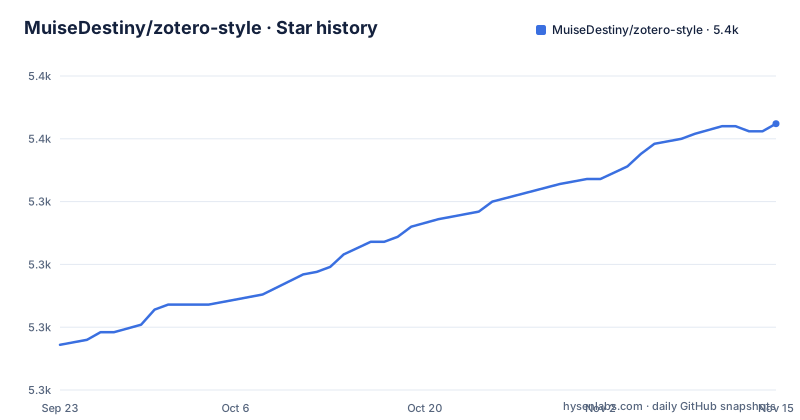
- MuiseDestiny/zotero-style5,356 ★ · +88
| Repository | 2026-09-23 | 2026-11-15 |
|---|---|---|
| MuiseDestiny/zotero-style | 5.3k | 5.4k |
88 Stars in the last 53 days, measured from the daily GitHub snapshot. Compare with other projects
Editorial analysis
What Zotero Style adds to the Zotero item list
Zotero's default item list is deliberately plain. It shows title, creator, year and whatever columns you enable, and it treats reading state as a binary flag. Zotero Style, published as "Ethereal Style for Zotero", rewrites parts of that list. The README describes three additions that change how a library reads at a glance: a title column whose background encodes reading progress, a progress column for seeing how annotations are distributed, and a status column. The audience is narrow and obvious: people who keep hundreds of PDFs in Zotero and annotate them there, and who want the list itself to carry information that currently requires opening each attachment. It is not a citation-style tool despite the name. The repository has nothing to do with CSL styles, Vancouver formatting or reference output; it is a UI layer over the library view.
Reading progress, annotation counts and the tag columns
The mechanism behind the title column is per-page reading time. The README says the plugin records reading time for each page of a PDF and shows that reading heat in the title background. So the column is not a percentage bar; it is a heat map of where you spent time inside a document, which is a different and more honest signal than a completion estimate. The progress column is used alongside it to see how annotations are distributed. Both depend on the plugin's own tracking of PDF interaction, which is why they only make sense for items with attachments you actually opened.
The README lists Tags and #Tags among the item-list columns it adds, alongside journal tag, impact factor, status, rating and short-note columns, and says the list supports column settings and view-group switching.
Publication Tags and the Fields setting
The item-list enhancements include journal tag and impact factor columns. The README says the journal data features need an external service such as easyScholar to be configured, so these columns are not filled from bundled ranking lists alone.
Installing Zotero Style from the xpi file
There is no plugin store entry. package.json points its release page at an xpi on GitHub Releases, and Zotero's own addon installer is the install path. Download the xpi first, then in Zotero open Tools, then Add-ons, and use the gear menu to install from file.
The release asset for the latest build is:
curl -L -o zotero-style.xpi https://github.com/MuiseDestiny/zotero-style/releases/latest/download/zotero-style.xpiThe README's own update instructions are explicit that you should not rely on GitHub releases for updates: it says GitHub Releases may not carry later updates and that you should check for and get the latest version through the update entry at the top right of the plugin's settings. That is worth taking literally. If you pin the xpi from a release page, you may miss newer builds.
For developers, the repository builds with npm and launches a development Zotero instance. The scripts distinguish Zotero 6 from Zotero 7:
npm install
npm run build
npm run start-z7
The package.json defines start-z6 and start-z7, plus stop and restart-dev and restart-prod targets, so the build tooling assumes you have a target Zotero installation to point at.
Where Zotero Style falls short
The README offers only a feature overview and defers installation, configuration and usage to the full documentation at plugins.muisedestiny.xyz/docs/style. It also says Pro features are not open source and ship as a separate encrypted module, that the repository source can lag behind the released plugin, and that the repository does not accept pull requests.
The second gap is testing. package.json defines test as a command that prints an error and exits with status 1, meaning there is no test suite in the repository. Combined with the absence of documented rollback, that means an upgrade that breaks your column layout has no supported undo beyond reinstalling an older xpi. The README does not document rollback.
The plugin is also the wrong tool if you do not annotate. Reading progress and annotation word counts are computed from your PDF interaction; in a library of unread PDFs, or one where you read in an external viewer, both columns stay empty and the plugin reduces to a tag filter.
How this differs from Zotero's own columns and from Zotero Better BibTeX
Zotero's built-in columns are metadata fields. They show what is stored on the item, and they are the same on every machine because they are part of the item data. Zotero Style's columns are derived state: reading time, annotation volume, generated rank tags. That is the real difference in approach, and it explains most of the plugin's constraints.
A closer comparison is Zotero Better BibTeX, which also extends Zotero's list behaviour but does it for citation keys and BibTeX export rather than for reading telemetry. Better BibTeX's output feeds a manuscript; Zotero Style's output feeds your own triage of a library. If your problem is that your bibliography export is unstable, Zotero Style will not help you at all, and the publication-rank tags it generates are display labels, not citation data. Choosing between them is not a matter of quality; they solve different problems in the same window.
Licence and maintenance cost
The repository is licensed AGPL-3.0, and package.json states AGPL-3.0-or-later. That matters if you plan to fork and distribute a modified build, because the AGPL's network clause is stronger than a permissive licence's. Bundling the plugin into a hosted service, or shipping a modified xpi, carries obligations that a plain MIT dependency does not. This is a description of the licence text, not legal advice; if your institution has rules about AGPL code in distributed products, check them before forking.
The last push to the default branch was on 2026-10-29, the same day as the newest release entry, a download and update guide tagged download-guide. Before that came 6.0.8, titled "Menu Visibility Manager", on 2026-06-07, and a release tagged 5.2.3 but titled 5.8.3 on 2025-12-30. The repository is not archived. Note the version mismatch between the release tags and package.json, which reports version 2.6.7; the build metadata and the release numbering are not in step, so do not use package.json to decide whether you are on the current build. Upgrade cost is low in the normal case because the plugin updates through the update entry in its own settings, but the absent test suite and the missing rollback path mean you should keep the previous xpi file around before accepting an update.
Editorial conclusion
Adopt Zotero Style if you read and annotate PDFs inside Zotero and want the item list to show reading progress, annotation volume, tag rendering and journal-rank labels without leaving the client. Skip it if you want a plugin with documented rollback and a test suite, since package.json's test script exits with an error, or if you need every feature open source, since the README says Pro features are not. Before installing, check which Zotero version you run against the start-z6 and start-z7 scripts, since the plugin ships separate launch paths for Zotero 6 and 7.
Frequently asked questions
How do I install the Zotero Style plugin?
Download the zotero-style.xpi asset from the GitHub releases page, then install it through Zotero's own add-on installer from the Tools menu. The README defers installation and configuration details to the full documentation at plugins.muisedestiny.xyz/docs/style.
Where can I download the Zotero Style xpi file?
package.json points the release page at https://github.com/MuiseDestiny/zotero-style/releases/latest/download/zotero-style.xpi. The README warns that GitHub Releases may not carry later updates, so it says to update through the update entry at the top right of the plugin's settings instead.
What does the Zotero Style plugin actually add to Zotero?
It modifies some existing Zotero columns and adds new ones: a title column whose background encodes per-page reading time, a progress column for seeing how annotations are distributed, and journal tag, impact factor, Tags, #Tags, status, rating and short-note columns. The README says the journal data features need an external service such as easyScholar.
Official sources
Add this badge to your README
If you maintain this project, the badge below links readers to this analysis and shows its maintenance status from the daily GitHub snapshot. Paste the markdown into your README; add ?metric=license or ?metric=stars to the image URL for a different field.

[](https://hysenlabs.com/projects/muisedestiny-zotero-style)Star history chart for your README
[](https://hysenlabs.com/projects/muisedestiny-zotero-style)Was this useful?