vdo.ninja is a page per feature, and a family of native capture apps
VDO.Ninja is a powerful tool that lets you bring remote video feeds into OBS or other studio software via WebRTC.
At a glance
- What is it?
- vdo.ninja is a browser based tool that brings remote camera feeds into studio software over WebRTC, usually with a direct connection between peers. The repository is unusual in shape: the root is a long list of single purpose HTML pages rather than a build system, and the bulk of the documentation is a catalogue of companion apps the author maintains, several of which carry hard constraints worth reading before you install them.
- Who is it for?
- vdo.ninja suits a broadcaster or a podcast host who needs a remote guest in the scene without installing anything on the guest's machine, since a browser is the whole client. It does not suit a production that cannot depend on a third party relay, unless you run one of the server options yourself.
- Can I use it commercially?
- Yes, with strict conditions. AGPL-3.0 is a network copyleft licence: if people use a modified version over a network, for example as a hosted service, you must offer them its source code under the same licence.
- Is it still maintained?
- Yes. The repository received new commits within the last day.
- What is it written in?
- Mainly JavaScript, according to GitHub's language statistics.
Answers come from the project's GitHub data, last synced on November 15, 2026, and from our analysis. They are not legal advice.
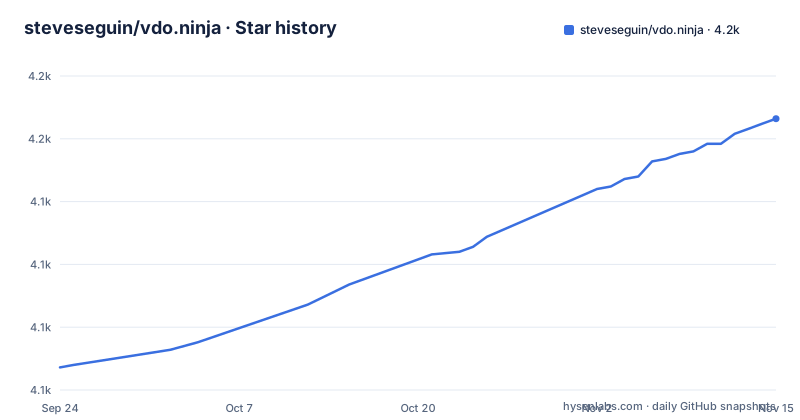
Star history
- steveseguin/vdo.ninja4,158 ★ · +99
| Repository | 2026-09-24 | 2026-11-15 |
|---|---|---|
| steveseguin/vdo.ninja | 4.1k | 4.2k |
99 Stars in the last 52 days, measured from the daily GitHub snapshot. Compare with other projects
Editorial analysis
The repository is a page per feature, not a build system
The top level of the repository is the best description of the project. There is no source directory and no bundler configuration in the root listing. Instead there are dozens of standalone pages, each named after what it does: a camera test, a device list, a page for dropping something into a scene, a chunked audio worklet, a page for checking a browser, a page for a 360 degree feed, a codecs page, a page for an intercom, a director messenger, a document control page, a cloud and a cloudflare page, a whiteboard-adjacent fonts page, an IP camera page, an install document, a clipboard page. A small core directory and a lineawesome icon set sit beside them. The examples directory then mirrors the same idea with a licence file of its own, and the naming convention of every file being a page rather than a module is the clearest statement of the architecture: this is a service built out of URLs.
Peer to peer by default, relays when the room gets large
The feature list leads with a direct peer to peer video transfer in most cases, followed by high quality video with very low latency. That word most is doing real work, because the next bullet is support for the two standard ingestion protocols and for servers you run yourself, and the related projects table explains when you need them. Meshcast is the server assisted option for larger rooms and for one to many streams, and its stated purpose is to reduce the publisher's upload load rather than to add features. The newer application supports the streaming protocol alongside the two relay protocols, and those two require an account. So the deployment choice is a ladder: direct connection first, your own server if that fails, a hosted server if you have a large room or need to relay to a broadcast protocol.
The rename is announced at the top and nothing else changed
The first line of the readme is a notice: the project has been rebranded from its previous name to the current one, with everything else staying the same. That matters because the search traffic, the forum and the old name are all still out there, and because the release history is continuous across the rename. The three recent releases show what changed and roughly how often. The oldest of the three is a patch release that bundles style fixes, a few small features and a cross site scripting patch, which is worth noting because it is a browser page served to strangers. The next is a minor release that improves the podcast studio and adds a debug view to the director's mesh view. The newest changes the default video quality when the service is used for conferencing rather than for streaming.
The director view is the production control room
One of the feature bullets is a control room with group chat, and there are two root pages dedicated to it: a director messenger and a control page. The messenger is the coordination surface for a multi party room, which is the piece that turns a video call into a production: who is about to go live, who is on a break, what is about to be shown. The control page is the room state itself. The related projects table adds the hardware side of the same idea, a plugin for a physical control surface that maps keys and dials to microphones, cameras, guests, scenes, mixer layouts and camera movement, and it is explicitly marked as still in beta and not yet published in that platform's store. So the director concept spans a page, a messenger and a physical desk, with the last one the least finished.
Four ways to get a phone camera into the room
The alternative versions section is really an installation matrix, and it is worth reading as one. A native application for phones on both major stores, which removes the browser from the guest's side entirely. A mixer page with custom layouts, which is the closest thing to a virtual studio desk. A client for the two streaming ingestion protocols, for people who already run that stack. And a whiteboard page, which is a production tool rather than a camera. Then two operational entries: a separate service for managing feeds for competitive play, and a nightly channel that is updated automatically and labelled as an alpha. The practical reading is that the browser path is the default, the store applications are the comfort option, and the nightly build is what you use only when you are testing something new.
The capture apps carry the constraints that matter
This is where the project is most honest, and a reader should read the table before installing anything. The game capture application is native to one desktop system, publishes games, application windows and a video capture protocol source, and does hardware encoding and window audio. The video capture extension for the browser requires a recent Chromium and cannot capture protected video at all. The desktop wrapper is for frameless playback and window capture when the built in browser source does not fit. The plugin for the studio software publishes from the studio, receives streams, and can add room participants as sources automatically, with the native receiver and a transparent capture path marked experimental. And the custom build of the studio software adds trickle connectivity and better relay reachability, which is the honest reason to run a fork rather than the release.
Local capture without a browser is a Python and GStreamer project
One entry in the table exists so a device never has to open a browser at all. It publishes or receives streams using a media framework driven from Python, and the supported targets are given precisely: a single board computer, Linux generally, a hardware-accelerated module, macOS, or Windows through a Linux subsystem. It supports hardware encoding, camera inputs, the streaming ingestion protocol on output, and is described as suited to computer vision workflows, which is the one use case where a browser tab is genuinely in the way. Next to it sits an audio plugin for digital audio workstations, which sends and receives the service's audio inside a host application, is currently limited to one desktop system, was tested against one host application, and carries no video at all.
Three licence files and a develop branch
The root carries a licence file, a file with the British spelling, and a third that names the licence explicitly, which is unusual and usually means the project has accumulated licence text from different eras. Alongside them sit a document about embedding the pages in frames, a security policy, a contribution guide, an agent instructions file, and a formatting configuration. The default branch is a development one rather than a stable one, which for a service deployed as pages means the live site is running whatever the development branch holds. The rest of the catalogue is overlay and service work built on the same core: a production intercom with separate audio groups, a managed lobby with reusable invitations and waiting lists where hosts sign in with a chat account, a tool that folds viewer chat from several platforms into overlays, live captions with a local recognition variant, and a tipping page wired into the service's own tipping options.
Editorial conclusion
vdo.ninja suits a broadcaster or a podcast host who needs a remote guest in the scene without installing anything on the guest's machine, since a browser is the whole client. It does not suit a production that cannot depend on a third party relay, unless you run one of the server options yourself. Before committing, read the constraints on the capture apps rather than the marketing: one requires a recent Chromium and cannot touch protected video, another is Windows only, and the audio plugin is a single platform and a single host application.
Frequently asked questions
What is vdo.ninja?
An open source tool that brings remote video feeds into studio software such as OBS over WebRTC, usually with a direct connection between peers. The project was renamed from OBS.Ninja, with everything else unchanged, and the repository is built as a set of standalone pages rather than a compiled application.
What does vdo ninja do?
It lets a remote participant join as a camera source without installing anything, and adds a director control room with group chat for running a multi party production. It also supports the two standard streaming ingestion protocols and servers you host yourself for larger rooms or one to many delivery.
How do I use vdo.ninja?
Open the site in a browser and choose the option to add a camera to the studio software, then send the room to your guest. Native applications exist for phones on both major app stores, and the documentation site, a support chat and a subforum are linked from the readme for anything that does not go to plan.
Does vdo ninja work with OBS?
Yes, that is the primary use case. A plugin publishes from the studio software, receives streams and can add room participants as sources automatically, and a native game capture application publishes games, windows and a video capture protocol source with hardware encoding. Parts of that integration are marked experimental.
Is vdo.ninja free?
The readme lists free software, free managed services and free support, and no price appears anywhere in the file. Some optional services built around it do have conditions, though: the relay application requires an account for the two broadcast protocols, and the creator tipping pages are a separate product.
Official sources
Add this badge to your README
If you maintain this project, the badge below links readers to this analysis and shows its maintenance status from the daily GitHub snapshot. Paste the markdown into your README; add ?metric=license or ?metric=stars to the image URL for a different field.

[](https://hysenlabs.com/projects/steveseguin-vdo-ninja)Star history chart for your README
[](https://hysenlabs.com/projects/steveseguin-vdo-ninja)Was this useful?