mumuy/browser: User-Agent parsing and browser fingerprinting with JavaScript
浏览器检测 - Useragent分析/浏览器识别/浏览器判断/用户代理信息/浏览器指纹/Useragent analysis tool/Browser detection
At a glance
- What is it?
- mumuy/browser is a JavaScript library for parsing User-Agent strings and collecting browser and device signals. It suits frontend and Node.js applications that need consolidated browser data, but its documentation leaves browser-only features and server-side behavior unclear.
- Who is it for?
- Frontend teams should consider mumuy/browser when a single API for User-Agent parsing and browser signals fits their application. It is a poor fit for security decisions based solely on fingerprint stability or for Node.js services requiring every getInfo field.
- Can I use it commercially?
- Yes. MIT is a permissive licence: you can use, modify and sell software built on it, as long as you keep its copyright and licence notices.
- Is it still maintained?
- Yes. The repository last received commits 36 days ago.
- What is it written in?
- Mainly JavaScript, according to GitHub's language statistics.
Answers come from the project's GitHub data, last synced on October 23, 2026, and from our analysis. They are not legal advice.
Star history
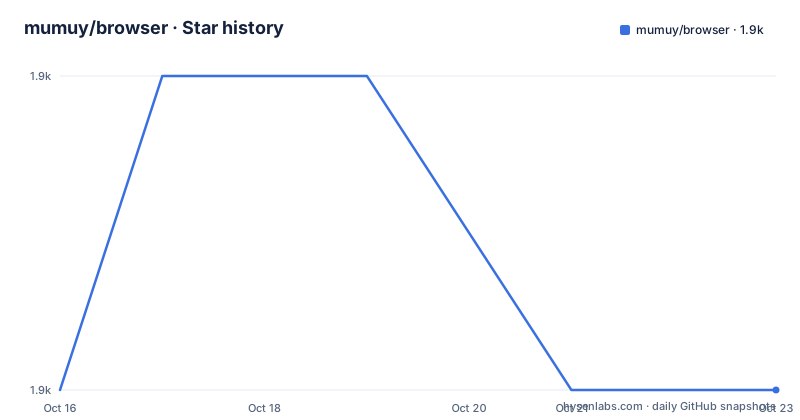
- mumuy/browser1,889 ★ · +0
| Repository | 2026-10-16 | 2026-10-23 |
|---|---|---|
| mumuy/browser | 1.9k | 1.9k |
0 Stars in the last 7 days, measured from the daily GitHub snapshot. Compare with other projects
Editorial analysis
Why mumuy/browser exists and where it fits
mumuy/browser consolidates browser detection work that would otherwise require separate User-Agent parsing, feature checks, and browser information collection. Its documented fields cover the browser and rendering engine, operating system, device class, screen, GPU, network, language, time zone, touch support, WebView status, and robot detection. It also identifies named clients and a large set of browser variants, including Chinese browsers, mobile vendor browsers, messaging clients, and crawlers.
The intended users are JavaScript developers who need these signals in a frontend application or in Node.js. The library is not limited to deciding whether a string starts with Chrome or Firefox. It also offers environment checks for fonts, WebGL, and NFC, plus a combined fingerprint method.
That breadth creates one important qualification. Browser identity, capability detection, and fingerprint generation answer different questions. A parsed User-Agent is a declared string and can be modified. Feature support concerns what the current browser exposes. Fingerprint output combines multiple browser characteristics. The README presents all three under one package, so consumers should decide which question they actually need before treating the results as interchangeable.
How mumuy/browser organizes detection and data access
The repository separates source code from distributed bundles. The package metadata points CommonJS and default consumers to `./dist/browser.min.js`, while the `import` export points to `./dist/browser.min.mjs`. Only `dist` is included in the published package. Source files live under `src`, and the project uses Rollup, Babel, and Terser through `rollup.config.mjs`, `babel.config.js`, and the development dependencies in `package.json`.
At the API level, `browser.parse()` takes a User-Agent string and returns identifying details such as browser name, version, engine, operating system, platform, device type, WebView status, robot status, and touch support. The documented result also includes fields such as `isTouch`, `userAgent`, `architecture`, and `bitness`, although the README does not explain which parser output path produces every field.
The separate `browser.getInfo()` method returns richer runtime information. A caller can request selected groups through fields such as `'network'`, or omit the argument to request all fields. These values include screen dimensions, refresh rate, device pixel ratio, memory, GPU information, language, network type, and time zone. This distinction matters: parsing a supplied string and collecting information from the current runtime are not the same operation.
The package offers `browser.isSupport()` for specific capabilities and `browser.getFingerprint()` for a combined value. Based on the repository layout, the distributed files are built from the JavaScript source, while the README defines the public surface. The internal matching rules and fingerprint composition are not documented in the repository documentation.
Installing browser-tool and parsing a User-Agent
The README documents both direct browser inclusion and npm installation. The npm package is named `browser-tool`, not `mumuy/browser`. It requires Node.js 20 or later, npm 8 or later, and explicitly asks Yarn users to use npm.
Install the package with the documented command:
npm install browser-toolFor a CommonJS project, require the package and parse the example User-Agent from the README:
var browser = require("browser-tool");

let info = browser.parse('Mozilla/5.0 (Windows NT 10.0; Win64; x64) AppleWebKit/537.36 (KHTML, like Gecko) Chrome/126.0.0.0 Safari/537.36 Edg/126.0.0.0');
The documented parsing model identifies Edge through the `Edg/126.0.0.0` token in this example. Applications should inspect the returned object rather than assuming that every field in the larger sample response will be populated by every User-Agent string. The README does not define a fallback value for missing fields.
A direct-download workflow is also documented. Obtain `browser.js` and include it with a `<script>` tag, which exposes a global function named `browser`. The README does not provide the download location for that file within this article.
Collecting runtime information and checking capabilities
The first runtime use documented by the project requests one information group. Call `getInfo()` with an array containing the group name, then await the result:
var browser = require("browser-tool");

let networkInfo = await browser.getInfo(['network']);
Omitting the field list requests all available information:
var browser = require("browser-tool");

let info = await browser.getInfo();
The documented response groups cover network, screen, device, GPU, language, time zone, and other runtime characteristics. Some values, including the IP address, are shown in the README even though the documented field selector does not explain how that value is obtained.
Capability checks use a separate method. The README lists font, WebGL, and NFC checks:
var browser = require("browser-tool");

let hasYaHei = browser.isSupport('font-family','Microsoft YaHei');
let isWebGL = browser.isSupport('webgl');
let isNFC = browser.isSupport('nfc');
These checks are useful when the application needs to choose an implementation that the browser exposes. They are also where runtime constraints become visible. NFC support, for example, cannot be established in the same way on every device. The README states that the library works in both frontend and Node.js, but it does not explain which runtime APIs each group uses or what Node.js returns for screen, battery, GPU, language, time zone, and browser-only capabilities.
Fingerprint collection, privacy boundaries, and reliability
The documented fingerprint call returns a combined value:
var browser = require("browser-tool");

let data = await browser.getFingerprint();
console.log('[浏览器指纹]',data.value);
This method should not be confused with a User-Agent parse. A User-Agent describes the client through one string. A fingerprint combines characteristics that can provide a more specific signal, but the README does not disclose the exact inputs, hashing process, stability guarantees, or fallback behavior.
That silence is a real adoption constraint. There is no documented promise that `data.value` remains constant across sessions, browsers, devices, privacy settings, or browser updates. There is also no documentation about consent, storage, retention, or disclosure requirements. An application collecting fingerprint data may therefore need to treat it as sensitive user information even though the repository describes the feature primarily as browser detection.
For basic UI adaptation, `parse()` or `isSupport()` is easier to reason about. For identity, fraud controls, or access decisions, the generated fingerprint requires separate validation against the intended environment and privacy policy. The project documentation does not claim that a fingerprint proves identity, and this review found no release notes or benchmark data that would justify such an interpretation.
Where browser-tool is the wrong detection approach
User-Agent parsing is the wrong tool when a server already receives structured request information and the decision depends on an authoritative protocol field. For example, a service can select client behavior from an explicit HTTP `User-Agent` header or framework-provided request data rather than reconstructing the client from unrelated screen and hardware signals. This alternative changes the boundary: parser-based detection runs inside application code and works from a string, while server-side request handling uses data already attached to the incoming request.
Feature detection is also preferable when the decision concerns an actual browser capability. Instead of asking `browser.isSupport('webgl')`, an application can directly test whether its intended WebGL operation can run. The direct approach observes the specific API and resources needed by the application. It does not depend on the library maintaining a separate browser support table.
There are further cases where mumuy/browser does not fit. A static content site has little reason to collect screen, battery, GPU, network, language, and fingerprint data. A backend service should not assume that browser APIs are available in Node.js merely because the package can be required there. The package requires Node.js 20 or later, but the README does not define a reduced Node.js result schema.
Package maintenance, license, and upgrade implications
The repository is not archived, and its last push was on 2026-09-17. The package metadata reports version `1.3.4`, while the repository has no GitHub releases. That distinction leaves the npm version as the only stated package version and gives consumers no documented release-note history for judging upgrade changes.
The build system uses Rollup with Babel and Terser. The `build` and `watch` scripts are intended for maintainers working from the repository, not for ordinary consumers who install the published `dist` files. Because `package.json` includes only `dist`, an npm consumer receives generated bundles rather than the `src` directory.
The declared license is MIT. The repository includes a `LICENSE` file and the package metadata repeats the MIT identifier. That permits use and modification under the license's stated terms, but consumers remain responsible for reviewing the actual license text and complying with its notice requirements.
Upgrade planning is constrained by the lack of releases and migration documentation. The README does not define a browser matching update policy, semantic-versioning policy, supported user-agent list, or rollback procedure. Consumers should therefore inspect the package version and parse results for their own representative strings before replacing an existing installation.
Editorial conclusion
Frontend teams should consider mumuy/browser when a single API for User-Agent parsing and browser signals fits their application. It is a poor fit for security decisions based solely on fingerprint stability or for Node.js services requiring every getInfo field. Before adoption, verify field availability in the target runtime, consent requirements for fingerprint data, and behavior with representative User-Agent strings.
Frequently asked questions
How do I install mumuy/browser with npm?
Install the published package name `browser-tool` with `npm install browser-tool`. The package requires Node.js 20 or later and npm 8 or later.
What is the difference between browser.parse() and browser.getInfo() in mumuy/browser?
`browser.parse()` analyzes a supplied User-Agent string. `browser.getInfo()` collects runtime information and can receive a list of requested information groups.
Does mumuy/browser provide browser fingerprinting in Node.js?
The README says the library can be used in the frontend or Node.js and shows `browser.getFingerprint()`, but it does not document which fingerprint fields are available in Node.js or guarantee identical results across runtimes.
Official sources
Add this badge to your README
If you maintain this project, the badge below links readers to this analysis and shows its maintenance status from the daily GitHub snapshot. Paste the markdown into your README; add ?metric=license or ?metric=stars to the image URL for a different field.

[](https://hysenlabs.com/projects/mumuy-browser)Star history chart for your README
[](https://hysenlabs.com/projects/mumuy-browser)Was this useful?