MurphySec CLI, a dependency scanner that sends your manifest to a server to find known flaws
An open source tool focused on software supply chain security. 墨菲安全专注于软件供应链安全,具备专业的软件成分分析(SCA)、漏洞检测、专业漏洞库。
At a glance
- What is it?
- MurphySec CLI is a Go command line tool for software supply chain security. It works out your project's dependencies by building it or parsing its package manifests, uploads that dependency information to a server, and matches it against a vulnerability knowledge base maintained by MurphySec. It covers Java, JavaScript and Go, and there is a hosted platform where the results are displayed.
- Who is it for?
- Adopt MurphySec CLI if you want a free command line dependency scanner that slots into an existing CI pipeline and you are comfortable with a hosted matching service, and skip it if your policy forbids sending dependency manifests to a third party or if you need coverage for languages beyond Java, JavaScript and Go.
- Can I use it commercially?
- Yes. Apache-2.0 is a permissive licence: you can use, modify and sell software built on it, as long as you keep its copyright and licence notices.
- Is it still maintained?
- Activity is slowing. The repository last received commits 7 months ago.
- What is it written in?
- Mainly Go, according to GitHub's language statistics.
Answers come from the project's GitHub data, last synced on November 6, 2026, and from our analysis. They are not legal advice.
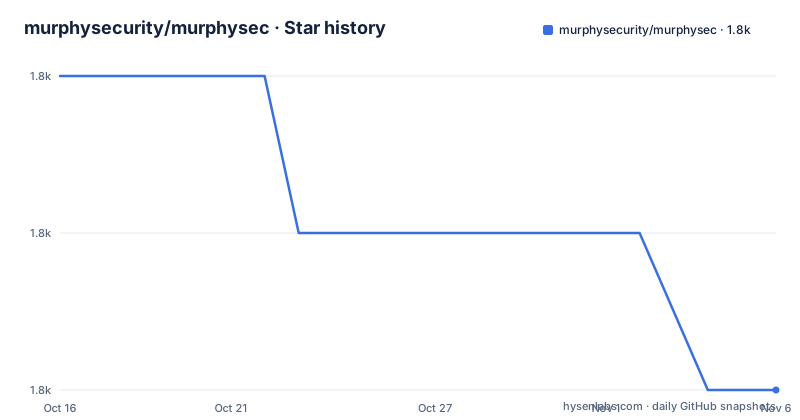
Star history
- murphysecurity/murphysec1,751 ★ · -2
| Repository | 2026-10-16 | 2026-11-06 |
|---|---|---|
| murphysecurity/murphysec | 1.8k | 1.8k |
-2 Stars in the last 21 days, measured from the daily GitHub snapshot. Compare with other projects
Editorial analysis
What the tool actually does, in two steps
The documented flow is short and worth understanding before you install anything. MurphySec CLI obtains the dependency information of your project mainly by building the project or by parsing the package manifest files. That dependency information is then uploaded to the server, and the dependencies with security issues in the project are identified through the vulnerability knowledge base maintained by MurphySec. So the client is a collector and a uploader, and the matching against known vulnerabilities happens server side against a database the project maintains. The feature list is correspondingly narrow: analyse the dependencies being used by your project, including direct and indirect dependencies, and detect known vulnerabilities in project dependencies. The project is described as an open source tool focused on software supply chain security, and the Chinese description names software composition analysis, vulnerability detection and a professional vulnerability database as its capabilities.
murphysec scan [your-project-path]The privacy note, and what it does and does not send
The project states a limit on what leaves your machine: the CLI will only send the dependencies and basic information of your project to the server for identifying the dependencies with security issues, and will not upload any code snippets. That is a meaningful reassurance for a scanner that runs inside a CI pipeline, and it is worth reading precisely rather than paraphrasing. What is sent is the dependency list, which is metadata about what you depend on rather than what you wrote, and a code snippet is a different class of data again. What the note does not claim is that nothing sensitive leaves the machine, because a dependency manifest can itself be informative about a company, its products and its internal project names. The two working scenarios the project lists are detecting security issues in your code locally and detecting them in a CI/CD pipeline, and the pipeline case is where the upload behaviour will be scrutinized by a security team rather than by a developer.
Note: MurphySec CLI will only send the dependencies and basic information
of your project to server for identifying the dependencies with security
issues, and will not upload any code snippets.
Installing the CLI, and the three platform one-liners
Installation is a script fetched over the network and piped into a shell, which is a normal pattern for a vendor CLI but worth reading before you paste it into a build. The Linux line downloads an install script with wget and pipes it to bash, the macOS line does the equivalent with curl, and the Windows line uses PowerShell to fetch and execute a PowerShell script. The alternative is to visit the GitHub Releases page and download the latest version of the CLI yourself, which is the better path for a controlled environment where a curl-to-shell pipeline would need an exception. The tool is written in Go, and the module file requires Go 1.24.0, with the module path github.com/murphysecurity/murphysec and the default branch named v3, which is an unusual branch name for a Go project but a common one for projects that treat the major version as a track. The command line interface is built on cobra, and the presence of a survey library in the dependencies explains the interactive prompt during login.
wget -q https://s.murphysec.com/release/install.sh -O - | /bin/bashAuthentication, and the token you hand to a pipeline
The CLI requires an access token from a MurphySec account, and the token is obtained from the platform console where you click a copy button next to the Token and paste it. There are two authentication methods. Interactive authentication runs the auth login command and pastes the access token in, and the documentation notes that repeating the command overwrites the old token if you need to change it. Parameter authentication passes the token with the --token parameter, which is the form you need in a CI job where nobody can paste anything. The distinction has a security consequence worth naming. A token stored in your CI system's secret store and passed as a parameter is one secret to rotate and one to audit, and the auth logout command exists so that a token can be revoked from the machine. The auth command group is described as mainly used for the management of certification, and the only subcommands listed are login and logout, which tells you the token model is deliberately minimal.
murphysec auth loginThe scan command and its flags
The scan command takes a directory and runs a detection, and the global flags describe how much you hear about it. The --log-level flag sets the verbosity of the command line output stream, and no log is printed by default, with the accepted values silent, error, warn, info and debug. The --json flag switches the result output to json, since by default the result details are not shown in the terminal. Two more global flags matter for automation. The --no-log-file flag stops the tool writing a log file, and the --write-log-to flag sets the path if you want it somewhere specific, which in a CI context is often a directory you collect artifacts from. There is also a --server flag to specify a server address, and a -v version flag. The scanning behaviour is set by the directory argument, so the same binary can be pointed at different project roots without configuration.
Usage:
  murphysec scan DIR [flags]

Flags:
  -h, --help   help for scan
      --json   json output

Global Flags:
      --log-level string      specify log level, must be silent|error|warn|info|debug
      --no-log-file           do not write log file
      --server string         specify server address
      --token string          specify API token
  -v, --version               show version and exit
      --write-log-to string   specify log file path
The results live on the platform, not in your terminal
This is the part of the design that determines whether the tool fits your workflow. The CLI does not show the result details by default, and you view the results in the MurphySec platform console, with the README including screenshots of a CLI scan result and of the scan result and scan detail result pages. So the terminal tells you that something was found, and the console tells you what. For a developer running a one-off scan, that is a reasonable division of labour, and the platform is where the vulnerability data and the project management live. For a team that wants the finding in the pull request or in the build log, the --json flag is the way out, since it emits the result as json rather than pointing you at the browser. There is also documentation for integrating the CLI into Jenkins, and the project describes its own audience as being reachable through an official WeChat account for group communication, which tells you where the support actually lives.
What the Go source tree reveals about the internals
The repository layout is unusually revealing for a scanner, because the directory names are the feature list. There is a collect/ directory for gathering dependency information, an inspector/ directory, a codehash/ directory for hashing source, a chunkupload/ directory for uploading in chunks, an env/ directory and an envinspection/ directory, a gitinfo/ directory that reads repository metadata, a projectlicense/ directory, a module/ directory, a model/ directory, an api/ directory, a config/ directory, and separate scanerr/, toolver/, errors/, logger/, infra/, utils/, version/ and cmd/ directories. The dependency list confirms the implementation approach. go-git is used for repository information, iseki0/go-yarnlock reads a yarn lockfile, vifraa/gopom reads a Maven pom, antlr4-go and antlr are the parser generators, xmlquery handles XML, and the list includes a package named licensematcher, which is a clue that project licence identification is part of what the tool does. The presence of a chunkupload package suggests large uploads are split, which matters for a monorepo with a large dependency graph.
collect/
inspector/
codehash/
chunkupload/
env/
envinspection/
gitinfo/
projectlicense/
module/
model/
api/
config/
scanerr/
toolver/
errors/
logger/
infra/
utils/
version/
cmd/
The version gap, and the licence
The release history and the branch name tell a story worth reading carefully. The published releases are v3.1.1 from 2023-05-15, v3.1.0 from 2023-05-11 and v3.0.1 from 2023-02-13, so the last tagged build is more than three years old as of now. The last push to the repository was on 2026-04-07 and the repository is not archived, and the newest published tag is still the 2023 one. That combination is common in Chinese vendor open source projects, where the shipped binary and the public repository can drift apart. The licence is Apache 2.0 with the file at the root, which permits commercial use as long as the licence and notice requirements are kept. The project also ships a Chinese README, a CONTRIBUTING.md, a SECURITY.md, a.gitlab-ci.yml as well as a.github/ directory, and an AGENTS.md, which suggests the repository is set up for work with AI coding assistants and carries both GitHub and GitLab CI configuration.
Editorial conclusion
Adopt MurphySec CLI if you want a free command line dependency scanner that slots into an existing CI pipeline and you are comfortable with a hosted matching service, and skip it if your policy forbids sending dependency manifests to a third party or if you need coverage for languages beyond Java, JavaScript and Go. Verify three things before you wire it into a build: that uploading the dependency list to the vendor's server is acceptable under your data handling rules, since the tool is designed around that flow; that the token you hand it is scoped the way you want, since the same token is used interactively and as a parameter; and which version you are running, because the last published release is v3.1.1 from 2023 while the default branch is v3 and the repository has been pushed to since, so the binary you download and the source you read may differ.
Frequently asked questions
What is MurphySec CLI and what does it detect?
It is a command line tool focused on software supply chain security that analyses the dependencies used by your project, including direct and indirect ones, and detects known vulnerabilities in them. It can be run locally or integrated into a CI/CD pipeline.
Which languages does MurphySec CLI support?
Currently Java, JavaScript and Go, with other development languages to be supported gradually in the future.
Does MurphySec CLI upload my source code to the server?
No. The documentation states that the CLI will only send the dependencies and basic information of your project to the server in order to identify dependencies with security issues, and will not upload any code snippets.
How do I authenticate the MurphySec CLI in a CI pipeline?
With parameter authentication, passing the access token using the `--token` flag. The alternative is interactive authentication through `murphysec auth login`, which pastes the token in, and the auth command group also offers a logout command. The CLI requires an access token from a MurphySec account.
Official sources
Add this badge to your README
If you maintain this project, the badge below links readers to this analysis and shows its maintenance status from the daily GitHub snapshot. Paste the markdown into your README; add ?metric=license or ?metric=stars to the image URL for a different field.

[](https://hysenlabs.com/projects/murphysecurity-murphysec)Star history chart for your README
[](https://hysenlabs.com/projects/murphysecurity-murphysec)Was this useful?