emogrifier moves your email CSS into style attributes
Converts CSS styles into inline style attributes in your HTML code.
At a glance
- What is it?
- emogrifier is a PHP library that parses your CSS and writes the matching declarations into style attributes on the HTML tags, so email clients that ignore style elements still show the design. It ships several processor classes that share one DOMDocument, and it does not solve the parts of email CSS that inline styles cannot express.
- Who is it for?
- Adopt emogrifier when you generate HTML email from a template and your sending pipeline still depends on style elements that many clients discard, and keep a plain template when your design needs states or responsive rules that inline styles cannot carry.
- Can I use it commercially?
- Yes. MIT is a permissive licence: you can use, modify and sell software built on it, as long as you keep its copyright and licence notices.
- Is it still maintained?
- Yes. The repository last received commits 2 days ago.
- What is it written in?
- Mainly PHP, according to GitHub's language statistics.
Answers come from the project's GitHub data, last synced on November 7, 2026, and from our analysis. They are not legal advice.
Star history
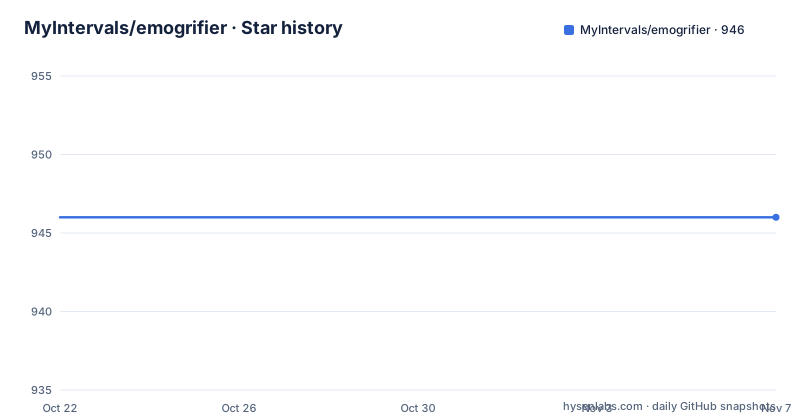
- MyIntervals/emogrifier946 ★ · +0
| Repository | 2026-10-22 | 2026-11-07 |
|---|---|---|
| MyIntervals/emogrifier | 946 | 946 |
0 Stars in the last 16 days, measured from the daily GitHub snapshot. Compare with other projects
Editorial analysis
The email client problem that created the library
emogrifier exists because of a specific behaviour of email clients. As the project puts it, the primary problem with uncooperative email clients is that most tend to only regard inline CSS, discarding all style elements and links to stylesheets in link elements.
That is the entire problem statement. A designer writes a stylesheet, a developer links it, and a large share of the audience sees unstyled HTML. The project was developed as part of Intervals to deal with the problems posed by certain email clients, namely Outlook 2007 and GoogleMail, when it comes to the way they handle styling contained in HTML emails. The note about implementation being a ways off on email standards has not changed much in the intervening years.
So the audience is developers who build HTML email, usually from a template, and who need a build step that flattens the stylesheet into the markup. It is not a general purpose HTML minifier or a CSS optimiser. It is a compatibility shim for a specific rendering gap, and treating it that way is what keeps expectations right.
Selectors are resolved against the parsed HTML and written into tags
The mechanism is described in one sentence in the documentation: emogrifier transmogrifies your HTML by parsing your CSS and inserting your CSS definitions into tags within your HTML based on your CSS selectors.
The pipeline runs through a DOMDocument, which is why the library is built around processors that can be handed the same document object. CSS is parsed, selectors are matched against the document tree, and the winning declarations are merged into the style attribute of each matched element. The element keeps its identity in the document, so the result is still valid HTML rather than a string with substitutions bolted on.
That structure is visible in the class list. The main entry point is CssInliner, and the other processors are subclasses of AbstractHtmlProcessor, which the documentation describes as other HTML-processing classes you can use to further change the HTML after inlining the CSS. The available ones shown here are HtmlNormalizer, CssToAttributeConverter, HtmlPruner and CssVariableEvaluator.
Because every processor works on the same DOMDocument, the order of the calls is the order of the transformations, and each step sees the output of the previous one. The documented chain inlines the CSS, prunes the document, and only then converts CSS into visual attributes, which is the sequence you would want since the attribute conversion is a fallback for clients that ignore CSS entirely.
One DOMDocument, several processors, in sequence
The sharing of a DOMDocument between CssInliner and the HTML-processing classes is the architectural decision, and the documentation shows it explicitly with CssInliner, HtmlPruner and CssToAttributeConverter working together:
use Pelago\Emogrifier\CssInliner;
use Pelago\Emogrifier\HtmlProcessor\CssToAttributeConverter;
use Pelago\Emogrifier\HtmlProcessor\HtmlPruner;

…

$cssInliner = CssInliner::fromHtml($html)->inlineCss($css);
$domDocument = $cssInliner->getDomDocument();
HtmlPruner::fromDomDocument($domDocument)->removeElementsWithDisplayNone()
  ->removeRedundantClassesAfterCssInlined($cssInliner);
$finalHtml = CssToAttributeConverter::fromDomDocument($domDocument)
  ->convertCssToVisualAttributes()->render();
The chain does three things. It inlines the stylesheet, then removes elements with display none and strips the class attributes that are redundant once the CSS has been inlined, and finally converts the remaining CSS into visual HTML attributes.
That last step is a last-resort fallback. CssToAttributeConverter turns a few style attribute values into visual HTML attributes, so style="width: 100px" becomes width="100", which gives at least some visual styling to clients that do not support CSS well.
HtmlNormalizer does the opposite job, cleaning the input before you inline: it adds an HTML5 document type if missing, disentangles incorrectly nested tags, and adds HEAD and BODY elements if they are missing.
The API is consistent throughout. Each class can be created from an HTML string with fromHtml, or from an existing document with fromDomDocument, and each ends with a render call.
Custom properties need a second pass
CSS variables are the case where inlining alone is not enough, and the documentation walks through it.
Consider a stylesheet that defines a custom property on the root and uses it in a rule:
:root {
    --text-color: green;
}

p {
    color: var(--text-color);
}
After CssInliner has inlined that CSS onto the HTML, the property is still a reference. The documentation shows the resulting markup with the custom property still declared on the html element as style="--text-color: green;" and the paragraph carrying style="color: var(--text-color);". The value has been copied around, but it has not been resolved.
Resolving it is the job of CssVariableEvaluator, whose evaluateVariables method applies the value of the custom property so that the paragraph style attribute becomes color: green;. Like the other processors it can be started from HTML or from a document:
use Pelago\Emogrifier\HtmlProcessor\CssVariableEvaluator;

…

$evaluatedHtml = CssVariableEvaluator::fromHtml($html)
  ->evaluateVariables()->render();
The practical lesson for a build pipeline is that resolving variables is a separate step, and that step has to be in the right place in the chain. A value defined on one element and consumed on another only resolves correctly if the evaluator runs over the document as a whole rather than per element.
Installing the package and getting a first result
Installation is a Composer package. You can add pelago/emogrifier to the require section of your composer.json, or run the Composer command directly:
composer require pelago/emogrifierThe package is published on Packagist under the pelago vendor name, which is worth noting since the repository and the vendor namespace differ from the project name.
The most basic usage takes the original HTML, inlines the external CSS, and returns the resulting HTML:
use Pelago\Emogrifier\CssInliner;

…

$visualHtml = CssInliner::fromHtml($html)->inlineCss($css)->render();
If all the CSS already lives inside style elements in the HTML, the CSS argument can be omitted:
$visualHtml = CssInliner::fromHtml($html)->inlineCss()->render();And if you want only the body content rather than the whole document, renderBodyContent does that:
$bodyContent = $visualHtml = CssInliner::fromHtml($html)->inlineCss()
  ->renderBodyContent();
Options are applied as method calls before the CSS is inlined, so the shape of the code is always fromHtml, then configuration, then inlineCss, then render. The example given for an option is disableStyleBlocksParsing, which stops the library from parsing style elements, and there is a link to the full options list in the documentation.
What inlining cannot fix, and when to skip it
The honest limit is that an inline style attribute can only describe the current state of one element. Anything that depends on a state or on the viewport cannot survive the transformation: a hover rule, an active state, a media query for a narrow screen, all of it has no place to live once the cascade is flattened onto the element.
That is a property of the technique rather than a bug in the library, and it is why the project documentation carries a section on supported CSS selectors and a separate section on caveats. Before you commit to a template, read those two sections and check them against the selectors your design actually uses, because a template that leans on media queries will not be rescued by inlining, it will be silently flattened into something that looks wrong.
The alternative approach, and it is the one most teams should consider first, is to write the email in a form that assumes no stylesheet support at all, with a table based layout and inline styles authored by hand or by a template engine. The cost of that route is a design that is constrained from the start. The cost of the emogrifier route is a pipeline with a PHP dependency and a step that can quietly change the output when the library version changes.
For a large sending system the deciding factor is usually the volume of legacy templates you cannot rewrite. For a new template written today, a build step that flattens CSS is often more machinery than the problem needs.
Licence, releases and the PHP version treadmill
The project is released under the MIT licence, with the LICENSE file in the repository root, and the composer.json and CHANGELOG.md sit alongside it in a repository that also carries a docs folder, a src directory, a tests directory and a Build directory.
The release history shows what the maintenance burden looks like for a library in the PHP ecosystem. Version 8.1.0 added support for PHP 8.5 and was released on 2025-09-15. Version 8.2.0 added support for Symfony 8.0 with performance improvements and bug fixes, on 2025-11-27. Version 8.3.0, released on 2026-10-11, is titled around supporting PHP 8.6, mitigating dependency hell in WordPress, and catering for extreme usage.
That 8.3.0 title is the interesting one for anyone deploying inside WordPress. A library that pulls in a parser and a DOM layer can bring a dependency tree that conflicts with what a site already has, and the release notes treat that as a first-class problem. The mention of extreme usage suggests the maintainers also spend effort on very large documents, which is the case where an inliner is most likely to hurt you.
The repository is not archived and the last push was on 2026-10-15, days after the 8.3.0 release. The project also documents its own release steps in the README.
Editorial conclusion
Adopt emogrifier when you generate HTML email from a template and your sending pipeline still depends on style elements that many clients discard, and keep a plain template when your design needs states or responsive rules that inline styles cannot carry. Verify first which selectors your template relies on against the project's supported selectors and caveats sections, and if you deploy to WordPress, check the dependency set of the release you install, since the 8.3.0 release was specifically about mitigating dependency hell in WordPress.
Frequently asked questions
How do I install emogrifier in a PHP project?
Add pelago/emogrifier to the require section of your composer.json, or run composer require pelago/emogrifier. The package is published on Packagist under the pelago vendor name, and the project is released under the MIT licence.
How do I inline CSS with emogrifier?
Create a CssInliner from your HTML, inline the CSS, then render: CssInliner::fromHtml($html)->inlineCss($css)->render(). The CSS argument can be omitted when all styles live in style elements, and renderBodyContent returns just the body content.
Does emogrifier resolve CSS custom properties?
Not during inlining. After CssInliner runs, a rule using var(--text-color) still holds the reference. The CssVariableEvaluator class applies the variable values, so call evaluateVariables on the document as a separate step.
What is the difference between CssInliner and CssToAttributeConverter?
CssInliner moves stylesheet rules into style attributes on matching tags. CssToAttributeConverter goes further and converts a few style values into visual HTML attributes, for example style="width: 100px" into width="100", as a fallback for clients that ignore CSS.
Which CSS does emogrifier support in email?
The project documentation carries dedicated sections on supported CSS selectors and on caveats, which are the places to check the selectors your template relies on. Inlining only writes declarations onto elements, so rules that depend on states or on the viewport have nowhere to go once the cascade is flattened.
Official sources
Add this badge to your README
If you maintain this project, the badge below links readers to this analysis and shows its maintenance status from the daily GitHub snapshot. Paste the markdown into your README; add ?metric=license or ?metric=stars to the image URL for a different field.

[](https://hysenlabs.com/projects/myintervals-emogrifier)Star history chart for your README
[](https://hysenlabs.com/projects/myintervals-emogrifier)Was this useful?