Nasiko: finding, metering and rerouting the coding agents your team already runs
Developer Control Plane for your AI Agents
At a glance
- What is it?
- Nasiko is a Rust control plane that detects Claude Code, Codex, OpenCode and Cursor CLI on a machine, records their sessions, and routes their LLM calls to providers you register. Discovery is read-only and cheap to try; reporting and routing need a running control plane, a login, and some care with secrets.
- Who is it for?
- Nasiko suits teams paying for several coding agents at once who want one record of sessions and a say over which model each harness calls. Teams that rely on Cursor CLI for routing should wait, since it only reports today.
- Can I use it commercially?
- Check first. The repository uses a licence we do not classify automatically, so read its LICENSE file before any commercial use.
- Is it still maintained?
- Yes. The repository last received commits 1 day ago.
- What is it written in?
- Mainly Rust, according to GitHub's language statistics.
Answers come from the project's GitHub data, last synced on November 15, 2026, and from our analysis. They are not legal advice.
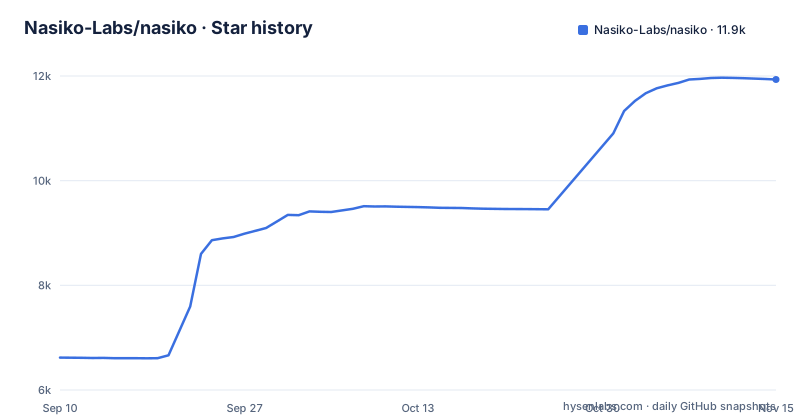
Star history
- Nasiko-Labs/nasiko11,933 ★ · +5,313
| Repository | 2026-09-10 | 2026-11-15 |
|---|---|---|
| Nasiko-Labs/nasiko | 6.6k | 11.9k |
5,313 Stars in the last 66 days, measured from the daily GitHub snapshot. Compare with other projects
Editorial analysis
Discovery reads the machine and changes nothing
The first thing Nasiko offers is a read-only scan. You build the CLI from a checkout, which means you need Rust installed:
git clone https://github.com/Nasiko-Labs/nasiko.git && cd nasiko
cargo install --path cli/ --force
nasiko agents discover
The command prints one row per supported harness with four columns: DETECTED, CONNECTED, VERSION and CONFIG, the last being where that harness keeps its configuration. It then exits. It edits no harness settings, needs no account, and sends nothing off the machine. That makes it a safe first step on a developer laptop before anyone agrees to hooks or routing.
Every build calls itself 0.1.0, so version checks lie
The Cargo workspace pins version = "0.1.0" for all crates, and older builds carry the same number. The project warns that nasiko --version cannot tell you whether agents discover exists in the binary you have. The check that works is running nasiko agents --help and looking for discover in the list; if it is missing, rerun the cargo install line with --force. The practical consequence for anyone scripting a rollout across machines: you cannot gate on the version string, you have to probe for subcommands. The GitHub release v1.0.0, published on 2026-02-12, is a separate desktop app for macOS, not a newer CLI version.
Reporting hooks differ per harness and queue on disk
Session reporting is an explicit opt-in per agent:
nasiko agents install <agent>    # claude, codex, opencode, or cursor
nasiko agents install <agent> --no-content  # omit prompt and response text
nasiko agents sync               # flush queued session-turn events to the control plane
Each harness gets the hooks it supports. Claude Code fires on Stop, OpenCode reports on session.idle, and Codex and Cursor use larger hook event sets. Completed turns land in ~/.nasiko/integrations/queue/ and are posted to /api/telemetry/coding-agent/events/batch, so a control plane that drops out for a while does not lose data. Deliveries that fail for good, for example after a cluster is renamed or deleted, move to ~/.nasiko/integrations/rejected/ and can be deleted. By default prompt and response text is captured; pass --no-content if that text must not reach the control plane. OpenCode has to be restarted after its plugin goes in, and Codex asks you to trust the new hooks.
Sessions appear without cost data until OTLP is configured
Ingested turns show up immediately as chat sessions through nasiko sessions and nasiko history <id>. What they do not show is the part most buyers came for. Traces, token counts and cost only appear once CODING_AGENT_OTLP_ENDPOINT is set. A team that installs the hooks and stops there will see conversation logs but no spend breakdown, which defeats the pitch of answering who spent the monthly bill on which model. Plan the OTLP endpoint as part of the first install, not as a later improvement.
Cursor CLI can be watched but not rerouted
Routing works by registering a provider and key with Nasiko, then pointing the harness at Nasiko instead of its vendor. Claude Code defaults to Anthropic and Codex to OpenAI; with routing, the inbound wire protocol and the outbound provider are decoupled. Claude Code, Codex and OpenCode support both reporting and routing. Cursor CLI supports discovery and session reporting only, marked not yet for routing. If your goal is to move Cursor traffic off its default provider, Nasiko cannot do that today. Undoing routing uses disconnect, which restores the harness settings, though a harness that is still running may need to be stopped first or disconnected with --force.
Auto-install will not rebind an agent you already installed
Reporting hooks are also installed automatically when you run nasiko connect <control-plane-url>, nasiko use, or nasiko auth login, but only when you are authenticated and only for agents with no existing install record. Routing commands such as nasiko connect claude do not trigger it. Nasiko never silently moves an installed agent to a new cluster. If you switch control planes, existing agents keep reporting to the old one until you run nasiko agents install <agent> again. Removing hooks with nasiko agents uninstall <agent> keeps the registered agent and its history on the server.
The Docker stack boots with public demo secrets
Reporting and routing need a control plane. The Docker path needs no Rust:
cp .env.example .env
docker compose up -d
The compose file starts pgvector on Postgres 16, Redis 7, RustFS object storage, an OpenTelemetry collector on ports 4317 and 4318, Tempo and Loki, with the UI at http://localhost:8080. The shipped .env.example contains working demo values: a fixed SECRETS_ENCRYPTION_KEY, JWT_SECRET=dev-secret-change-me, and an admin account named admin with a placeholder password. SECRETS_ENCRYPTION_KEY is an AES-256-GCM key that must be exactly 32 bytes, base64-encoded, and is validated at startup. Anyone who boots without replacing these values has agent secrets encrypted with a key published on GitHub. The short .env.example covers only the compose path; the full set of roughly 120 server variables lives in server/.env.example.
Running from source has a destructive reset next to the run target
Building the server yourself goes through the justfile. just infra starts Postgres, Redis and S3 from docker-compose.infra.yml, and just run sources server/.env, falling back to server/.env.example when the former is absent, then runs cargo run -p nasiko-server. That fallback means a forgotten server/.env silently starts the server on demo values. The justfile picks podman when /usr/bin/podman exists and docker otherwise. just fresh deletes the Postgres and S3 volumes plus every nasiko-agent-* container; it asks for confirmation, but there is no undo once you answer yes.
Editorial conclusion
Nasiko suits teams paying for several coding agents at once who want one record of sessions and a say over which model each harness calls. Teams that rely on Cursor CLI for routing should wait, since it only reports today. Before rolling it out, confirm your build actually lists agents discover, decide whether prompt text may leave the machine, and replace every demo secret in .env before the first boot.
Frequently asked questions
Does nasiko agents discover change my Claude Code or Codex configuration?
No. Discovery reads the machine, prints a row per supported harness, and exits. It changes no harness settings, needs no account, and sends nothing off the machine.
Which coding agents can Nasiko route to other models?
Claude Code, Codex and OpenCode support routing. Cursor CLI supports discovery and session reporting, but routing is marked not yet.
Do I need Rust to run Nasiko?
The CLI is a Rust crate installed with cargo, so it needs Rust. The control plane can run with Docker only via docker compose up -d after copying .env.example to .env.
Official sources
Add this badge to your README
If you maintain this project, the badge below links readers to this analysis and shows its maintenance status from the daily GitHub snapshot. Paste the markdown into your README; add ?metric=license or ?metric=stars to the image URL for a different field.

[](https://hysenlabs.com/projects/nasiko-labs-nasiko)Star history chart for your README
[](https://hysenlabs.com/projects/nasiko-labs-nasiko)Was this useful?