Ndless opens the TI-Nspire to native code, and every calculator OS version gets its own installer
The TI-Nspire calculator extension for native applications
At a glance
- What is it?
- A loader and toolchain for running assembly and C programs on the TI-Nspire, maintained across more than a dozen OS versions with a separate installer binary for each. The persistent install exists but is flagged as experimental, and the install steps are the same shape every time: two files, one folder, one keypress.
- Who is it for?
- Adopt Ndless if you develop for the TI-Nspire and need native code, either to write your own programs or to run an existing one. Do not adopt it as a way to use a calculator for general purposes, since the loader depends on a matching OS version and a persistent install is explicitly experimental.
- Can I use it commercially?
- Not without permission. GitHub finds no licence file in the repository, and without a licence all rights are reserved by default: you may read the code but not reuse it. Check the README, or ask the authors, before using it.
- Is it still maintained?
- Yes. The repository last received commits 1 day ago.
- What is it written in?
- Mainly C, according to GitHub's language statistics.
Answers come from the project's GitHub data, last synced on November 7, 2026, and from our analysis. They are not legal advice.
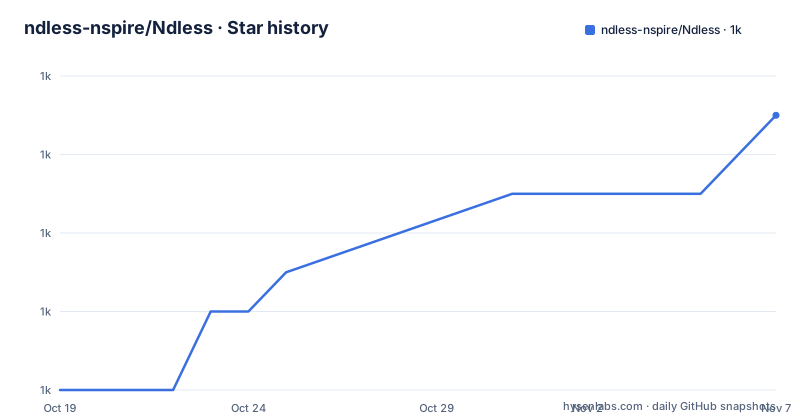
Star history
- ndless-nspire/Ndless1,039 ★ · +7
| Repository | 2026-10-19 | 2026-11-07 |
|---|---|---|
| ndless-nspire/Ndless | 1k | 1k |
7 Stars in the last 19 days, measured from the daily GitHub snapshot. Compare with other projects
Editorial analysis
A loader plus a toolchain, and one installer per OS version
Installing Ndless on your calculator makes it possible to run assembly programs, and Ndless combines an executable loader and utilities to open the TI-Nspire to third-party C and assembly development.
The way the project is packaged is the first thing to understand. Each release targets a specific set of OS versions, and the recent tags show it. r2022 is for OS 6.4.0.74, r2021 is for OS 4.5.5.79 and 6.2.0.333, and r2020 is for the same pair. The repository title line for the current release states it as Ndless r2022 for TI-Nspire OS up to v6.4.0.74.
Each supported OS version gets its own installer file, and the quick guide is organised by OS version with a section for each. The current ones are 6.2.0.333 and 6.4.0.74, which need OS 6.2.0.333 or 6.4.0.74 on a CX II, CX II-T or CX II CAS. Below that sit 4.5.5.79 for CX or CX CAS, 5.2.0.771 and 5.3.0.564 for CX II, 4.5.3.14 and 4.5.4.48, 4.5.0, 4.4.0, 4.2.0, 4.0.3, 3.9.1, 3.9.0, and 3.6.
That is over a dozen OS versions still installable, which tells you something about the project's maintenance model. The community keeps old calculators in use, and the project supports the ones that people actually have rather than only the current shipping version.
The primary language is C, and the repository layout matches a toolchain with an SDK and a loader. There is an `ndless-sdk/` directory and an `ndless/` directory, and the Makefile confirms the split.
SUBDIRS = ndless-sdk ndless

all: $(patsubst %, build-%, $(SUBDIRS))
So the SDK builds first and the loader second. There is also a `Makefile.include`, a `Mozilla-Public-License-v1.1.html` file at the root, and a `.gitmodules` file pointing at submodules that the Makefile checks for before it will do anything. The check is a hard error.
$(error Run `git submodule init' and `git submodule update' to checkout the submodules)That is a good design choice. A build that silently proceeds with missing submodules produces a loader that fails in confusing ways on the device, so the Makefile refuses to start instead.
The install is the same five steps for every OS version
The quick guide repeats the same procedure for each OS version, with small variations, and the current one is the clearest example.
First, set your language to English through the Settings menu, pressing `[Home]`, then `[5]` for Settings, then `[1]` for Change Language, and choosing English. This is not optional, and it appears in the CX II and 4.5.5.79 sections.
Second, transfer `ndless_installer_4.5.5-6.2.0-6.4.0.tns` into a folder named `ndless` at the top level. Third, transfer `ndless_resources.tns` into the same folder. Fourth, open the installer, press any alphanumeric key and wait. And if it fails or reboots, try again until it works.
The instruction to retry until it works is unusual to read and it is a real characteristic of the platform. The Nspire is a handheld with limited memory, and the installer is competing with the OS for it, so a failed attempt is a common event rather than a sign of a broken file. The 3.9.1 section makes the memory constraint explicit: if you get a message that says Insufficient memory, reset your calculator and try again. The 3.9.1 section also tells you to disconnect your USB cable before opening the installer and to connect the handheld to your computer afterwards, and the 3.6 section simply says to press the menu button once the installer is open.
The older sections close the installer with Ctrl+W instead of pressing a key, which reflects how the installer flow changed as the OS versions advanced.
Uninstalling is symmetric and simple. To uninstall Ndless, run the `ndless_resources.tns` file and select Yes, after which the device reboots. That same file is the recovery path, which is why it is transferred as a separate file in every single section rather than bundled into the installer.
Persistent install is the risky path and the docs say so
A persistent installation means Ndless will automatically load when you turn on or reboot the calculator, removing the need to run the installer every time. The procedure is close to the standard one, with a different file.
You ensure Ndless is not currently installed, resetting the calculator first if it is. You set the language to English. You transfer `persistent_6.2.0-6.4.0.tns` from the release's `persistent` folder into the `ndless` folder, rename the file you just transferred to `persistent.tns`, transfer `ndless_resources.tns` into the same folder, and open `persistent.tns` and wait for the automatic installation.
The warning above that procedure is the important part. This feature is experimental and not ready for daily use, and the Ndless team is not responsible for any data loss, reboot-looped calculators, or any damage incurred to your Nspire.
That is a stronger disclaimer than most projects make, and it is consistent with the failure modes described. If you get stuck in a reboot loop, hold `[ESC]`, and if that fails, format your filesystem via the maintenance menu. Running the `ndless_resources.tns` file after installing lets you uninstall the loader as well.
The two installation modes exist because the standard one requires the user to open the installer after every reboot, which is tedious for a device that reboots often, and the persistent one automates that at the cost of a bootloader-level change with a real brick risk. The project chose to ship it with the warning attached rather than hide it, and the Makefile reflects the structure, with the persistent binaries moved into their own directory in the distribution.
mv dist/ndless/persistent_*.tns dist/ndless/persistent/The naming convention, `persistent_6.2.0-6.4.0.tns`, encodes the OS range it covers, which is how you pick the right one when several are in the release.
Building the SDK needs four submodules and a toolchain
The Makefile's submodule check names them, and they tell you what the build depends on.
$(wildcard ndless-sdk/thirdparty/nspire-io/Makefile) \
$(wildcard ndless-sdk/thirdparty/zlib/configure) \
$(wildcard ndless-sdk/tools/luna/Makefile) \
$(wildcard ndless-sdk/thirdparty/freetype2/Makefile)
So the SDK pulls in nspire-io for host device communication, zlib, the Luna SDK, and Freetype2 for font handling. All four are submodules that must be initialised before the build proceeds.
The distribution target shows what actually ships.
dist: all
	rm -rf dist
	mkdir -p dist/ndless/samples
	mkdir -p dist/ndless/persistent
	cp Mozilla-Public-License-v1.1.html README.md dist/ndless/
	cp ndless/calcbin/* dist/ndless/
	mv dist/ndless/persistent_*.tns dist/ndless/persistent/
	rm dist/ndless/downgradefix_3.9*.tns dist/ndless/ndless_installer_3.9.0_classic.tns
	cp ndless-sdk/samples/*/*.tns dist/ndless/samples/
	rm dist/ndless/samples/freetype_demo.tns
	cd dist/ndless && 7z a ../ndless.zip .
The `calcbin` directory holds the built calculator binaries, which is the loader itself. The persistent variants are moved into their own folder, the 3.9 downgrade fix and the classic 3.9.0 installer are removed from the distribution, and the SDK samples are copied in, with the Freetype demo removed. The final step is a 7z archive, which is the format the download page serves.
The Mozilla Public License file is copied into the distribution alongside the README, which tells you that the licence situation is not simply MIT or GPL. The repository metadata reports the licence as unknown, which is consistent with a project that ships a mixed licence file, and anyone redistributing the loader or the SDK samples should read the MPL text rather than assume.
The release process also has a documentation trail outside the repository. There is a user guide at tiplanet.org/ndless, a developer guide on a WordPress site, and a wiki at hackspire.org for in-depth information, alongside the official site at ndless.me.
Editorial conclusion
Adopt Ndless if you develop for the TI-Nspire and need native code, either to write your own programs or to run an existing one. Do not adopt it as a way to use a calculator for general purposes, since the loader depends on a matching OS version and a persistent install is explicitly experimental. Verify first that your exact OS version and hardware model are covered by a release, that the language setting is set to English before you install, and that you keep a copy of your calculator data before the first install, since the documentation warns about data loss in the persistent path.
Frequently asked questions
What does Ndless do for the TI-Nspire?
It combines an executable loader and utilities that make it possible to run assembly programs and to develop third-party C and assembly software on the calculator. The official site is ndless.me and the source is in the ndless-nspire/Ndless repository.
How do I install Ndless on a TI-Nspire?
Set the calculator language to English, transfer the installer .tns file for your OS version and ndless_resources.tns into a folder named ndless, then open the installer and press the required key. If it fails or reboots, try again, and reset the calculator if you get an Insufficient memory message.
What is a persistent Ndless installation and should I use it?
It makes Ndless load automatically when you turn on or reboot the calculator, so you do not have to run the installer each time. The README marks it as experimental and not ready for daily use, and warns that the team is not responsible for data loss, reboot-looped calculators or damage.
How do I uninstall Ndless?
Run the ndless_resources.tns file and select Yes, after which the device reboots. The same file is used to uninstall the loader after a persistent installation.
What does building Ndless from source require?
Four git submodules must be checked out first, nspire-io, zlib, the Luna SDK and Freetype2, and the Makefile errors out if they are missing. The build then runs make in the ndless-sdk and ndless directories, and make dist packages the result as a zip.
Official sources
Add this badge to your README
If you maintain this project, the badge below links readers to this analysis and shows its maintenance status from the daily GitHub snapshot. Paste the markdown into your README; add ?metric=license or ?metric=stars to the image URL for a different field.

[](https://hysenlabs.com/projects/ndless-nspire-ndless)Star history chart for your README
[](https://hysenlabs.com/projects/ndless-nspire-ndless)Was this useful?