clashctl: a shell-based installer and manager for mihomo and Clash on Linux
An elegant way to set up and use a clash/mihomo-based proxy environment.
At a glance
- What is it?
- nelvko/clash-for-linux-install wraps the mihomo/Clash kernel, a web panel and subscription handling behind a single clashctl command. It suits headless Linux and container hosts where you want a proxy service without editing YAML by hand.
- Who is it for?
- Adopt it if you run a headless Linux box or container and want mihomo running as a service with subscription switching from one command. Do not adopt it if you need a graphical desktop client, or if you are not willing to accept that the kernel it installs is a third-party binary and that the maintainer's disclaimer limits the project to study and research.
- Can I use it commercially?
- Yes. MIT is a permissive licence: you can use, modify and sell software built on it, as long as you keep its copyright and licence notices.
- Is it still maintained?
- Yes. The repository last received commits 5 days ago.
- What is it written in?
- Mainly Shell, according to GitHub's language statistics.
Answers come from the project's GitHub data, last synced on November 14, 2026, and from our analysis. They are not legal advice.
Star history
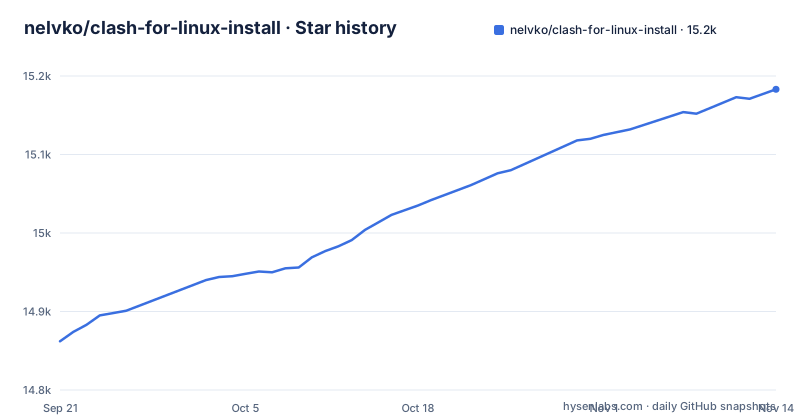
- nelvko/clash-for-linux-install15,183 ★ · +321
| Repository | 2026-09-21 | 2026-11-14 |
|---|---|---|
| nelvko/clash-for-linux-install | 14.9k | 15.2k |
321 Stars in the last 54 days, measured from the daily GitHub snapshot. Compare with other projects
Editorial analysis
What clashctl actually solves on a Linux host
Running mihomo or Clash on a Linux server usually means three separate chores: fetching a kernel binary that matches the architecture, writing a config directory the daemon will accept, and registering a service so it survives a reboot. The repository bundles those steps into one script and then keeps them reachable through a command named clashctl. The README describes the project as a one-click deployment and management tool for the mihomo / clash kernel, covering the kernel, a web panel and runtime dependencies.
The target user is not someone with a desktop. It is someone on a VPS, a home server or a container who wants the proxy running as a background service and wants to switch subscriptions or nodes without hand-editing YAML. The README states support for both root and ordinary users, for mainstream Linux distributions, for container environments, and for systemd and OpenRC init systems. That last detail matters: many similar shell installers assume systemd and quietly fail on Alpine or on other OpenRC hosts.
How the install script, clashctl and subconverter fit together
The repository is a Shell project. The top level holds install.sh, uninstall.sh, a scripts directory, a resources directory, a tests directory, and an .env.example configuration template. That template says day-to-day settings belong in the .env file in the install directory, and that values such as the kernel and init type are filled in automatically at install time.
After installation, clashctl is the single entry point. The README's quick start shows it managing proxy on and off, kernel status, the web panel address, subscriptions and node switching, and the help output for the full command list. Subscriptions are handled as named sources: you add a URL, update it, and switch between sources. The README also states integration with subconverter, the external converter project, so subscription formats that the kernel does not read directly can be converted.
One release is listed, tagged clash (Clash Premium), dated 2026-03-31. The README separately describes clashctl as able to upgrade the kernel, so kernel version and tool version move independently.
Installing it and running a first subscription
The README gives one installation command. It downloads install.sh with curl through an acceleration prefix and pipes it to bash. The README notes that the prefix can fail and that other mirrors are listed elsewhere, so treat that hostname as replaceable rather than fixed.
GH_PROXY=https://gh-proxy.org/
curl -fsSL "${GH_PROXY}https://raw.githubusercontent.com/nelvko/clashctl/HEAD/install.sh" | \
  bash -s -- --gh-proxy "$GH_PROXY"
The repository's .env.example lists the settings clashctl reads, such as subscription timeouts, the GitHub proxy and the update branch; day-to-day changes go in the .env file in the install directory.
Once the script finishes, the README's quick start uses clashctl for everything. The commands below are copied from that list: turn the proxy on, check the kernel, print the panel address, add and enable a subscription, and switch node.
clashctl on
clashctl status
clashctl ui
clashctl sub add --use "<订阅链接>"
clashctl node
Run clashctl -h for the full command set. The README does not document what each command prints, so expect to read the output rather than match it against a documented format. Removal is a separate script in the install directory; run clashctl off first, because the uninstall script cannot clear the current shell's proxy variables.
bash "$CLASHCTL_HOME/uninstall.sh"Where this approach breaks down
The installer pulls a kernel binary from the network. That is inherent to a one-click tool of this shape, but it means the trust boundary is the download, not the repository. The README does not document checksum verification or signature checking for the kernel, and it does not document rollback if an upgrade produces a kernel that will not start. The upgrade path is one-directional as far as the documentation shows.
Second, this is a command-line service manager, not a desktop client. There is no native GUI; the README's answer to interface needs is a web panel address printed by clashctl ui. If you want tray icons, per-application routing rules edited by mouse, or profile switching from a window, this is the wrong tool and a desktop client is the right one.
Third, the project's own disclaimer is unusually direct. It states the main purpose of writing the project was to study and research Shell programming, and that nothing in it should be used in ways that violate applicable laws or regulations. That is a statement about the author's intent, and it shifts the compliance question entirely onto whoever runs the installer.
Finally, the README documents no configuration schema for the kernel itself. If you need to hand-tune rules, DNS behaviour or TUN parameters beyond what clashctl's tun and mixin commands expose, the README points to the Wiki for advanced configuration.
How it differs from a desktop Clash client
The obvious alternative for Linux users is a graphical client such as Clash Verge, which is a desktop application with a window, profile management and system tray integration. The difference is not cosmetic. A desktop client owns the session: it starts when you log in, it exposes settings through a UI, and its lifecycle is tied to your graphical session. clash-for-linux-install does the opposite. It installs a kernel plus a service, so the proxy is up before anyone logs in and stays up on a headless machine with no display at all.
That trade runs both ways. The service model is what you want on a server and what you do not want on a laptop where you toggle the proxy by hand. The README's clashctl on and clashctl off commands are the closest thing to that toggle, and they are terminal commands, not menu items. The project also integrates subconverter, downloaded on demand, which a desktop client may or may not do; that matters if your subscription provider hands out a format the kernel will not read directly.
Maintenance, upgrades and what the MIT licence leaves open
The repository is not archived, and the last push was on 2026-10-28. The single listed release, tagged clash (Clash Premium), is dated 2026-03-31, so the tool and the kernel it ships have separate timelines. The README states that clashctl can upgrade the kernel, which is the main recurring maintenance action; the rest is subscription updates through the sub command and updating clashctl itself with clashctl update.
The licence is MIT, which is permissive: it allows use, modification and redistribution provided the copyright notice and permission notice are kept. It comes with no warranty. The repository also carries a disclaimer that the author reserves the right to amend, and asks users to read and follow it before using the project. That disclaimer sits alongside the licence rather than replacing it, and it is a statement of intent about lawful use, not a technical control. Nothing in the licence or the disclaimer checks what you route through the proxy or where the kernel binary came from. If you are deploying this inside an organisation, the questions to settle are the ones the repository cannot answer for you: which kernel build is acceptable, and who reviews install.sh before it runs.
Editorial conclusion
Adopt it if you run a headless Linux box or container and want mihomo running as a service with subscription switching from one command. Do not adopt it if you need a graphical desktop client, or if you are not willing to accept that the kernel it installs is a third-party binary and that the maintainer's disclaimer limits the project to study and research. Before committing, check that the install path works on your distribution and init system, confirm which kernel build install.sh pulls and where it writes it, and read uninstall.sh to see exactly what it removes. The project's own boundary is stated in the README: it exists for learning and researching Shell programming.
Frequently asked questions
How do I install clash-for-linux-install on Ubuntu?
The README gives a single command that downloads install.sh with curl through an acceleration prefix and pipes it to bash. It states support for mainstream Linux distributions, root and ordinary users, and both systemd and OpenRC init systems, so Ubuntu is covered by that claim rather than by a distro-specific instruction.
Does clash-for-linux-install include a GUI?
No native desktop interface is documented. The README exposes a web panel instead, whose address is printed by the clashctl ui command. If you need a windowed client with tray integration, a desktop application is the right category of tool.
How do I add and update a subscription with clashctl?
The README's quick start shows clashctl sub add --use "<订阅链接>" to add and enable a source; the sub command handles adding, switching and updating subscriptions, and clashctl node switches between nodes. The README also states that subconverter is integrated for converting subscription formats.
How do I uninstall clash-for-linux-install?
Run clashctl off to clear the current shell's proxy variables, then bash "$CLASHCTL_HOME/uninstall.sh". The README says this deletes the install directory and its data, while restore data in .clashctl-backups/ is kept until you remove it manually.
Can I use clash-for-linux-install in Docker?
The README states that container environments are among the supported targets, alongside root and ordinary users and systemd or OpenRC init systems. The documentation does not give a container-specific command or image, so the install path stays the same script.
Official sources
Add this badge to your README
If you maintain this project, the badge below links readers to this analysis and shows its maintenance status from the daily GitHub snapshot. Paste the markdown into your README; add ?metric=license or ?metric=stars to the image URL for a different field.

[](https://hysenlabs.com/projects/nelvko-clash-for-linux-install)Star history chart for your README
[](https://hysenlabs.com/projects/nelvko-clash-for-linux-install)Was this useful?