ssh-action: pushing SSH out of a CI runner with drone-ssh and a settings table
GitHub Actions for executing remote ssh commands.
At a glance
- What is it?
- appleboy's GitHub Action is a thin, well documented wrapper around drone-ssh. What matters is the input surface: connection, command and proxy settings, with fingerprint verification and cipher control in the table rather than buried in scripts.
- Who is it for?
- This action is a good fit when a deploy has to happen over SSH and you want the connection details to live in workflow YAML rather than in a script you maintain separately. The parameter table in the README is unusually complete for an action, including the defaults that matter for security: `use_insecure_cipher` is false, `curl_insecure` is false, and `allenvs` is false, so nothing leaks without being asked for.
- Can I use it commercially?
- Yes. MIT is a permissive licence: you can use, modify and sell software built on it, as long as you keep its copyright and licence notices.
- Is it still maintained?
- Yes. The repository last received commits 69 days ago.
- What is it written in?
- Mainly Shell, according to GitHub's language statistics.
Answers come from the project's GitHub data, last synced on October 24, 2026, and from our analysis. They are not legal advice.
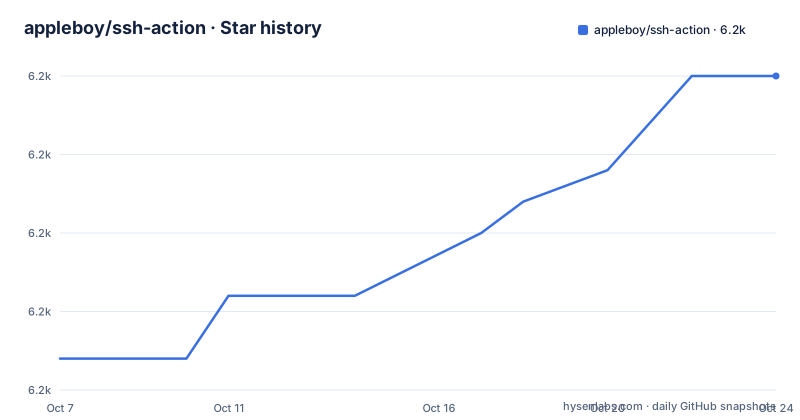
Star history
- appleboy/ssh-action6,225 ★ · +9
| Repository | 2026-10-07 | 2026-10-24 |
|---|---|---|
| appleboy/ssh-action | 6.2k | 6.2k |
9 Stars in the last 17 days, measured from the daily GitHub snapshot. Compare with other projects
Editorial analysis
What the action actually is: drone-ssh in a runner wrapper
The README describes the project as a GitHub Action for executing remote SSH commands in CI/CD workflows, built with Golang and [drone-ssh](https://github.com/appleboy/drone-ssh), which is the same author's command line tool for the same job. That relationship explains most of the design: the action is a distribution and configuration layer over an existing binary rather than a new implementation of SSH.
The repository is small and shaped like it. `action.yml` is the input contract, `entrypoint.sh` is the entry point the runner invokes, `.goreleaser.yaml` handles cross-platform builds of the Go binary, `testdata/` holds test fixtures, and the README exists in English, Simplified Chinese and Traditional Chinese as `README.md`, `README.zh-cn.md` and `README.zh-tw.md`. There is also a `CLAUDE.md` at the root and a Trivy security scanning badge in the README's badge row.
The version story is in the releases. v1.2.3 added a configurable curl insecure flag and improved error handling in the binary download flow, which is a useful signal about how the action works: it fetches the drone-ssh binary at run time rather than shipping it in the image. v1.2.4 bumped the default `DRONE_SSH_VERSION` to 1.8.2 and changed CI to trigger only on version tags. v1.2.5, published on 2026-01-28, refactored output handling for `GITHUB_OUTPUT` in workflows and rewrote the SSH agent workflow documentation, which is what made command output capturable as action outputs.
The connection inputs and their defaults
The README groups inputs into three tables: connection settings, SSH command settings and proxy settings. Connection is where most of the security decisions live, and the defaults are conservative:
| host                | SSH host address                                                  |         |
| port                | SSH port number                                                   | 22      |
| username            | SSH username                                                      |         |
| key                 | Content of SSH private key (e.g., raw content of `~/.ssh/id_rsa`) |         |
| key_path            | Path to SSH private key                                           |         |
| fingerprint         | SHA256 fingerprint of the host public key                         |         |
| use_insecure_cipher | Allow additional (less secure) ciphers                            | false   |
Three entries deserve a note. `key` takes the raw content of the private key file rather than a path, which is how a GitHub secret is supplied; `key_path` is for runners where the key already exists on disk. `passphrase` handles encrypted keys. `fingerprint` is the important one: it is the SHA256 fingerprint of the host's public key, and setting it moves the action from trusting whatever answers on that host to verifying who answered.
`protocol` accepts `tcp`, `tcp4` and `tcp6`, which matters on dual-stack runners where an IPv6 route to the target behaves differently from an IPv4 one. `timeout` defaults to 30s for the connection itself, and `sync` defaults to false, meaning multi-host runs fan out and finish at the slowest host rather than in lockstep.
Command inputs, output capture, and the 10 minute default
The command table is where the action earns its keep. `script` takes commands to run remotely. `script_path` points at a file in the repository, which is the pattern most teams should use, since a script in the repo can be reviewed and linted rather than living as a quoted string in YAML.
| script          | Commands to execute remotely                                                      |         |
| script_path     | Path to a file in the repository containing commands to execute remotely          |         |
| envs            | Environment variables to pass to the shell script                                 |         |
| allenvs         | Pass all environment variables with `GITHUB_` and `INPUT_` prefixes to the script | false   |
| command_timeout | Timeout for SSH command execution                                                 | 10m     |
| capture_stdout  | Capture standard output from commands as action output                            | false   |
`command_timeout` defaults to 10m, which is a ceiling on the remote script rather than the connection. It is generous enough that a slow migration will finish and low enough that a hung SSH session fails the job instead of billing a runner for hours.
`capture_stdout`, added to work with the `GITHUB_OUTPUT` refactor in v1.2.5, is how a remote command's result comes back into the workflow rather than only into the log. `allenvs` is the input to look at twice: when true it forwards every environment variable prefixed `GITHUB_` or `INPUT_` to the remote script, which is convenient and is also a wide surface to forward into a machine you are deploying to. `envs` is the narrow alternative, and `envs_format` gives control over how values are transferred.
Two smaller inputs have obvious uses: `debug` turns on debug mode for the action itself, and `request_pty` asks the server for a pseudo-terminal, which some CLI tools require in order to behave normally.
Proxy and jump host support for hosts you cannot reach directly
A deploy target inside a private network is usually not reachable from a hosted runner, and this action handles that with a second set of inputs for a jump host:
| proxy_host   | SSH proxy host                                  |     |
| proxy_port   | SSH proxy port                                  | 22  |
| proxy_username | SSH proxy username                           |     |
Setting `proxy_host` routes the connection through that machine, which covers the standard case of a bastion or a VPN gateway that only accepts SSH. The README has a dedicated section on proxy and jump host usage, and the pattern is inherited directly from drone-ssh, so anything that works with the command line tool works here.
The multi-host story is in the same family. The README documents multiple hosts, multiple hosts with different ports, and synchronous execution across hosts, which is what `sync` controls. Asynchronous execution by default means a deploy to twenty hosts fails the job if any one of them fails, rather than waiting for a barrier between waves. That is usually the behaviour you want for a deploy, and it is worth knowing that `sync` exists if you need ordered execution instead.
Passing environment variables into a remote shell script is documented as its own scenario, and capturing command output is another, which tells you the intended workflow is a script in the repository, variables passed in explicitly, and results captured as outputs rather than parsed out of a log by the next step.
Host fingerprint verification is the setting that matters most
The README has a security section with two named items: protecting your private key and host fingerprint verification. The private key advice is the standard one for a hosted runner: supply the key content through a repository secret rather than committing it, so the key exists in the workflow only for the duration of the job.
Fingerprint verification is the part people skip. The `fingerprint` input takes the SHA256 fingerprint of the host public key, and when it is set the action checks the host against it instead of accepting the key the server presents. Without it, a workflow that runs on a shared runner and reaches your server by hostname is trusting a name resolution result, and on a network you do not control that is a real exposure.
The rest of the security surface is in the defaults rather than in prose. `use_insecure_cipher` is false, so the action uses sensible cipher defaults unless you opt into weaker algorithms. `curl_insecure` is false and was added as a configurable flag in v1.2.3, so a workflow that needs to skip TLS verification has to say so explicitly. `allenvs` is false, so environment forwarding is opt-in.
On the supply chain side, v1.2.3 also added automated Trivy security scanning to the CI workflow, and the README carries a badge for it alongside the build badge. For an action whose entire job is to hold a credential and open a socket, that scan is more relevant than it would be for a library.
Troubleshooting, licence and where the project stands
The README's troubleshooting section is short and has one named entry, command not found for npm or other commands, which is the classic symptom of a remote script running without the login shell's PATH. That is what `request_pty` and a fully qualified command path are for.
Licence is MIT, and the language on the repository is listed as Shell because the entry point is a shell script around a Go binary. There is a marketplace listing at github.com/marketplace/actions/ssh-remote-commands, so the action is installable by name in a workflow rather than only by repository reference. Topics on the repository are `github-actions`, `ssh` and `ssh-client`, which is an honest and narrow description.
For maintenance, the repository is not archived and the last push was on 2026-08-16. The release cadence in the visible history is roughly every two to three months: v1.2.3 on 2025-11-08, v1.2.4 on 2025-11-28, v1.2.5 on 2026-01-28. The v1.2.5 documentation pass updated the README and assets for a new SSH agent workflow, so if you are following an older tutorial, the flags in it may predate the current table.
The honest comparison is with running ssh by hand inside a workflow. That works and needs no action, but you end up maintaining key handling, host verification, retry behaviour and output parsing as steps in your YAML, with no defaults and no version pinning. This action centralises those decisions in one versioned `uses` line and one input table, which is the trade.
Editorial conclusion
This action is a good fit when a deploy has to happen over SSH and you want the connection details to live in workflow YAML rather than in a script you maintain separately. The parameter table in the README is unusually complete for an action, including the defaults that matter for security: `use_insecure_cipher` is false, `curl_insecure` is false, and `allenvs` is false, so nothing leaks without being asked for. The repository is not archived and the last push was on 2026-08-16, with v1.2.5 published on 2026-01-28 pinning a drone-ssh default of 1.8.2 from v1.2.4 onward. Set `fingerprint` to the host's SHA256 key fingerprint in any workflow that deploys to production, and read `action.yml` for the authoritative input list, since the README defers to it.
Frequently asked questions
Is appleboy/ssh-action safe to use with a production server key?
The action runs in your own workflow runner and connects with credentials you supply through secrets, and its defaults are conservative: `use_insecure_cipher` and `curl_insecure` are both false, and environment forwarding via `allenvs` is opt-in. Set `fingerprint` to the SHA256 fingerprint of the host public key so the action verifies the server instead of trusting it. Licence is MIT.
How do I pass a private key and host to ssh-action?
Set `host`, `port` (22 by default) and `username` as connection inputs, then supply the key either through `key`, which takes the raw content of a private key file, or `key_path` for a key already on the runner. Use `passphrase` if the key is encrypted, and `fingerprint` for the SHA256 fingerprint of the host's public key. `script` holds the commands and `script_path` points at a file in the repository.
Can ssh-action deploy to hosts behind a jump host?
Yes. The proxy inputs `proxy_host`, `proxy_port` (22 by default), `proxy_username` and `proxy_password` route the connection through a second machine, and the README has a dedicated section on proxy and jump host usage. The README also documents multiple hosts, multiple hosts with different ports, and synchronous execution through the `sync` input, which is false by default.
How do I get the output of a remote command back into my workflow?
Set `capture_stdout`, which captures standard output from commands as action output. That capability pairs with the output handling refactor shipped in v1.2.5, published on 2026-01-28, which reworked how results are written to `GITHUB_OUTPUT`. For environment variables going the other way, use `envs` or the broader `allenvs`.
Official sources
Add this badge to your README
If you maintain this project, the badge below links readers to this analysis and shows its maintenance status from the daily GitHub snapshot. Paste the markdown into your README; add ?metric=license or ?metric=stars to the image URL for a different field.

[](https://hysenlabs.com/projects/appleboy-ssh-action)Star history chart for your README
[](https://hysenlabs.com/projects/appleboy-ssh-action)Was this useful?