Neocities backend development setup with Vagrant
Neocities.org - the web site. Yep, the backend is open source!
At a glance
- What is it?
- Neocities is the open source backend and website for Neocities.org. Its documented development path uses Vagrant, a local Rack server, and port 9292, while production deployment and license terms require direct inspection of the repository.
- Who is it for?
- Developers who want to modify the Neocities.org site should use this repository when a Vagrant-based Ruby and Rack environment fits their workstation. Operators should not treat it as documented one-command production infrastructure, and contributors should inspect `LICENSE.txt`, `config.yml.template`, and `Gemfile` first.
- Can I use it commercially?
- Check first. The repository uses a licence we do not classify automatically, so read its LICENSE file before any commercial use.
- Is it still maintained?
- Yes. The repository last received commits 11 days ago.
- What is it written in?
- Mainly JavaScript, according to GitHub's language statistics.
Answers come from the project's GitHub data, last synced on November 6, 2026, and from our analysis. They are not legal advice.
Star history
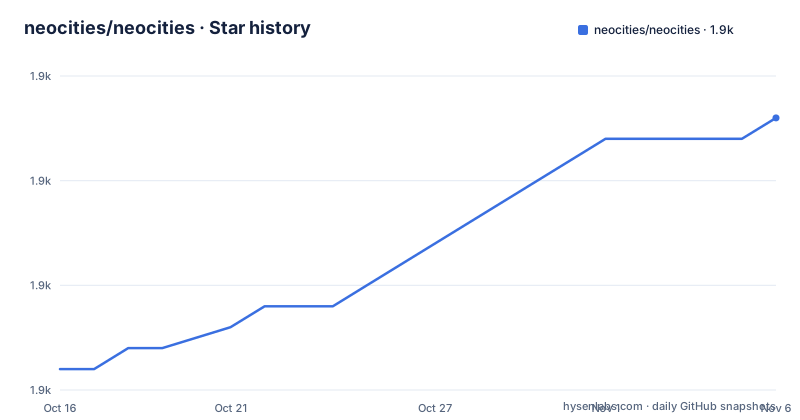
- neocities/neocities1,933 ★ · +12
| Repository | 2026-10-16 | 2026-11-06 |
|---|---|---|
| neocities/neocities | 1.9k | 1.9k |
12 Stars in the last 21 days, measured from the daily GitHub snapshot. Compare with other projects
Editorial analysis
What the Neocities source repository contains
This repository contains the Neocities.org website and its open source backend. It is intended for developers who want to fix a bug, add a website feature, or contribute code through a pull request. It is not a support channel for the hosted service. The README explicitly directs product support requests to `https://neocities.org/contact` and says that issues unrelated to the source code will be closed.
The repository layout indicates a server-side web application. `app.rb`, `environment.rb`, `config.ru`, and `puma_config.rb` sit at the root. Directories such as `app/`, `models/`, `views/`, `workers/`, `migrations/`, and `public/` provide conventional locations for application code, models, templates, background work, database changes, and public assets. This structure helps contributors locate likely code, but the README does not explain individual routes, database schemas, worker queues, or request flows. Those details must be checked in the corresponding source files.
Neocities should therefore be treated as the source for an existing hosted service, not as a generic application starter kit that can be renamed and deployed without review. Its migrations, workers, configuration, templates, public assets, and tests are tied to Neocities.org. The absence of a generic deployment tutorial is a visible difference between this repository and a distributable web application template.
Why Neocities development uses Vagrant and Rack
The README reduces local setup work by placing the development environment in a Vagrant virtual machine. It says that installing Vagrant and running the provisioning command builds a machine that automatically installs everything needed to run Neocities. This is convenient for contributors, although the README does not enumerate the provisioned operating system, Ruby version, database version, system packages, or external services.
The documented server command uses `rackup`. At the root of the repository, `Gemfile` and `Gemfile.lock` define the Ruby dependency files, while `config.ru` is the Rack entry point. The repository also contains `puma_config.rb` and `rainbows_config.rb`, which indicate server configuration files. The README does not say whether either server is used for the public service, so the local Rack command should not be treated as a complete description of hosted operation.
This approach favors a provisioned virtual machine over a documented list of host dependencies. That choice reduces ambiguity about some local setup, but it also makes Vagrant a prerequisite for following the README exactly. The repository contains no documented container image or non-Vagrant development tutorial, and the README does not offer an alternative setup path.
Launching Neocities with the documented Vagrant setup
The first documented requirement is Vagrant on the host. From a checkout of the repository, run the following command to create, start, and provision the virtual machine. The README notes that this process can take a while because Vagrant builds the machine and installs its dependencies.
vagrant up --provisionNext, make a copy of `config.yml.template` in the repository root and rename the copy to `config.yml`. The README gives this as a manual file operation and does not specify a shell command for it. It also does not explain which keys must be edited or whether the template works unchanged for development.
Enter the provisioned machine with the next command.
vagrant sshInside that environment, start the Neocities Rack application with the following command.
bundle exec rackup -o 0.0.0.0The README then directs the developer to open `http://127.0.0.1:9292` in a browser. That URL is the documented verification point for this local tutorial. The repository also includes `config.yml.ci`, which indicates a CI configuration file, but the README does not say whether it should be copied to `config.yml` or which values it contains.
Configuration and runtime dependencies the README leaves implicit
Creating `config.yml` is the clearest setup requirement in the tutorial, yet its contents remain undocumented in the README. The file must be based on `config.yml.template`, because the README supplies neither required keys nor default values. Secrets, service endpoints, database credentials, and development defaults therefore need to be identified from that template rather than inferred from directory names.
Other root files point to operational areas that the tutorial does not address. `puma_config.rb` and `rainbows_config.rb` contain server configuration, `workers/` contains worker code, and `migrations/` contains database changes. The README does not state whether migrations run automatically during `rackup`, how workers are started, or which external services must already be available in the Vagrant machine. Seeing the site at port 9292 confirms that the documented Rack process is reachable. It does not prove that every background worker or service dependency is healthy.
This is a meaningful limitation for contributors who expect one command to produce a fully documented application environment. The tutorial gets a developer to the local web interface, but it does not define the full runtime dependency graph or explain how to diagnose incomplete setup. Repository files are the relevant source for those details.
Contribution workflow and verification files
The README gives a branch-based GitHub contribution workflow: fork the repository, create a feature branch, commit changes, push the branch, and create a pull request. Its example branch command is shown below.
git checkout -b my-new-featureAfter making a change, the README uses the following example to commit tracked modifications and publish the branch.
git commit -am 'Add some feature'
git push origin my-new-feature
The pushed `my-new-feature` branch can then be used for a pull request. The repository includes a `Rakefile` and a `tests/` directory. Its badges also refer to a GitHub Actions workflow named `ci.yml` and a Coveralls coverage status for the `master` branch. These files show that test and automation files exist, but the README does not provide an exact local test command or describe the complete CI sequence. Starting the application with `rackup` should not be treated as a substitute for running tests.
The default branch is `master`, and GitHub has no releases for this repository. There is therefore no release artifact or release-note migration path documented in GitHub. Contributors should use the existing workflow and repository checks rather than describe a versioned release process that is not documented.
Licensing, maintenance, and Neocities upgrade limits
GitHub classifies this repository's license as a custom license, and the repository points readers to `LICENSE.txt`. The README does not reproduce its permissions, restrictions, attribution requirements, or redistribution conditions. The existence of source code under a custom license should not be treated as permission to use it under assumed open source terms. Anyone copying, modifying, or redistributing Neocities code needs to read `LICENSE.txt` directly.
The repository is not archived, and its last push was on 2026-09-28. This confirms recent repository activity, but it does not establish a release cadence, compatibility policy, or deployment procedure for the hosted service. GitHub lists no releases, leaving contributors without a documented sequence of tagged upgrade artifacts.
The README does not provide a production upgrade, database migration, backup, or rollback procedure. That matters because the repository includes `migrations/`, `workers/`, `puma_config.rb`, and `rainbows_config.rb`. An upgrade may involve more than updating application code, but the README does not describe those dependencies or their required order. Developers should not infer that a new `master` commit can be deployed without checking configuration and migration changes.
When the Neocities backend is the wrong tool
This repository is the wrong place for someone seeking account help, hosting support, or help configuring an individual Neocities site. The README separates source contributions from product support and directs support requests to `https://neocities.org/contact`. The repository also does not describe itself as a static site generator or a general hosting package.
It may also be unsuitable for an operator who needs a complete production procedure. The README documents a Vagrant development machine, a Rack startup command, and access at port 9292. It does not document production secrets, worker supervision, database provisioning, backups, capacity limits, monitoring, deployment, or rollback. A separately documented hosting or infrastructure package would be the relevant alternative for those requirements. The difference is the documented operating model: this repository supplies Neocities.org source and contributor instructions, not a complete deployment guide.
For contributors, the fit test is whether the proposed change belongs to the Neocities.org source and whether the workstation can run Vagrant and its provisioned virtual machine. A request about personal site settings should not be filed as a source-code issue under the process described by the README.
Editorial conclusion
Developers who want to modify the Neocities.org site should use this repository when a Vagrant-based Ruby and Rack environment fits their workstation. Operators should not treat it as documented one-command production infrastructure, and contributors should inspect `LICENSE.txt`, `config.yml.template`, and `Gemfile` first.
Frequently asked questions
How do I run Neocities locally for development?
The README documents starting a provisioned Vagrant machine, creating `config.yml` from `config.yml.template`, entering the machine with `vagrant ssh`, and running `bundle exec rackup -o 0.0.0.0`. The local site is then available at `http://127.0.0.1:9292`.
Can I file a Neocities account or hosting question on GitHub?
No. The README says issues unrelated to the source code will be closed and directs support requests to `https://neocities.org/contact`.
Does the Neocities README document a production deployment process?
No. It documents a Vagrant development setup and a local Rack command, but it does not provide a production deployment, rollback, backup, or scaling procedure.
Official sources
Add this badge to your README
If you maintain this project, the badge below links readers to this analysis and shows its maintenance status from the daily GitHub snapshot. Paste the markdown into your README; add ?metric=license or ?metric=stars to the image URL for a different field.

[](https://hysenlabs.com/projects/neocities-neocities)Star history chart for your README
[](https://hysenlabs.com/projects/neocities-neocities)Was this useful?