ChatHeadEnabler: A Narrow Xposed Module That Restores a Messenger Choice
Choose between chat head and bubble in Facebook Messenger
At a glance
- What is it?
- ChatHeadEnabler is an Xposed module for rooted Android that forces Facebook Messenger to show chat heads or bubbles. It is a small, single-purpose tool that works only on Android 11 and up with LSPosed.
- Who is it for?
- Adopt ChatHeadEnabler if you are already running a rooted Android 11+ device with Magisk and LSPosed, and you are annoyed by Messenger's default bubble behavior or its missing chat head toggle. Do not adopt it if you are unwilling to root your phone or if you use a non-rooted setup, since the project only documents the root path and points elsewhere for non-rooted users.
- Can I use it commercially?
- Not without permission. GitHub finds no licence file in the repository, and without a licence all rights are reserved by default: you may read the code but not reuse it. Check the README, or ask the authors, before using it.
- Is it still maintained?
- Activity is slowing. The repository last received commits 10 months ago.
- What is it written in?
- Mainly Java, according to GitHub's language statistics.
Answers come from the project's GitHub data, last synced on October 22, 2026, and from our analysis. They are not legal advice.
Star history
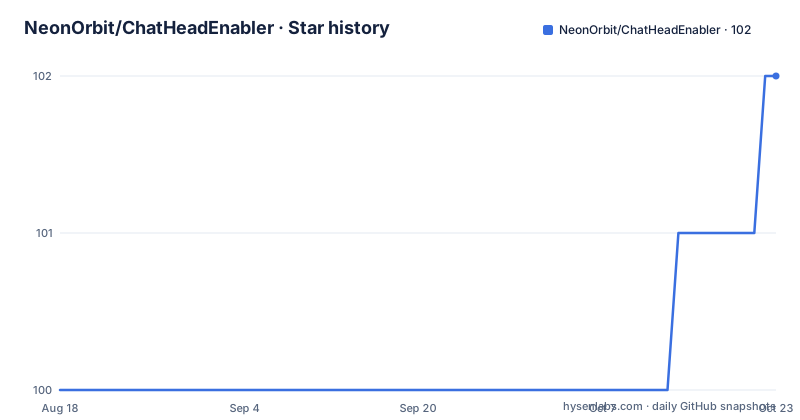
- NeonOrbit/ChatHeadEnabler102 ★ · +2
| Repository | 2026-08-18 | 2026-10-22 |
|---|---|---|
| NeonOrbit/ChatHeadEnabler | 100 | 102 |
2 Stars in the last 65 days, measured from the daily GitHub snapshot. Compare with other projects
Editorial analysis
What Problem It Solves and Who It Is For
Facebook Messenger has shifted between two notification styles over the years: chat heads, the floating circular avatars that sit on top of other apps, and bubbles, the Android 11 native equivalent that groups conversations into a single draggable icon. Some users prefer the older chat head layout, others want bubbles, and Messenger does not always expose a clear setting to switch between them. ChatHeadEnabler is an Xposed module that forces Messenger to use one or the other. The README states that by default the module enables chat heads, and you can switch to bubbles from Messenger's own settings page by tapping a toggle icon. This is for people who already have a rooted phone with Magisk and LSPosed installed. It is not a standalone app, and it does not work without the Xposed framework. The target user is someone who is comfortable with root-level tools and wants a small, surgical change to a single app.
How the Module Works: Xposed Hooking and a Toggle
The mechanism is standard Xposed hooking. The module intercepts Messenger's code at runtime and changes the behavior that governs whether chat heads or bubbles are shown. The README gives no technical details about which methods are hooked or how the detection works, but the practical flow is clear. After installation and activation in LSPosed Manager, you restart Messenger. The module applies its default, which enables chat heads. To switch to bubbles, you open Messenger, go to its settings page, tap the toggle icon in the top-right corner, and choose bubble from a pop-up dialog. The toggle icon itself is removable: long press on it to hide it. This design means the module does not add its own configuration screen. It injects a control into Messenger's existing UI. That is a deliberate choice to keep the module minimal, but it also means the toggle's placement depends on Messenger's layout, which can change with app updates.
Installation and Requirements: Root, Magisk, LSPosed
The README lists three hard requirements: Android 11 or later, root access via Magisk, and the LSPosed Xposed framework. The installation steps are short. Download and install the ChatHeadEnabler APK, activate it in LSPosed Manager, then restart Messenger. There is no mention of a specific Messenger version, so you must assume the module targets the version that was current at the last release, v2.4.7 from December 2025. For non-rooted devices, the README points to an XDA thread rather than describing a method. That thread likely covers a virtual Xposed solution or a patched APK, but the README does not explain it. The certificate fingerprints are listed at the bottom of the README, SHA-1 and SHA-256, which is useful for verifying the integrity of a downloaded APK. The module itself is a Java project, and the repository has no homepage, so documentation is limited to the README and the XDA thread.
Limitations and Failure Modes
The most obvious limitation is the narrow scope. This module does one thing: it toggles between chat heads and bubbles in Messenger. It does not add other Messenger features, does not modify notification behavior beyond that choice, and offers no configuration beyond the toggle. A bigger risk is compatibility. Messenger updates frequently, and an Xposed hook that works on one version may break on the next. The release history shows gaps: v2.4.7 came in December 2025, but v2.4.5 was in March 2023 and v2.4.4 in December 2022. That two-and-a-half-year gap suggests the module is maintained sporadically. If Messenger changes its internal APIs, the module may fail silently, meaning chat heads or bubbles simply do not appear, and you might not know why. Another failure mode is the root requirement itself. If you are not rooted, the module is useless as described. The README's pointer to a non-rooted thread is vague and unverified. Finally, the toggle icon removal is permanent until you re-enable it, and the README does not say how to restore it if you change your mind.
Alternatives and Different Approaches
The main alternative is to use Messenger's own settings without any module. If Messenger already exposes a chat head or bubble toggle, you do not need ChatHeadEnabler at all. The module exists precisely because that toggle is not always available or is hidden. Another alternative is a different Xposed module that targets Messenger more broadly, such as a module that removes ads or enables other hidden features. Those modules take a wider approach, hooking many methods, which increases the chance of breakage but also gives more control. A third approach is to use Android's native bubble settings per app. In Android 11 and later, you can long-press a notification and choose to show it as a bubble, but that only works if the app supports bubbles. Messenger does support bubbles, so you might be able to force that behavior without root. The difference is that ChatHeadEnabler gives you the choice between the two styles, while the native setting may only let you turn bubbles on or off, not switch to the older chat head style. If you want the exact chat head look, the module is the only option listed here.
Maintenance and Upgrade Cost
The repository is not archived, and the latest release is from December 2025, which suggests active maintenance at the time of writing. However, the release history shows long gaps, so you should not expect frequent updates. The maintenance cost is on you: every time Messenger updates, you need to check whether the module still works. There is no automated compatibility check in the README. You will need to monitor the XDA thread for user reports. Upgrading the module itself is straightforward, download the new APK and reinstall, but you must re-activate it in LSPosed Manager if the module ID changes, which is rare. The license is listed as unknown in the repository metadata, and the README does not state a license. That is a real concern. Without a license, you have no legal permission to redistribute or modify the code, even for personal use beyond what the law allows. If you plan to use this module for yourself, the license is not a blocker, but if you want to fork or learn from the code, you should contact the author or check the repository files directly.
What to Verify Before You Install
Before you install, confirm that your device is on Android 11 or later, because the module will not work on older versions. Verify that you have Magisk and LSPosed set up correctly, and that LSPosed is active for the Messenger app. The README does not mention whether you need to enable the module for Messenger specifically, but LSPosed normally requires you to select the target app. Check the certificate fingerprints from the README against the APK you download to ensure it has not been tampered with. Then read the XDA thread linked in the README for known issues with specific Messenger versions. If you are on a non-rooted device, do not assume the linked thread will solve everything; it may require a different framework or a patched app, and that path is not documented in the repository. Finally, back up your current Messenger settings, because the module changes the app's behavior at runtime, and a bad hook could cause crashes that require clearing the app's data.
Editorial conclusion
Adopt ChatHeadEnabler if you are already running a rooted Android 11+ device with Magisk and LSPosed, and you are annoyed by Messenger's default bubble behavior or its missing chat head toggle. Do not adopt it if you are unwilling to root your phone or if you use a non-rooted setup, since the project only documents the root path and points elsewhere for non-rooted users. Before installing, verify your Messenger version matches the module's target, check the XDA thread for known issues, and confirm the certificate fingerprints from the release match the APK you download. The module is a narrow fix, not a general Messenger tweak, so expect it to do exactly one thing and nothing more.
Frequently asked questions
How do I turn on Chathead on Messenger?
Chathead is the default once the module is in place. Download and install ChatHeadEnabler, activate it from LSPosed Manager, and restart Messenger; the chat head feature is what you get with no further action.
How to disable chat head Messenger bubble?
Open the Messenger app and go to its settings page, click the toggle icon in the top-right corner, then choose the bubble option from the pop-up dialog. Long press on the icon afterwards to remove the toggle itself.
How do I open Chathead?
The module only enables the chat head feature, so there is nothing extra to open. After installing it, activating it from LSPosed Manager, and restarting Messenger, chat heads behave the way Messenger's own default does.
What is the difference between Messenger bubbles and chat heads?
They are the two conversation surfaces Messenger can use, and choosing between them is the module's only job. The README treats the chat head as the default and documents the bubble as the option you select from the Messenger settings page, without explaining the behavioural difference between them.
Official sources
Add this badge to your README
If you maintain this project, the badge below links readers to this analysis and shows its maintenance status from the daily GitHub snapshot. Paste the markdown into your README; add ?metric=license or ?metric=stars to the image URL for a different field.

[](https://hysenlabs.com/projects/neonorbit-chatheadenabler)Star history chart for your README
[](https://hysenlabs.com/projects/neonorbit-chatheadenabler)