HomeLab as a GitOps blueprint: Flux, Istio, Longhorn, and the trade-offs of a personal cluster
My HomeLab environment
At a glance
- What is it?
- Michaelpalacce/HomeLab is a personal Kubernetes homelab built around FluxCD 2, Istio, Longhorn, and tofu-controller. It is a working reference for GitOps patterns, but it is not a turnkey distribution.
- Who is it for?
- Adopt this repository if you run a small homelab on bare metal, want a working FluxCD 2 setup with Istio and Longhorn, and are comfortable adapting someone else's conventions. Do not adopt it if you need a supported, documented platform or if you expect to run without a domain, wildcard TLS, or a cloud backup target.
- Can I use it commercially?
- Not without permission. GitHub finds no licence file in the repository, and without a licence all rights are reserved by default: you may read the code but not reuse it. Check the README, or ask the authors, before using it.
- Is it still maintained?
- Yes. The repository received new commits within the last day.
- What is it written in?
- Mainly Python, according to GitHub's language statistics.
Answers come from the project's GitHub data, last synced on October 21, 2026, and from our analysis. They are not legal advice.
Star history
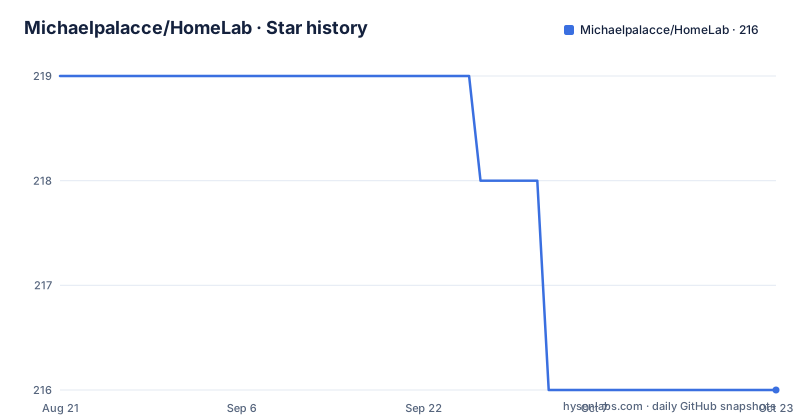
- Michaelpalacce/HomeLab216 ★ · -3
| Repository | 2026-08-21 | 2026-10-21 |
|---|---|---|
| Michaelpalacce/HomeLab | 219 | 216 |
-3 Stars in the last 61 days, measured from the daily GitHub snapshot. Compare with other projects
Editorial analysis
What this repository actually is
Michaelpalacce/HomeLab is a personal Kubernetes homelab configuration stored in a public GitHub repository. It is not a product, not a distribution, and not a template with a support contract. The README says it is "things I've done on the side with time taken away from my family," which is a honest warning about the level of polish. What you get is a set of local Helm charts, FluxCD 2 HelmReleases, and documentation that shows how one person runs a cluster at home. The primary language is Python, but the repository is mostly YAML, shell, and documentation. If you are an engineer evaluating whether to build a similar setup, this is a reference implementation, not a package to install.
The GitOps loop: FluxCD 2 and Renovate as the automation core
The repository's central mechanism is FluxCD 2. Flux is bootstrapped into the cluster and polls GitHub for changes, then applies them automatically. That is the classic GitOps pattern: your cluster state lives in git, and a controller reconciles it. The README states that this is "pretty stable," which is a subjective claim but consistent with the design. Renovate Bot runs periodic scans for new image versions and opens pull requests for each change. That means updates are proposed as code changes, not applied directly. This is a good practice because it gives you a review point. The combination of Flux for reconciliation and Renovate for update proposals is the core of the automation. If you are considering this pattern, you need to accept that Flux will apply changes automatically once they are merged, so your git history becomes your audit trail.
Networking and TLS: Istio, Gateway API, and wildcard certificates
Services are exposed through Istio with Gateway API, and TLS is handled by cert-manager. A wildcard certificate is issued for the domain *.sgenov.dev. The certificate secret is replicated to every namespace as ingress using a tool called reflector. The README explains that replication is needed to avoid Let's Encrypt rate limits. That is a concrete constraint: if you have many namespaces and each requests its own certificate, you will hit rate limits. The wildcard approach solves that but requires you to control a domain and a DNS provider. The README also mentions that NodePort exposure was removed but can be re-enabled by uncommenting nodePort values in the Helm charts. That is a sign of the repository's history: it moved from a simpler NodePort approach to a more sophisticated Gateway API setup. If you do not have a domain or do not want to manage DNS, this part of the repository will not fit you.
Storage and backup: Longhorn and Velero with real cost numbers
Longhorn provides replicated storage for the cluster. The README calls it "fast and tailor made for k8s" and notes it is developed by the same people behind k3s and Rancher. That is a factual attribution, not a performance claim. For backup, Velero is used with the AWS plugin and restic to ship data to external sources. The author states they pay around $7 per month, mainly due to Wasabi pricing for a 1TB minimum. That is a specific and useful data point: backup costs are not zero even for a homelab. The backup runs on a schedule every evening. If you are evaluating storage options, Longhorn is a solid choice because it is Kubernetes-native, but it consumes disk space for replication. Velero's integration with restic means you can send backups to object storage, which is a common pattern. The cost figure is for one person's setup, so your mileage will vary depending on how much data you back up.
Infrastructure as code with tofu-controller and the limits of Terraform
The repository uses tofu-controller, a tool by the FluxCD team, to reconcile a git repo for Terraform changes. It applies changes when drift is detected. The README notes that VM creation is not handled because it "has proven to be a nuisance with the Terraform provider." That is a honest limitation. The author says security is the main focus, but does not detail what that means in practice. If you are looking for a full infrastructure-as-code story that includes virtual machines, this repository does not provide that. The tofu-controller approach is useful for managing cloud resources or other declarative configs, but it is not a substitute for a mature provisioning pipeline. The limitation with VM creation is a real trade-off: you get GitOps for Terraform, but you still have to provision the underlying nodes manually or with Ansible, which is also listed as a tool.
Running it without Flux: a fallback path and a concrete example
The README offers a fallback for people who do not want Flux. You can go to Helm/apps and install any app with a plain helm install command, such as helm install media media -n media --create-namespace. However, the README warns that ingress, cert-management, and Longhorn are handled only via Flux. That means if you skip Flux, you lose those components unless you configure them separately. The README gives a detailed example of a HelmRelease for Longhorn, showing the YAML structure and how it maps to a manual helm install. The example includes values like ingress.enabled, host, tlsSecret, and service.ui.nodePort. This is useful because it shows the exact configuration keys. The fallback path is not a full alternative; it is a way to install individual apps without the GitOps controller. If you are evaluating this repository, you should know that the core value is in the Flux-managed parts, and skipping Flux means you are on your own for the infrastructure pieces.
Limitations and the wrong tool cases
The most obvious limitation is that this is a single person's setup, not a maintained project. There is no license, no release process, and no issue tracker mentioned. The last push is unknown, and there are no recent releases. That means you cannot rely on updates or fixes. The README explicitly warns about the time constraints, so you should expect rough edges. Another limitation is the dependence on a specific domain and DNS setup. The wildcard certificate approach requires you to own a domain and manage DNS records. If you are behind a CGNAT or do not have a public IP, this will not work. The control plane load balancing uses DNS A records, which is a simple but fragile method: if a node goes down, DNS still points to it until you change the record. The README acknowledges this by saying they do not have a load balancer. Finally, the repository is heavily tied to FluxCD 2. If you prefer Argo CD or plain Helm, you will have to translate everything. The fallback path only covers app installation, not the infrastructure components.
Alternatives and the difference in approach
A common alternative to this repository is a full-fledged distribution like k3s with embedded Helm or a Rancher-based setup. The difference is that k3s gives you a Kubernetes distribution with its own packaging, while this repository is a layer on top of a cluster you build yourself. Another alternative is to use Argo CD instead of FluxCD 2. Argo CD uses a different model: it pulls from a git repo and syncs applications, but it is not as tightly integrated with HelmRelease custom resources. FluxCD 2 uses HelmRelease objects, which are more declarative for Helm charts. If you prefer a UI for sync status, Argo CD has one, while Flux relies more on kubectl and CLI tools. A third alternative is to use a managed Kubernetes service like EKS or GKE, which removes the need for MetalLB and Longhorn because the cloud provider handles load balancing and storage. That changes the cost model and the operational burden. The choice depends on whether you want to run bare metal or in the cloud.
Maintenance and upgrade cost
The README does not describe an upgrade process, but the use of Renovate Bot indicates that updates are handled through pull requests. That means you will need to review and merge those pull requests regularly. The cost of maintenance is the time to review changes and ensure they do not break your cluster. The repository pins chart versions, as seen in the Longhorn example with version 1.2.4. Pinning is good for reproducibility but means you must manually bump versions when you want to upgrade. The README says Renovate submits pull requests for each change, so you still have to approve them. There is no mention of automated testing before merge. That is a gap: a change to a Helm chart could break your cluster, and you would only notice after Flux applies it. The lack of a license is a legal concern if you plan to reuse the code in a commercial setting; you should contact the author or find a different reference. The documentation is present in the docs folder, but its depth is not verified here.
Editorial conclusion
Adopt this repository if you run a small homelab on bare metal, want a working FluxCD 2 setup with Istio and Longhorn, and are comfortable adapting someone else's conventions. Do not adopt it if you need a supported, documented platform or if you expect to run without a domain, wildcard TLS, or a cloud backup target. Before using anything, verify the current state of the Helm charts and Flux versions, because the repository is a personal snapshot and may have drifted from your environment. The real value is the pattern: a documented GitOps loop with explicit HelmRelease values and a clear path to skip Flux for individual apps.
Frequently asked questions
Can I install apps from the HomeLab repository without using Flux?
Yes. Go to Helm/apps and install any app with a plain helm command, for example helm install media media -n media --create-namespace. Ingress, cert management and Longhorn are handled only through Flux, and the helm-release.yaml for a service records which chart and version it uses.
How does the HomeLab cluster hand certificates to namespaces?
cert-manager issues one wildcard certificate, and reflector duplicates the resulting secret into all namespaces under the name ingress so ingress resources can consume it. The stated reason is that Let's Encrypt rate limits certificate requests.
How is the control plane of the HomeLab cluster load balanced?
With DNS load balancing: an A record for the control plane points at the addresses of the control plane nodes. The reason given is that there is no load balancer in the homelab and the control plane should not be exposed on a single node.
How do image updates reach the HomeLab cluster?
Renovate scans periodically for new image versions and submits a pull request for each change, also covering actions, Helm charts and Helm releases. Flux then polls GitHub and applies what has been merged, so updates pass through review and a commit.
Official sources
Add this badge to your README
If you maintain this project, the badge below links readers to this analysis and shows its maintenance status from the daily GitHub snapshot. Paste the markdown into your README; add ?metric=license or ?metric=stars to the image URL for a different field.

[](https://hysenlabs.com/projects/michaelpalacce-homelab)Star history chart for your README
[](https://hysenlabs.com/projects/michaelpalacce-homelab)