SuzieQ: putting the whole network into one queryable store
Using network observability to operate and design healthier networks
At a glance
- What is it?
- SuzieQ polls network devices, normalizes the output into a vendor independent form and stores it as parquet so engineers can ask structural questions with SQL-like commands. It suits teams with many vendors in one estate, and it is a poor fit as a realtime alerting system.
- Who is it for?
- SuzieQ fits network engineers and designers who need one vendor independent view of prefixes, MAC tables, BGP and EVPN state across a large estate, especially when questions come back after the fact rather than during an incident. It does not fit a team that needs live streaming telemetry, and the open source edition is not the same product as the Stardust Systems enterprise version.
- Can I use it commercially?
- Yes. Apache-2.0 is a permissive licence: you can use, modify and sell software built on it, as long as you keep its copyright and licence notices.
- Is it still maintained?
- Yes. The repository last received commits 70 days ago.
- What is it written in?
- Mainly Python, according to GitHub's language statistics.
Answers come from the project's GitHub data, last synced on November 7, 2026, and from our analysis. They are not legal advice.
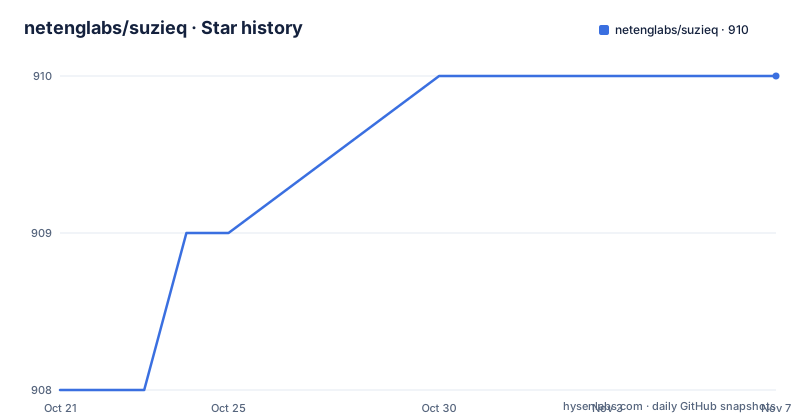
Star history
- netenglabs/suzieq910 ★ · +2
| Repository | 2026-10-21 | 2026-11-07 |
|---|---|---|
| netenglabs/suzieq | 908 | 910 |
2 Stars in the last 17 days, measured from the daily GitHub snapshot. Compare with other projects
Editorial analysis
The problem is a hundred logins, not a lack of data
SuzieQ starts from a plain frustration. A network engineer who wants to know how many unique prefixes exist in a routing table, or how many MAC addresses sit in the MAC tables across the estate, has to log into node after node and read the output in whatever format that vendor happens to use. Ask what changed in the routing table between 10 pm and midnight, which nodes have been up the longest, or which BGP sessions have taken the most routing updates, and the answer requires correlating snapshots collected at different times from machines that do not agree on syntax.
The project calls this a problem of observability, defined as the ability of a system to answer questions you pose while operating the network. The emphasis is deliberate. Monitoring and alerting watch for a state someone already thought to define. Observability is closer to keeping enough history around to answer a question nobody asked in advance, and the questions the project puts forward in its documentation are mostly retrospective.
The audience is stated plainly: network engineers and designers. The homepage belongs to Stardust Systems, the company behind the project, and the documentation notes that an enterprise edition exists alongside the open source code. That split matters when you evaluate the project, because the open repository is a usable tool and the commercial one is a supported product with a different feature set.
Topics assigned to the repository include network analysis, network validation and network monitoring, and the package description reads as a framework and application for network observability.
Poller, normalizer and parquet: how the data actually flows
The architecture has three stages and they are worth naming precisely, because each one is a place where behaviour is decided.
The poller connects to devices and gathers state. Which protocol it speaks is decided by parsing frameworks rather than by SuzieQ itself, and the dependency list shows the stack: textfsm for template based output parsing, netconan for network state collection, asyncssh for SSH sessions, aiohttp for HTTP, and pyvmomi for VMware. The keywords in the package metadata name the platforms the project has been aimed at, including Cisco, Arista, Junos, Cumulus, SoNIC and IOS. Vendor coverage therefore lives in the parsers, not in the core, which is why the framework is described as multi-vendor.
The normalizer converts vendor output into a common schema. This is the stage that makes the rest of the tool possible, because a prefix count only means something if the prefixes from three different operating systems are expressed the same way. The project states the goal plainly: store the data in a vendor independent way.
The store is parquet, with pyarrow and pandas handling the columnar files. The container mounts a host directory at /home/suzieq/parquet, and the documentation asks for roughly 100 MB of free space at minimum for a poller run. Parquet rather than a database is a deliberate choice that pays off in one direction: the data is a sequence of timestamped snapshots, so the analysis layer is a set of columnar operations over time rather than an OLTP workload. It also means the data at rest is files you can copy, back up and move between environments without a running service.
The analysis layer sits on top with four interfaces. The project lists CLI, GUI, REST API and python objects, and says they are largely equivalent, with the GUI combining output from several CLI commands onto one page. The REST server is built on fastapi with uvicorn, and the GUI is a streamlit application using streamlit-aggrid for its tables, with graphviz and networkx available for the topology and ECMP questions.
The demo container ships with data, so you can query in a minute
The quickest way to see whether SuzieQ answers the questions you care about is the demo image, which already contains collected data. Start it and map the GUI port:
docker run -it -p 8501:8501 --name suzieq netenglabs/suzieq-demoTwo entry points are then available. suzieq-cli gives you the command line analyzer, and suzieq-gui gives you the graphical interface, reachable in a browser at http://localhost:8501. Because the demo image ships with pre-collected data, you can explore without any device access and without building an inventory file, which makes it a reasonable way to settle the question of whether the normalized schema matches the state you actually care about.
Inside the CLI, one command shows what scenarios are covered:
device unique columns=namespaceRead the command shape carefully. Commands are object oriented, the first word is the entity type, and options are given as key equals value. The same shape applies to the routing table, the MAC table and the BGP session objects, so learning one command teaches the grammar. The documentation for the analyzer lives at suzieq.readthedocs.io, and screencasts are linked from the project page.
Installing from PyPI gives you four separate programs
If a container is not acceptable, the project supports installation as a Python package, and it strongly recommends doing so inside a virtual environment. The first step creates one:
python -m venv suzieqThat creates a directory named suzieq holding everything related to the environment. Activate it from the current directory on Linux or macOS:
source suzieq/bin/activateThe install itself is a standard pip call:
pip install suzieqWhen it finishes, four separate executables are on your path, and the split tells you how the tool is meant to be used. sq-poller polls devices and gathers data. suzieq-gui launches the GUI. suzieq-cli runs the command line analyzer. sq-rest-server runs the REST API server. Nothing here is a single all in one binary, so if you want an API for another application to query, you run a separate server process, and if you want a UI, that is another process again.
The build behind this is poetry based. The project file is pyproject.toml with a poetry.lock committed, and the dependency set is large and opinionated, including pandas at ~1.5, numpy at ~1.26, pydantic, aiohttp, fastapi, uvicorn and streamlit. The presence of a lock file and a .pre-commit-config.yaml along with .pylintrc and .flake8 tells you the project treats linting as part of its workflow rather than an afterthought.
Pointing the poller at real devices starts with an inventory file
Against your own network, the poller needs two things: an inventory file describing the devices, and a directory for the data. The documentation asks you to create the inventory file following the poller instructions and to pick a storage location, allowing at least 100 MB, which it calls dbdir.
The container run then mounts both:
docker run -it -v <parquet-out-local-dir>:/home/suzieq/parquet -v <inventory-file>:/home/suzieq/inventory.yml --name sq-poller netenglabs/suzieq:latestThe poller is then launched with the inventory file and a namespace, where the namespace is where the collected data is stored:
sq-poller -D inventory.yml -n mydatacenterThe -D flag takes an inventory file in SuzieQ's own native format. If you already keep devices in an Ansible inventory, you use -a instead of -D, which removes a conversion step for teams that already have one.
A sample inventory lives in the repository at samples/inventory.yml, and samples/docker-compose.yml shows the compose form of the same setup. A Caddyfile in the samples directory suggests a reverse proxy is expected somewhere in front of the REST or GUI service in a real deployment, and samples/suzieq-cfg.yml matches the configuration file the Dockerfile copies into /home/suzieq/.suzieq/suzieq-cfg.yml.
That Dockerfile also shows two details worth knowing. It creates a non root user named suzieq with uid 1000 and runs the container as that user, and it rewrites the config so the service binds to 0.0.0.0 rather than 127.0.0.1. The image exposes the parquet directory as a volume, so the data survives the container.
The documented Python version contradicts the build metadata
This is the sharpest inconsistency in the project right now, and it will bite you at install time.
The written instructions state that SuzieQ requires python version 3.7.1 at least, that it has been tested with python versions 3.7 and 3.8, and that it has not been tested to work on Windows, recommending Linux or macOS. The package metadata says something different. The python constraint in pyproject.toml is ">=3.10, < 3.12", and the pinned dependency versions match that newer baseline: pandas at ~1.5, numpy at ~1.26, pydantic 2.7 or later, uvicorn at ~0.35.0, streamlit pinned to 1.54.0 and fastapi at 0.133.1. The Docker image follows the newer baseline too, since its PATH points at python3.9 site-packages directories while the runtime itself comes from a base image built with a version argument.
So the prose documentation still describes a Python 3.7 and 3.8 world while the shipped package requires 3.10 or 3.11. The version number in the metadata, 0.25.0, also sits ahead of the most recent tagged release in the release list, which is v0.24.0 from 2025-05-09. Earlier tags in that list are v0.22.0 from 2024-01-10 and v0.21.0 from 2023-06-07, so tag names do not line up one to one with the internal version either.
Practically, this means you should read pyproject.toml rather than the prose before you plan an install, and you should assume the old 3.7 instructions are stale. The repository was not archived and the last push was on 2026-08-29, so the code is moving even where the write-up lags.
Where SuzieQ is the wrong tool
SuzieQ is a polling and analysis system, and several common needs sit outside that shape.
It is not a streaming telemetry pipeline. The model is one that runs a poller and writes timestamped snapshots to parquet. If your requirement is sub second visibility into packet rates or interface counters with a dashboard that updates continuously, a streaming collector built for that purpose is the right shape, and SuzieQ will not become one by configuration.
It is not an alerting system either. Its value is answering questions, including questions asked after the fact, and a poller that has just finished a collection cycle cannot page you. The project positions observability as going beyond monitoring and alerting, which is a statement about depth of question answering rather than a claim to cover the alerting gap.
It is a poor fit for a small estate where one person knows one vendor well. The multi-vendor normalization is the entire justification for the extra moving parts, and with a handful of devices from one vendor, reading the native command output is faster and the schema is exactly what the platform already documents. Note also that the open source project is not the enterprise product, so teams that need vendor support, a contract or a roadmap are looking at a different thing.
The realistic alternative approach is to do what SuzieQ automates, in a smaller way: collect device output on a schedule with a script, keep it in text files, and grep it. That loses cross-vendor normalization and the time series, and it loses the ability to compare a prefix count at 22:00 with one at midnight. SuzieQ's payoff is exactly the historical correlation, so the question is whether your team actually asks retrospective questions often enough to justify the extra infrastructure.
Editorial conclusion
SuzieQ fits network engineers and designers who need one vendor independent view of prefixes, MAC tables, BGP and EVPN state across a large estate, especially when questions come back after the fact rather than during an incident. It does not fit a team that needs live streaming telemetry, and the open source edition is not the same product as the Stardust Systems enterprise version. Before adopting, check the Python version your fleet runs, since the project metadata now requires 3.10 to 3.11 while the written instructions still describe 3.7, and confirm that your device vendors are covered by the parsing frameworks the poller depends on.
Frequently asked questions
What does SuzieQ do that a normal network monitoring tool does not?
SuzieQ collects state from devices, normalizes it into a vendor independent form and stores it so that you can ask questions about the network later, such as what changed in the routing table between two times. The project defines observability as the ability to answer trivial or complex questions as you operate the network, and positions itself beyond monitoring and alerting.
How do I install SuzieQ and which commands does it provide?
Install it with pip install suzieq, preferably inside a virtual environment created with python -m venv suzieq. The install provides sq-poller for gathering data, suzieq-cli for the command line analyzer, suzieq-gui for the graphical interface and sq-rest-server for the REST API.
What is the SuzieQ inventory file and which flag do I use?
The inventory file lists the devices the poller should collect from, and a sample is provided at samples/inventory.yml. Use -D for the SuzieQ native format, as in sq-poller -D inventory.yml -n mydatacenter, and use -a instead if your devices are described in an Ansible inventory file.
Which Python version does SuzieQ need?
The package metadata in pyproject.toml constrains Python to >=3.10, < 3.12, while the written instructions still describe a minimum of 3.7.1 with testing on 3.7 and 3.8. The project has not been tested on Windows, and Linux or macOS are the recommended platforms.
Is there a commercial version of SuzieQ?
Yes. The documentation states that an enterprise version is also available, and the company behind the project is Stardust Systems, whose site is listed as the project homepage. The open source repository and the enterprise product are separate offerings, so feature expectations from one should not be carried over to the other.
Official sources
Add this badge to your README
If you maintain this project, the badge below links readers to this analysis and shows its maintenance status from the daily GitHub snapshot. Paste the markdown into your README; add ?metric=license or ?metric=stars to the image URL for a different field.

[](https://hysenlabs.com/projects/netenglabs-suzieq)Star history chart for your README
[](https://hysenlabs.com/projects/netenglabs-suzieq)Was this useful?