Netlify CLI: local development, deployment, and site management
Netlify Command Line Interface
At a glance
- What is it?
- Netlify CLI is a TypeScript command-line client for Netlify sites, functions, environment variables, builds, and local development. It suits developers who want Netlify workflows in a terminal or reproducible CI installation, but it is tied to the Netlify platform rather than provider-neutral deployment tooling.
- Who is it for?
- Adopt Netlify CLI when the deployment target is Netlify and the team values terminal-based site management, local function development, or a lockfile-controlled CI setup. Do not choose it as a provider-neutral deployment client.
- Can I use it commercially?
- Yes. MIT is a permissive licence: you can use, modify and sell software built on it, as long as you keep its copyright and licence notices.
- Is it still maintained?
- Yes. The repository received new commits within the last day.
- What is it written in?
- Mainly TypeScript, according to GitHub's language statistics.
Answers come from the project's GitHub data, last synced on October 23, 2026, and from our analysis. They are not legal advice.
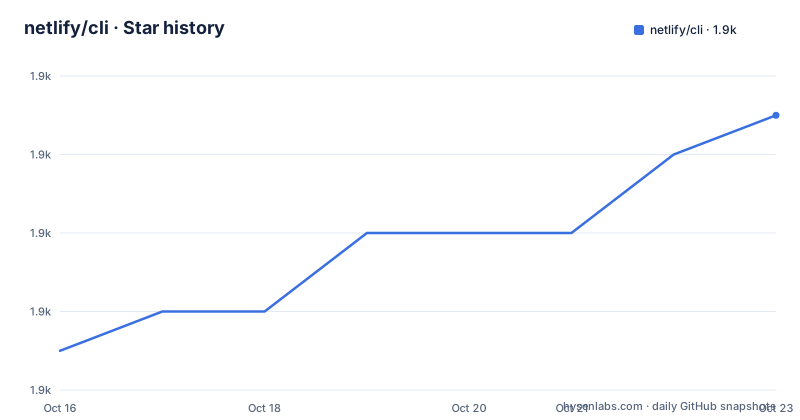
Star history
- netlify/cli1,931 ★ · +6
| Repository | 2026-10-16 | 2026-10-23 |
|---|---|---|
| netlify/cli | 1.9k | 1.9k |
6 Stars in the last 7 days, measured from the daily GitHub snapshot. Compare with other projects
Editorial analysis
What Netlify CLI puts in the terminal
Netlify CLI addresses developers who need to work with Netlify without navigating the web interface for every task. Its command set covers the lifecycle around a Netlify site: initializing or linking a project, starting a local development server, creating builds, deploying, viewing status, opening a site, and managing environment variables. There are also command groups for Netlify Functions, blobs, API operations, integrations, and recipes.
The package exposes both `netlify` and `ntl` as executable names. Both point to `./bin/run.js`, so they are aliases for the same entry point rather than separate tools. This is useful for scripts and established command habits, although the README consistently demonstrates the longer `netlify` form.
The intended users are frontend developers, platform engineers, and CI systems that already deploy to Netlify. It is less suitable for a team seeking one deployment interface across several unrelated hosting providers. The command names, package description, and Netlify-specific documentation place this client inside the Netlify ecosystem. The README does not claim equivalence with general-purpose deployment tools, and it does not document offline deployment behavior.
The executable and TypeScript build path
The repository is primarily TypeScript and is published as an npm package named `netlify-cli`. Its package metadata marks it as an ES module through `"type": "module"`. The `bin` mapping directs both executable names to `./bin/run.js`, which is the published process entry point. Distribution files include `/bin`, `/scripts`, `/functions-templates`, and `/dist`, while source maps are excluded.
The build script compiles the project with `typescript-native` through `tsconfig.build.json`. A separate development script runs the same compiler in watch mode. This layout separates contributor development from package consumption: the published package includes the executable code and compiled output, while the repository keeps source, tests, fixtures, documentation, and configuration separate.
That structure explains why local development has its own contribution workflow. The README instructs contributors to uninstall a global package, clone the repository, install its dependencies, and run `npm link` inside the CLI directory. Contributors can then invoke the linked `netlify` command while changing the TypeScript source. The repository also includes unit, integration, and end-to-end test scripts, but the README does not document their expected output or setup beyond the package scripts.
Installing Netlify CLI for interactive use
Netlify CLI requires Node.js version 22.13.0 or above. For a workstation, the README gives a global npm installation. This makes the `netlify` command available from any directory.
npm install netlify-cli -gAfter installation, `netlify` exposes the command interface. The documented help form is:
netlify [command]

# Run `help` for detailed information about CLI commands
netlify [command] help
The `[command]` notation is a placeholder in the usage syntax, not a literal argument to type. A first practical check is therefore to invoke the `login` command listed in the README's command index. Netlify's separate getting-started documentation explains the login and deployment flow, but the README does not state what credentials are requested or what success output appears.
Homebrew is also documented as an alternative installer:
brew install netlify-cliThese options solve package availability, but they do not make the installed CLI version reproducible by themselves.
A lockfile-based CI installation
For CI, the README recommends installing Netlify CLI locally as a development dependency instead of installing it globally. From the project root, use:
npm install --save-dev netlify-cliThe local package can then be resolved through the project's `package.json` and `package-lock.json`. The README specifically links to npm's `npm ci` documentation when explaining reproducible builds. It also names Renovate and Dependabot as possible tools for managing CLI updates. It does not provide a required CI workflow, authentication configuration, token environment variable, or deploy flags, so those details must come from the project's Netlify configuration and Netlify's getting-started documentation.
The distinction matters because a global CI installation always receives the latest CLI version. The README warns that this can include breaking changes. A local installation controlled by a lockfile gives the build a declared dependency version and lets the repository define upgrades through reviewed dependency changes. That is a concrete advantage for repeated CI builds.
Netlify CLI can then participate in existing npm scripts, but the README does not give a complete script definition. Adding one would require selecting the project's actual build, test, or deployment commands rather than inventing unsupported options.
Local development, builds, and deploy commands
The command index groups related operations under `dev`, `build`, `serve`, `watch`, `deploy`, and `status`. The repository separately points developers to `docs/commands/dev.md` for Netlify Dev. This indicates that local development is a distinct workflow rather than simply a local file server. Netlify Dev is commonly associated with emulating parts of the Netlify environment, but the README does not specify proxying rules, framework detection, port configuration, or hot-reload behavior, so those details should not be treated as documented guarantees.
The same caution applies to deployments. `deploy` is a documented command, while the Netlify getting-started guide is the named source for deployment instructions. The README does not specify required arguments for an initial deployment or explain whether a site must be linked first. The `link`, `init`, and `unlink` commands indicate that site association is part of the CLI's state management, but the README does not describe the files that store that association.
Engineers should therefore use the full CLI reference at `cli.netlify.com` for exact command syntax. The repository's command index is reliable for command discovery, but it is not a substitute for option-level documentation.
Site state, environment data, and functions
Netlify CLI extends beyond deployment commands. The `env` group points toward environment configuration, while `functions` addresses serverless functions. The package also ships a `/functions-templates` directory, confirming that function-related templates are part of the distributed package rather than merely documentation links.
This matters when judging adoption. A static-only project may need little beyond `deploy` and `status`, but a Netlify Functions project gains more from the same client. The README does not document how secrets are entered, whether values can be read back, how local environment files are selected, or how function invocation differs between `dev` and a deployed site. It also does not state whether credentials or site metadata are written to a particular configuration file. The full command reference and Netlify documentation are required for those decisions.
The `api`, `blobs`, `integration`, `open`, `sites`, and `switch` groups show that the CLI is intended as a broader control surface. That breadth can be an advantage for routine Netlify administration, but it also means the tool is not simply a deploy script. Teams should review the exact commands permitted in automation, especially when CI credentials and site selection matter.
Maintenance, upgrades, and the MIT boundary
The repository is not archived. Its last push was on 2026-10-16, and the listed releases include v27.12.1 on 2026-10-13, v27.12.0 on 2026-10-08, and v27.11.2 on 2026-10-06. These facts indicate recent repository and release activity, but the README does not define a support window for older CLI versions.
Upgrade cost depends heavily on installation method. A global installation may move to a new release with breaking changes. A local dependency introduces explicit upgrade work in `package.json` and the lockfile, but it makes that transition reviewable and repeatable. The repository includes `renovate.json5`, while the README also mentions Dependabot, although it does not say that Dependabot is configured in this repository.
Netlify CLI is distributed under the MIT License. Its package metadata identifies Netlify Inc. as author and links to the repository's `LICENSE` file. The license permits use and modification under its terms, but using the CLI does not remove account, service, API, or generated-code restrictions that may apply separately to Netlify. Organizations should examine those service terms directly rather than treating the MIT package license as a blanket answer.
Editorial conclusion
Adopt Netlify CLI when the deployment target is Netlify and the team values terminal-based site management, local function development, or a lockfile-controlled CI setup. Do not choose it as a provider-neutral deployment client. Verify first that Node.js 22.13.0 or newer is available, decide between local and global installation, and confirm that the selected Netlify workflow matches the commands required by the project.
Frequently asked questions
What Node.js version does Netlify CLI require?
The README requires Node.js version 22.13.0 or above.
How do I install Netlify CLI for CI?
Install it from the project root as a development dependency with `npm install --save-dev netlify-cli`. The README recommends a lockfile so CI uses a reproducible dependency version.
Should Netlify CLI be installed globally in CI?
The README advises against that approach because a global CI installation always receives the latest version, including possible breaking changes. A local installation is the documented recommendation.
Official sources
Add this badge to your README
If you maintain this project, the badge below links readers to this analysis and shows its maintenance status from the daily GitHub snapshot. Paste the markdown into your README; add ?metric=license or ?metric=stars to the image URL for a different field.

[](https://hysenlabs.com/projects/netlify-cli)Star history chart for your README
[](https://hysenlabs.com/projects/netlify-cli)Was this useful?