txtai: One Python Framework That Tries to Cover Search, RAG, and Agents
💡 All-in-one AI framework for semantic search, LLM orchestration and language model workflows
At a glance
- What is it?
- txtai is an Apache-2.0 Python framework that bundles semantic search, LLM pipelines, workflows, and agents. Its breadth is real, but so is the complexity that comes with it.
- Who is it for?
- Adopt txtai if you need a single Python codebase that can index text, images, or audio, run semantic search, and then feed results into LLM-driven pipelines or agents. Skip it if you already have a specialized vector database and only want a thin retrieval layer, because txtai's bundled defaults and multi-component design will add conceptual weight.
- Can I use it commercially?
- Yes. Apache-2.0 is a permissive licence: you can use, modify and sell software built on it, as long as you keep its copyright and licence notices.
- Is it still maintained?
- Yes. The repository last received commits 1 day ago.
- What is it written in?
- Mainly Python, according to GitHub's language statistics.
Answers come from the project's GitHub data, last synced on November 13, 2026, and from our analysis. They are not legal advice.
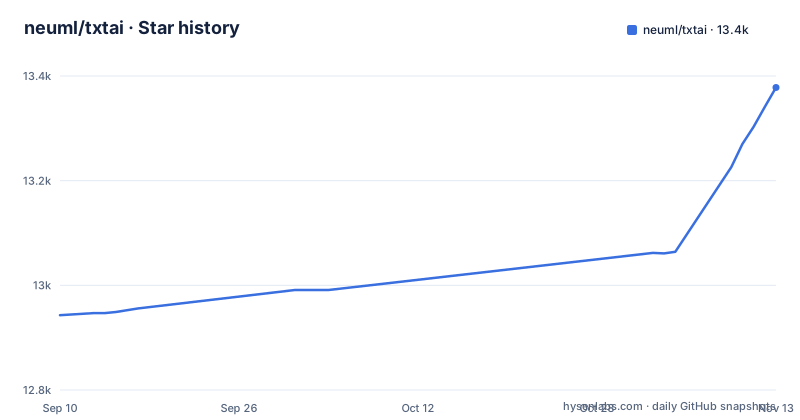
Star history
- neuml/txtai13,378 ★ · +435
| Repository | 2026-09-10 | 2026-11-13 |
|---|---|---|
| neuml/txtai | 12.9k | 13.4k |
435 Stars in the last 64 days, measured from the daily GitHub snapshot. Compare with other projects
Editorial analysis
What txtai actually bundles
The README describes txtai as an all-in-one AI framework, and the feature list confirms that claim. It includes an embeddings database that is a union of vector indexes, both sparse and dense, with graph networks and relational databases on top. That single component supports semantic search and also acts as a knowledge source for LLM applications. Beyond search, txtai has pipelines for tasks like transcription, translation, summarization, and question answering. Workflows join those pipelines together, and agents connect embeddings, pipelines, workflows, and other agents. The framework also ships web and Model Context Protocol APIs, with bindings for JavaScript, Java, Rust, and Go. This is not a narrow library. It is an attempt to cover the whole lifecycle of a language model application, from indexing to autonomous problem solving. That breadth is the main reason to consider it, and also the main source of its complexity.
The embeddings database as the core mechanism
The key architectural fact in the README is that the embeddings database is a union of vector indexes, graph networks, and relational databases. That is a different starting point from a standalone vector index like FAISS or a dedicated vector database. In txtai, the index is not just a list of vectors. It can carry graph structure and relational data in the same store. The README says this foundation enables vector search and serves as a knowledge source for LLM applications. In practice, that means you can index documents, build a graph of relationships between them, and then query with SQL or vector search. The practical consequence is that you do not need to stitch together a separate vector store, a graph database, and a relational database. But you also inherit txtai's abstractions for all three.
Getting started with pip and a YAML config
The README gives a minimal path to running code. You install with pip or Docker. The first example is two lines of Python: create an Embeddings instance, index two sentences, and search for a positive result. The output shown is a tuple with an index and a score. That example uses the default model, so it works without any configuration. The second example shows a YAML file, app.yml, that sets the embeddings path to sentence-transformers/all-MiniLM-L6-v2. You then start the API with CONFIG=app.yml uvicorn txtai.api:app and query it with curl. This is a clean separation. The Python API is for embedded use inside your own application. The YAML plus uvicorn path is for running a standalone service. The README says you can be up and running in minutes, and the examples support that, as long as you accept the default model. Changing the model or adding pipelines means reading the documentation and example notebooks.
Where the README runs out of detail
The README is long on feature lists and short on operational specifics. Its opening examples show one concrete configuration, the embeddings path. For transcription or translation pipelines, the example notebooks such as examples/11_Transcribe_audio_to_text.ipynb and examples/12_Translate_text_between_languages.ipynb are the place to look. The README does link to over 70 example notebooks, which is a genuine resource, but it is not a substitute for inline documentation. For an engineer evaluating the project, this means the first hour will be spent reading examples rather than writing code. That is not a fatal flaw, but it is a real cost. The README's promise of batteries included is only true for the basic search case.
Model selection and deployment trade-offs
The README stresses that you can run local, with no need to ship data to remote services. Local operation can reduce remote data exposure, but you are responsible for model storage and compute; txtai also documents cloud integrations. The default model in the examples is sentence-transformers/all-MiniLM-L6-v2, which is small and fast, but it has limited capacity for domain-specific language. For technical or domain-specific corpora, measure retrieval quality on representative queries and compare other models if needed; larger models may increase resource use. The README says txtai works with micromodels all the way up to LLMs. Another limitation is that the framework is Python-first. Bindings exist for JavaScript, Java, Rust, and Go, but those bindings are for the API, not for the full Python API. If your team is not Python-centric, you will be running a separate txtai service and talking to it over HTTP, which adds network latency and operational overhead. For a small internal tool, that may be acceptable. For a high-throughput production system, it is a real constraint.
Alternatives: specialized vector databases and dedicated agent frameworks
The most direct alternative to txtai is a dedicated vector database such as Qdrant or Weaviate, paired with a separate embedding model and a separate LLM orchestration tool like LangChain or LlamaIndex. The difference in approach is that these tools specialize in one layer. A vector database focuses on efficient storage and retrieval of vectors, with its own query language and scaling story. An orchestration framework focuses on chaining model calls and tool use. With txtai, you get all of that in one package, but each component is less deep than a specialist. For example, a dedicated vector database will typically have more tuning options for index types, replication, and sharding. If your primary need is high-scale, low-latency vector search across millions of records, a specialist database is likely a better fit. If your primary need is a quick prototype that combines search with LLM workflows, txtai's integrated approach saves you the integration work. The trade-off is between depth and convenience.
Maintenance, licensing, and upgrade cadence
txtai is licensed under Apache-2.0, which is permissive and does not impose copyleft obligations. The repository is actively maintained, with releases roughly on a monthly schedule. The recent versions are v9.12.0 in late July 2026, v9.13.0 in late August, and v9.14.0 in early October. That cadence suggests regular feature additions and bug fixes. The README notes that NeuML is the company behind txtai and offers consulting services, plus a hosted product called txtai.cloud. That means the core project is backed by a commercial entity, which is good for continuity, but it also means some features may be steered toward the hosted offering. Before adopting, check the release notes for v9.14.0 to see if any breaking changes affect your planned usage. The project also has bindings for other languages, so an upgrade to the core may require updating those bindings as well. The maintenance burden is real, but it is lighter than maintaining your own integration of multiple independent libraries.
Editorial conclusion
Adopt txtai if you need a single Python codebase that can index text, images, or audio, run semantic search, and then feed results into LLM-driven pipelines or agents. Skip it if you already have a specialized vector database and only want a thin retrieval layer, because txtai's bundled defaults and multi-component design will add conceptual weight. Before adopting, verify that the models you plan to use are supported by the underlying Hugging Face and Sentence Transformers versions, and check the release notes for v9.14.0 to see whether any recent API changes affect your planned workflows. Then run the two-line indexing example from the README on your own data to confirm that the default embedding model gives acceptable search quality.
Frequently asked questions
How does txtai differ from LlamaIndex?
txtai's key component is an embeddings database, a union of vector indexes (sparse and dense), graph networks and relational databases. Pipelines, workflows and agents are layered on that one object, and the stack is Python 3.11+ with Hugging Face Transformers, Sentence Transformers and FastAPI under an Apache 2.0 license.
What are the alternatives to txtai?
Alternatives include a dedicated vector database such as Qdrant or Weaviate combined with an embedding model, or a retrieval orchestration framework such as LlamaIndex or LangChain. Compare deployment, model support and operational requirements for your workload.
What does txtai need before the two line example runs?
Python 3.11 or newer. The default install already includes faiss-cpu, huggingface-hub, msgpack, numpy, regex, pyyaml, safetensors, torch, tqdm and transformers, so the quickstart example is not a lightweight install.
How do you serve the txtai search API locally?
Put an embeddings path in app.yml, then run CONFIG=app.yml uvicorn "txtai.api:app" and call it with curl -X GET "http://localhost:8000/search?query=positive". The api extra has to be installed first, because uvicorn and fastapi are not in the default dependency list.
What does the MINIMAL environment variable change in a txtai install?
It moves the default dependency list into an extras group named default and renames the package txtai_minimal. Without it, the same dependencies install alongside the standard txtai package.
Official sources
Add this badge to your README
If you maintain this project, the badge below links readers to this analysis and shows its maintenance status from the daily GitHub snapshot. Paste the markdown into your README; add ?metric=license or ?metric=stars to the image URL for a different field.

[](https://hysenlabs.com/projects/neuml-txtai)Star history chart for your README
[](https://hysenlabs.com/projects/neuml-txtai)Was this useful?