ngosang/trackerslist: A daily-updated public tracker list for BitTorrent clients
GitHub describes it as Updated list of public BitTorrent trackers. The metadata lists the GPL-2.0 license. This article stays within the project description and details documented in the GitHub repository README.
At a glance
- What is it?
- ngosang/trackerslist is a GPL-2.0 repository that publishes curated lists of public BitTorrent trackers, refreshed daily by a bot. It is a simple, low-maintenance resource for users who want to improve peer discovery without running their own tracker.
- Who is it for?
- Adopt ngosang/trackerslist if you run a BitTorrent client and want a zero-config way to add public trackers to improve peer discovery. Do not use it if you need private trackers, real-time updates, or a guarantee of uptime, since the lists are public and may include trackers that go offline.
- Can I use it commercially?
- Yes, with conditions. GPL-2.0 is a copyleft licence: if you distribute software that includes it, you must release that software's source code under the same licence. Running it internally without distributing it does not trigger that obligation.
- Is it still maintained?
- Yes. The repository last received commits 1 day ago.
- What is it written in?
- GitHub does not report a main language for this repository.
Answers come from the project's GitHub data, last synced on November 15, 2026, and from our analysis. They are not legal advice.
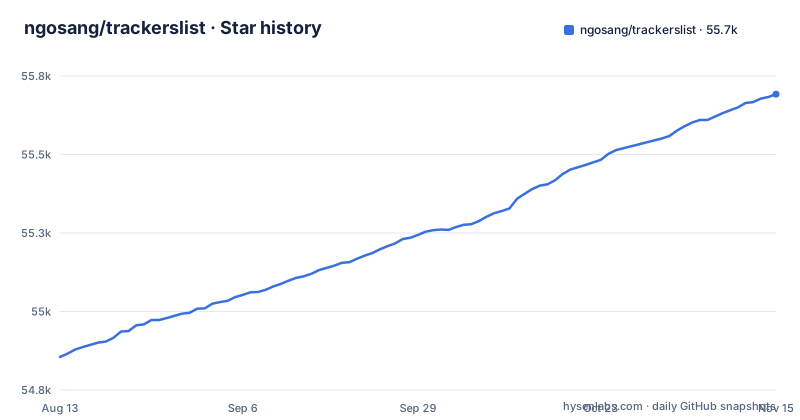
Star history
- ngosang/trackerslist55,692 ★ · +837
| Repository | 2026-08-13 | 2026-11-15 |
|---|---|---|
| ngosang/trackerslist | 54.9k | 55.7k |
837 Stars in the last 94 days, measured from the daily GitHub snapshot. Compare with other projects
Editorial analysis
What problem this solves and who it is for
Public BitTorrent trackers are a moving target. Domains expire, servers shut down, and new trackers appear. Manually maintaining a list of working trackers is tedious and error-prone. ngosang/trackerslist solves that by publishing a set of text files, each containing a curated list of public trackers, updated automatically every day. The target user is anyone who runs a BitTorrent client and wants to improve peer discovery for public torrents. It is not for users who rely on private trackers, which are not listed and would not be appropriate for a public list.
How the lists are structured and maintained
The repository contains multiple list files, each with a specific protocol or use case. There is trackers_best, which holds 20 trackers, and trackers_all, which holds 72. The all list is split into UDP, HTTP, HTTPS, WebSocket, I2P, and Yggdrasil variants. A separate set of IP-based lists replaces domains with IP addresses, which the README says can help with DNS problems. The notes explain that a bot checks the trackers and updates the lists daily. Duplicate domains and duplicate IP addresses are removed, and the remaining trackers are sorted by popularity and latency, from best to worst. This sorting is useful because it lets a client try the most responsive trackers first. The presence of a blacklist file suggests that some trackers are deliberately excluded, though the README does not detail the criteria beyond removing duplicates and Cloudflare IPs from the IP lists.
Getting the lists into your client
There is no installation step. You download a text file and feed it to your BitTorrent client. The README provides direct raw links, such as https://raw.githubusercontent.com/ngosang/trackerslist/master/trackers_all.txt, plus two mirrors: one on GitHub Pages and one on jsDelivr. For example, to fetch the all list with curl, you would run: curl -o trackers_all.txt https://raw.githubusercontent.com/ngosang/trackerslist/master/trackers_all.txt. Then you add the trackers to your client. The README lists third-party tools for this, including bittorrent-tracker-editor for .torrent files, a Deluge plugin, several Transmission scripts, a qBittorrent bash script, and multiple aria2 scripts. No configuration keys are needed because the project is just data.
Protocol variants and their practical limits
The list files are not interchangeable. WebSocket trackers, which the README notes are supported by few clients, are grouped separately in trackers_all_ws, which contains only 4 trackers. I2P trackers require an I2P router and a compatible client like qBittorrent, BiglyBT, Tixati, or libtorrent. Yggdrasil trackers require the Yggdrasil Network Router. The IP-based lists can be shorter because Cloudflare IPs are removed, as the README states. This means trackers hosted behind Cloudflare will not appear in the IP lists, even though they may be reachable via their domain names. For most users, the domain-based lists are safer, unless you have a specific DNS problem.
A real limitation: public trackers are not a guarantee
The project's value depends entirely on the bot's daily checks, but those checks cannot guarantee uptime. A tracker that responds today may be down tomorrow, and the list is only as fresh as the last update. The README shows a last update date of 2026/11/03. More importantly, public trackers are often unreliable by nature. They can be rate-limited, blocked by ISPs, or shut down without notice. The README points to a blacklist of excluded trackers, but it is not a substitute for a private tracker or a well-configured DHT. If you need reliable peer discovery for a large swarm, this list is a supplement, not a solution. It is the wrong tool for anyone who expects a stable, guaranteed set of trackers.
Alternatives and how they differ
The main alternative is to run your own tracker, such as an open-source implementation like opentracker or chihaya. A private tracker gives you control over who can announce and how often, and it does not depend on a third-party list. The difference is fundamental: ngosang/trackerslist is a static data feed, while a self-hosted tracker is a live service. Another alternative is to rely on DHT and PEX, which are built into most clients and require no external trackers at all. DHT is decentralized and does not need a list, but it can be slower to find peers on a new torrent. The list approach is simpler to set up than a private tracker and more reliable than pure DHT for initial peer discovery. The trade-off is that you trust the list maintainer's checks and the public trackers' uptime.
Maintenance and licensing considerations
The repository is not archived, and the last push was on 2026-11-01. The license is GPL-2.0, which means the list files themselves are licensed under the GNU General Public License version 2. If you redistribute the lists, you must comply with that license, which includes providing source and preserving the license notice. For a simple data file, this is usually not a burden, but it is worth noting if you plan to bundle the lists in a larger project. The maintenance cost for a user is near zero: you download a file and update it periodically. There is no upgrade path because there is no software to upgrade. The main cost is checking the last update date to ensure the bot is still running, which you can do by visiting the README or the raw links.
Editorial conclusion
Adopt ngosang/trackerslist if you run a BitTorrent client and want a zero-config way to add public trackers to improve peer discovery. Do not use it if you need private trackers, real-time updates, or a guarantee of uptime, since the lists are public and may include trackers that go offline. Before using, verify that the trackers in your chosen list are reachable from your network, especially if you rely on the IP variants, and check the blacklist to understand why some trackers are excluded. The repository is a static resource, not a service, so its value depends entirely on the bot's daily checks, which you should monitor by checking the last update date in the README.
Frequently asked questions
Which BitTorrent tracker is the best?
The repository does not name one. It publishes a trackers_best list of 20 entries sorted by popularity and latency from best to worst, and those lists are regenerated every day by a bot, so the contents and the order reflect the last measurement pass rather than a fixed ranking. A tracker at the top today may not be there tomorrow.
Where can I find a list of trackers for qBittorrent?
From this repository, which publishes eleven plain text lists and links to a qBittorrent bash script under its third-party tools section for adding them to a client. The per-protocol files cover UDP, HTTP, HTTPS, WebSocket, I2P and Yggdrasil, and every list is reachable from three places: a raw GitHub link, a GitHub Pages mirror and a CDN mirror.
What are the top public trackers?
The trackers_all list holds 72 entries and trackers_best holds 20, both regenerated daily. Entries sharing a domain or resolving to the same IP address are removed and the removals are recorded in a blacklist file, so the counts are after merging rather than a count of distinct things you can connect to.
Official sources
Add this badge to your README
If you maintain this project, the badge below links readers to this analysis and shows its maintenance status from the daily GitHub snapshot. Paste the markdown into your README; add ?metric=license or ?metric=stars to the image URL for a different field.

[](https://hysenlabs.com/projects/ngosang-trackerslist)Star history chart for your README
[](https://hysenlabs.com/projects/ngosang-trackerslist)Was this useful?