gpustat reads NVML, ROCm SMI and npu-smi and prints one line per accelerator
📊 A simple command-line utility for querying and monitoring GPU status
At a glance
- What is it?
- gpustat turns a vendor SMI query into a single line per GPU, with process ownership attached by default. That default makes it a fast triage tool on shared boxes and a poor fit for continuous collection.
- Who is it for?
- Adopt gpustat for interactive triage on a shared host, or embed new_query() in a job script that needs to log a dict per run. Skip it where you need historical series, alerting or a browser view: it prints a snapshot and exits, with no daemon and no history file.
- Can I use it commercially?
- Yes. MIT is a permissive licence: you can use, modify and sell software built on it, as long as you keep its copyright and licence notices.
- Is it still maintained?
- Yes. The repository last received commits 1 day ago.
- What is it written in?
- Mainly Python, according to GitHub's language statistics.
Answers come from the project's GitHub data, last synced on November 22, 2026, and from our analysis. They are not legal advice.
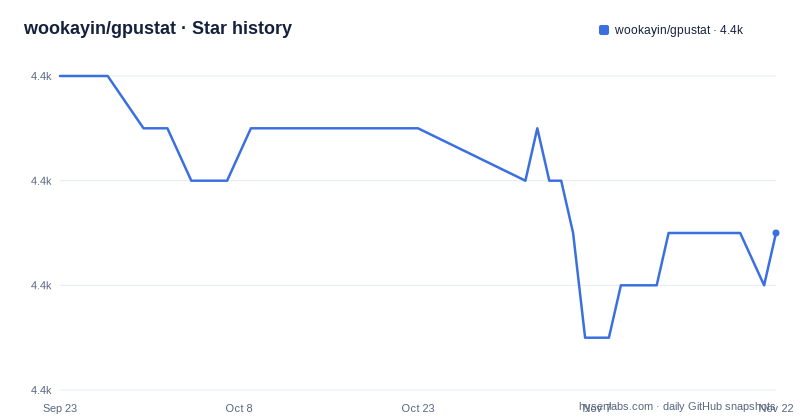
Star history
- wookayin/gpustat4,389 ★ · -3
| Repository | 2026-09-23 | 2026-11-22 |
|---|---|---|
| wookayin/gpustat | 4.4k | 4.4k |
-3 Stars in the last 60 days, measured from the daily GitHub snapshot. Compare with other projects
Editorial analysis
One line per accelerator, with the process owner already attached
Reading temperature is not the problem gpustat solves. nvidia-smi does that. The problem is that nvidia-smi output asks you to correlate three separate blocks: a device table, a process table, and a memory figure, then match a PID to a human name yourself. On a shared training box with a dozen cards and dozens of jobs, that correlation is the slow part.
gpustat collapses it. One query prints a single line per device:
[0] GeForce GTX Titan X | 77°C, 96 % | 11848 / 12287 MB | python/52046(11821M)Read it right to left. A bracketed number gives the device index, NVML supplies the model name, then temperature, then utilization as a percentage, then used and total memory in MB, then the process list as command name over PID with that process's memory footprint. That trailing field is what nvidia-smi spreads across a table: you can see that PID 52046, a python process, is holding 11821 MB of the 11848 MB in use. That is a runaway job, and you have it on one screen.
Whoever needs to know what a GPU is doing without having started the job is the audience: an ML platform engineer, a cluster administrator, a researcher on a shared department server. Automation has its use for it too, because gpustat doubles as a library. Output stays terse and pipe-friendly, closer to top or htop than to a monitoring dashboard.
One query surface, three vendor backends behind --backend
Most GPU CLIs bind you to one vendor's library. gpustat dispatches on a backend selector that takes auto, nvidia, amd or ascend, and auto is the default. Detection happens inside the query, so the same command works on a mixed fleet box without the operator declaring anything.
NVML via the nvidia-ml-py package carries the NVIDIA path. AMD goes through ROCm SMI via the rocmi package, and Huawei Ascend 910B NPUs go through the driver-provided npu-smi command, which must be present in PATH.
Choice of backend matters for scripts. Naming it explicitly turns an auto-detection guess into a stated fact, which is what you want in a job submission wrapper. The Python API takes the same argument:
stats = gpustat.new_query(backend="amd")
stats = gpustat.new_query(backend="ascend", id=[0, 1])
An id argument mirrors the command line `--id`, which targets specific device indices such as `--id 0,1,2`. On an eight-card node where your job holds two cards, restricting the query to those two indices avoids six idle lines that are not yours to think about.
pip install gpustat, and the pynvml package that does not work
Installation is a single pip line, and the project's own README puts a warning box above the driver requirements that is worth reading before you install anything else:
pip install gpustatIf you lack root, the same install lands in the user namespace with `pip install --user gpustat`. For the master branch rather than the last tagged release:
pip install git+https://github.com/wookayin/gpustat.git@masterA warning box above the driver requirements names a package you must not install. Listing it as a dependency in your own project fails the same way. The correct binding is nvidia-ml-py. Version floors are tied to the library, not to gpustat alone: gpustat 1.2+ requires nvidia-ml-py >= 12.535.108, gpustat 1.0+ requires NVIDIA Driver 450.00 or higher together with nvidia-ml-py >= 11.450.129. If your driver predates that, the fallback is to pin below the major version with `pip install gpustat<1.0`.
Python version matters in the same way: 1.1 and later need Python >= 3.6, and only gpustat below 1.0 still runs on Python 2.7.
The index gpustat prints is not the index CUDA uses
This is the detail that costs people hours, and it is the strongest argument for reading gpustat's README closely. Both gpustat and nvidia-smi index devices by PCI BUS ID. CUDA uses a different default ordering that assigns the fastest GPU the lowest ID. Those two orderings disagree on many multi-GPU servers.
Pick a device index in your training script because gpustat showed a busy process sitting there, set CUDA_VISIBLE_DEVICES to that index, and you can land on an idle card while the busy one stays busy. Your accelerator is not broken, your index space is.
The fix is one environment variable, and the README is explicit that it must be set before you set CUDA_VISIBLE_DEVICES:
export CUDA_DEVICE_ORDER=PCI_BUS_IDSet it in the shell, in the systemd unit, or in the scheduler's job script, not in the Python process after torch has already initialised CUDA. Any tooling that reads gpustat output and feeds it into CUDA_VISIBLE_DEVICES programmatically should carry this export with it. Nothing in gpustat enforces the agreement for you.
Process attribution is the expensive part, and --no-processes drops it
Three levers exist.
Start with the nvidia-smi daemon. Running `nvidia-smi daemon` requires root, and the README states it makes querying much faster and uses less CPU. Running it means a persistent root-owned daemon on the host just to speed up a read command.
Next comes `--no-processes`, which drops the user and memory columns entirely. Scripts that only need temperature, utilization and memory should use it.
Granularity is the third lever. `--show-cmd` prints the process name, `--show-full-cmd` prints the full command line plus cpu stats, `--show-pid` adds the PID, and `--show-user` shows the owning username. `--show-all` turns on every device property at once, and the finer flags such as `--show-fan`, `--show-codec` and `--show-power` are opt-in. Each one widens the line. Narrow defaults exist because the answer to "is something wrong" should fit on one line.
Where gpustat sits against nvidia-smi, nvtop and the collection tooling
nvidia-smi is the baseline and the real difference is aggregation, not data. Both read NVML and both report the same device fields. nvidia-smi hands you two tables and expects the reader to join them; gpustat performs the join in the output line and adds the CLI ergonomics around it, including `--json` for a machine-readable dump and shell completion scripts for bash, zsh and tcsh.
nvtop and its Python sibling nvitop take a different approach. Those are curses-style terminal interfaces that redraw in place, so they suit a human sitting in front of a terminal and watching a graph. gpustat prints and exits, which is what a script and a log file need. Watch modes on both sides bridge that gap imperfectly: gpustat offers `--watch`, `-i` or `--interval` as its own re-query loop, and older versions were expected to be wrapped in the system watch command.
The real gap sits in the other direction. gpustat has no daemon, no time-series database, no alert rules and no history file. Its own answer to a web view is a separate project, gpustat-web, described in the README as being in alpha. If your requirement is retention or paging you, you are feeding gpustat --json into something else, not deploying gpustat.
Using gpustat as a library instead of a command
No equivalent of the library API exists in nvidia-smi, and it takes three calls. A query returns a GPUStatCollection object that can render itself or serialize itself:
import gpustat

stats = gpustat.new_query()   # a GPUStatCollection
stats.print_formatted()       # same output as the `gpustat` command

data = stats.jsonify()        # query result as a dict (same as `gpustat --json`)
That shape suits a scheduler wrapper or a pre-flight check inside a training script: query, take the dict, assert that the cards your job was allocated are not already occupied by someone else, and exit non-zero before you burn an allocation. print_formatted exists so a library caller can reproduce the terminal output exactly, which keeps log lines consistent with what an operator sees.
One packaging detail matters if you vendor this. Running setup.py directly without setuptools_scm installed raises an ImportError telling you to use `pip install -e .` instead, and the project is MIT licensed.
Editorial conclusion
Adopt gpustat for interactive triage on a shared host, or embed new_query() in a job script that needs to log a dict per run. Skip it where you need historical series, alerting or a browser view: it prints a snapshot and exits, with no daemon and no history file. Before anything else, run gpustat --json once on a real training box and confirm the process owner field matches what ps shows, because that field is the whole reason to prefer it over nvidia-smi. Check the accelerator brand too: the AMD and Ascend paths depend on rocmi and on npu-smi being in PATH.
Frequently asked questions
how to install gpustat
Run `pip install gpustat`, or `pip install --user gpustat` without root privilege. NVIDIA support needs nvidia-ml-py rather than the pynvml package, which the project states will not work.
gpustat vs nvidia smi
Both query NVML for the same device fields. gpustat prints the device line and its owning processes together, adds --json output, and can target specific indices, while nvidia-smi presents separate tables.
Why does gpustat report a different GPU index than my CUDA job uses?
gpustat and nvidia-smi index by PCI BUS ID, while CUDA assigns the lowest ID to the fastest GPU by default. Set CUDA_DEVICE_ORDER=PCI_BUS_ID before setting CUDA_VISIBLE_DEVICES so both orderings agree.
Official sources
Add this badge to your README
If you maintain this project, the badge below links readers to this analysis and shows its maintenance status from the daily GitHub snapshot. Paste the markdown into your README; add ?metric=license or ?metric=stars to the image URL for a different field.

[](https://hysenlabs.com/projects/wookayin-gpustat)Star history chart for your README
[](https://hysenlabs.com/projects/wookayin-gpustat)Was this useful?